Portable R for Windows now has a new variant that bundles the full Rtools compilation toolchain alongside R. Download, extract, and install.packages(type = "source") works immediately. No installer, no system PATH changes, no registry entries. This post covers what’s in the bundle, how R discovers the toolchain, and as a bonus from digging through R’s source code for this project, how to point any R installation at a custom Rtools location.
R only vs. R + Rtools
The original R-only variant (~100 MB .zip) still covers the majority of use cases where CRAN binary packages are sufficient. The new R + Rtools variant (~850 MB .7z) is for when you need a C/C++/Fortran compiler: packages without CRAN binaries, development versions from GitHub, or ARM64 Windows where CRAN doesn’t distribute binaries at all.
They’re separate downloads because Rtools is large. The full toolchain is ~3.5 GB uncompressed, so bundling it by default would turn a quick 100 MB download into something much heavier. The R + Rtools variant uses .7z (LZMA2) instead of .zip because the combined bundle exceeds GitHub’s 2 GB release asset limit under zip compression. LZMA2 brings it down to ~850 MB.
Instead of installing Rtools separately (which touches the registry, modifies PATH, and installs to C:\rtools45), the -full variant embeds it directly inside the portable R directory. R finds the bundled toolchain through RTOOLS{VER}_HOME (or RTOOLS{VER}_AARCH64_HOME on ARM64), set in etc/Renviron.site. This tells R’s Makeconf where to find compiler headers and libraries, and tells Rcmd_environ and Rprofile.windows where to find gcc, make, and the rest of the toolchain. Everything resolves relative to R_HOME, so the whole directory is relocatable.
Quick start
Download and extract the R + Rtools bundle (requires 7-Zip for the .7z format):
# Install 7-Zip if needed: winget install 7zip.7zip
curl.exe -fSLO https://github.com/portable-r/portable-r-windows/releases/download/v4.5.3/portable-r-4.5.3-win-x64-full.7z
& "$env:ProgramFiles\7-Zip\7z.exe" x portable-r-4.5.3-win-x64-full.7z
Then compile from source:
portable-r-4.5.3-win-x64-full\bin\Rscript.exe -e "install.packages('Rcpp', type='source')"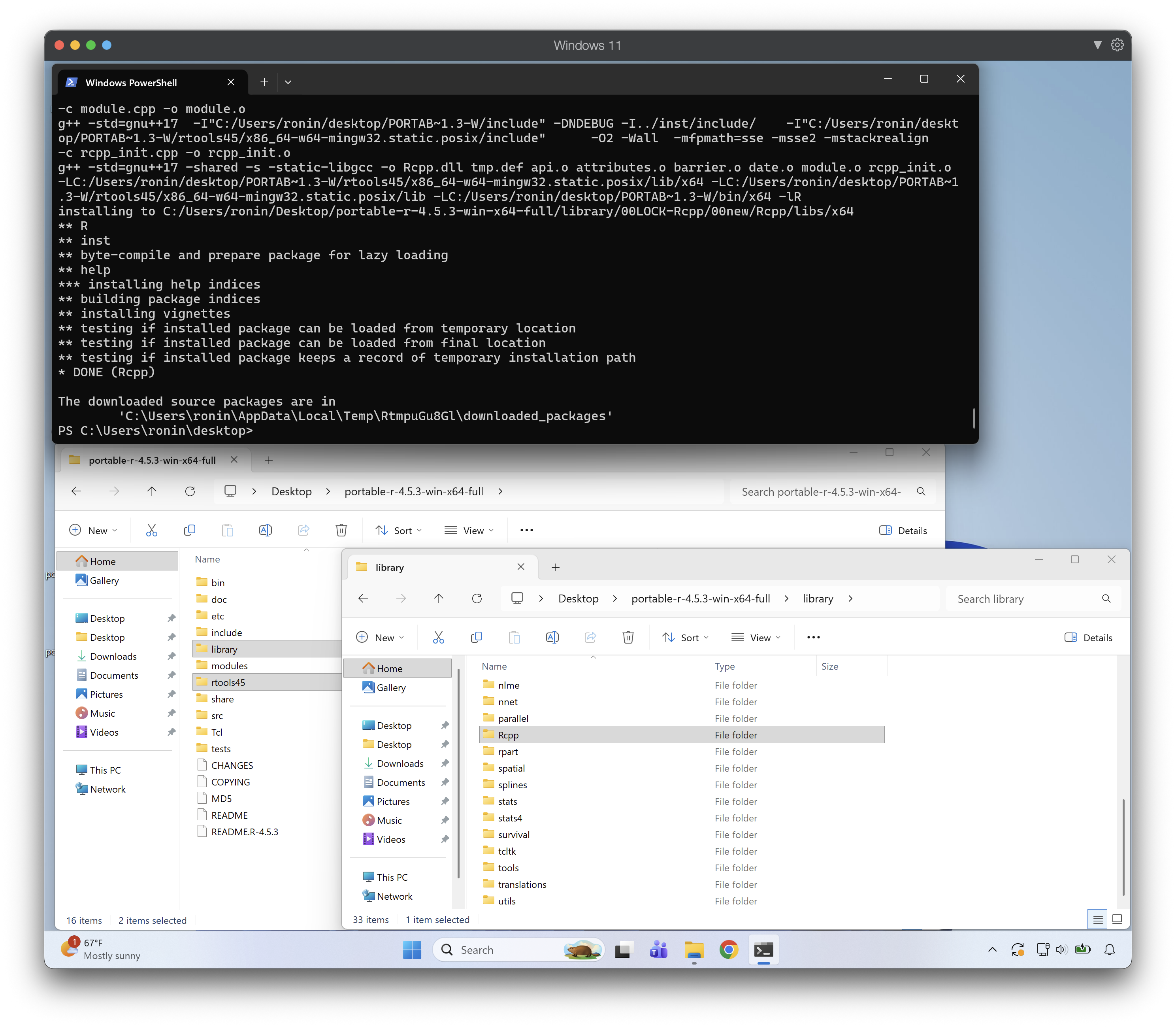
What’s in the box
Rtools lives inside the R tree as a rtools{VER}/ subdirectory. Renviron.site sets RTOOLS45_HOME to point at it, and R’s build infrastructure derives everything else from that.
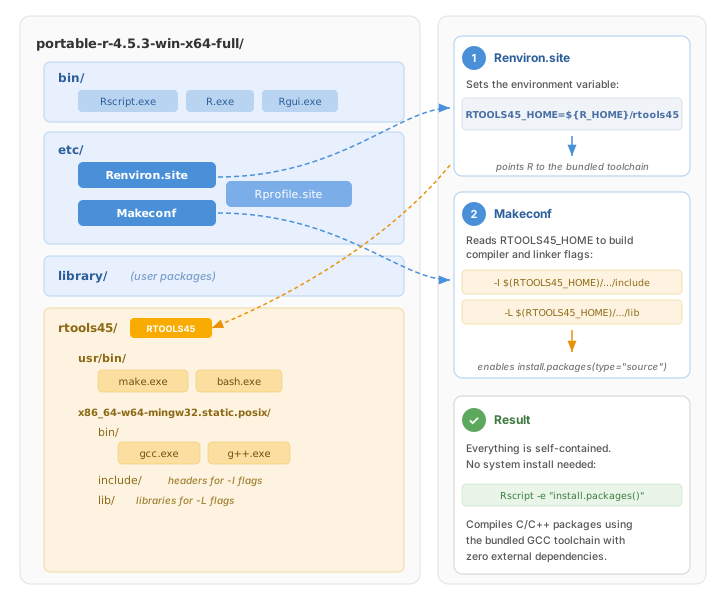
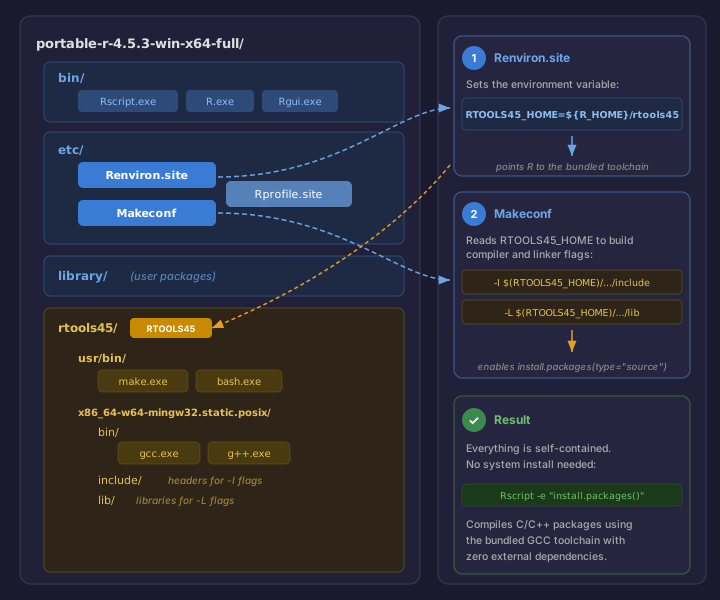
Each R minor version maps to the correct Rtools version automatically:
| R Series | Rtools | Compiler |
|---|---|---|
| R 4.5.x | Rtools45 | GCC 14.3 (x64), LLVM/Clang 19 (ARM64) |
| R 4.4.x | Rtools44 | GCC 13.3 (x64), LLVM/Clang 17 (ARM64) |
| R 4.3.x | Rtools43 | GCC 12.3 (x64) |
Archive format
The R-only variant remains a .zip (~100 MB) that Windows can extract natively. The R + Rtools variant is distributed as .7z (~850 MB) because the full toolchain is ~3.5 GB uncompressed, which exceeds GitHub’s 2 GB release asset limit under zip compression. LZMA2 gets it down to a manageable size. 7-Zip is free, open source, and available via winget install 7zip.7zip.
Available versions
All 12 supported R versions (4.3.0 through 4.5.3) have R + Rtools variants available for x64. ARM64 variants are available for R 4.4.0+. See the full download table on the releases page.
Staying current
A daily CI job scrapes CRAN for new R and Rtools releases. When a new version appears, the build system updates automatically and publishes new releases. The download table in the README is generated from the actual GitHub releases, so it always reflects what’s published.
Using Rtools from a custom location
If you’re not using the portable R + Rtools bundle but want to install Rtools somewhere other than the default C:\rtools45, R provides environment variables to point it at a custom location. This is useful if you keep Rtools on a secondary drive, a network share, or alongside a project.
The short version
Set RTOOLS{VER}_HOME to the root of your Rtools installation, where {VER} matches your R series (e.g., RTOOLS45_HOME for R 4.5.x, RTOOLS44_HOME for R 4.4.x, RTOOLS43_HOME for R 4.3.x). R’s Makeconf, Rcmd_environ, and Rprofile.windows all derive their compiler flags, include paths, library paths, and PATH from this single variable.
More precisely, the variable name is RTOOLS{VER}_{ARCH}_HOME where {ARCH} is empty for x64 and AARCH64 for ARM64. So on x64 you set RTOOLS45_HOME, and on ARM64 you set RTOOLS45_AARCH64_HOME. The ARM64 section below covers this in detail.
System-wide (persistent, affects all R sessions):
[System.Environment]::SetEnvironmentVariable("RTOOLS45_HOME", "D:\tools\rtools45", "User")Per-session (temporary, current terminal only):
$env:RTOOLS45_HOME = "D:\tools\rtools45"Per-project (via .Renviron in your project root):
RTOOLS45_HOME=D:/tools/rtools45Note the forward slashes in .Renviron files. R handles them correctly on Windows.
What this controls
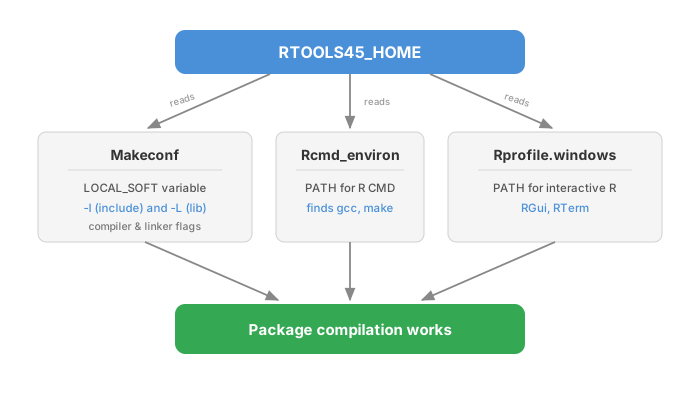
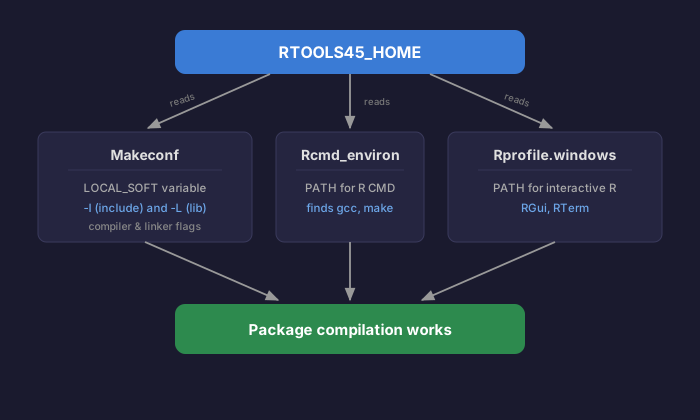
When R compiles a package from source, three things need to find Rtools:
Makeconfneeds the toolchain’s include and library directories for-Iand-Lcompiler flags. It readsRTOOLS45_HOMEand derivesLOCAL_SOFTfrom it (e.g.,D:/tools/rtools45/x86_64-w64-mingw32.static.posix).Rcmd_environneeds the toolchain’sbin/directories on PATH soR CMDcan findgcc,make, etc. It readsRTOOLS45_HOMEand constructsR_RTOOLS45_PATHfrom it.Rprofile.windowsdoes the same PATH setup for interactive R sessions (RGui, RTerm).
All three read from the same RTOOLS{VER}_HOME variable, so setting it once is sufficient.
ARM64
ARM64 Windows uses a separate variable: RTOOLS45_AARCH64_HOME (or RTOOLS44_AARCH64_HOME). The default is C:\rtools45-aarch64. If you’ve installed the ARM64 Rtools elsewhere:
$env:RTOOLS45_AARCH64_HOME = "D:\tools\rtools45-aarch64"Alternative: R_CUSTOM_TOOLS_SOFT
If you need finer control, R_CUSTOM_TOOLS_SOFT overrides LOCAL_SOFT in Makeconf directly, taking precedence over RTOOLS{VER}_HOME. Point it at the toolchain’s sysroot (not the Rtools root):
R_CUSTOM_TOOLS_SOFT=D:/tools/rtools45/x86_64-w64-mingw32.static.posixSimilarly, R_CUSTOM_TOOLS_PATH overrides the PATH that Rcmd_environ and Rprofile.windows construct:
R_CUSTOM_TOOLS_PATH=D:/tools/rtools45/x86_64-w64-mingw32.static.posix/bin;D:/tools/rtools45/usr/binThese are built into R’s source code (src/gnuwin32/fixed/etc/Makeconf, src/gnuwin32/fixed/etc/Rcmd_environ, and src/library/profile/Rprofile.windows) and are the official mechanism for non-standard Rtools locations.