Anthropic ships the official Python SDK for the Claude API, and almost everything you do runs through one call: client.messages.create(...). You construct a client once (client = anthropic.Anthropic(), which reads ANTHROPIC_API_KEY from the environment), hand it a model, a max_tokens cap, and a messages list of role-tagged turns, and you get back a Message object. The recurring mental model in this sheet is one picture: a request (a messages list plus an optional system prompt) flows along a gray arrow into client.messages.create(...), and a green Message flows back, whose .content is a list of typed blocks (text, thinking, tool_use) and whose .stop_reason tells you why it stopped. This is not a generic HTTP sheet: where it looks like the requests sheet, the contrast is the point. requests fetches JSON over the wire; this sheet covers the typed Claude surface, the Message, role-tagged turns, content blocks, streaming events, the tool-use loop, image blocks, cache breakpoints, and model selection. The conventional import is import anthropic, the current 2026 default model is claude-opus-4-8, and everything here is verified against anthropic 0.74.0 (removed spellings are flagged per section).


Client and First Message
Construct one client = anthropic.Anthropic() (it reads ANTHROPIC_API_KEY from the environment) and call client.messages.create(...) with a model, a max_tokens cap, and a messages list; you get back a Message object. The reply text is not a plain string: msg.content is a list of typed blocks, so read msg.content[0].text only after checking block.type == "text", and inspect msg.stop_reason and msg.usage for why it stopped and what it cost.
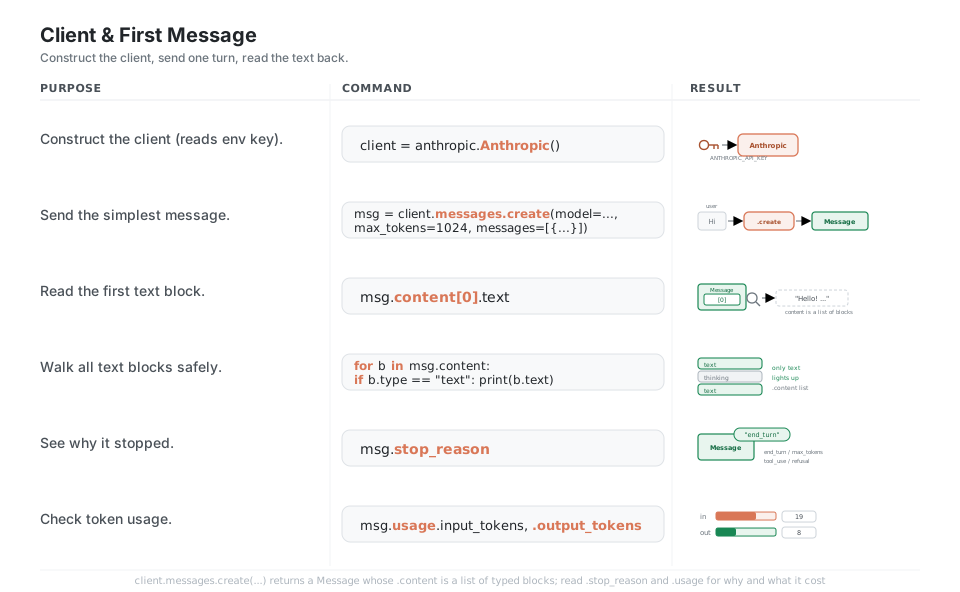
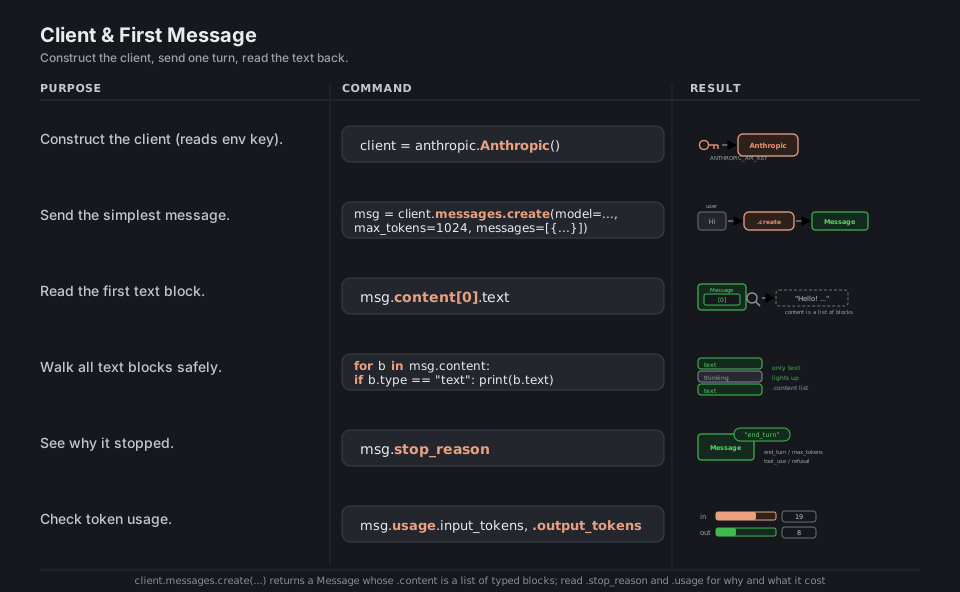
import anthropic

client = anthropic.Anthropic()                 # reads ANTHROPIC_API_KEY
msg = client.messages.create(
    model="claude-opus-4-8", max_tokens=1024,
    messages=[{"role": "user", "content": "Hi"}],
)
msg.content[0].text                            # 'Hello! ...'  (content is a LIST of blocks)
[b.text for b in msg.content if b.type == "text"]   # walk blocks safely
msg.stop_reason                                # 'end_turn' / 'max_tokens' / 'tool_use' / 'refusal'
msg.usage.input_tokens, msg.usage.output_tokens     # what it cost
See Client SDKs. The client reads ANTHROPIC_API_KEY from the environment by default.
Messages and Roles
The API is stateless: a conversation is just a Python list of {"role": ..., "content": ...} turns that you resend in full on every call, alternating user and assistant, always starting with user. To continue a chat, append the model’s own msg.content back as an assistant turn and then append the next user turn; a plain string content is shorthand for a one-element list containing a single text block.
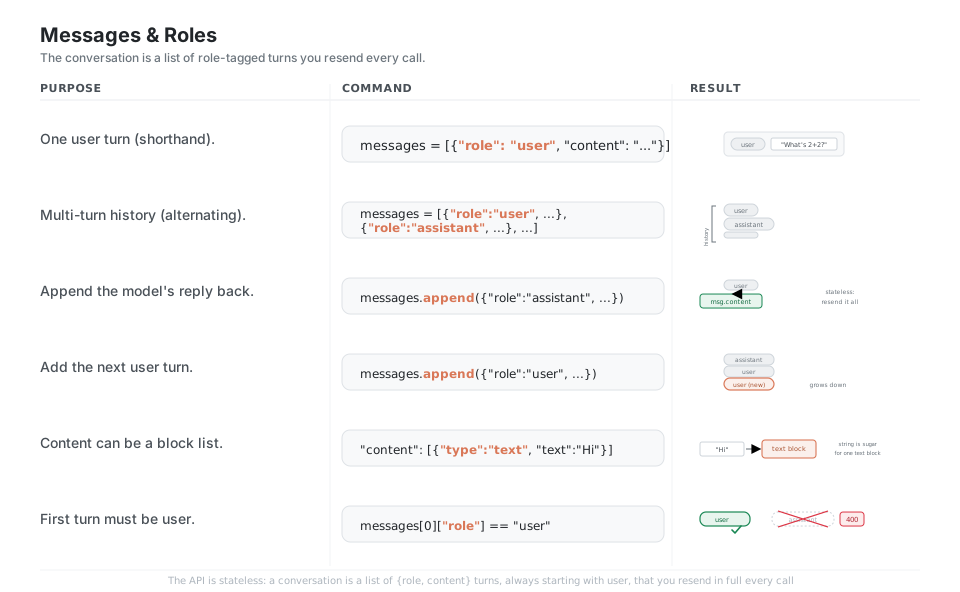
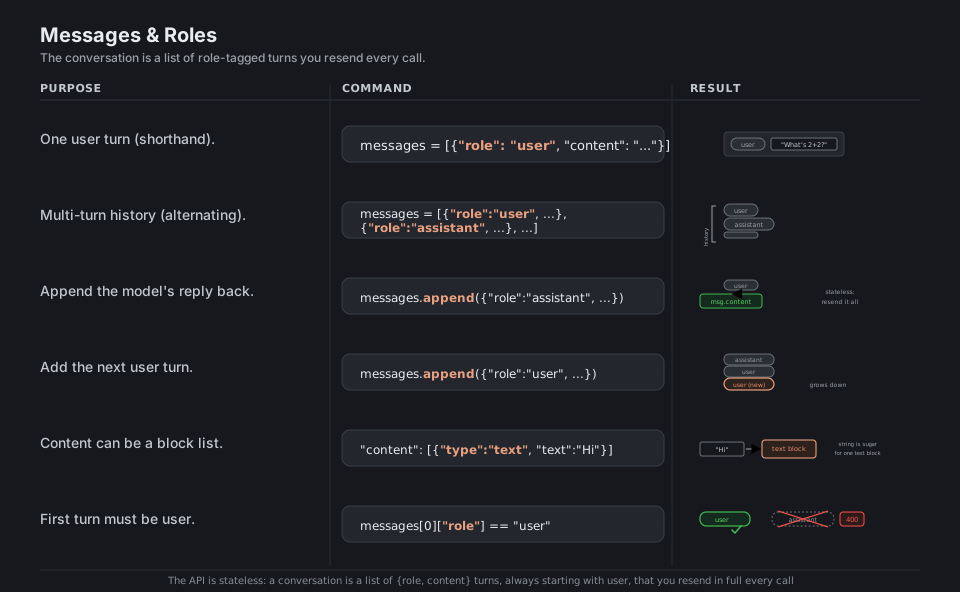
messages = [{"role": "user", "content": "What's 2+2?"}]   # one user turn (shorthand)
messages = [{"role": "user", "content": "Hi"},
            {"role": "assistant", "content": "Hello!"},
            {"role": "user", "content": "..."}]           # alternating history
messages.append({"role": "assistant", "content": msg.content})   # resend it all, stateless
messages.append({"role": "user", "content": "and 3+3?"})         # next user turn
{"role": "user", "content": [{"type": "text", "text": "Hi"}]}    # string is sugar for one text block
messages[0]["role"] == "user"                                    # first turn must be user (else 400)
See Messages API. The first turn must be user; a leading assistant turn returns 400.
System Prompt and Parameters
The system prompt is a top-level parameter, separate from the messages list, and is where you set persona and rules; max_tokens is a required hard ceiling on the output. On current models you deepen reasoning with thinking={"type": "adaptive"} (not a token budget) and trade quality against cost with output_config={"effort": "..."}; reasoning is hidden by default, so pass display="summarized" if you want to show it.
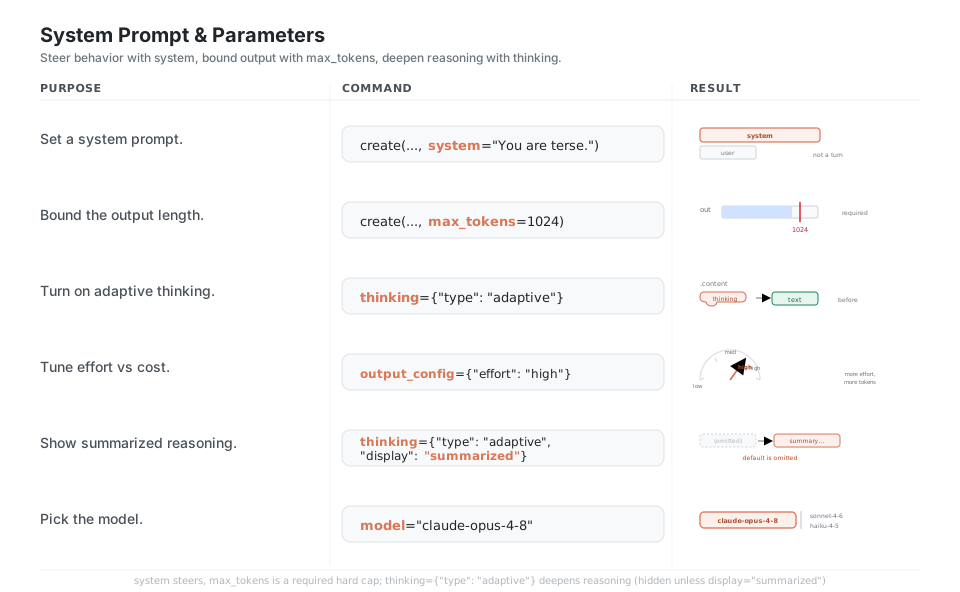
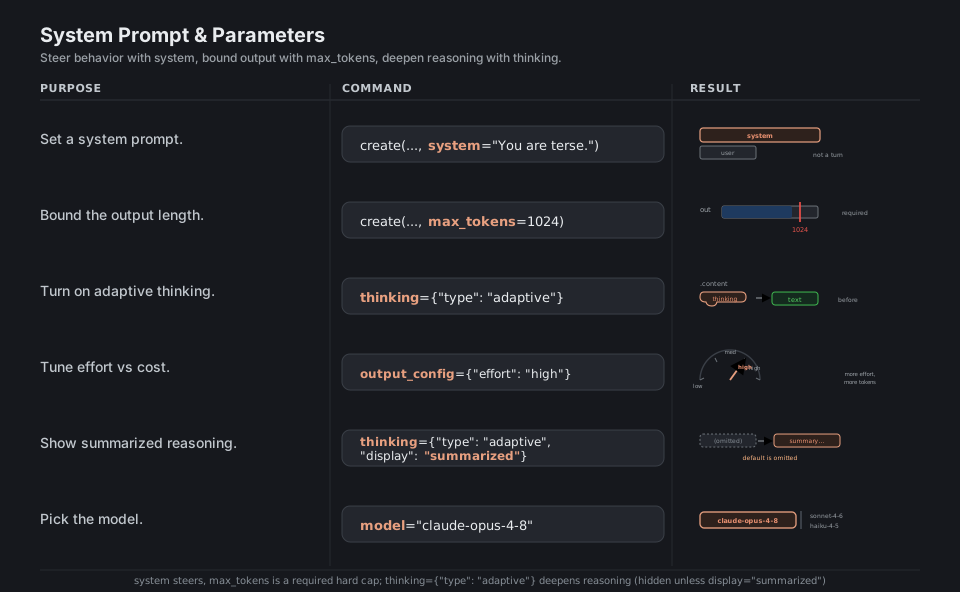
client.messages.create(..., system="You are a terse assistant.")   # top-level, not a turn
client.messages.create(..., max_tokens=1024)                       # hard cap, always required
thinking={"type": "adaptive"}                                      # deepen reasoning (not a budget)
output_config={"effort": "high"}                                   # low / medium / high / max
thinking={"type": "adaptive", "display": "summarized"}             # default is omitted
model="claude-opus-4-8"                                            # or sonnet-4-6 / haiku-4-5
See Adaptive thinking. Use thinking={"type": "adaptive"}, not the removed budget_tokens.
Streaming
For anything long, open with client.messages.stream(...) as stream: and iterate stream.text_stream to print tokens as they arrive, then call stream.get_final_message() to get the complete accumulated Message. Streaming is the right default for high max_tokens because a non-streaming request can exceed the SDK’s HTTP timeout and fail; if you need fine control, iterate the raw event stream and switch on event.type.
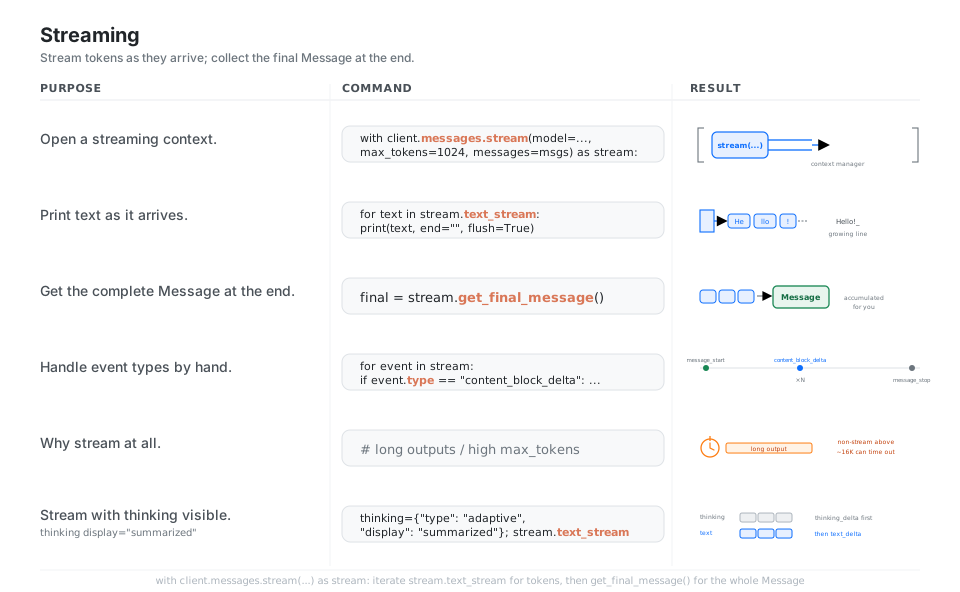
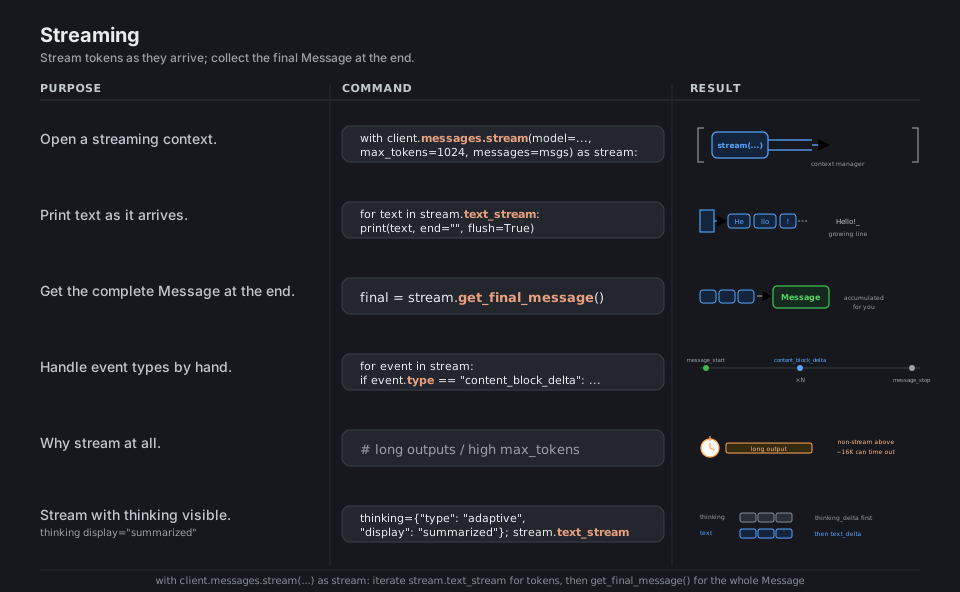
with client.messages.stream(                      # context manager
    model="claude-opus-4-8", max_tokens=1024, messages=messages
) as stream:
    for text in stream.text_stream:               # tokens as they arrive
        print(text, end="", flush=True)
    final = stream.get_final_message()            # complete Message, accumulated for you

for event in stream:                              # raw events for fine control
    if event.type == "content_block_delta": ...   # message_start -> deltas -> message_stop
# stream for long outputs: non-streaming above ~16K max_tokens can time out
See Streaming. Prefer streaming for high max_tokens to avoid HTTP timeouts.
Tool Use
A tool is a JSON-schema description you pass in tools=; when the model wants one, the response has stop_reason == "tool_use" and a tool_use block carrying a name, an input, and an id. You run the tool in your own code, append the model’s turn, then send back a user turn containing a tool_result block whose tool_use_id matches, and loop until stop_reason == "end_turn" (or let the beta tool_runner drive the loop for you).
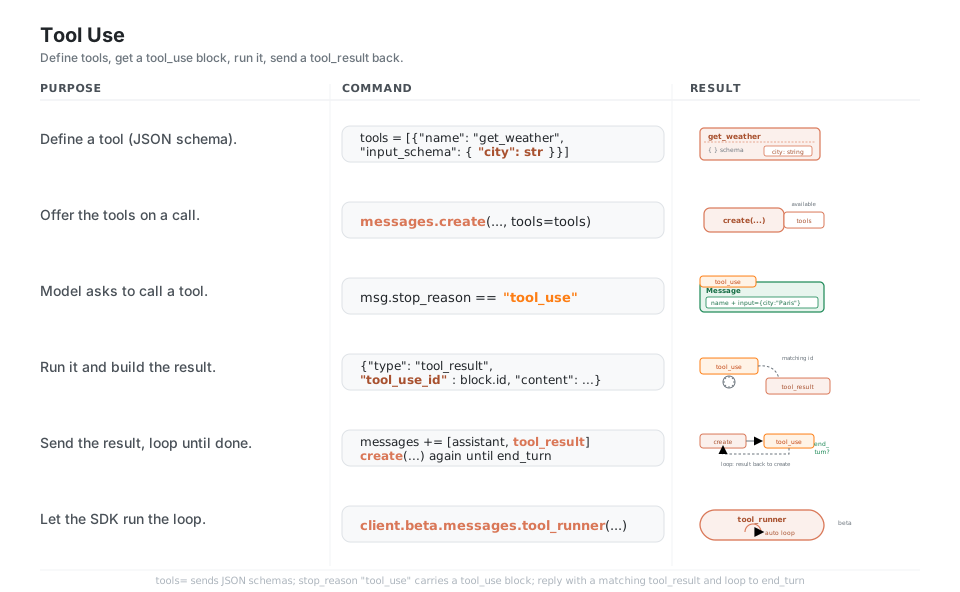
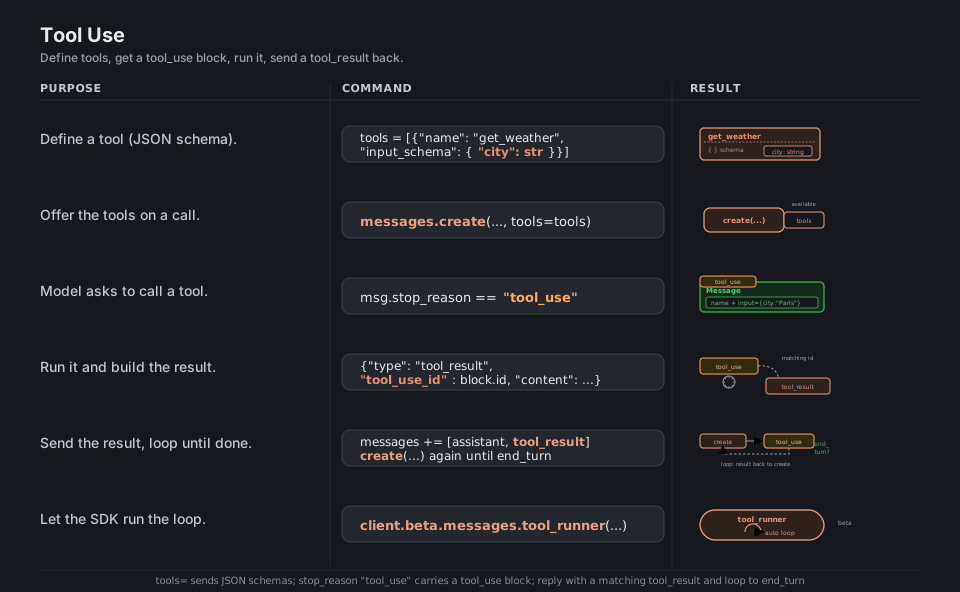
tools = [{"name": "get_weather", "description": "...",
          "input_schema": {"type": "object",
                           "properties": {"city": {"type": "string"}},
                           "required": ["city"]}}]            # JSON-schema tool
client.messages.create(..., tools=tools, messages=messages)  # offer the tools
msg.stop_reason == "tool_use"                                # model wants a tool_use block
{"type": "tool_result", "tool_use_id": block.id, "content": "18C, sunny"}   # id must match
# append assistant msg.content, then the tool_result user turn, call again until 'end_turn'
client.beta.messages.tool_runner(...)                        # beta: runs the loop for you
See Tool use overview. The tool_result tool_use_id must match the tool_use block’s id.
Multimodal Images
To send an image, put an image content block in a user turn’s content list alongside your text block; the source is either base64 (with a media_type like image/png) or a url. Vision-capable models read jpeg, png, gif, and webp, and the answer comes back as ordinary text blocks you read the same way as any other message.
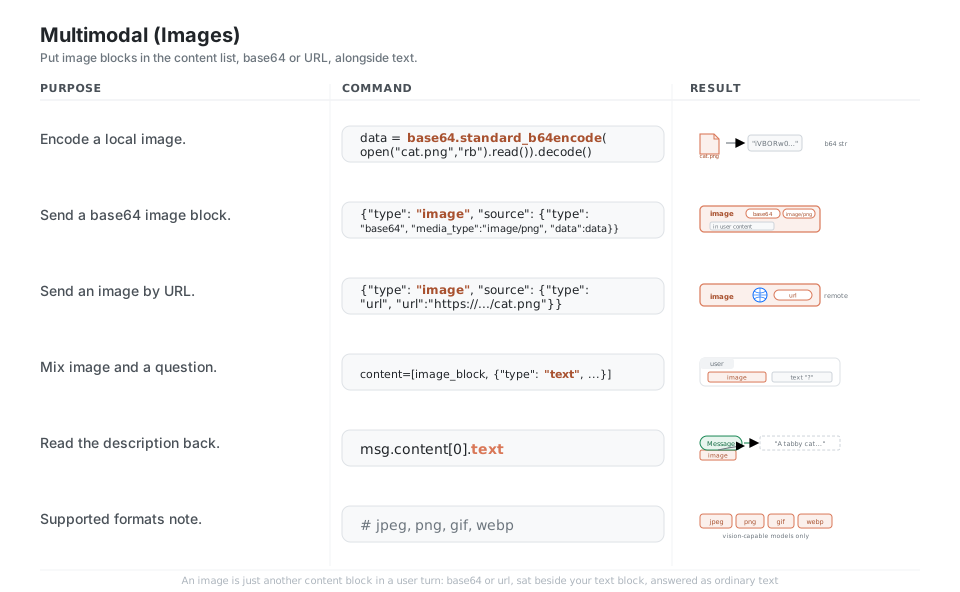
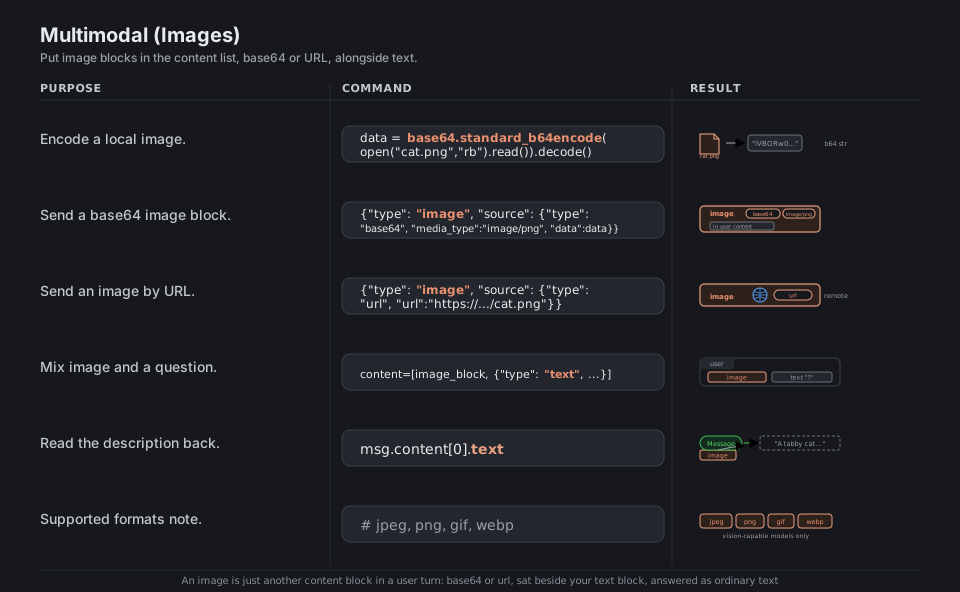
import base64
data = base64.standard_b64encode(open("cat.png", "rb").read()).decode()    # encode locally
{"type": "image", "source": {"type": "base64",                             # base64 block
                             "media_type": "image/png", "data": data}}
{"type": "image", "source": {"type": "url", "url": "https://.../cat.png"}}  # or by URL
content = [image_block, {"type": "text", "text": "What is this?"}]          # mix in one user turn
msg.content[0].text                                                        # 'A tabby cat...'
# vision-capable models only; formats: jpeg, png, gif, webp
See Vision. Image blocks live in a user turn’s content list; only vision-capable models read them.
Prompt Caching
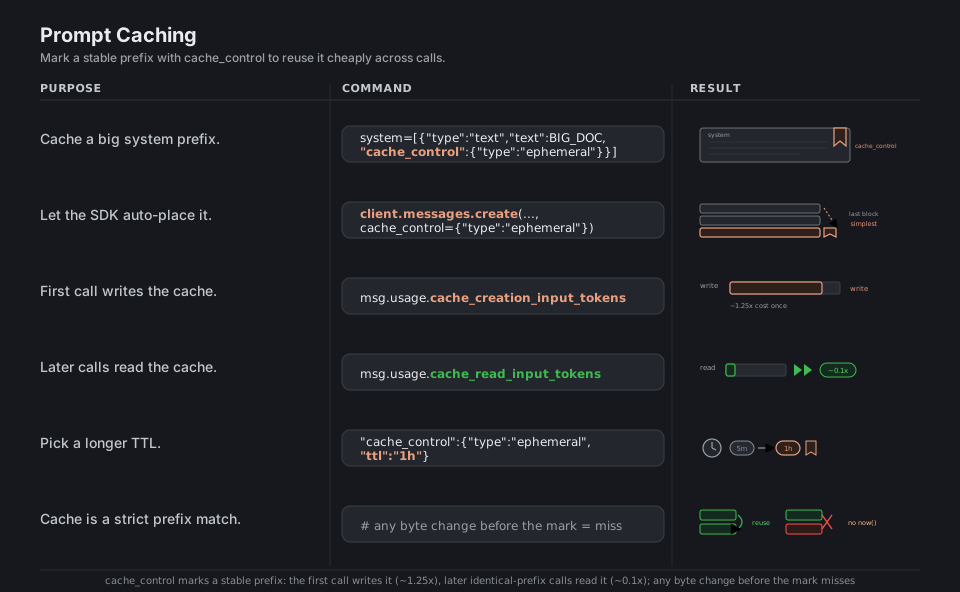
Mark the end of a stable prefix with cache_control={"type": "ephemeral"} (on a system block, or top-level to auto-place it) and the API caches that prefix: the first call pays a small write premium (cache_creation_input_tokens), and later calls with the same prefix read it back at roughly a tenth of the cost (cache_read_input_tokens). Caching is a strict prefix match, so any byte change before the breakpoint (a timestamp, a reordered key) silently invalidates it.
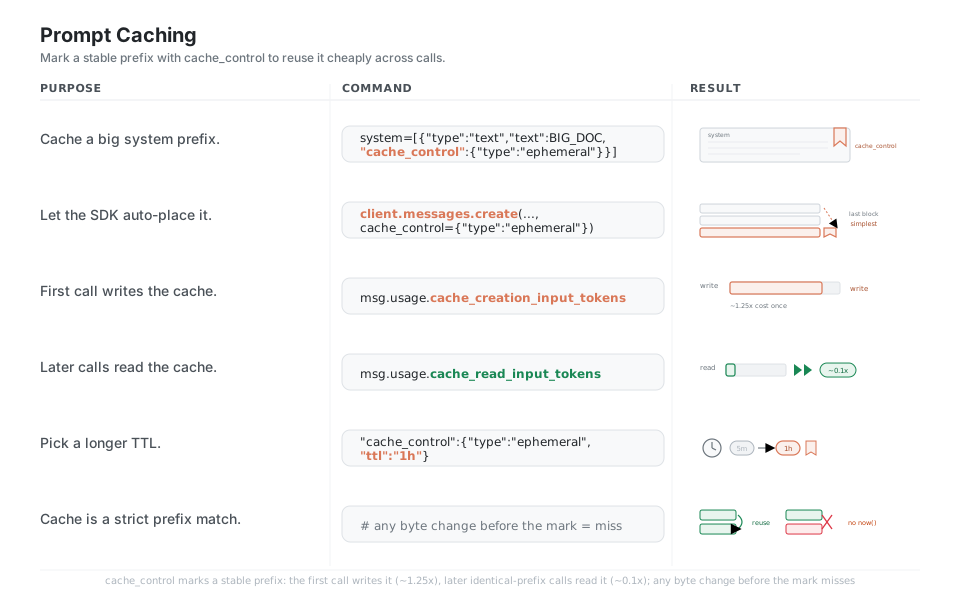
system=[{"type": "text", "text": BIG_DOC,
         "cache_control": {"type": "ephemeral"}}]        # breakpoint on a stable prefix
client.messages.create(..., cache_control={"type": "ephemeral"})   # auto-place: simplest
msg.usage.cache_creation_input_tokens                    # first call writes (~1.25x cost once)
msg.usage.cache_read_input_tokens                        # later calls read (~0.1x cost)
"cache_control": {"type": "ephemeral", "ttl": "1h"}      # longer TTL (default 5m)
# strict prefix match: any byte changed before the mark = miss (no datetime.now() in the prefix)
See Prompt caching. Caching is a strict prefix match, so keep volatile bytes after the breakpoint.
Token Counting and Models
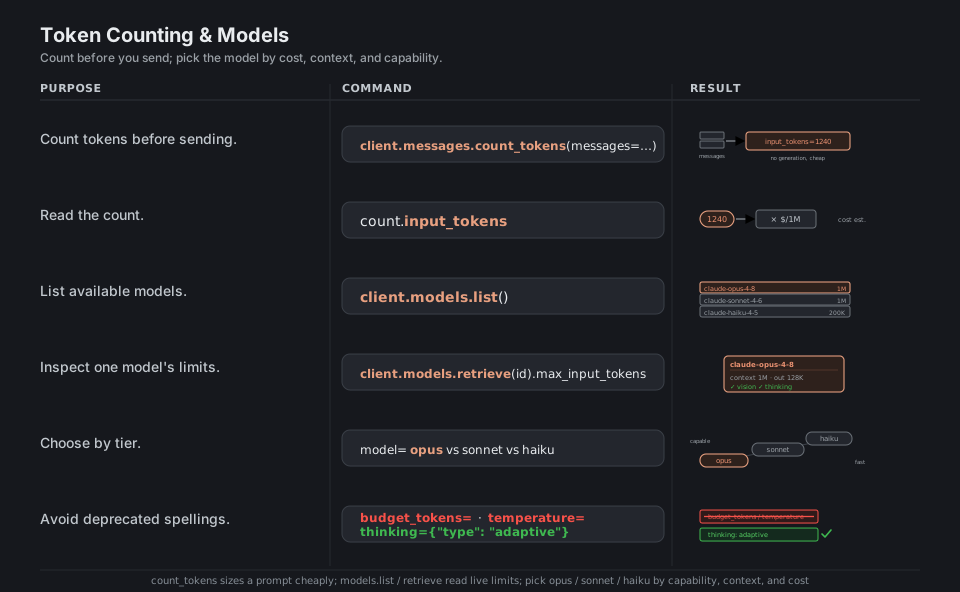
Call client.messages.count_tokens(...) to size a prompt before you send it (no generation, so it is cheap), and use client.models.list() / client.models.retrieve(id) to read live context windows and capabilities. Pick the model by tier, claude-opus-4-8 for the hardest work, claude-sonnet-4-6 for a balance, claude-haiku-4-5 for speed and cost, and avoid removed parameters (budget_tokens, temperature on the Opus 4.8 family) in favor of adaptive thinking and effort.
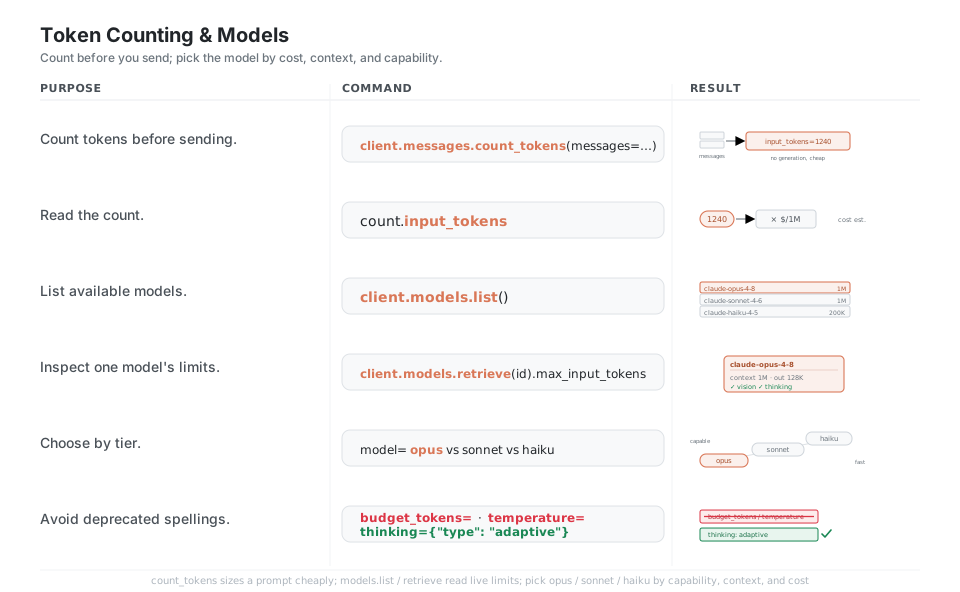
count = client.messages.count_tokens(                    # no generation, cheap
    model="claude-opus-4-8", messages=messages)
count.input_tokens                                       # size before you pay to generate
client.models.list()                                     # discover models + context windows
client.models.retrieve("claude-opus-4-8").max_input_tokens   # inspect one model's limits
model="claude-opus-4-8"   # vs "claude-sonnet-4-6" vs "claude-haiku-4-5"   # choose by tier
# avoid removed params: no budget_tokens, no temperature on opus-4-8; use adaptive thinking
See Token counting. Counting does not generate, so it is a cheap way to size a prompt first.
Quick Reference
| Command | What it does | Area |
|---|---|---|
anthropic.Anthropic() |
Construct the client (reads env key) | Client |
client.messages.create(...) |
Send a message, get a Message back |
Messages |
messages=[{"role": "user", ...}] |
The turn list (resend every call) | Roles |
system="..." |
Set persona / rules (top-level param) | System |
max_tokens=1024 |
Hard cap on output (always required) | System |
thinking={"type": "adaptive"} |
Enable adaptive reasoning | Thinking |
output_config={"effort": "high"} |
Trade quality vs cost | Effort |
client.messages.stream(...) |
Stream tokens as they arrive | Streaming |
tools=[...] + tool_result |
Define and answer tool calls | Tools |
{"type": "image", "source": {...}} |
Send an image block | Vision |
cache_control={"type": "ephemeral"} |
Cache a stable prefix | Caching |
client.messages.count_tokens(...) |
Size a prompt before sending | Tokens |
client.models.list() |
Discover models and limits | Models |
| Attribute | Type | Meaning |
|---|---|---|
msg.content |
list |
Typed blocks: text, thinking, tool_use |
msg.content[0].text |
str |
Text of the first text block |
msg.stop_reason |
str |
end_turn / max_tokens / tool_use / refusal |
msg.stop_sequence |
str or None |
The stop sequence hit, if any |
msg.role |
str |
Always "assistant" for a reply |
msg.model |
str |
Model that produced the reply |
msg.usage.input_tokens |
int |
Uncached input tokens billed |
msg.usage.output_tokens |
int |
Output tokens generated |
msg.usage.cache_creation_input_tokens |
int |
Tokens written to cache (~1.25x) |
msg.usage.cache_read_input_tokens |
int |
Tokens served from cache (~0.1x) |
| Value | Meaning | What to do |
|---|---|---|
end_turn |
Finished naturally | Done |
max_tokens |
Hit the output cap | Raise max_tokens or stream |
tool_use |
Wants to call a tool | Run it, send a tool_result |
stop_sequence |
Hit a custom stop sequence | Done |
refusal |
Declined for safety | Surface it; do not retry as-is |
pause_turn |
Paused mid server-tool loop | Re-send to resume |
Block type |
Direction | Holds |
|---|---|---|
text |
in / out | A string of text |
thinking |
out | Reasoning (empty unless display="summarized") |
tool_use |
out | A tool call: name, input, id |
tool_result |
in | Your tool output, keyed by tool_use_id |
image |
in | A base64 or url image source |
document |
in | A PDF / text document source |
| Model id | Tier | Context | Max output |
|---|---|---|---|
claude-opus-4-8 |
Most capable | 1M | 128K |
claude-sonnet-4-6 |
Balanced | 1M | 64K |
claude-haiku-4-5 |
Fastest / cheapest | 200K | 64K |
Appendix: Sample Code
The request to Message mental model
import anthropic

client = anthropic.Anthropic()  # reads ANTHROPIC_API_KEY

msg = client.messages.create(
    model="claude-opus-4-8",
    max_tokens=1024,
    system="You are a terse assistant.",
    messages=[{"role": "user", "content": "Name three primary colors."}],
)

msg.content[0].text          # 'Red, blue, yellow.'
msg.stop_reason              # 'end_turn'
msg.usage.input_tokens       # e.g. 19
msg.usage.output_tokens      # e.g. 8

# content is a LIST of typed blocks, not a string:
for block in msg.content:
    if block.type == "text":
        print(block.text)
A multi-turn conversation (resend the whole list)
import anthropic

client = anthropic.Anthropic()
messages = [{"role": "user", "content": "What's 2 + 2?"}]

msg = client.messages.create(
    model="claude-opus-4-8", max_tokens=256, messages=messages
)

# Append the model's reply, then the next question, and call again.
messages.append({"role": "assistant", "content": msg.content})
messages.append({"role": "user", "content": "And times 10?"})

msg = client.messages.create(
    model="claude-opus-4-8", max_tokens=256, messages=messages
)
print(next(b.text for b in msg.content if b.type == "text"))
Streaming with adaptive thinking
import anthropic

client = anthropic.Anthropic()

with client.messages.stream(
    model="claude-opus-4-8",
    max_tokens=2048,
    thinking={"type": "adaptive", "display": "summarized"},
    messages=[{"role": "user", "content": "Explain why the sky is blue."}],
) as stream:
    for text in stream.text_stream:
        print(text, end="", flush=True)
    final = stream.get_final_message()   # complete Message, accumulated for you

print("\n", final.usage.output_tokens)
The tool-use loop (manual)
import anthropic

client = anthropic.Anthropic()

tools = [{
    "name": "get_weather",
    "description": "Get the current weather for a city.",
    "input_schema": {
        "type": "object",
        "properties": {"city": {"type": "string"}},
        "required": ["city"],
    },
}]

def get_weather(city: str) -> str:
    return "18C, sunny"   # your real implementation here

messages = [{"role": "user", "content": "What's the weather in Paris?"}]

while True:
    msg = client.messages.create(
        model="claude-opus-4-8", max_tokens=1024, tools=tools, messages=messages
    )
    if msg.stop_reason != "tool_use":
        break

    messages.append({"role": "assistant", "content": msg.content})
    results = []
    for block in msg.content:
        if block.type == "tool_use":
            out = get_weather(**block.input)
            results.append({
                "type": "tool_result",
                "tool_use_id": block.id,   # must match the tool_use block's id
                "content": out,
            })
    messages.append({"role": "user", "content": results})

print(next(b.text for b in msg.content if b.type == "text"))
Sending an image (base64) and caching a big prefix
import anthropic
import base64

client = anthropic.Anthropic()

with open("cat.png", "rb") as f:
    data = base64.standard_b64encode(f.read()).decode("utf-8")

msg = client.messages.create(
    model="claude-opus-4-8",
    max_tokens=512,
    # Cache a large stable system prefix so repeat calls are ~10x cheaper on it.
    system=[{
        "type": "text",
        "text": BIG_STYLE_GUIDE,                 # a long, unchanging document
        "cache_control": {"type": "ephemeral"},  # the cache breakpoint
    }],
    messages=[{
        "role": "user",
        "content": [
            {"type": "image",
             "source": {"type": "base64", "media_type": "image/png", "data": data}},
            {"type": "text", "text": "What is in this image?"},
        ],
    }],
)

print(msg.content[0].text)
print(msg.usage.cache_creation_input_tokens)  # nonzero on the first call
print(msg.usage.cache_read_input_tokens)      # nonzero on later identical-prefix calls
Counting tokens before you send
import anthropic

client = anthropic.Anthropic()

count = client.messages.count_tokens(
    model="claude-opus-4-8",
    system="You are a terse assistant.",
    messages=[{"role": "user", "content": "Summarize the French Revolution."}],
)
print(count.input_tokens)   # size the prompt before paying to generate
Behavior notes
contentis a list of typed blocks, not a string. Readmsg.content[0].textonly after checkingblock.type == "text"; a reply can interleavethinking,text, andtool_useblocks.- The API is stateless. There is no server-side session: you resend the full
messageslist every call, so append the model’s ownmsg.contentback as anassistantturn to continue a chat. max_tokensis always required, and a non-streaming call with a high cap can exceed the SDK’s HTTP timeout; stream anything long withclient.messages.stream(...).- Tool results key by id. A
tool_resultblock’stool_use_idmust match thetool_useblock’sid, and you loop untilstop_reason == "end_turn". - Caching is a strict prefix match. Any byte change before the
cache_controlbreakpoint (a timestamp, a reordered key) invalidates the cache, so keep volatile content after the mark. - Removed spellings on Opus 4.8. Use
thinking={"type": "adaptive"}instead of the removedbudget_tokens, and do not passtemperature,top_p, ortop_k(they return400).
References
Anthropic / Claude documentation (current)
- Developer platform docs home and the Messages API reference
- Client SDKs overview, Adaptive thinking, Streaming
- Tool use overview, Vision, Prompt caching, Token counting
- Models overview (IDs, context windows, pricing)
Related and supporting
- Effort parameter, Structured outputs, Handling stop reasons
- Rate limits and errors, the models migration guide
Project