GeoPandas is pandas for geospatial data: a GeoDataFrame is an ordinary DataFrame with one special column of shapely geometries (the geometry column) plus a coordinate reference system, so everything you already know from pandas (indexing, groupby, merges, filtering) keeps working while you add CRS-aware spatial operations on top. The recurring mental model in this sheet is one picture: a plain table of muted attribute columns gains a single accent-green geometry column of little shape glyphs (points, lines, polygons), and a CRS badge (for example EPSG:4326) rides along pinned to that column. Where this looks like the pandas sheet, the contrast is the point: pandas slices and aggregates rows and columns, while GeoPandas adds the spatial dimension pandas lacks, joining by where shapes touch rather than by a key, and merging geometry with a spatial groupby. The conventional import is import geopandas as gpd, and every command here was verified live against geopandas 1.1.3.


The GeoDataFrame
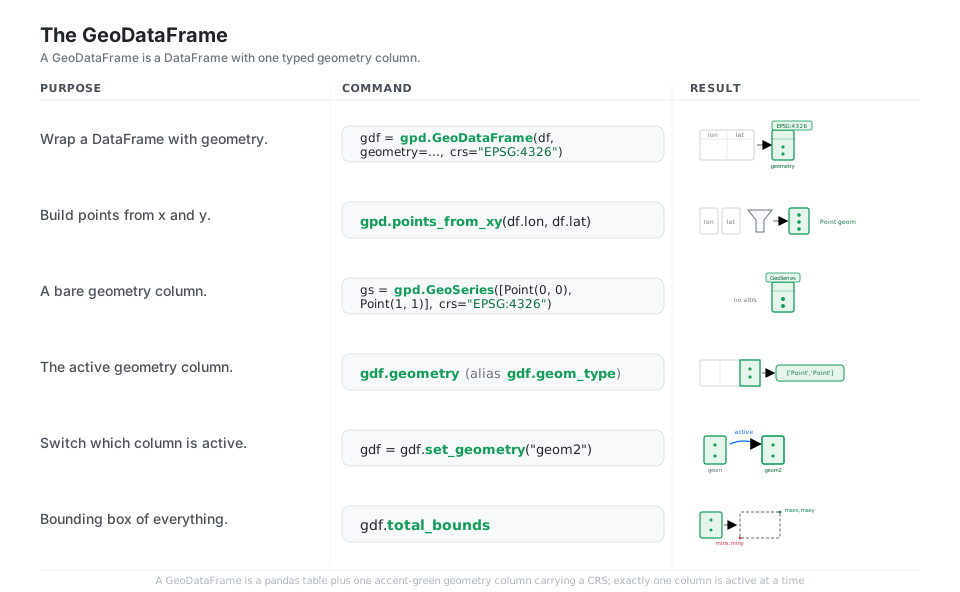
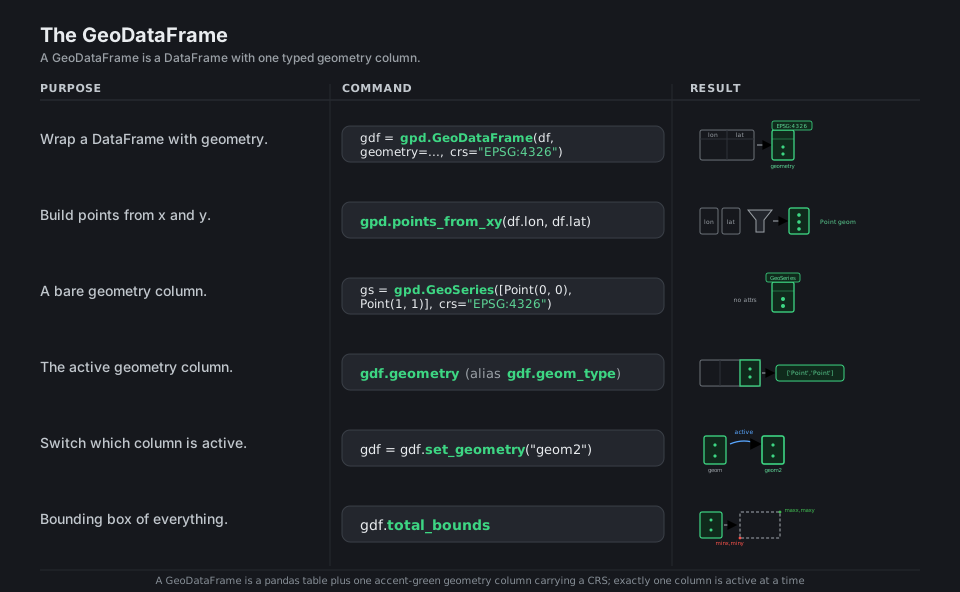
A GeoDataFrame is just a pandas DataFrame with one special column of shapely geometries (the geometry column) plus a CRS, so everything you know from pandas (indexing, groupby, merges, filtering) still works, and the geometry column adds spatial superpowers. Build one by wrapping an existing frame with geometry=gpd.points_from_xy(...), and remember that exactly one column at a time is the “active” geometry, which gdf.geometry and set_geometry control.
import geopandas as gpd
from shapely.geometry import Point

gdf = gpd.GeoDataFrame(                                  # wrap a DataFrame
    df, geometry=gpd.points_from_xy(df.lon, df.lat), crs="EPSG:4326")
gs = gpd.GeoSeries([Point(0, 0), Point(1, 1)], crs="EPSG:4326")  # bare geometry
gdf.geometry                          # the active geometry column
list(gdf.geom_type)                   # ['Point', 'Point', ...]
gdf = gdf.set_geometry("geom2")       # switch which column is active
gdf.total_bounds                      # array([minx, miny, maxx, maxy])
See Data structures. Exactly one column is the active geometry; set_geometry changes it.
Read & Write
gpd.read_file reads essentially any vector format (Shapefile, GeoJSON, GeoPackage, and more) through the default pyogrio engine, and gdf.to_file writes them back, choosing the format by extension or an explicit driver=. For analytics, prefer GeoParquet (to_parquet / read_parquet): it is columnar, fast, and stores the CRS, unlike the Shapefile format, which truncates column names and splits one dataset across several sidecar files.
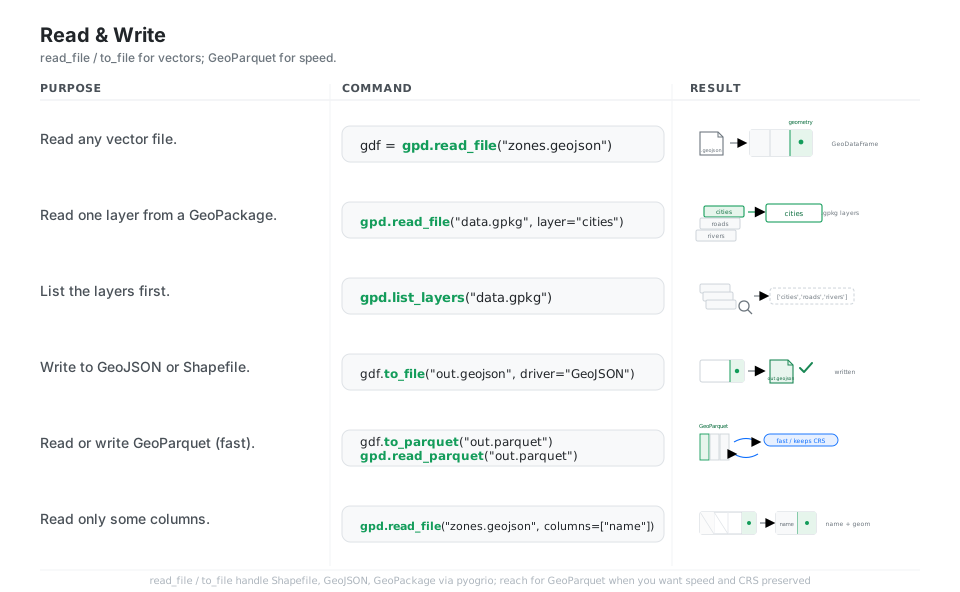

gdf = gpd.read_file("zones.geojson")               # read any vector format
gpd.read_file("data.gpkg", layer="cities")         # one layer from a GeoPackage
gpd.list_layers("data.gpkg")                       # ['cities', 'roads', 'rivers']
gdf.to_file("out.geojson", driver="GeoJSON")       # write a vector file
gdf.to_parquet("out.parquet")                      # GeoParquet: fast, keeps CRS
gpd.read_parquet("out.parquet")                    # round-trip back
gpd.read_file("zones.geojson", columns=["name"])   # read only some columns
See Reading and writing files. The default engine is pyogrio; fiona is now optional.
CRS & Reproject
A coordinate reference system tells GeoPandas what the coordinate numbers mean: EPSG:4326 is longitude/latitude in degrees (good for storage, bad for measuring), while a projected CRS like UTM or Web Mercator uses meters. set_crs only labels the data (use it when the CRS is missing), whereas to_crs actually reprojects the coordinates into a new system; always reproject every layer to a common CRS before you join or measure.
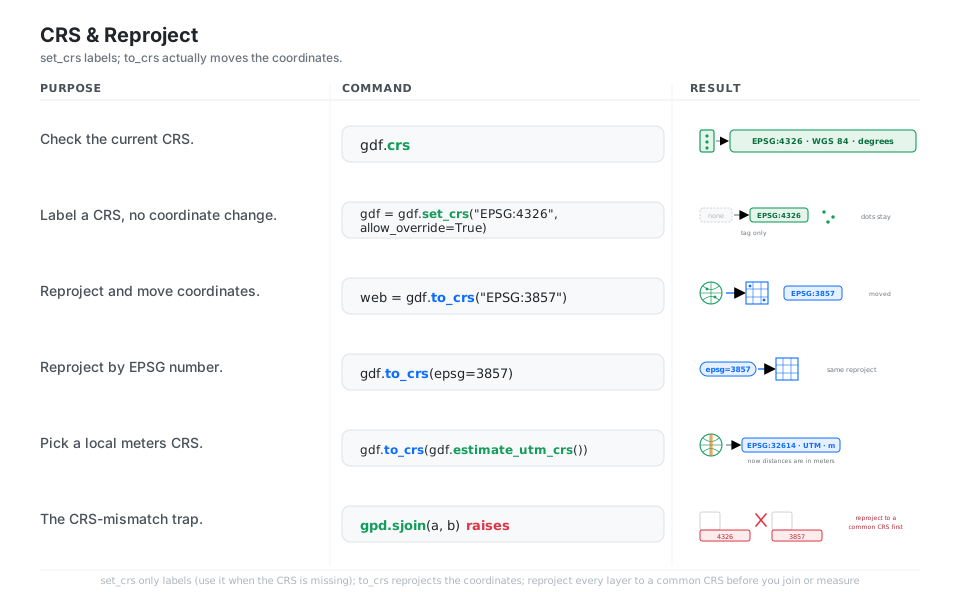
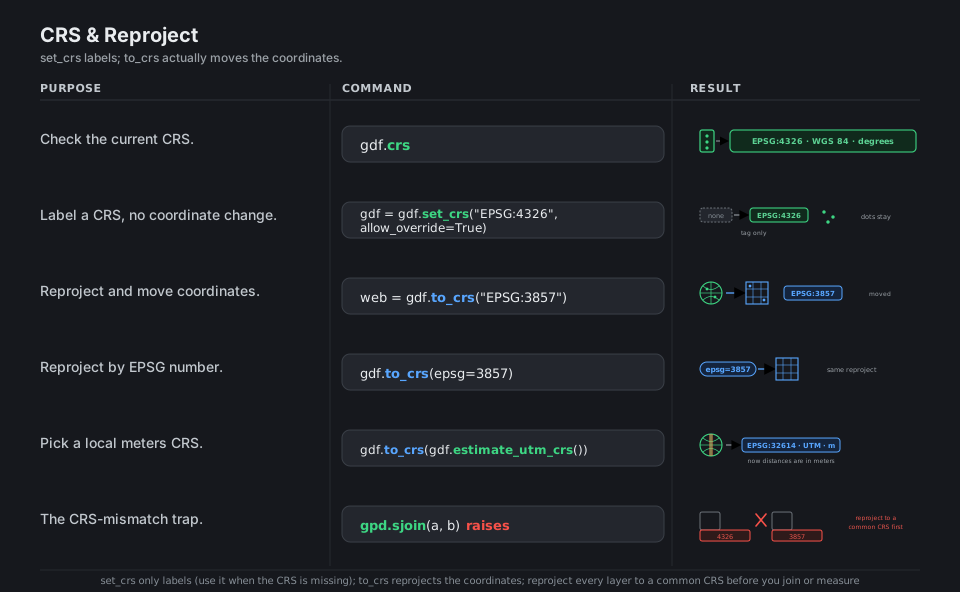
gdf.crs                                       # inspect the current CRS
gdf = gdf.set_crs("EPSG:4326", allow_override=True)  # label only (no move)
web = gdf.to_crs("EPSG:3857")                 # reproject (moves coordinates)
gdf.to_crs(epsg=3857)                          # reproject by EPSG number
gdf.to_crs(gdf.estimate_utm_crs())            # pick a local meters CRS (UTM)
gpd.sjoin(a, b)   # mismatched CRS -> reproject to a common CRS first
See Managing projections. set_crs only labels; to_crs actually moves the coordinates.
Predicates & Geometric Operations
Spatial predicates return booleans about how shapes relate (within, intersects, contains, touches, crosses, disjoint), and you use them to filter and select, the same way you use comparison operators on a numeric column. Spatial operations return new geometry: buffer grows a shape by a radius (in CRS units), union_all() fuses many shapes into one, centroid collapses to a point, and gpd.clip cuts one layer to the outline of another.
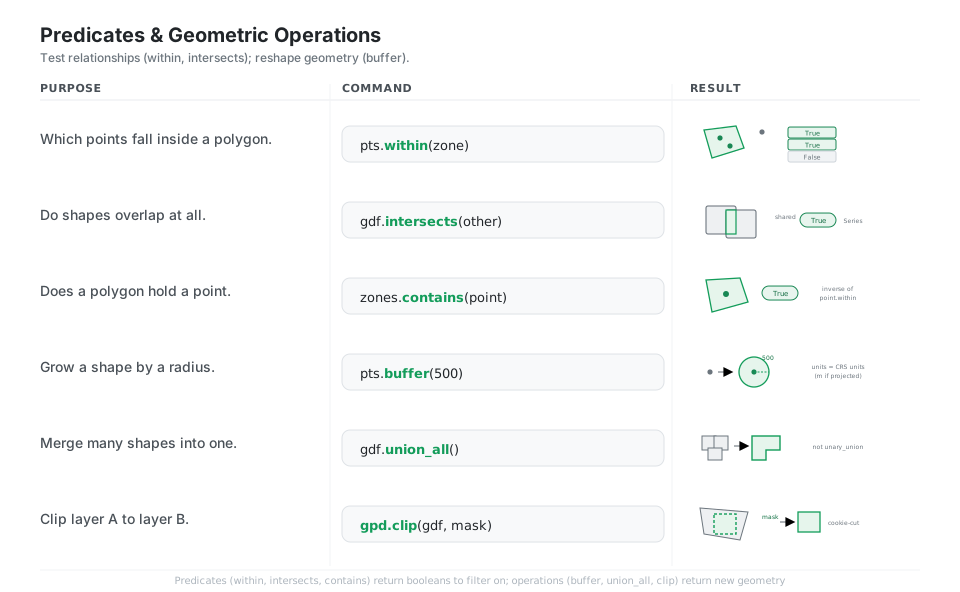
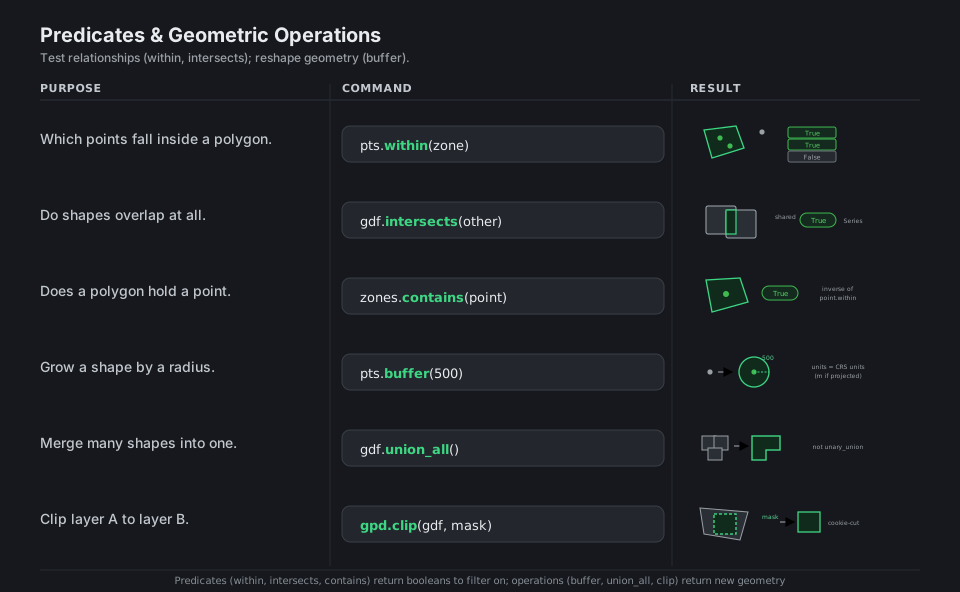
pts.within(zone)              # which points fall inside -> boolean Series
gdf.intersects(other)         # do shapes overlap at all -> True / False
zones.contains(point)         # does a polygon hold a point
pts.buffer(500)               # grow by a radius (units = CRS units)
gdf.union_all()               # merge many shapes into one (not unary_union)
gpd.clip(gdf, mask)           # cut a layer to a mask outline (cookie-cutter)
See Geometric manipulations. Use union_all(); the old unary_union is deprecated.
Spatial Joins
gpd.sjoin is a join keyed on location instead of on a shared column: it attaches the attributes of whichever right-hand shape each left-hand shape relates to, where the relationship is set by predicate= (within, intersects, contains). Use how= like a SQL join (inner drops non-matches, left keeps every left row with NaN attributes), and reach for sjoin_nearest when you want the closest feature rather than an exact spatial relationship.
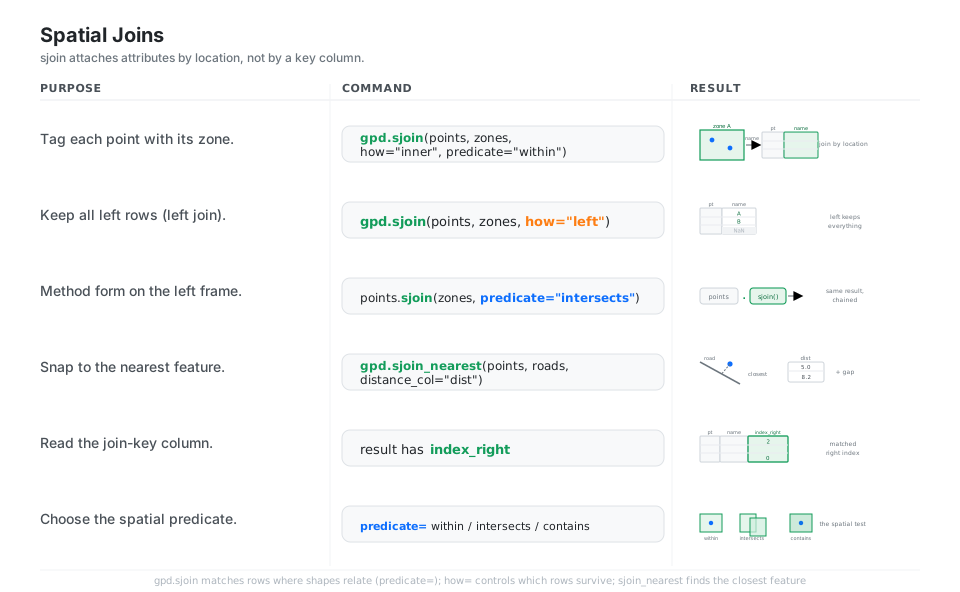
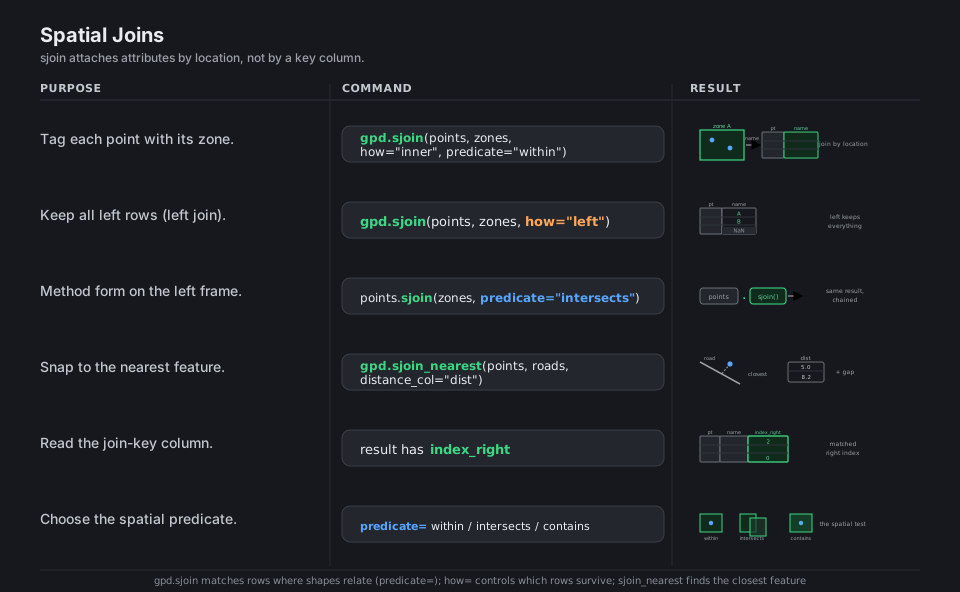
gpd.sjoin(points, zones, how="inner", predicate="within")  # tag points by zone
gpd.sjoin(points, zones, how="left")          # keep all left rows (NaN if outside)
points.sjoin(zones, predicate="intersects")   # method form on the left frame
gpd.sjoin_nearest(points, roads, distance_col="dist")  # snap to nearest feature
# result carries 'index_right' -> the matched right-row index
# predicate= is one of: within, intersects, contains
See Spatial joins. how= controls which rows survive; predicate= defines a match.
Dissolve & Aggregate
dissolve is the spatial analogue of groupby: it merges the geometry of every row that shares a by= key into a single shape and aggregates the other columns with aggfunc=, so counties dissolve into states while their populations sum. Plain groupby would drop the geometry; dissolve keeps it, and explode is the inverse, splitting a multi-part geometry back into one row per part.
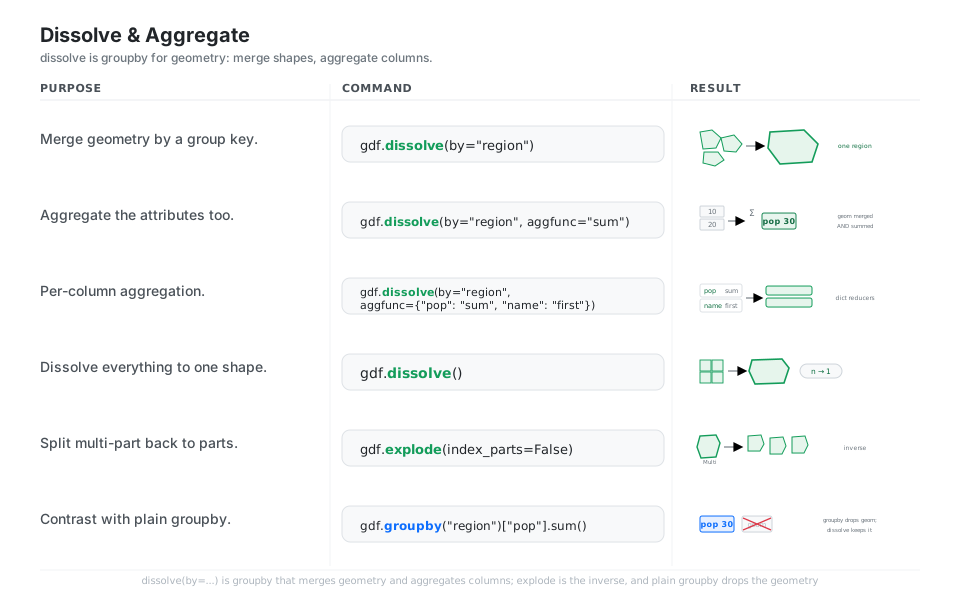
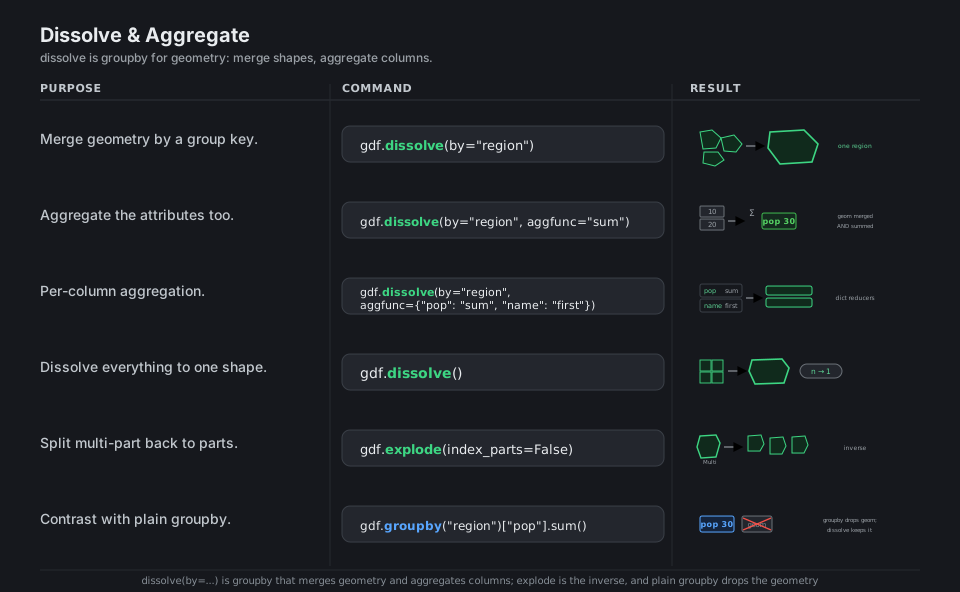
gdf.dissolve(by="region")                     # merge geometry by a group key
gdf.dissolve(by="region", aggfunc="sum")      # also sum the attribute columns
gdf.dissolve(by="region", aggfunc={"pop": "sum", "name": "first"})  # per-column
gdf.dissolve()                                # dissolve everything to one shape
gdf.explode(index_parts=False)                # split multi-part back to parts
gdf.groupby("region")["pop"].sum()            # groupby drops geometry; dissolve keeps it
See Aggregation with dissolve. dissolve keeps the geometry; groupby discards it.
Plot a Choropleth Map
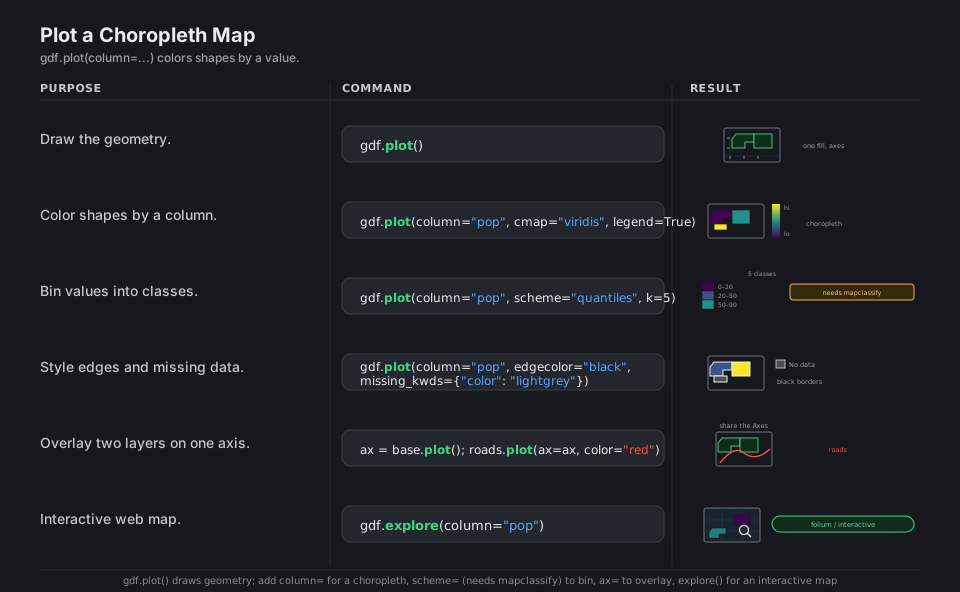
gdf.plot() draws the geometry on a Matplotlib axis, and passing column="value" turns it into a choropleth that shades each shape by that value, with cmap= setting the color ramp and legend=True adding a colorbar. Use scheme= (which needs the optional mapclassify package) to bin values into classes like quantiles, draw layers on a shared ax to stack them, and call gdf.explore() for an interactive web map instead of a static one.
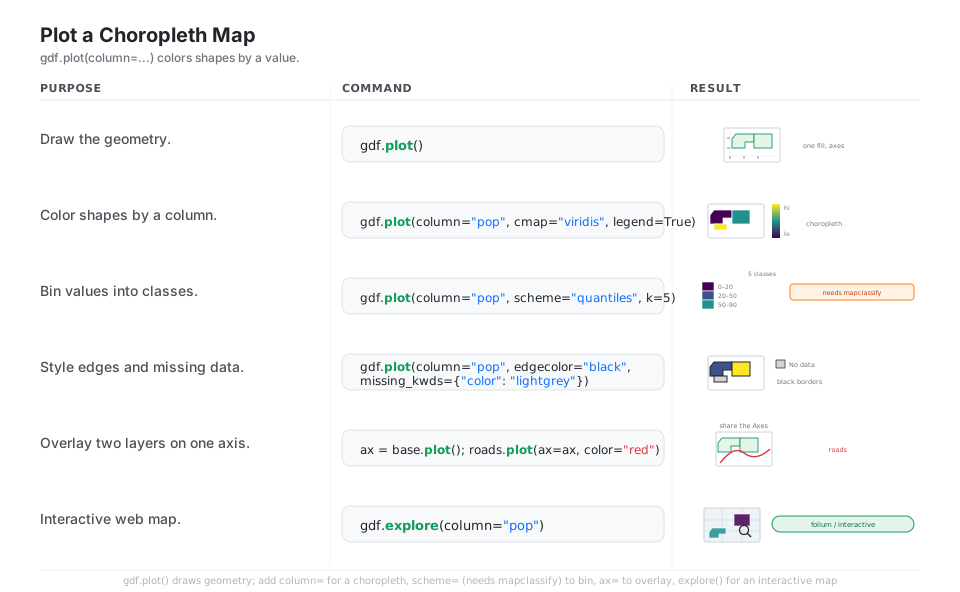
import matplotlib.pyplot as plt

gdf.plot()                                              # draw the geometry
gdf.plot(column="pop", cmap="viridis", legend=True)     # choropleth + colorbar
gdf.plot(column="pop", scheme="quantiles", k=5, legend=True)  # needs mapclassify
gdf.plot(column="pop", edgecolor="black",
         missing_kwds={"color": "lightgrey"})           # style edges + missing
ax = base.plot(); roads.plot(ax=ax, color="red")        # overlay on one Axes
gdf.explore(column="pop")                               # interactive web map (folium)
See Mapping and plotting tools. scheme= needs mapclassify; explore needs folium.
Area, Length & Distance
Measurements come straight off the geometry as .area, .length, and .distance(...), but their units are the CRS units, so a geographic (degree-based) CRS gives meaningless “degree” areas and triggers a warning. Reproject to a projected, meter-based CRS first (gdf.to_crs(gdf.estimate_utm_crs()) picks a sensible local UTM zone), then your areas are square meters and your distances are meters.
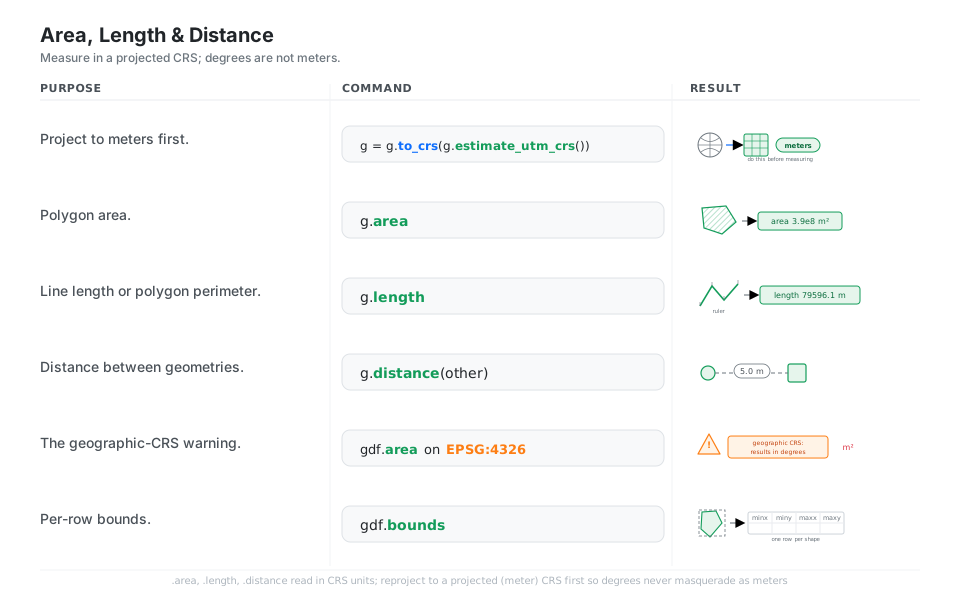
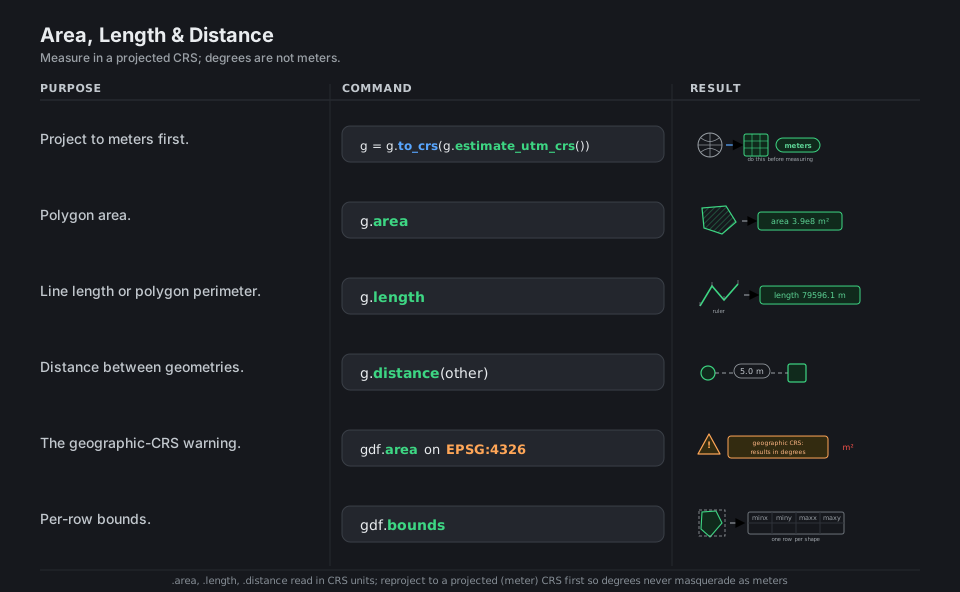
g = gdf.to_crs(gdf.estimate_utm_crs())   # project to meters first (do this!)
g.area                                   # polygon area -> square meters
g.length                                 # line length / polygon perimeter -> meters
g.distance(other)                        # distance between geometries -> meters
gdf.area                                 # on EPSG:4326 -> warns: degrees, not meters
gdf.bounds                               # per-row box: minx, miny, maxx, maxy
See Re-projecting using GeoPandas. Measure in a projected CRS; degrees are not meters.
Quick Reference
| Command | What it does | Area |
|---|---|---|
gpd.GeoDataFrame(df, geometry=..., crs=...) |
Wrap a DataFrame with geometry | Structure |
gpd.points_from_xy(x, y) |
Build a point geometry column | Structure |
gpd.read_file(path) |
Read any vector format | IO |
gdf.to_file(path, driver=...) |
Write a vector file | IO |
gpd.read_parquet / gdf.to_parquet |
GeoParquet (fast, keeps CRS) | IO |
gdf.crs |
Inspect the CRS | CRS |
gdf.set_crs(...) |
Label the CRS (no move) | CRS |
gdf.to_crs(...) |
Reproject coordinates | CRS |
gdf.estimate_utm_crs() |
Pick a local meters CRS | CRS |
gdf.within / .intersects / .contains |
Spatial predicates (booleans) | Predicates |
gdf.buffer(d) |
Grow shapes by a radius | Ops |
gdf.union_all() |
Merge shapes into one | Ops |
gpd.clip(gdf, mask) |
Cut a layer to a mask | Ops |
gpd.sjoin(a, b, predicate=...) |
Join by location | Join |
gpd.sjoin_nearest(a, b) |
Join to nearest feature | Join |
gdf.dissolve(by=..., aggfunc=...) |
Spatial groupby (merge geometry) | Aggregate |
gdf.plot(column=..., legend=True) |
Choropleth map | Plot |
gdf.explore(column=...) |
Interactive web map | Plot |
gdf.area / .length / .distance(...) |
Measure (CRS units) | Measure |
| Type | Shape | Typical source |
|---|---|---|
Point |
A single location | GPS, x/y coordinates |
LineString |
A path | Roads, rivers, routes |
Polygon |
A filled region | Boundaries, zones, parcels |
MultiPoint / MultiLineString / MultiPolygon |
A collection of the above | A country with islands, a multi-segment road |
GeometryCollection |
Mixed types together | Overlay or intersection results |
| CRS | Units | Use it for |
|---|---|---|
EPSG:4326 (WGS 84) |
Degrees (lon/lat) | Storage, GPS, GeoJSON; NOT for measuring |
EPSG:3857 (Web Mercator) |
Meters | Web/tile maps; distorts area far from the equator |
EPSG:326xx / 327xx (UTM) |
Meters | Local area and distance (use estimate_utm_crs) |
A national grid (for example EPSG:5070 US Albers) |
Meters | Country-scale equal-area analysis |
| Knob | Options | Meaning |
|---|---|---|
predicate= |
intersects (default), within, contains, touches, crosses, overlaps, covers, covered_by |
The spatial test that defines a match |
how= |
inner, left, right |
Which rows survive, like a SQL join |
sjoin_nearest |
distance_col=, max_distance= |
Match the closest feature and record the gap |
Appendix: Sample Code
Build a GeoDataFrame from a plain DataFrame
import geopandas as gpd
import pandas as pd

df = pd.DataFrame({
    "city": ["San Francisco", "New York", "London"],
    "lon":  [-122.42, -74.01, -0.13],
    "lat":  [  37.77,  40.71, 51.51],
})

gdf = gpd.GeoDataFrame(
    df,
    geometry=gpd.points_from_xy(df.lon, df.lat),
    crs="EPSG:4326",
)

gdf.geometry.name     # 'geometry'  -> the active geometry column
list(gdf.geom_type)   # ['Point', 'Point', 'Point']
gdf.total_bounds      # array([-122.42, 37.77, -0.13, 51.51])
Read, reproject, measure (the canonical flow)
The single most common mistake is measuring in degrees. Reproject first, then measure.
import geopandas as gpd

zones = gpd.read_file("zones.geojson")   # arrives in EPSG:4326 (degrees)

# Reproject to a local meters CRS chosen automatically
zones_m = zones.to_crs(zones.estimate_utm_crs())

zones_m["area_km2"] = zones_m.area / 1_000_000   # m^2 -> km^2
zones_m["perimeter_km"] = zones_m.length / 1_000

# zones.area on the original EPSG:4326 layer would warn:
#   "Geometry is in a geographic CRS. Results ... are likely incorrect."
A spatial join: tag points with the polygon they fall in
import geopandas as gpd

stores = gpd.read_file("stores.geojson")      # points
districts = gpd.read_file("districts.gpkg")   # polygons

# Make sure both layers share a CRS before joining
stores = stores.to_crs(districts.crs)

tagged = gpd.sjoin(
    stores, districts[["district_name", "geometry"]],
    how="left", predicate="within",
)
# Each store row now carries 'district_name' (NaN if it fell outside every district).
# The matched right-row index lands in the 'index_right' column.
Dissolve: counties into states
import geopandas as gpd

counties = gpd.read_file("counties.gpkg")

states = counties.dissolve(
    by="state",
    aggfunc={"population": "sum", "name": "count"},
)
# Geometry of all counties in a state is merged into one polygon,
# while 'population' is summed and 'name' is counted per state.
# Contrast: counties.groupby("state")["population"].sum() drops the geometry entirely.
A choropleth map saved to disk
import geopandas as gpd
import matplotlib.pyplot as plt

states = gpd.read_file("states.gpkg")

ax = states.plot(
    column="population",
    cmap="viridis",
    scheme="quantiles", k=5,          # needs the optional 'mapclassify' package
    legend=True,
    edgecolor="black", linewidth=0.3,
    missing_kwds={"color": "lightgrey", "label": "No data"},
    figsize=(8, 5),
)
ax.set_axis_off()
plt.savefig("choropleth.png", dpi=150, bbox_inches="tight")

# For an interactive (folium) web map instead of a static PNG:
# states.explore(column="population", cmap="viridis")
Round-trip through GeoParquet
import geopandas as gpd

gdf = gpd.read_file("zones.geojson")

gdf.to_parquet("zones.parquet")             # columnar, fast, stores the CRS
again = gpd.read_parquet("zones.parquet")

again.crs == gdf.crs   # True  -> GeoParquet preserves the CRS (Shapefile does not)
Behavior notes
to_crsmoves coordinates;set_crsonly labels. Useset_crswhen the CRS is missing or wrong but the numbers are already correct; useto_crsto actually reproject. Mixing them up is the classic silent bug.- Measure in a projected CRS, never a geographic one.
.area,.length, and.distanceon anEPSG:4326layer return degree-based nonsense and warn; reproject withgdf.to_crs(gdf.estimate_utm_crs())first so the results are in meters. - Use
union_all(), notunary_union. The oldgdf.unary_unionis deprecated (still present in 1.1.3 but slated for removal);gdf.union_all()is the supported spelling. dissolvekeeps geometry;groupbydrops it. Reach fordissolve(by=..., aggfunc=...)whenever you want a spatialgroupbythat merges shapes; plain pandasgroupbydiscards the geometry column.- Optional extras for plotting.
scheme=inplotneedsmapclassifyandgdf.explore()needsfolium; installgeopandas[all]to pull both in. - The bundled datasets are gone.
geopandas.datasetswas removed in 1.0, sogpd.datasets.get_path("naturalearth_lowres")no longer works; load real files or build geometries with shapely. The default file IO engine is nowpyogrio, andfionais optional.
References
GeoPandas documentation (latest)
- Documentation home and the getting-started introduction
- User guide, API reference, and installation
- Data structures, Reading and writing files, Managing projections
- Geometric manipulations, Spatial joins, Aggregation with dissolve
- Mapping and plotting tools and Re-projecting using GeoPandas
Project and related