Gradio is the fastest way to wrap any Python function, especially an ML model, in a shareable web UI. Where Streamlit reruns the whole script top to bottom on every interaction, Gradio is component-and-event driven: you declare typed input and output components, bind a Python function to them, and the framework wires the data flow, so nothing reruns unless an event listener fires. The recurring mental model in this sheet is one picture: an input component on the left flows along a gray arrow into a blue fn box (your Python function), which flows out along a gray arrow to an output component on the right. Gradio’s center of gravity is the model-to-demo loop: gr.Interface(fn, inputs, outputs) gives a working demo in three arguments, and launch(share=True) hands you a public link. The conventional import is import gradio as gr, and everything here is Gradio v6: every component, layout, and listener lives under the single gr.* namespace, so no extra imports are ever needed (v5 and earlier spellings are flagged per section).


gr.Interface
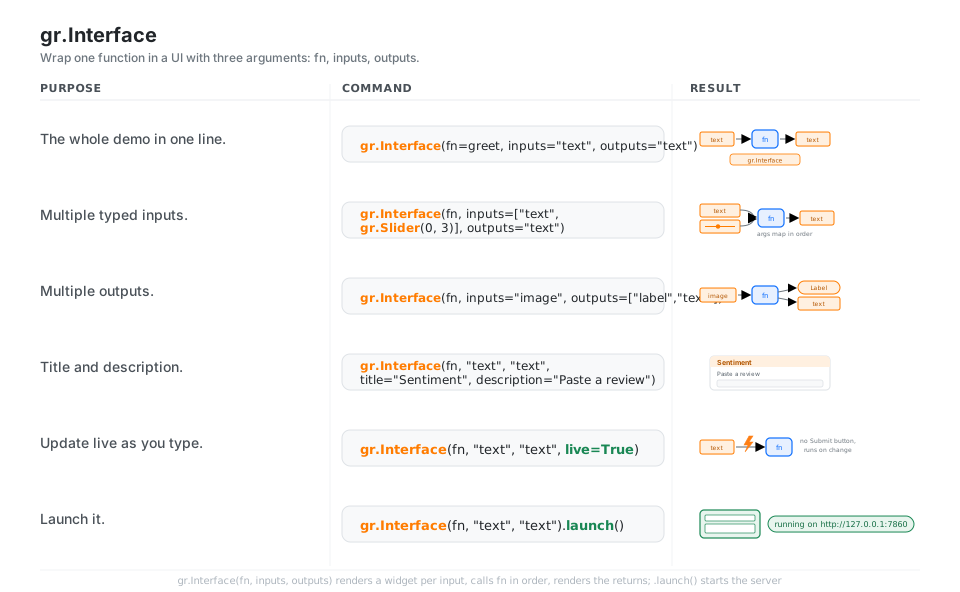
gr.Interface(fn, inputs, outputs) is the whole demo in three arguments: Gradio renders an input widget per inputs entry, calls your fn with those values in order, and renders the return value(s) in the outputs widgets. Strings like "text", "image", and "label" are shorthand for the matching component, live=True runs on every change instead of waiting for a Submit, and .launch() starts the server.
import gradio as gr

gr.Interface(fn=greet, inputs="text", outputs="text")          # the whole demo
gr.Interface(fn, inputs=["text", gr.Slider(0, 3)], outputs="text")   # args map in order
gr.Interface(fn, inputs="image", outputs=["label", "text"])    # multiple outputs
gr.Interface(fn, "text", "text", title="Sentiment", description="Paste a review")
gr.Interface(fn, "text", "text", live=True)                    # run on every change
gr.Interface(fn, "text", "text").launch()                      # start the server
See The interface class. Strings like "text" are shorthand for the matching component.
Input Components
Each input component declares a type and becomes one argument of your function: gr.Textbox gives a str, gr.Slider and gr.Number give a number, gr.Dropdown/gr.Radio/gr.Checkbox give a choice or bool, and media components like gr.Image(type="pil") hand your function a ready-to-use Python object. The order of inputs is the order of your function’s positional arguments, so the UI and the signature stay in lockstep.
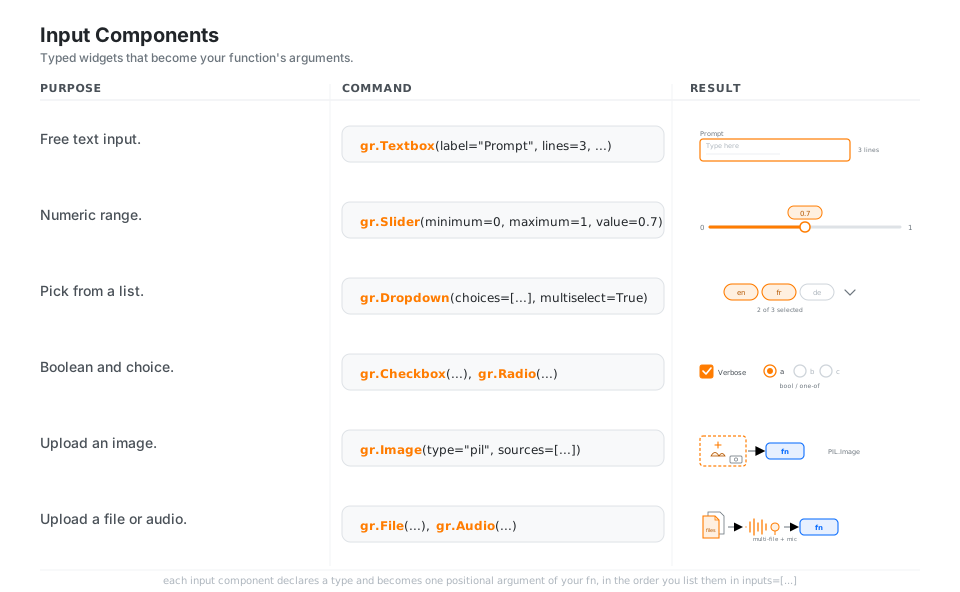
gr.Textbox(label="Prompt", lines=3, placeholder="Type here")   # -> str
gr.Slider(minimum=0, maximum=1, step=0.05, value=0.7)          # -> float
gr.Dropdown(choices=["en", "fr", "de"], multiselect=True)      # -> list of choices
gr.Checkbox(label="Verbose"); gr.Radio(["a", "b", "c"])        # bool / one-of
gr.Image(type="pil", sources=["upload", "webcam"])             # -> PIL.Image
gr.File(file_count="multiple"); gr.Audio(sources=["microphone"])
See Textbox. Use sources=[...] (a list), not the old singular source= string.
Output Components
Whatever your function returns is rendered by the matching output component: gr.Textbox, gr.Markdown, and gr.HTML for text, gr.Label for classification confidences, gr.JSON and gr.Dataframe for structured data, and gr.Image, gr.Audio, gr.Video, gr.Gallery, and gr.Plot for media and figures. List multiple outputs and return a tuple in the same order, exactly mirroring the inputs side.
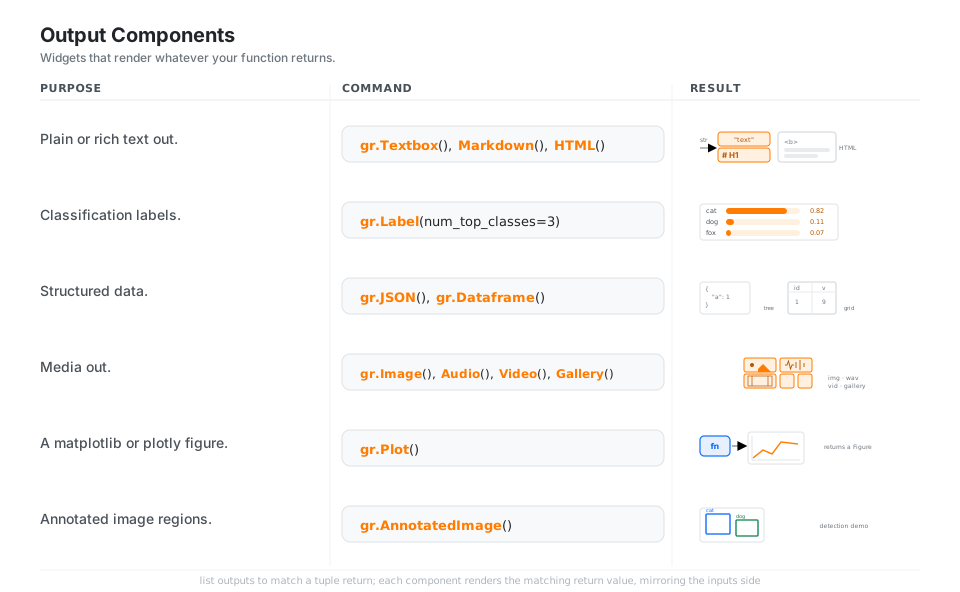
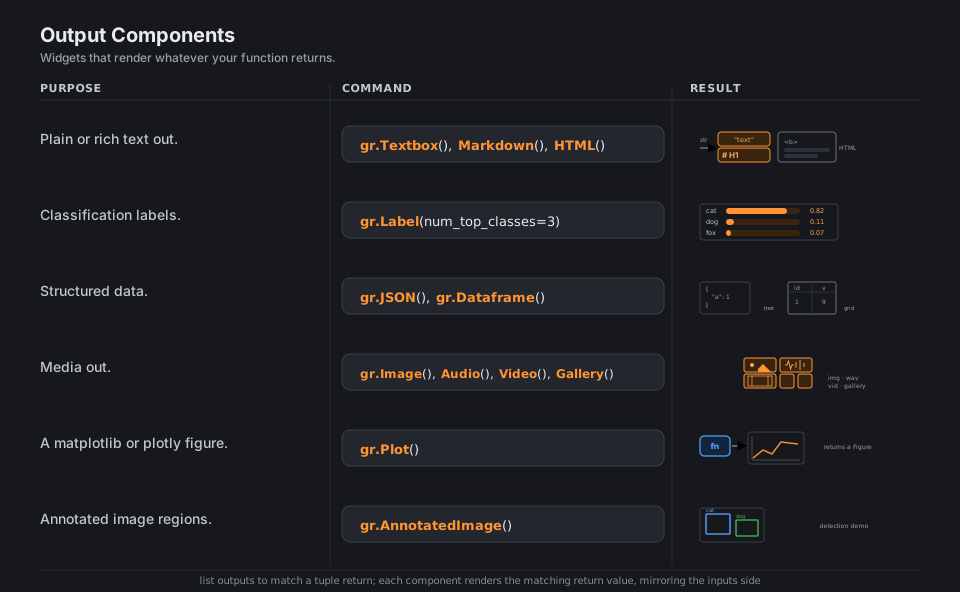
gr.Textbox(); gr.Markdown(); gr.HTML()              # str -> rendered text
gr.Label(num_top_classes=3)                         # dict[str, float] -> confidences
gr.JSON(); gr.Dataframe()                            # dict -> tree, DataFrame -> grid
gr.Image(); gr.Audio(); gr.Video(); gr.Gallery()    # media the fn can return
gr.Plot()                                            # returns a matplotlib / plotly Figure
gr.AnnotatedImage()                                  # image plus labeled regions
See Label. List multiple outputs and return a tuple in the same order.
gr.Blocks
When the Interface scaffold is too rigid, open a with gr.Blocks() as demo: block and place every component yourself, arranging them with gr.Row (side by side), gr.Column (stacked, with a scale=), gr.Tab, and gr.Accordion. Inside Blocks you create buttons and components but they do nothing until you wire them with an event listener, which is the next panel.
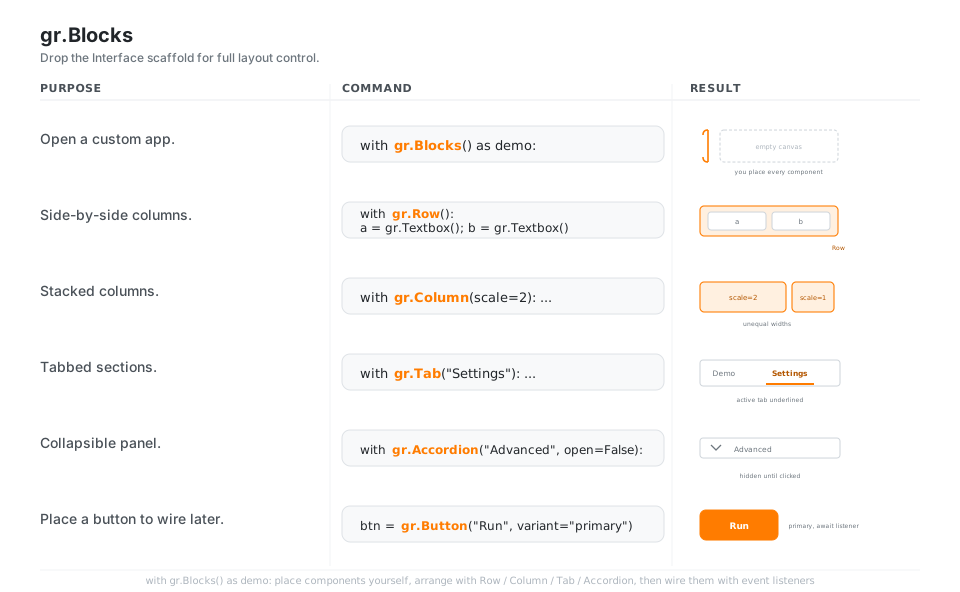
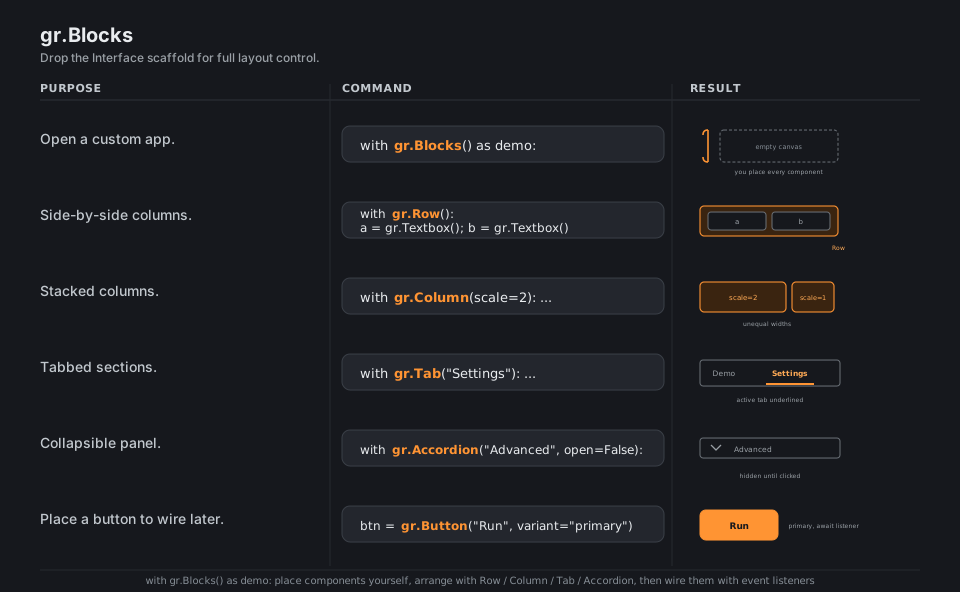
with gr.Blocks() as demo:                       # you place every component
    with gr.Row():                              # side-by-side layout
        a = gr.Textbox(); b = gr.Textbox()
    with gr.Column(scale=2):                    # stacked, weighted width
        ...
    with gr.Tab("Settings"):                    # tabbed sections
        ...
    with gr.Accordion("Advanced", open=False):  # hidden until clicked
        ...
    btn = gr.Button("Run", variant="primary")   # ready for an event listener
See Blocks. Components do nothing until you wire them with an event listener.
Event Listeners
In Blocks you connect components by attaching a listener to a trigger: btn.click(fn, inputs, outputs) runs fn when the button is clicked, while .change, .submit, and demo.load fire on value change, Enter, and page load. Chain steps with .then(...), and return gr.update(...) (or a new component value) to change a component’s visibility, choices, or value at runtime.
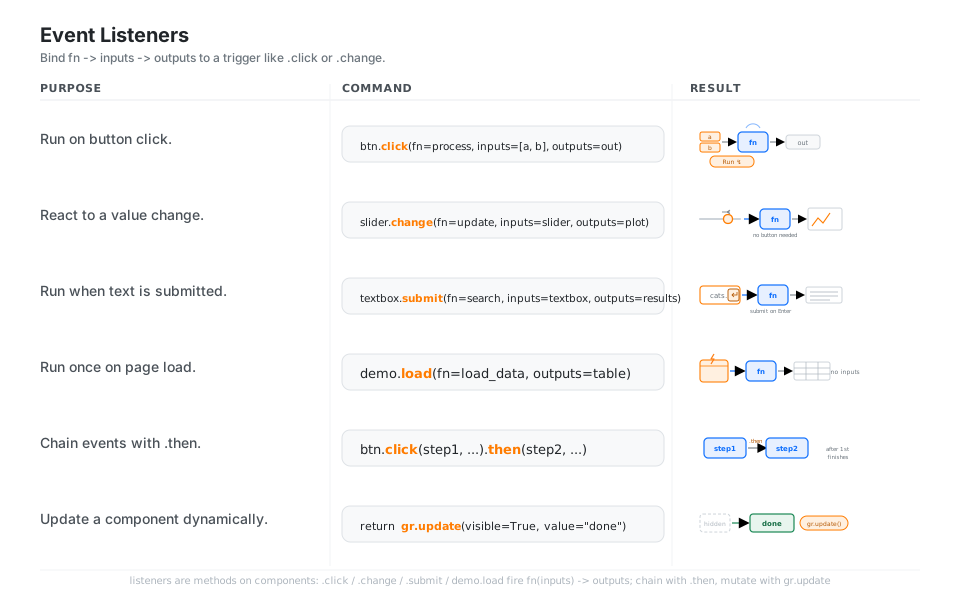
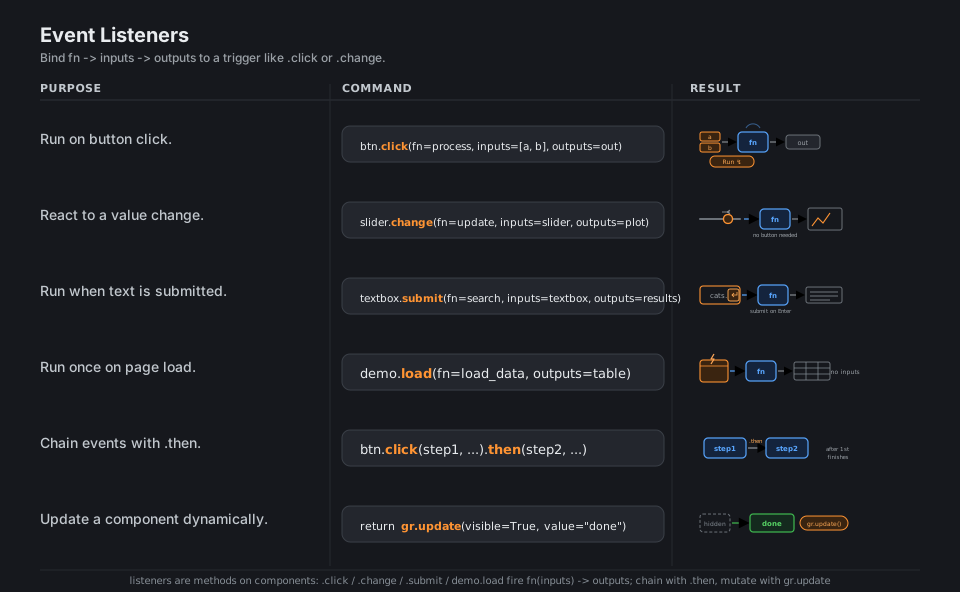
btn.click(fn=process, inputs=[a, b], outputs=out)         # run on click
slider.change(fn=update, inputs=slider, outputs=plot)     # react to a change
textbox.submit(fn=search, inputs=textbox, outputs=results)  # run on Enter
demo.load(fn=load_data, outputs=table)                    # run once on page load
btn.click(step1, ...).then(step2, ...)                    # chain: step2 after step1
return gr.update(visible=True, value="done")              # update a component at runtime
See Blocks and event listeners. Listeners are methods on components (btn.click(...)).
gr.ChatInterface
gr.ChatInterface(fn=respond) builds an entire chat UI from a single function respond(message, history) that returns the assistant’s reply; history is a list of role-tagged dicts in the messages format ({"role": ..., "content": ...}). yield partial strings to stream tokens as they generate, pass examples=[...] for starter prompts, and supply a custom chatbot=gr.Chatbot(...) to control the transcript.
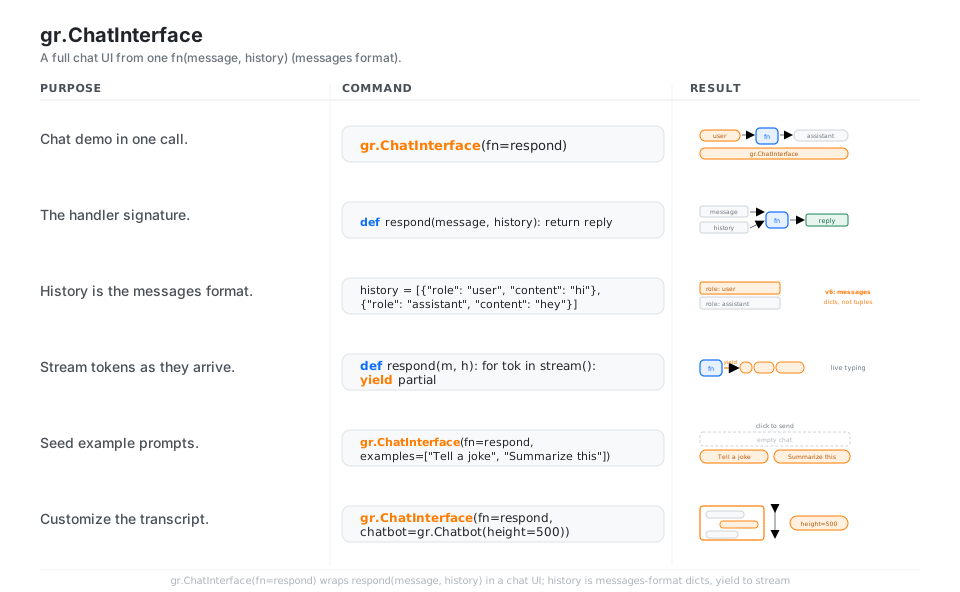
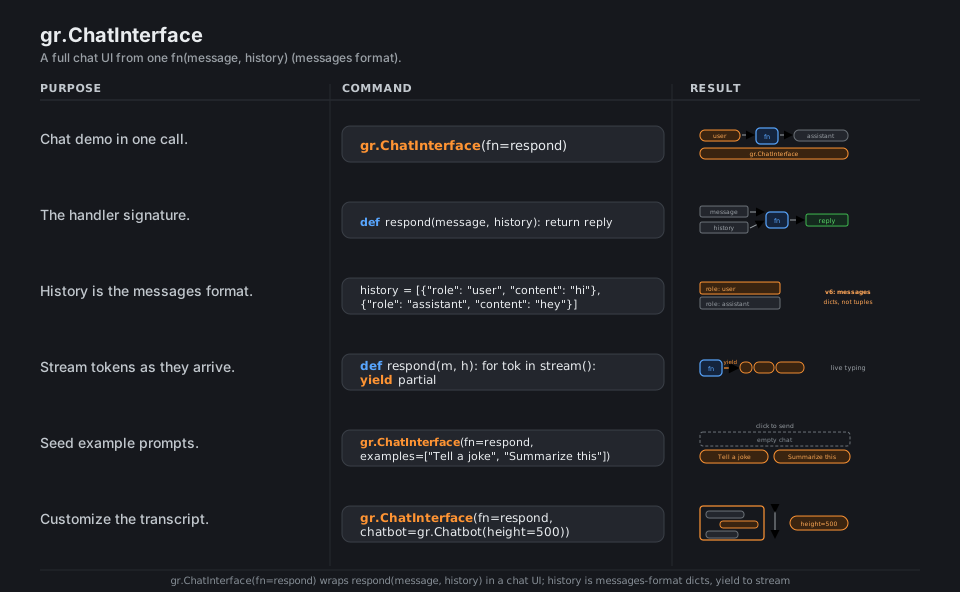
gr.ChatInterface(fn=respond)                          # full chat UI in one call

def respond(message, history):                        # message: str, history: list
    return reply

history = [{"role": "user", "content": "hi"},          # v6: messages dicts, not tuples
           {"role": "assistant", "content": "hey"}]

def respond(m, h):
    for tok in stream():
        yield partial                                  # stream tokens, live typing

gr.ChatInterface(fn=respond, examples=["Tell a joke", "Summarize this"])
gr.ChatInterface(fn=respond, chatbot=gr.Chatbot(height=500))   # custom transcript
See Creating a chatbot fast. In v6 the history is always the messages format; do not pass type=.
State, Examples & Flagging
gr.State(initial) holds per-session data that survives across clicks (one independent copy per user) by passing it through a listener’s inputs and outputs. examples=[[...], ...] adds clickable rows that autofill and run the demo (with cache_examples=True to precompute them), and flagging_mode="manual" adds a Flag button that appends flagged samples to .gradio/flagged for later review.
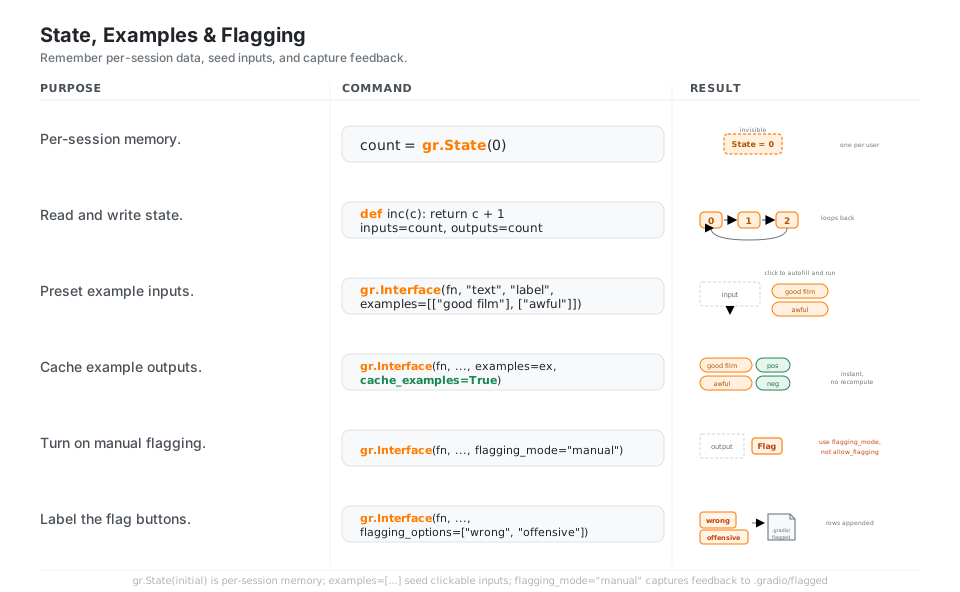
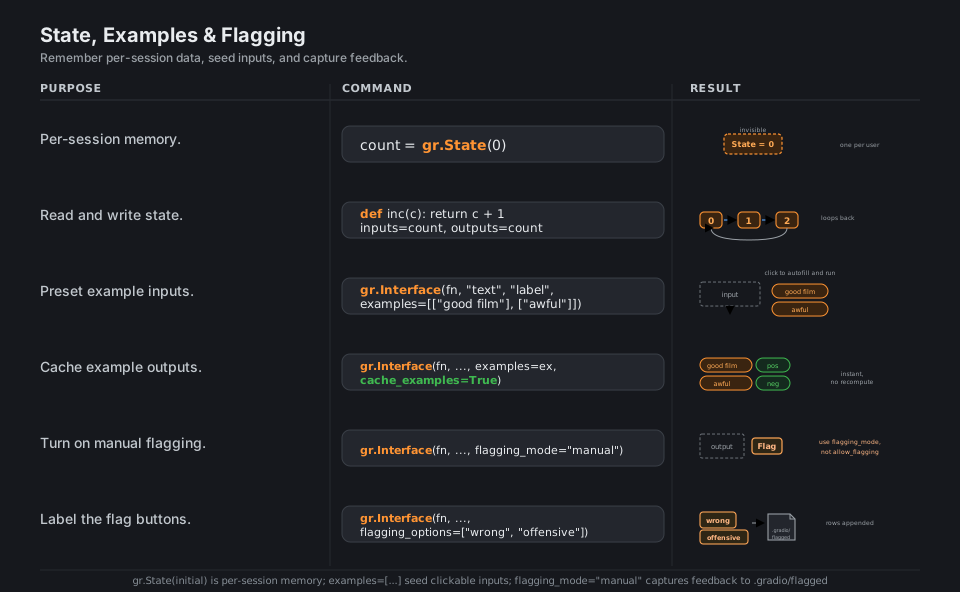
count = gr.State(0)                          # per-session, lives across clicks
def inc(c): return c + 1                     # wired inputs=count, outputs=count
gr.Interface(fn, "text", "label", examples=[["good film"], ["awful"]])  # click to autofill
gr.Interface(fn, ..., examples=ex, cache_examples=True)   # precomputed, instant
gr.Interface(fn, ..., flagging_mode="manual")             # add a Flag button
gr.Interface(fn, ..., flagging_options=["wrong", "offensive"])  # -> .gradio/flagged
See State. Use flagging_mode="manual", not the old allow_flagging= argument.
Launch & Share
demo.launch() serves the app on http://127.0.0.1:7860; add share=True for a temporary public *.gradio.live link, set server_name/server_port to control the bind address, and auth=("user", "pass") to gate it behind a login. For development, run gradio app.py to auto-reload on save, and gr.mount_gradio_app(app, demo, path=...) embeds the demo inside an existing FastAPI application.
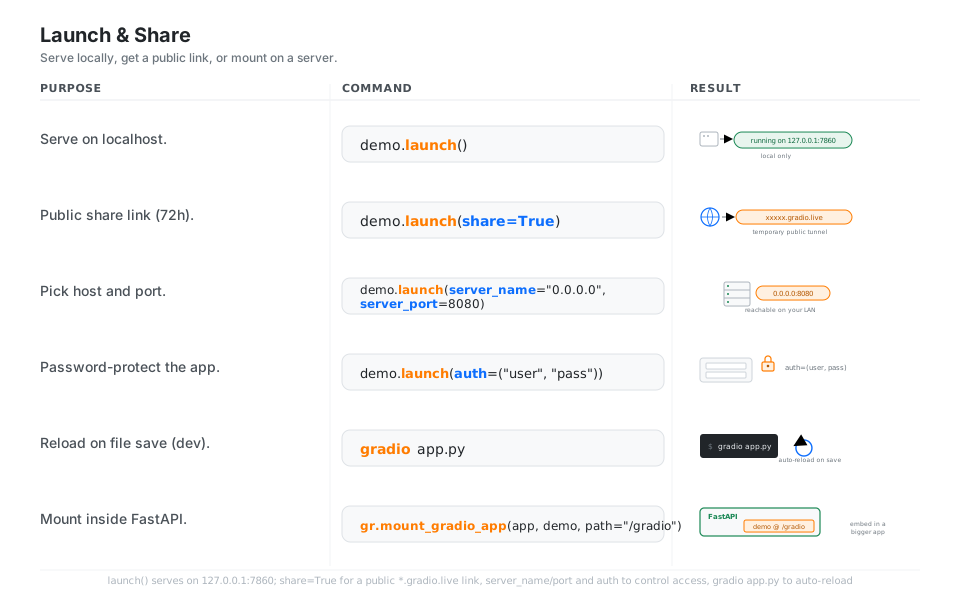
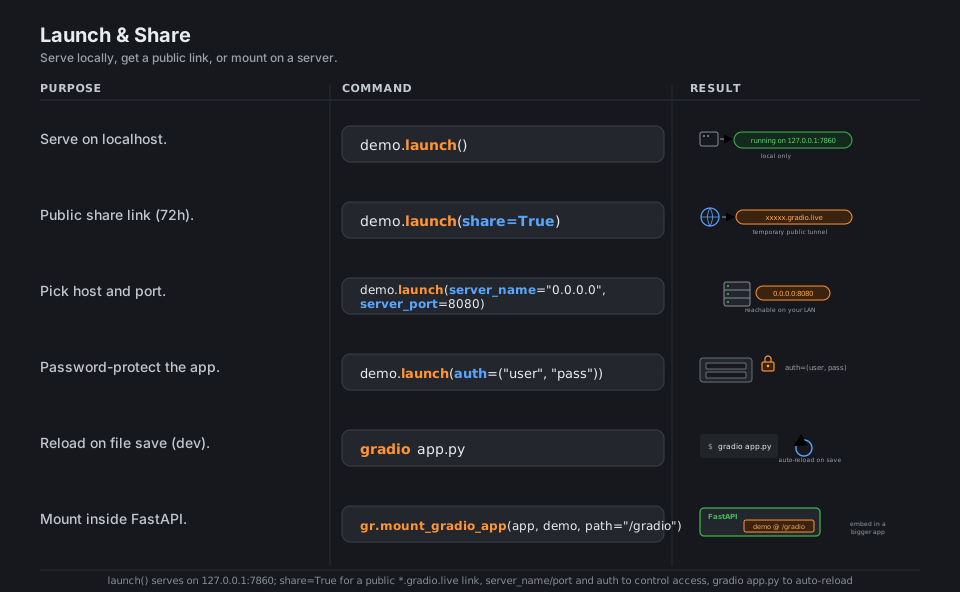
demo.launch()                                           # http://127.0.0.1:7860
demo.launch(share=True)                                 # temporary *.gradio.live link
demo.launch(server_name="0.0.0.0", server_port=8080)    # reachable on your LAN
demo.launch(auth=("user", "pass"))                       # password-protect the app
gradio app.py # dev: auto-reload on savegr.mount_gradio_app(app, demo, path="/gradio") # embed in a FastAPI appSee Sharing your app. share=True gives a temporary public tunnel that lasts up to 72 hours.
Quick Reference
| Command | What it does | Area |
|---|---|---|
gr.Interface(fn, inputs, outputs) |
One-line demo from a function | Interface |
gr.Textbox, gr.Slider, gr.Number |
Text and numeric inputs | Inputs |
gr.Image, gr.Audio, gr.File |
Media and file inputs | Inputs |
gr.Label, gr.JSON, gr.Dataframe |
Structured outputs | Outputs |
gr.Image, gr.Gallery, gr.Plot |
Media and figure outputs | Outputs |
with gr.Blocks() as demo: |
Custom-layout app | Blocks |
gr.Row(), gr.Column(), gr.Tab() |
Layout containers | Blocks |
btn.click(fn, inputs, outputs) |
Run on click | Events |
comp.change / .submit / demo.load |
Run on change / Enter / load | Events |
gr.update(...) |
Change a component at runtime | Events |
gr.ChatInterface(fn=respond) |
Full chat UI from one fn | Chat |
gr.State(initial) |
Per-session memory | State |
examples=[...], cache_examples=True |
Clickable preset inputs | Examples |
flagging_mode="manual" |
Add a Flag button | Flagging |
demo.launch(share=True) |
Serve and get a public link | Launch |
| Component | Hands your fn | Use for |
|---|---|---|
gr.Textbox |
str |
prompts, free text |
gr.Number / gr.Slider |
float |
numeric params |
gr.Checkbox |
bool |
on/off flags |
gr.Radio / gr.Dropdown |
a choice (or list) | pick one or many |
gr.Image(type="pil") |
PIL.Image |
image inputs |
gr.Audio |
path or (sr, np.ndarray) |
audio inputs |
gr.File |
path(s) | arbitrary uploads |
gr.Dataframe |
pandas.DataFrame |
tabular inputs |
| Component | Render from | Use for |
|---|---|---|
gr.Textbox / gr.Markdown / gr.HTML |
str |
text and rich text |
gr.Label |
dict[str, float] |
classification confidences |
gr.JSON |
dict / list | structured data |
gr.Dataframe |
pandas.DataFrame |
tables |
gr.Image / gr.Gallery |
array, path, or list | one or many images |
gr.Audio / gr.Video |
path or array | media playback |
gr.Plot |
matplotlib / plotly Figure |
charts |
| Listener | Fires when | Typical trigger |
|---|---|---|
.click |
a button is clicked | gr.Button |
.change |
a value changes | sliders, dropdowns |
.submit |
Enter is pressed | gr.Textbox |
.input |
the user edits (not programmatic) | gr.Textbox, gr.Slider |
.select |
an item is selected | gr.Gallery, gr.Dataframe |
demo.load |
the page loads | the Blocks app |
.then(...) |
the previous event finishes | chaining steps |
| Argument | Effect |
|---|---|
share=True |
temporary public *.gradio.live link |
server_name="0.0.0.0" |
bind on all interfaces (LAN) |
server_port=8080 |
choose the port (default 7860) |
auth=("user", "pass") |
password-protect the app |
debug=True |
print errors in the cell, keep alive |
show_error=True |
show tracebacks to the user |
max_file_size="10mb" |
cap upload size |
pwa=True |
installable progressive web app |
Appendix: Sample Code
The Interface in three arguments
import gradio as gr

def greet(name, intensity):
    return "Hello, " + name + "!" * int(intensity)

demo = gr.Interface(
    fn=greet,
    inputs=["text", gr.Slider(0, 3, step=1)],
    outputs=["text"],
    examples=[["Ada", 2], ["Linus", 1]],
)

if __name__ == "__main__":
    demo.launch()
The same demo as Blocks (full layout control)
This is the pattern to copy once you need custom layout: place components yourself, then wire them with an event listener.
import gradio as gr

def greet(name, intensity):
    return "Hello, " + name + "!" * int(intensity)

with gr.Blocks() as demo:
    gr.Markdown("# Greeter")
    with gr.Row():
        name = gr.Textbox(label="Name")
        intensity = gr.Slider(0, 3, step=1, label="Intensity")
    out = gr.Textbox(label="Greeting")
    btn = gr.Button("Greet", variant="primary")
    btn.click(fn=greet, inputs=[name, intensity], outputs=out)

if __name__ == "__main__":
    demo.launch()
Per-session State (a click counter)
import gradio as gr

with gr.Blocks() as demo:
    count = gr.State(0)         # independent per user, survives across clicks
    out = gr.Number(label="Clicks")
    btn = gr.Button("Increment")

    def inc(c):
        c = c + 1
        return c, c             # new state, and the number to display

    btn.click(inc, inputs=count, outputs=[count, out])

demo.launch()
A streaming ChatInterface (messages format)
import gradio as gr

def respond(message, history):
    # history is a list of {"role": ..., "content": ...} dicts (messages format)
    reply = ""
    for token in f"You said: {message}".split():
        reply += token + " "
        yield reply            # stream tokens into the assistant bubble

demo = gr.ChatInterface(
    fn=respond,
    examples=["Tell me a joke", "Summarize this paragraph"],
    title="Echo bot",
)

demo.launch()
Launch options and FastAPI mounting
import gradio as gr
from fastapi import FastAPI

demo = gr.Interface(lambda x: x, "text", "text")

# Local + public link, on a chosen port, password-protected:
demo.launch(
    server_name="0.0.0.0",
    server_port=8080,
    share=True,
    auth=("user", "pass"),
)

# Or embed inside an existing FastAPI app:
app = FastAPI()
app = gr.mount_gradio_app(app, demo, path="/gradio")
# then serve with: uvicorn app:app
During development, run gradio app.py (instead of python app.py) to auto-reload the app on every file save.
Behavior notes
- Components live directly under
gr. The old top-levelgr.inputs.*andgr.outputs.*namespaces were removed years ago; usegr.Textbox,gr.Image, and friends directly. - Use
flagging_mode, notallow_flagging. Passflagging_mode="manual"/"never"/"auto"; the oldallow_flagging=argument no longer exists ongr.Interface. - Chat history is always the messages format. In v6 the history is a list of
{"role", "content"}dicts; the oldtype="tuples"and thetype=parameter were removed, so do not passtype=. gr.Imagetakessources=[...]. Use the list form (sources=["upload", "webcam"]), not the old singularsource=string.- Wire custom layouts with listeners. Event listeners are methods on components (
btn.click(...)); insidegr.Blocksa component does nothing until a listener binds it to afn. share=Trueis temporary. The public*.gradio.livetunnel lasts up to 72 hours; for a permanent home, deploy to Hugging Face Spaces or mount inside FastAPI.
References
Gradio documentation (v6)
- Documentation home and the Quickstart
- Key features, The interface class, Blocks and event listeners
- Creating a chatbot fast, Sharing your app
Component references
Project and related