httpx is the modern HTTP client for Python: a requests-compatible sync API plus a first-class async twin. You fire one-off calls with top-level functions (httpx.get, httpx.post) exactly the way you already know, graduate to a reusable Client that pools connections, and when you need concurrency you reach for httpx.AsyncClient and await the identical method surface. The recurring mental model in this sheet is one picture: a request envelope on the left flows along a gray arrow to a server, which flows back to a Response box on the right, colored by status class (green 2xx, amber 3xx, red 4xx/5xx). The single biggest idea is that httpx is requests with the same shape plus an async twin, so the sync Client and the AsyncClient are drawn as a matched pair throughout. The conventional import is import httpx (the async panels also assume import asyncio), and everything here is httpx v2-era 0.28 verified live against https://httpbin.org.


Sync Requests
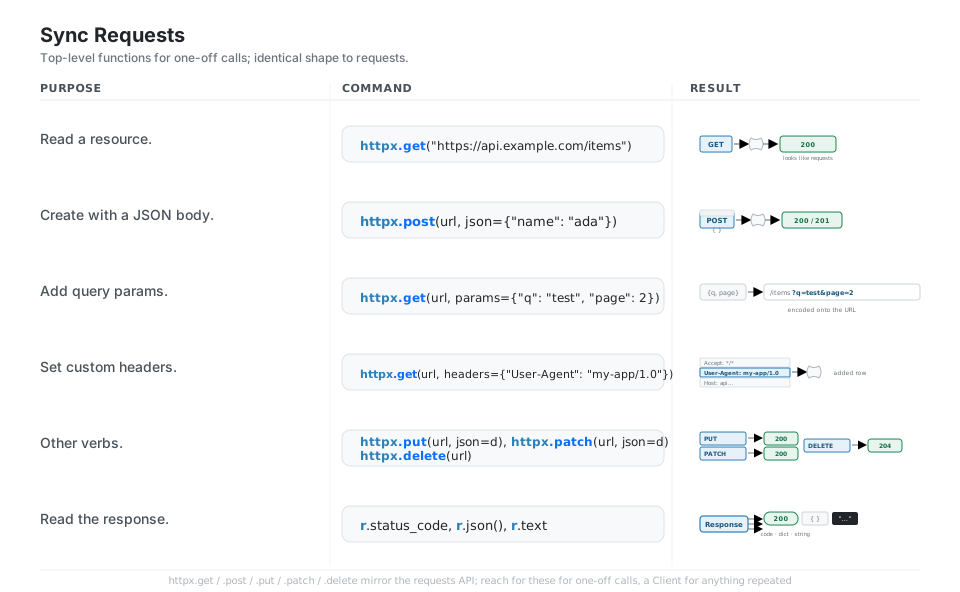
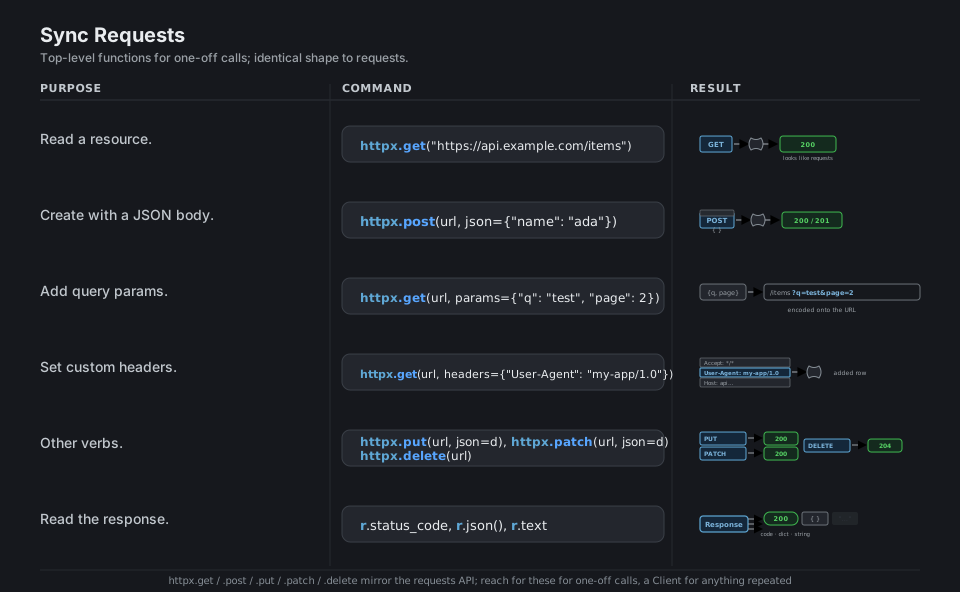
httpx ships top-level httpx.get, httpx.post, httpx.put, httpx.patch, and httpx.delete functions that mirror the requests API almost exactly, so a one-off call, query params, custom headers, a json= body, and reading r.status_code / r.json() / r.text all look and behave the way you already know. Reach for these for quick scripts; for anything repeated, open a Client instead.
import httpx

r = httpx.get("https://api.example.com/items")        # one-off GET (requests-style)
httpx.post(url, json={"name": "ada"})                 # POST a JSON body
httpx.get(url, params={"q": "test", "page": 2})       # add query params -> ?q=test&page=2
httpx.get(url, headers={"User-Agent": "my-app/1.0"})  # set custom headers
httpx.put(url, json=d); httpx.patch(url, json=d); httpx.delete(url)   # other verbs

r.status_code   # 200       r.json()   # {...}       r.text   # "..."
See Quickstart. For repeated calls to one host, open a Client and reuse it.
The Reusable Client
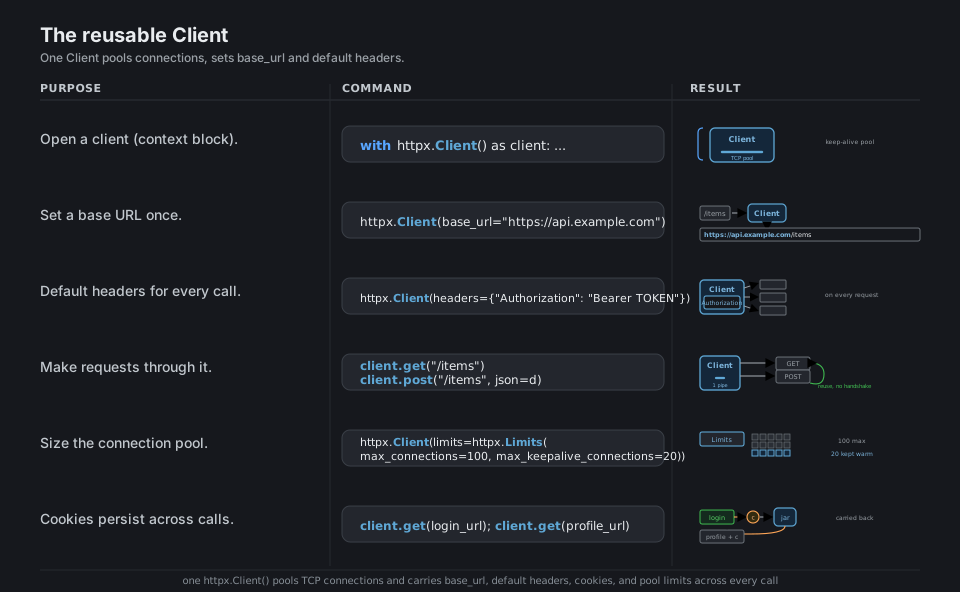
A httpx.Client() is the workhorse: it keeps a pool of TCP connections alive across calls, so repeated requests to the same host skip the handshake and run much faster, and it carries a base_url, default headers, cookies, and a limits= pool size that apply to every request. Use it as a context manager (with httpx.Client() as client:) so the pool is closed cleanly.
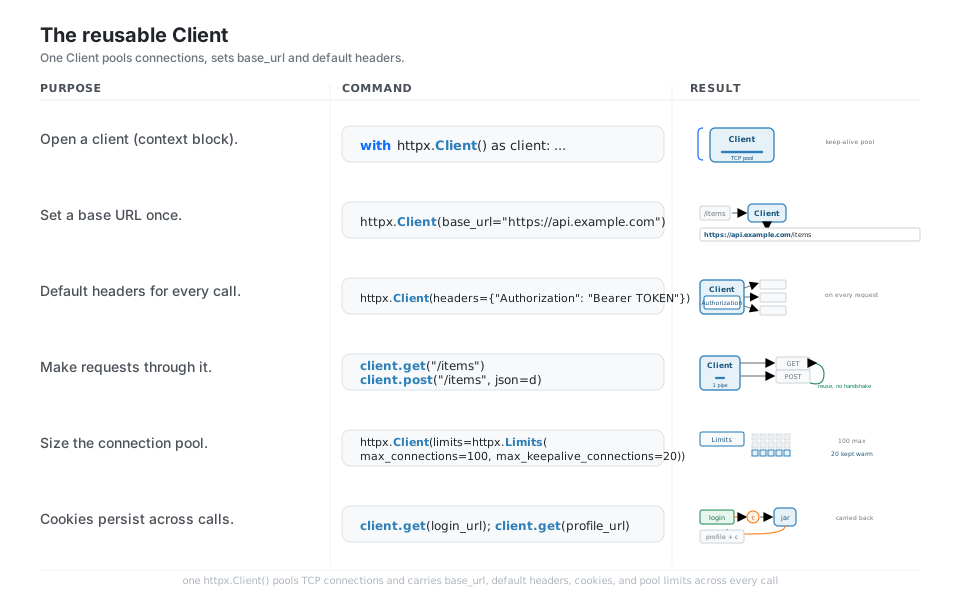
with httpx.Client() as client:                        # pooled, closed cleanly
    client.get("/items")                              # reuses the keep-alive pool

httpx.Client(base_url="https://api.example.com")      # prepend a base URL once
httpx.Client(headers={"Authorization": "Bearer TOKEN"})   # default headers
httpx.Client(limits=httpx.Limits(max_connections=100, max_keepalive_connections=20))
client.get("/items"); client.post("/items", json=d)   # no new handshake per call
See Clients. The reusable client replaces requests.Session().
Bodies and Auth
As with requests, the keyword chooses the encoding: json= serializes a dict and sets application/json, data= sends a URL-encoded form, and files= sends a multipart upload; the one change to remember is that raw bytes or text go in content=, not data=. Authentication is built in: pass auth=("user", "pass") or httpx.BasicAuth(...) for Basic, and httpx.DigestAuth(...) for the challenge-response Digest flow.
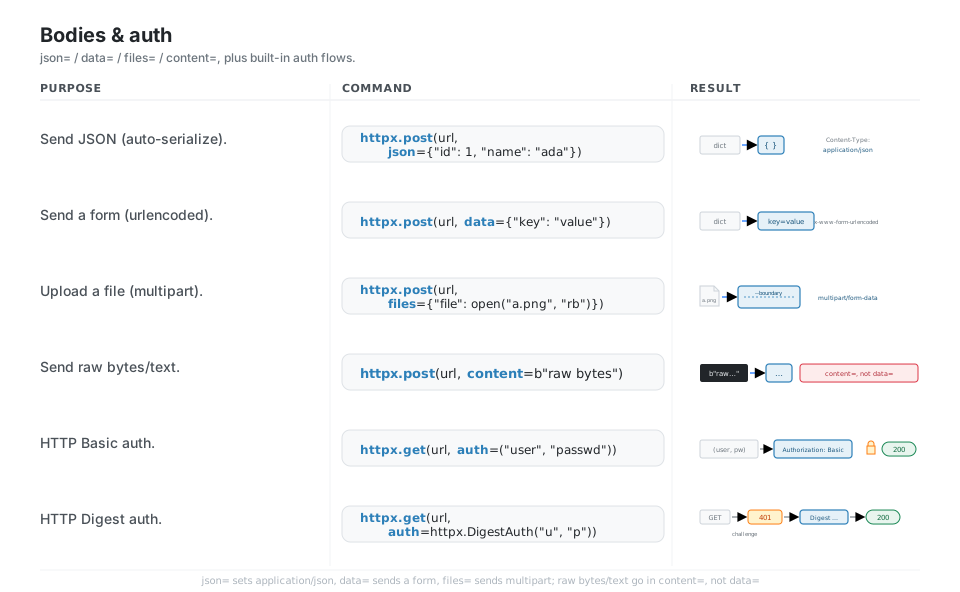
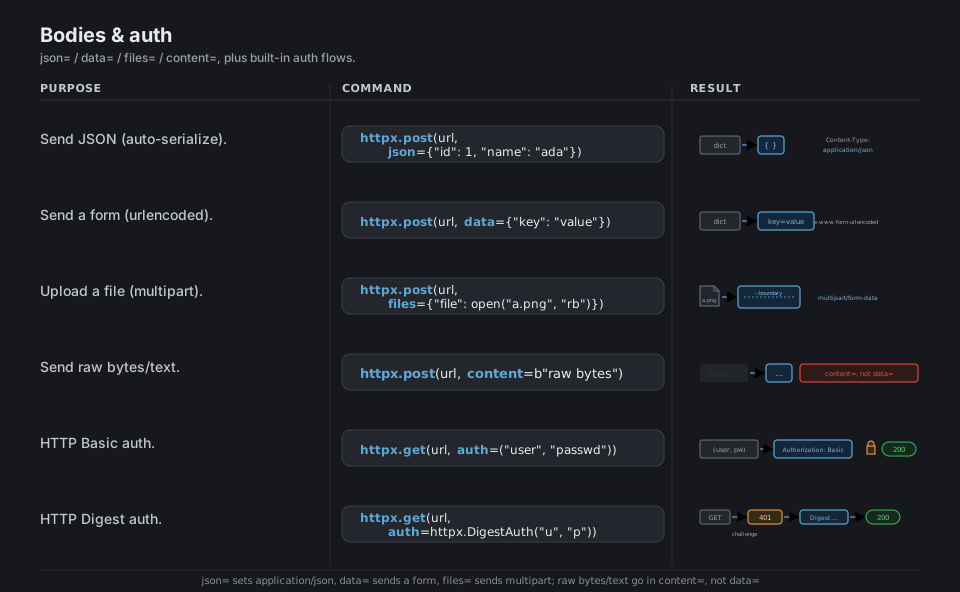
httpx.post(url, json={"id": 1, "name": "ada"})        # application/json
httpx.post(url, data={"key": "value"})                # application/x-www-form-urlencoded
httpx.post(url, files={"file": open("a.png", "rb")})  # multipart/form-data
httpx.post(url, content=b"raw bytes")                 # raw body: content=, NOT data=

httpx.get(url, auth=("user", "passwd"))               # or httpx.BasicAuth("user", "passwd")
httpx.get(url, auth=httpx.DigestAuth("user", "passwd"))   # 401 challenge -> re-sent -> 200
See Authentication. Raw bodies use content=; data=<bytes> is deprecated.
Async with AsyncClient
The reason to choose httpx over requests is its async twin: httpx.AsyncClient() exposes the identical method surface, but each request is a coroutine you await, so it can yield control while the network is busy. You write your logic in an async def main(), call requests as await client.get(...), and run the whole thing from sync code with asyncio.run(main()); reading the returned Response (.json(), .text) needs no await.
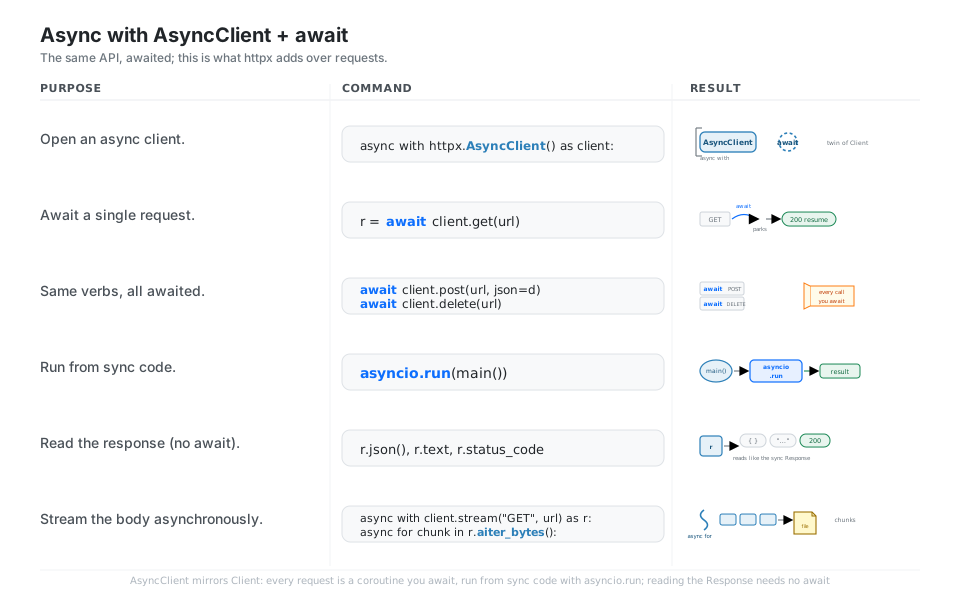
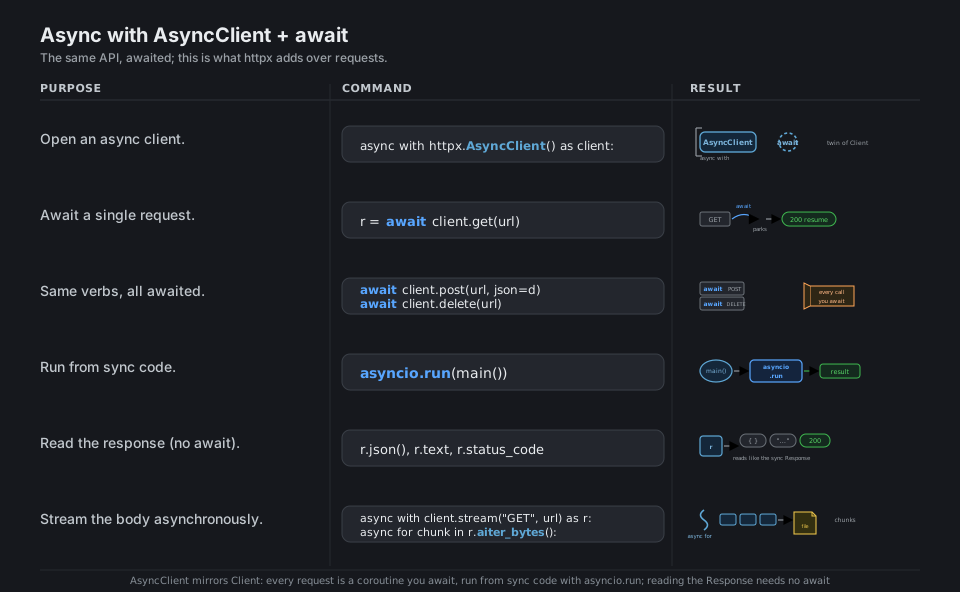
import asyncio, httpx

async def main():
    async with httpx.AsyncClient() as client:         # twin of the sync Client
        r = await client.get("https://api.example.com/items")   # await each request
        await client.post(url, json=d); await client.delete(url)
        r.json(); r.text; r.status_code               # reading needs no await

asyncio.run(main())                                   # run from sync code
See Async support. Every request call is awaited; reading the Response is not.
Concurrent Fan-Out
Async pays off when you have many requests: build a list of coroutines and hand them to asyncio.gather(*tasks) to run them concurrently over one pooled AsyncClient, turning five one-second requests into roughly one second of wall-clock time instead of five. Cap pressure on the server with an asyncio.Semaphore, consume results in completion order with asyncio.as_completed, and pass return_exceptions=True so one failure does not sink the whole batch.
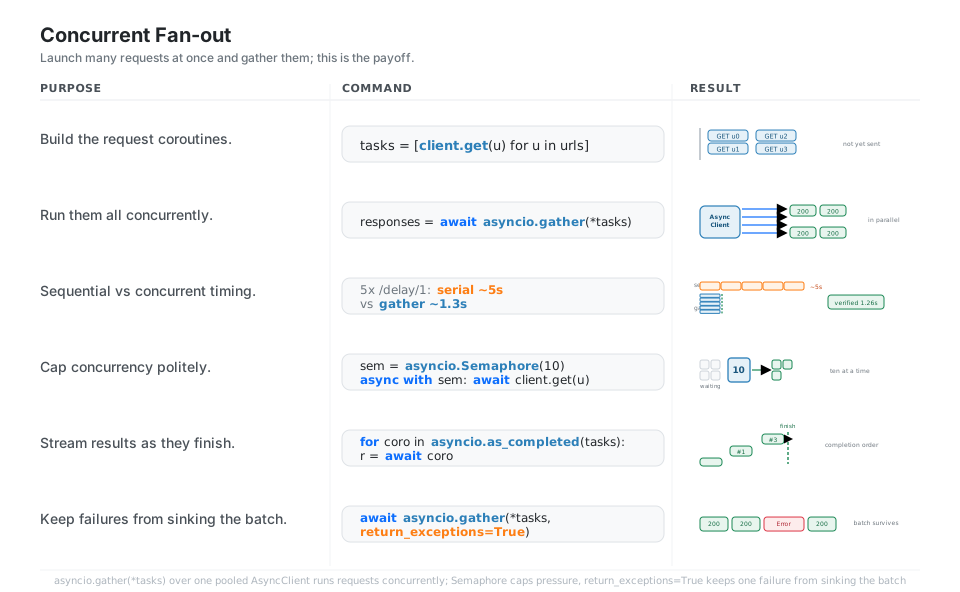
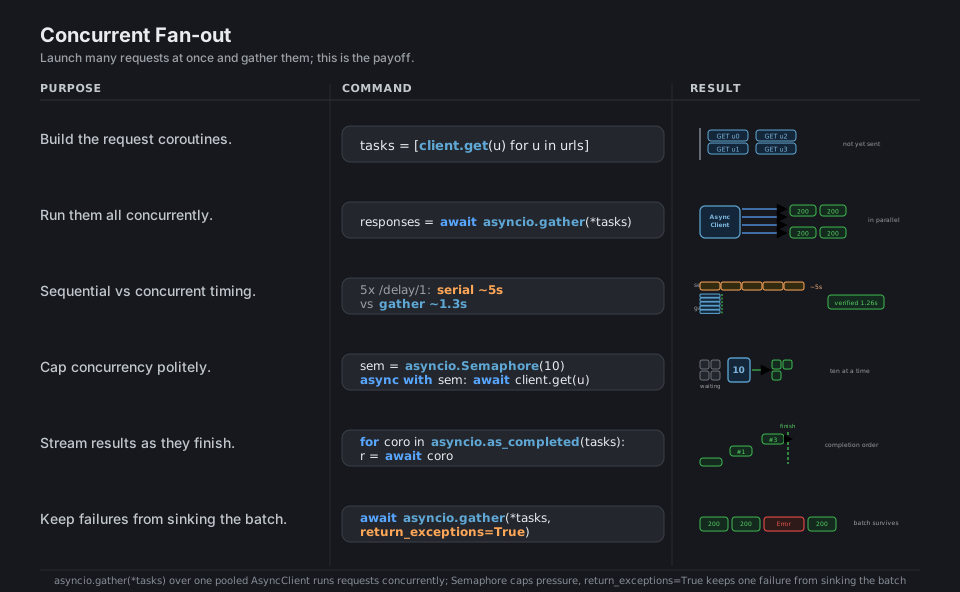
tasks = [client.get(u) for u in urls]                 # not-yet-sent coroutines
responses = await asyncio.gather(*tasks)              # run concurrently (~1.3s vs ~5s serial)

sem = asyncio.Semaphore(10)                           # cap concurrency politely
async with sem: await client.get(u)                   # at most 10 in flight

for coro in asyncio.as_completed(tasks): r = await coro    # results as they finish
await asyncio.gather(*tasks, return_exceptions=True)  # one failure does not sink the batch
See Making async requests. One pooled AsyncClient serves the whole fan-out.
HTTP/2
Install the extra (pip install "httpx[http2]") and pass http2=True to a Client or AsyncClient, and httpx will negotiate HTTP/2 when the server supports it, multiplexing many request and response streams over a single TCP connection instead of one connection per request. Check r.http_version to confirm what was negotiated; if the server only speaks HTTP/1.1, httpx falls back transparently and your code keeps working.
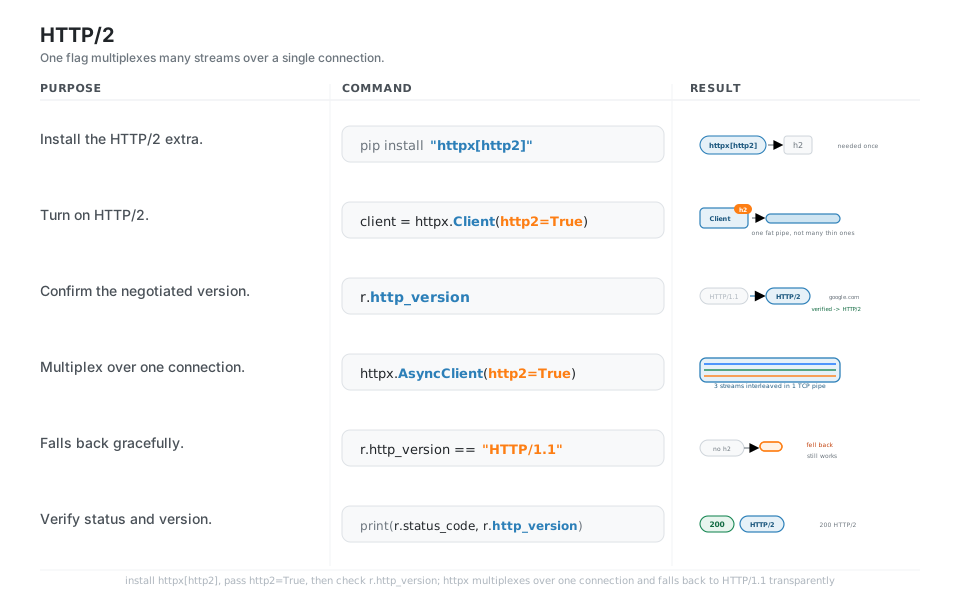
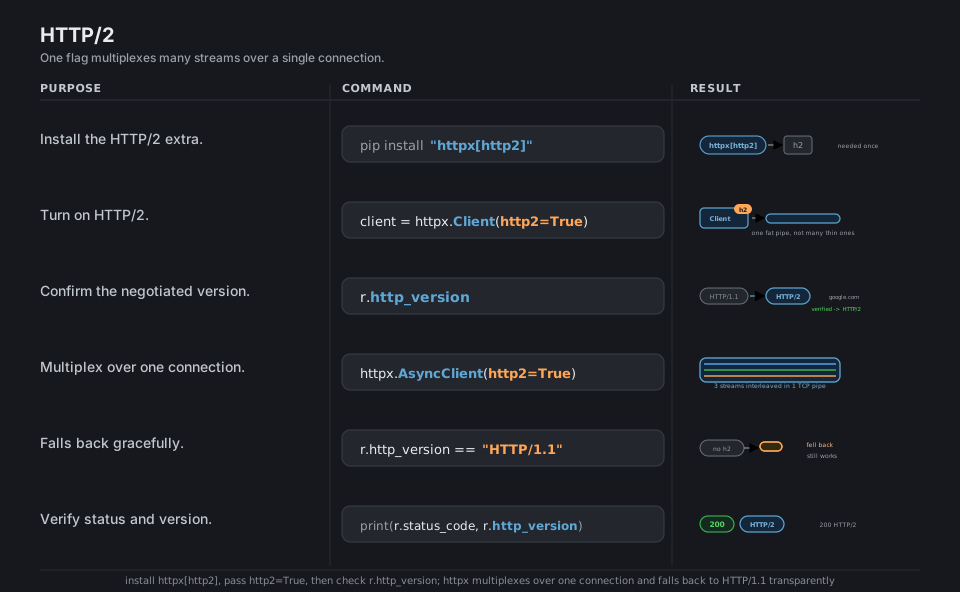
# needed once: pip install "httpx[http2]"  (or uv add "httpx[http2]")
client = httpx.Client(http2=True)                     # negotiate HTTP/2

r.http_version                                        # "HTTP/1.1" or "HTTP/2"
# verified: google.com -> "HTTP/2"

httpx.AsyncClient(http2=True)                          # many streams over one TCP pipe
# server without h2: r.http_version == "HTTP/1.1"     # falls back, still works
See HTTP/2 support. The h2 dependency arrives with the httpx[http2] extra.
Streaming Responses
For large downloads or long-lived feeds, open the response with client.stream("GET", url) inside a with block so the body is not buffered into memory all at once, then pull it in pieces with r.iter_bytes(chunk_size=...), r.iter_text(), or r.iter_lines(). The status line and headers arrive first, so you can branch on r.status_code before reading a byte of the body, and the async client offers the matching aiter_bytes() / aiter_lines().
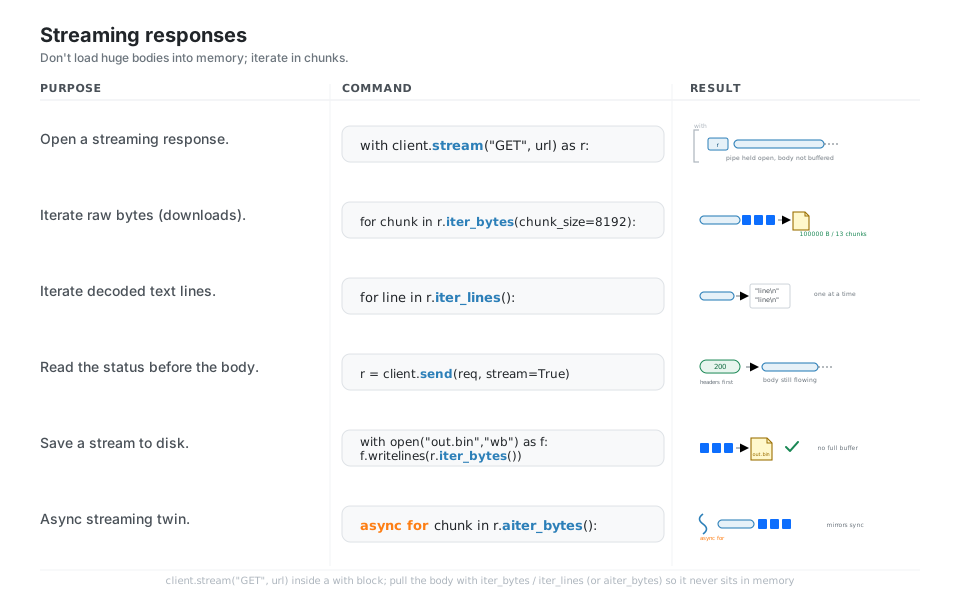
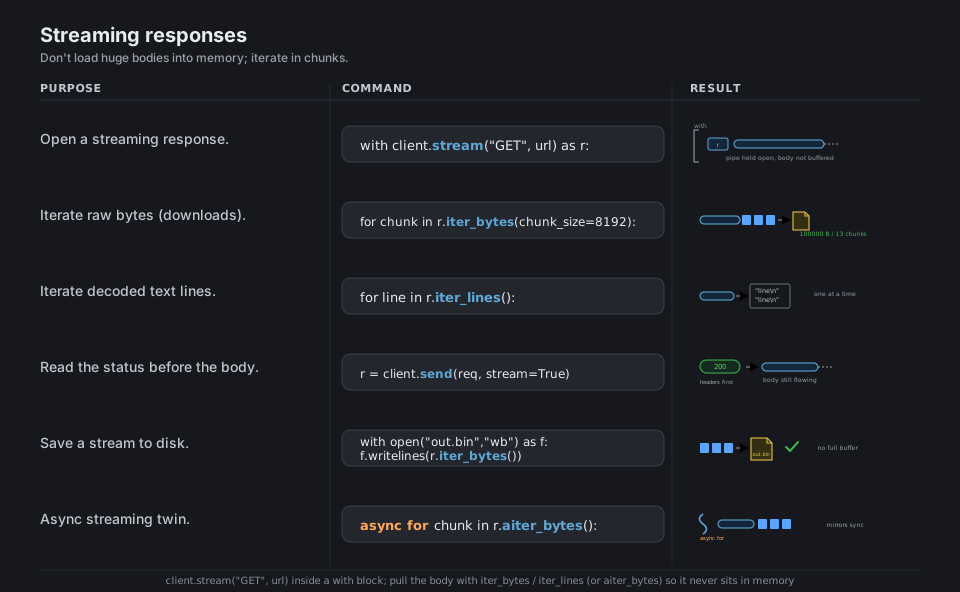
with client.stream("GET", url) as r:                  # body not buffered yet
    r.status_code                                     # status arrives before the body
    for chunk in r.iter_bytes(chunk_size=8192):       # 8 KiB chunks, low memory
        ...
    for line in r.iter_lines():                       # decoded text, line by line
        ...

async for chunk in r.aiter_bytes():                   # async streaming twin
    ...
See Streaming responses. The body never fully sits in memory.
Where httpx Differs from requests
Porting requests code is mostly mechanical, but four defaults bite: httpx does not follow redirects unless you pass follow_redirects=True, it applies a 5 second timeout by default (requests waits forever), raw bodies move from data= to content=, and raise_for_status() raises httpx.HTTPStatusError rather than requests.HTTPError. Prefer the boolean checks r.is_success / r.is_error / r.is_redirect, and catch httpx.RequestError (or its parent httpx.HTTPError) for transport problems.
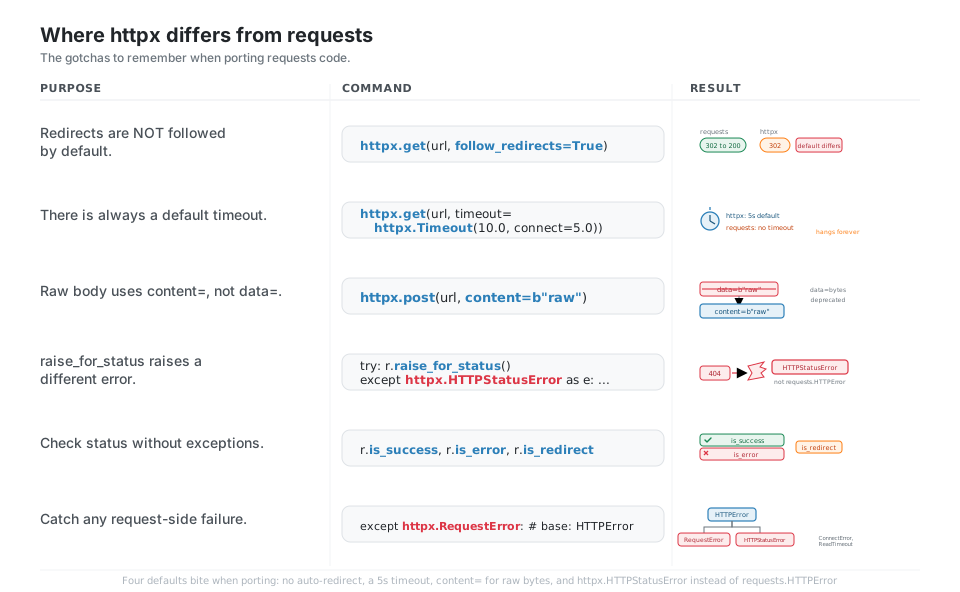
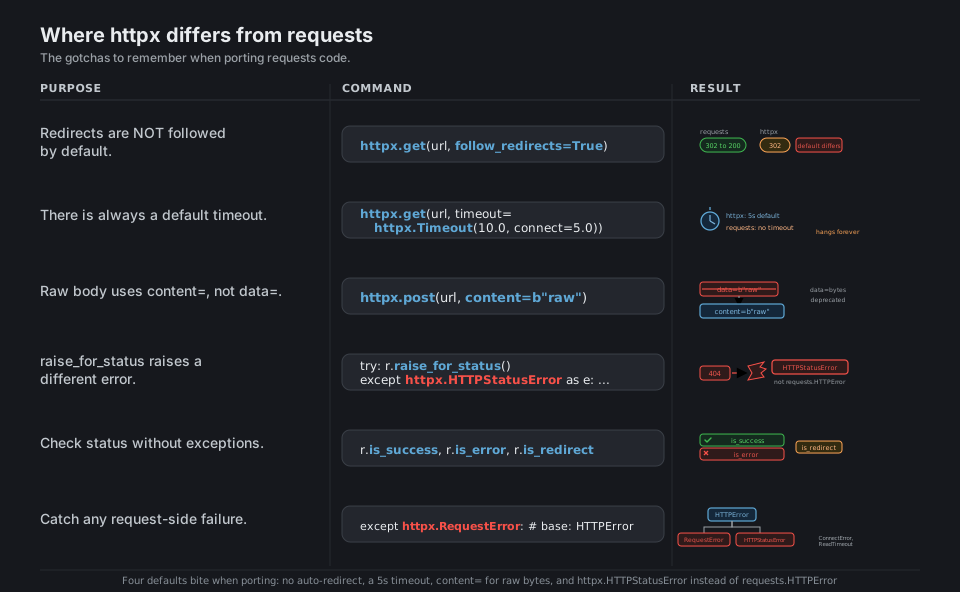
httpx.get(url, follow_redirects=True)                 # httpx does NOT follow 3xx by default
httpx.get(url, timeout=httpx.Timeout(10.0, connect=5.0))   # default is 5s, not "forever"
httpx.post(url, content=b"raw")                       # requests data=b"..." -> httpx content=

try:
    r.raise_for_status()                              # raises httpx.HTTPStatusError, not HTTPError
except httpx.HTTPStatusError as e: ...

r.is_success; r.is_error; r.is_redirect               # boolean checks, no exceptions
except httpx.RequestError: ...                        # transport errors (base: httpx.HTTPError)
See Migrating from requests. Four defaults differ; everything else ports as-is.
Quick Reference
| Command | What it does | Area |
|---|---|---|
httpx.get(url) |
One-off GET (requests-style) | Sync |
httpx.post(url, json=…) |
One-off POST with a JSON body | Sync |
httpx.Client() |
Pooled, reusable sync client | Client |
Client(base_url=…, headers=…) |
Defaults applied to every call | Client |
Client(limits=httpx.Limits(…)) |
Size the connection pool | Client |
content=b"…" |
Raw bytes/text body (not data=) |
Body |
auth=httpx.BasicAuth(u, p) |
HTTP Basic auth | Auth |
auth=httpx.DigestAuth(u, p) |
HTTP Digest auth | Auth |
httpx.AsyncClient() |
Pooled async client | Async |
await client.get(url) |
Awaited request | Async |
await asyncio.gather(*tasks) |
Run requests concurrently | Concurrency |
Client(http2=True) |
Negotiate HTTP/2 | HTTP/2 |
r.http_version |
"HTTP/1.1" or "HTTP/2" |
HTTP/2 |
client.stream("GET", url) |
Stream a response body | Streaming |
r.iter_bytes(chunk_size=…) |
Chunked download (sync) | Streaming |
r.aiter_bytes() |
Chunked download (async) | Streaming |
follow_redirects=True |
Opt in to following 3xx | Differences |
r.raise_for_status() |
Raise HTTPStatusError on 4xx/5xx |
Differences |
| Attribute | Type | Meaning |
|---|---|---|
r.status_code |
int |
Numeric status, e.g. 200 |
r.is_success |
bool |
True for 2xx |
r.is_redirect |
bool |
True for a 3xx with a Location |
r.is_error |
bool |
True for 4xx/5xx |
r.json() |
dict/list |
Body parsed as JSON |
r.text |
str |
Body decoded to text |
r.content |
bytes |
Raw body bytes |
r.headers |
mapping | Case-insensitive response headers |
r.url |
httpx.URL |
Final URL (after any redirects) |
r.history |
list |
Redirect chain (each a Response) |
r.http_version |
str |
"HTTP/1.1" or "HTTP/2" |
r.elapsed |
timedelta |
Round-trip time |
r.cookies |
jar | Cookies set by the server |
| Behavior | requests | httpx |
|---|---|---|
| Follow redirects | Yes, by default | No, pass follow_redirects=True |
| Default timeout | None (can hang forever) | 5 seconds |
| Raw body keyword | data=b"…" |
content=b"…" |
raise_for_status error |
requests.HTTPError |
httpx.HTTPStatusError |
| Async support | No (sync only) | Yes (AsyncClient + await) |
| HTTP/2 | No | Yes (http2=True, needs httpx[http2]) |
| Reusable session/client | requests.Session() |
httpx.Client() / httpx.AsyncClient() |
| Exception | Raised when |
|---|---|
HTTPError |
Base class, catch this to catch everything |
RequestError |
Base for transport problems (connection, timeout, protocol) |
ConnectError |
DNS failure, refused connection, network down |
TimeoutException (ConnectTimeout, ReadTimeout, WriteTimeout, PoolTimeout) |
A configured timeout was exceeded |
HTTPStatusError |
raise_for_status() on a 4xx/5xx |
TooManyRedirects |
Redirect chain exceeded max_redirects |
DecodingError |
Response body could not be decoded |
| Call | Does |
|---|---|
asyncio.run(main()) |
Run an async def main() from sync code |
await asyncio.gather(*tasks) |
Run coroutines concurrently, return results in order |
asyncio.gather(*tasks, return_exceptions=True) |
Do not abort the batch on one failure |
asyncio.as_completed(tasks) |
Yield results in completion order |
asyncio.Semaphore(n) |
Cap how many requests run at once |
Appendix: Sample Code
The request to Response mental model (sync)
import httpx

r = httpx.get("https://httpbin.org/get", params={"q": "test"}, timeout=10)

r.status_code             # 200
r.is_success              # True
r.url                     # URL('https://httpbin.org/get?q=test')
r.headers["content-type"] # 'application/json'
r.http_version            # 'HTTP/1.1'
r.json()["args"]          # {'q': 'test'}  -> server echoed our query param
A reusable Client (base_url, default headers, pooling)
This is the pattern to copy for any real API client: one Client, a base_url, default headers, and a sized connection pool, used as a context manager.
import httpx

def make_client(token: str) -> httpx.Client:
    return httpx.Client(
        base_url="https://httpbin.org",
        headers={"Authorization": f"Bearer {token}", "User-Agent": "my-app/1.0"},
        timeout=httpx.Timeout(10.0, connect=5.0),
        limits=httpx.Limits(max_connections=100, max_keepalive_connections=20),
    )

with make_client("TOKEN") as client:
    r = client.get("/get")
    r.raise_for_status()
    print(r.json()["headers"]["User-Agent"])   # 'my-app/1.0'
Async fan-out: many requests, run concurrently
import asyncio
import httpx

async def fetch_all(paths: list[str]) -> list[httpx.Response]:
    async with httpx.AsyncClient(base_url="https://httpbin.org", timeout=20) as client:
        tasks = [client.get(p) for p in paths]
        return await asyncio.gather(*tasks)

# Five one-second requests finish together in ~1.3s, not ~5s.
responses = asyncio.run(fetch_all(["/delay/1"] * 5))
print([r.status_code for r in responses])   # [200, 200, 200, 200, 200]
Capped concurrency and resilient gathering
import asyncio
import httpx

async def fetch(client, sem, url):
    async with sem:                      # at most N requests in flight
        r = await client.get(url)
        r.raise_for_status()
        return r.json()

async def main(urls):
    sem = asyncio.Semaphore(10)
    async with httpx.AsyncClient(timeout=20) as client:
        tasks = [fetch(client, sem, u) for u in urls]
        # return_exceptions=True so one bad URL does not sink the batch
        return await asyncio.gather(*tasks, return_exceptions=True)

results = asyncio.run(main(["https://httpbin.org/get"] * 20))
HTTP/2 with confirmation
import httpx

# Requires the extra: pip install "httpx[http2]"
with httpx.Client(http2=True) as client:
    r = client.get("https://www.google.com/")
    print(r.status_code, r.http_version)   # 200 HTTP/2
Streaming a large download to disk (sync and async)
import asyncio
import httpx

url = "https://httpbin.org/bytes/100000"   # ~100 KiB of random bytes

# Sync: iterate 8 KiB chunks; the full body never sits in memory.
with httpx.Client(timeout=30) as client:
    with client.stream("GET", url) as r:
        r.raise_for_status()
        with open("download.bin", "wb") as f:
            for chunk in r.iter_bytes(chunk_size=8192):
                f.write(chunk)

# Async twin: aiter_bytes() inside an async for.
async def download():
    async with httpx.AsyncClient(timeout=30) as client:
        async with client.stream("GET", url) as r:
            r.raise_for_status()
            total = 0
            async for chunk in r.aiter_bytes():
                total += len(chunk)
            return total

print(asyncio.run(download()))   # 100000
Robust error handling (note the httpx exception names)
import httpx

try:
    r = httpx.get(
        "https://httpbin.org/status/503",
        timeout=httpx.Timeout(10.0, connect=3.05),
        follow_redirects=True,    # httpx does NOT follow redirects by default
    )
    r.raise_for_status()          # turns 4xx/5xx into httpx.HTTPStatusError
    data = r.json()
except httpx.TimeoutException:
    print("timed out, server too slow")
except httpx.ConnectError:
    print("could not reach the server")
except httpx.HTTPStatusError as e:
    print(f"bad status: {e.response.status_code}")
except httpx.RequestError as e:
    print(f"request failed: {e!r}")   # base for transport-level errors
Behavior notes
- Raw bodies use
content=. Bytes or text go incontent=. Passingdata=<bytes>still works but emits aDeprecationWarning; usedata=only for form fields. - Redirects are not followed by default. Pass
follow_redirects=Trueper request or set it on theClient. This is the opposite of requests. - There is always a default timeout. httpx applies a 5 second default (
Timeout(timeout=5.0)); requests has none. Configure withhttpx.Timeout(...)(fields:connect,read,write,pool). raise_for_status()raiseshttpx.HTTPStatusError(notrequests.HTTPError); catch transport problems withhttpx.RequestError, and catch everything with the common basehttpx.HTTPError.- The reusable client is
httpx.Client()/httpx.AsyncClient(), notrequests.Session(); always use it as a context manager so the connection pool closes.
References
httpx documentation (latest)
- Documentation home and the Quickstart
- Clients, Authentication, Async support
- HTTP/2 support, Streaming responses, the Migrating from requests guide
- API reference, Timeouts, Resource limits, Exceptions
Project and related