pathlib is the standard library’s object-oriented filesystem path API, the modern replacement for string paths and most of os.path. The recurring mental model in this sheet is one picture: a Path object is a small blue chip holding a path string, and almost every method either derives a new Path from it with pure string math that never touches the disk (/, .parent, .with_suffix), or asks the filesystem a question or performs an action that does touch the disk (.exists(), .glob(), .read_text(), .mkdir()). Keeping that pure-versus-disk split in mind is the single most useful thing to take away: pure path math is fast, safe, and side-effect-free, while disk-touching calls can fail, raise, or destroy data. The conventional import is one line, from pathlib import Path, assumed in every panel, and a Path works anywhere a string path is expected because it implements os.PathLike.


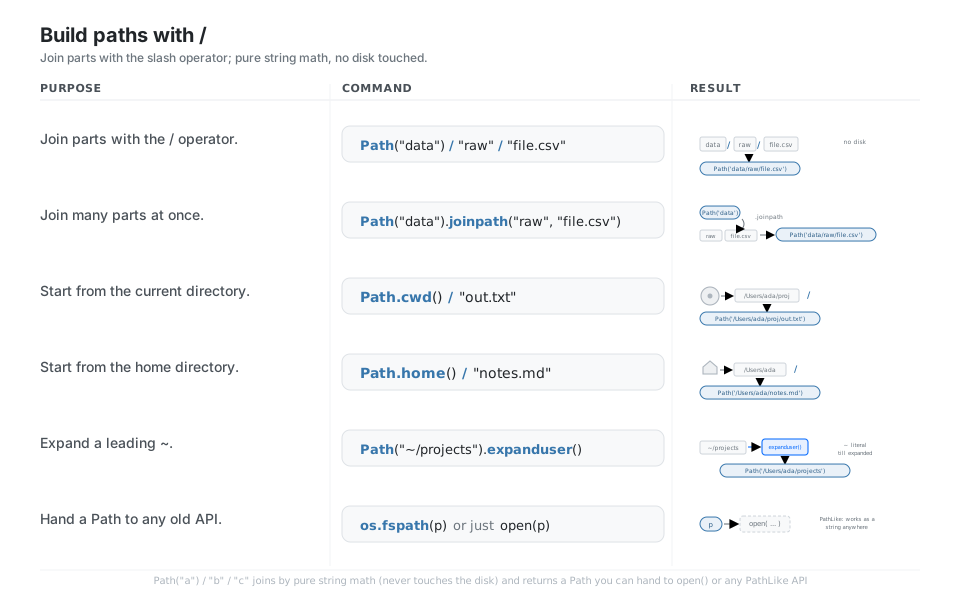
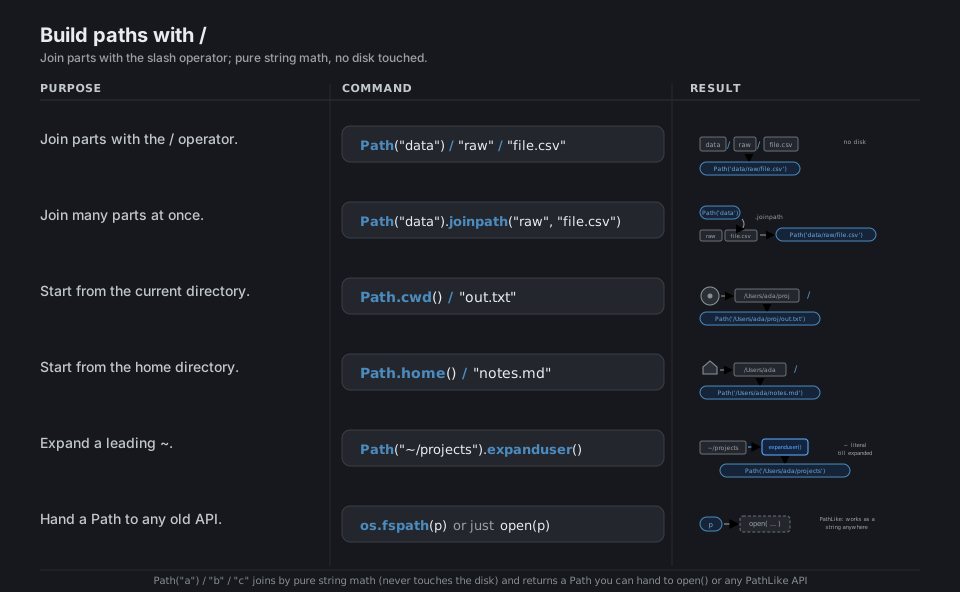
Build paths with /
pathlib overloads the / operator so you join path segments the way they actually look on disk, Path("data") / "raw" / "file.csv", instead of nesting os.path.join calls or gluing strings. Every join is pure string math that never touches the filesystem, and the result is a Path object you can hand to open(), os.scandir, or any library, because Path implements os.PathLike. Start a path from Path.cwd() or Path.home(), and call .expanduser() to turn a leading ~ into the real home directory.
from pathlib import Path

Path("data") / "raw" / "file.csv"        # join with the / operator
Path("data").joinpath("raw", "file.csv") # join many parts at once
Path.cwd() / "out.txt"                    # start from the current directory
Path.home() / "notes.md"                  # start from the home directory
Path("~/projects").expanduser()           # expand a leading ~ to the real home

import os
os.fspath(Path("data/file.csv"))          # any Path works as a string path (PathLike)
See Operators. A Path is os.PathLike, so open(p) works with no conversion.
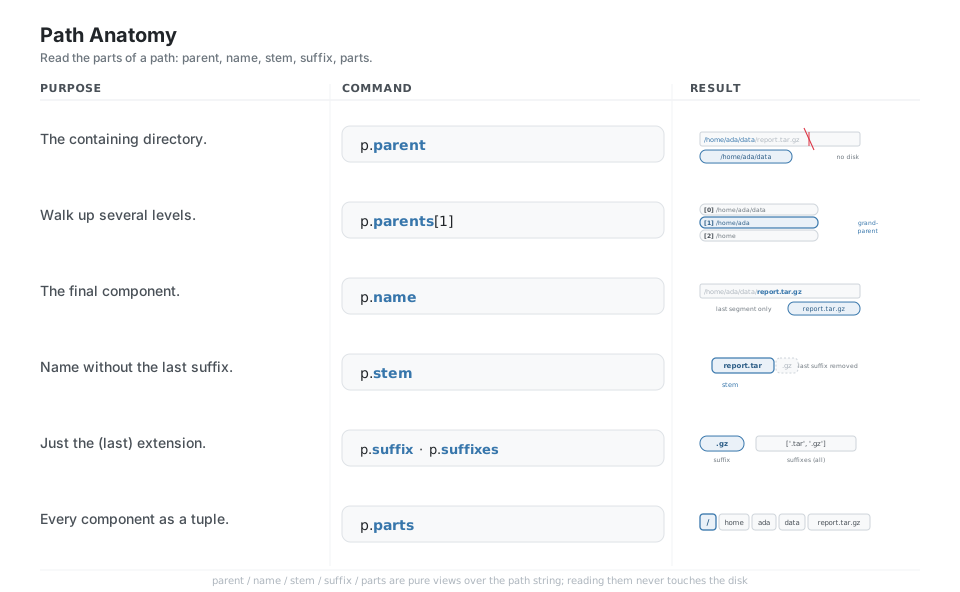
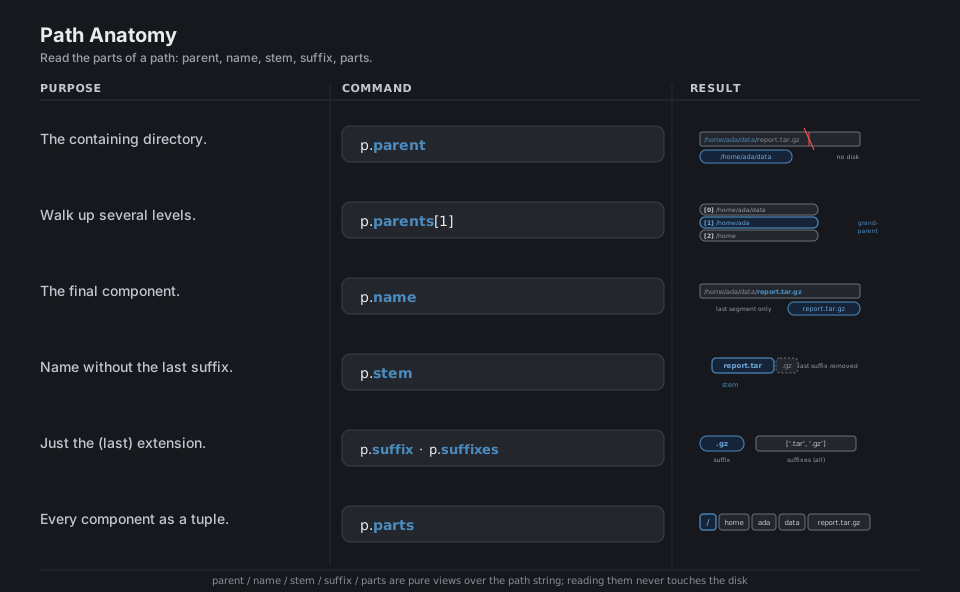
Path anatomy
A Path exposes its components as plain attributes you read, not parse: .parent is the containing directory, .name is the last segment, .stem is the name without its final suffix, and .suffix is that final extension (.suffixes gives all of them, like ['.tar', '.gz']). .parts explodes the whole thing into a tuple, and .parents is an indexable sequence of ancestor directories, so p.parents[1] is the grandparent. None of these touch the disk; they are pure views over the path string.
p = Path("/home/ada/data/report.tar.gz")

p.parent       # PosixPath('/home/ada/data')   the containing directory
p.parents[1]   # PosixPath('/home/ada')        walk up several levels
p.name         # 'report.tar.gz'               the final component
p.stem         # 'report.tar'                  name without the last suffix
p.suffix       # '.gz'                         just the last extension
p.suffixes     # ['.tar', '.gz']               every extension
p.parts        # ('/', 'home', 'ada', 'data', 'report.tar.gz')   each component
See Methods and properties. Every attribute here is pure path math; nothing reads the disk.
Rewrite names and suffixes
To derive a new path from an old one, use the with_* methods rather than slicing strings: .with_suffix(".parquet") swaps the extension, .with_name("new.txt") replaces the whole filename, and .with_stem("new") changes the name while keeping the suffix. Each returns a brand-new Path and leaves the original untouched. Remember that .with_suffix replaces the last suffix (it does not append), so to add a second extension you build the name yourself with p.parent / (p.name + ".gz").
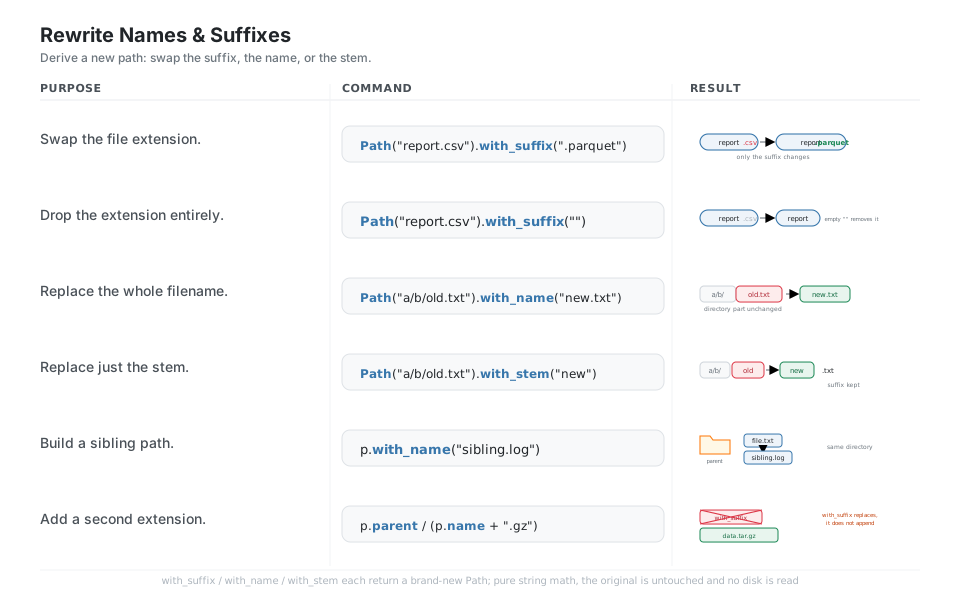
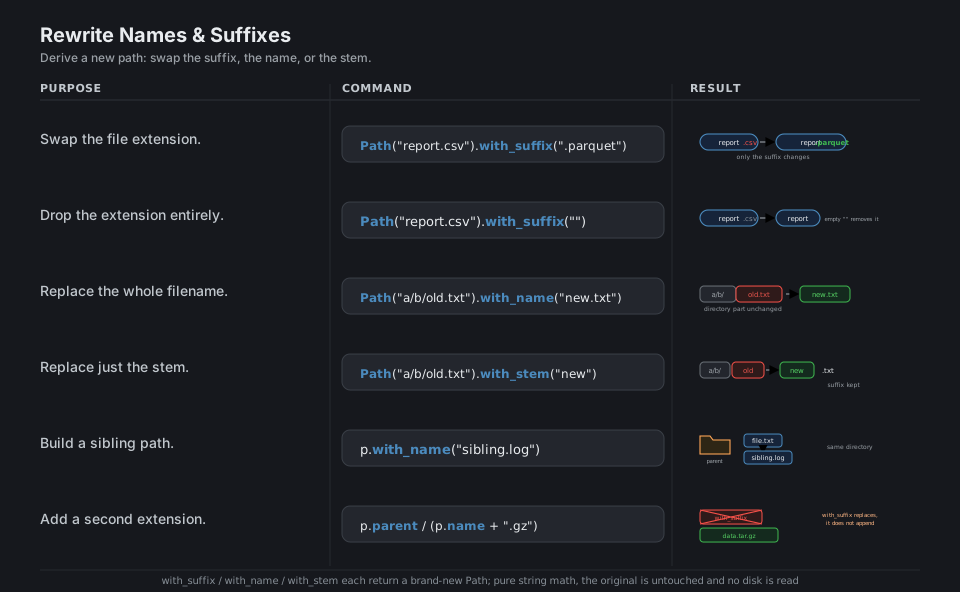
Path("report.csv").with_suffix(".parquet")  # 'report.parquet'   swap the extension
Path("report.csv").with_suffix("")          # 'report'           drop the extension
Path("a/b/old.txt").with_name("new.txt")    # 'a/b/new.txt'      replace the filename
Path("a/b/old.txt").with_stem("new")        # 'a/b/new.txt'      replace just the stem

p = Path("a/b/file.txt")
p.with_name("sibling.log")                   # 'a/b/sibling.log'  a sibling in the same dir

# with_suffix REPLACES; to ADD a second extension, build the name yourself
d = Path("data.tar")
d.parent / (d.name + ".gz")                  # 'data.tar.gz'
See with_suffix. with_suffix replaces the last suffix, it does not append one.
Inspect the filesystem
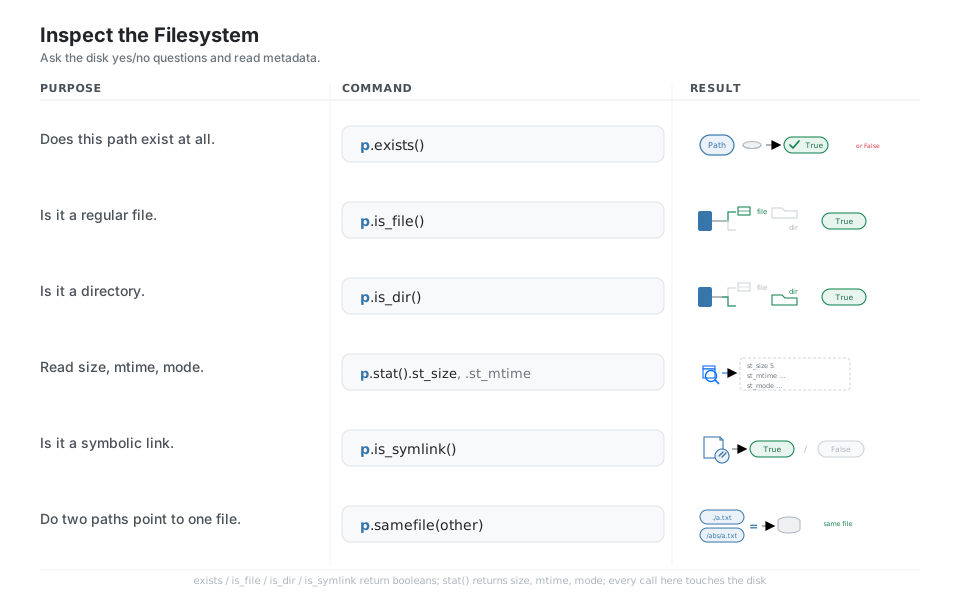
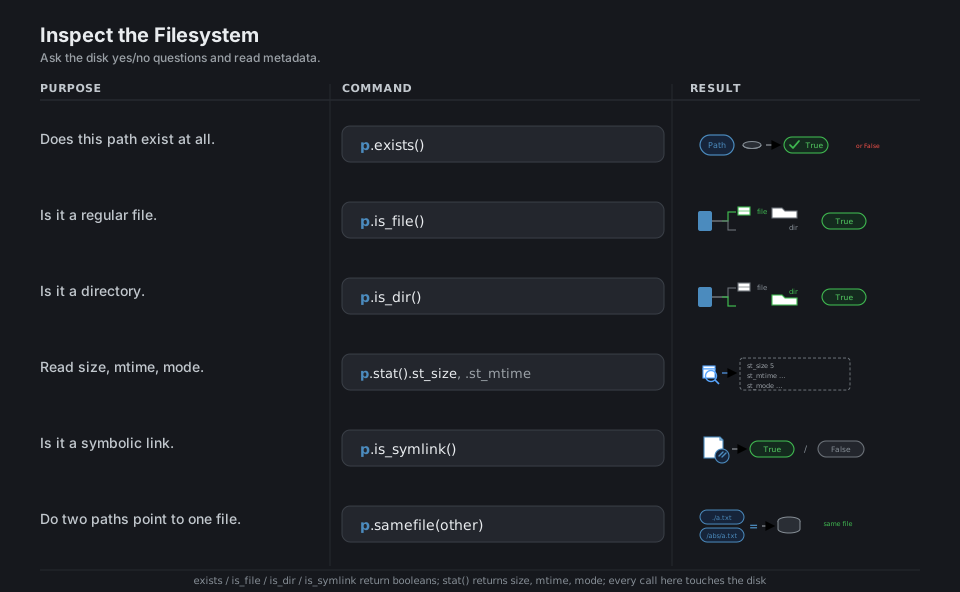
These are the methods that actually ask the disk a question: .exists(), .is_file(), and .is_dir() return booleans, and .stat() returns an os.stat_result whose .st_size, .st_mtime, and .st_mode give you size, modification time, and permissions. .is_symlink() tells you whether the path itself is a link, and .samefile(other) reports whether two different-looking paths resolve to the same file. Because every call here hits the filesystem, expect them to raise (or you can catch) OSError and friends when permissions or races get in the way.
p = Path("report.txt")

p.exists()           # True / False   does this path exist at all
p.is_file()          # True / False   is it a regular file
p.is_dir()           # True / False   is it a directory
p.stat().st_size     # 5              size in bytes
p.stat().st_mtime    # 1718.../float  last-modified time
p.is_symlink()       # True / False   is it a symbolic link
p.samefile("./report.txt")   # True   do two paths point to one file
See Path.stat. Every call here touches the disk and may raise OSError.
Glob a tree
.iterdir() lists one directory level, .glob(pattern) filters that one level by a shell-style wildcard, and .rglob(pattern) searches the entire subtree (it is exactly glob("**/" + pattern)). All three return lazy iterators, so loop over them directly instead of building giant lists when a tree is large. To test a single path against a pattern, use .full_match("**/*.py") (whole-path matching, added in 3.13) rather than the older .match, which only checks from the right, and pass case_sensitive=False (3.12+) when you want case-insensitive matching.
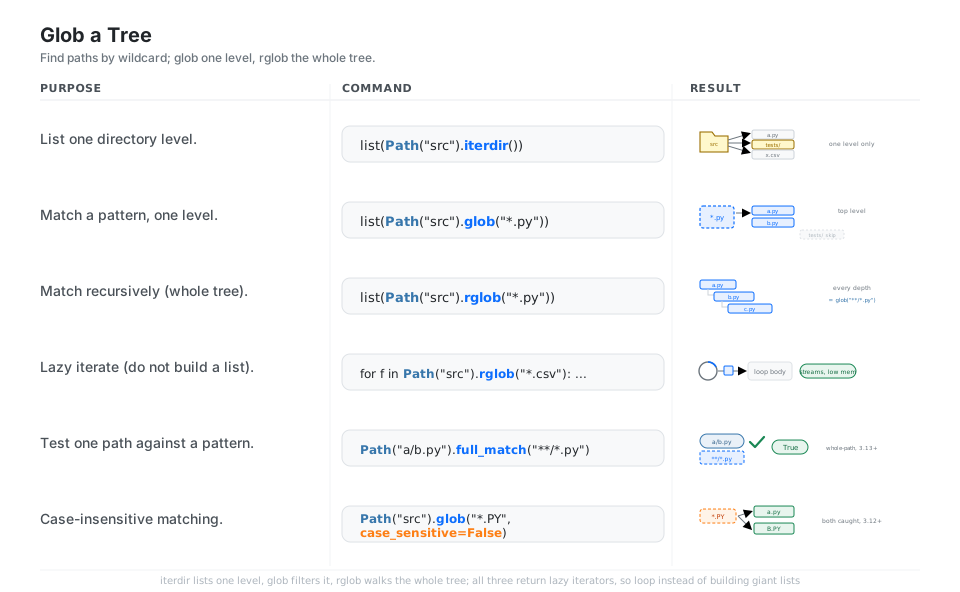
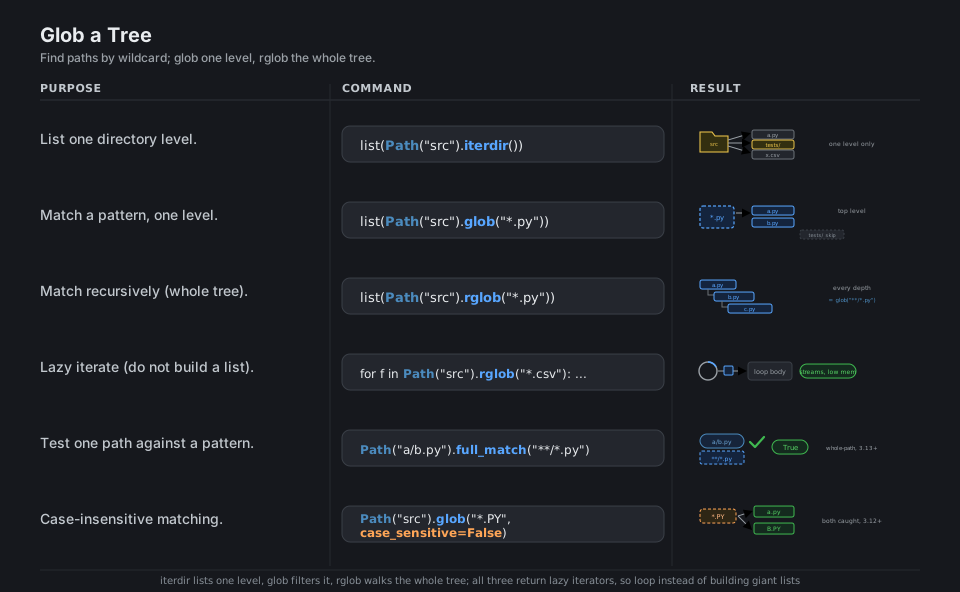
list(Path("src").iterdir())              # list one directory level
list(Path("src").glob("*.py"))           # match a pattern, one level
list(Path("src").rglob("*.py"))          # match recursively (whole tree)

for f in Path("src").rglob("*.csv"):     # lazy iterate, low memory
    ...                                  # streams files one at a time

Path("a/b.py").full_match("**/*.py")     # True   test a path against a pattern (3.13+)
list(Path("src").glob("*.PY", case_sensitive=False))  # case-insensitive (3.12+)
See Path.glob. full_match matches the whole path; match is suffix-only.
Read and write in one call
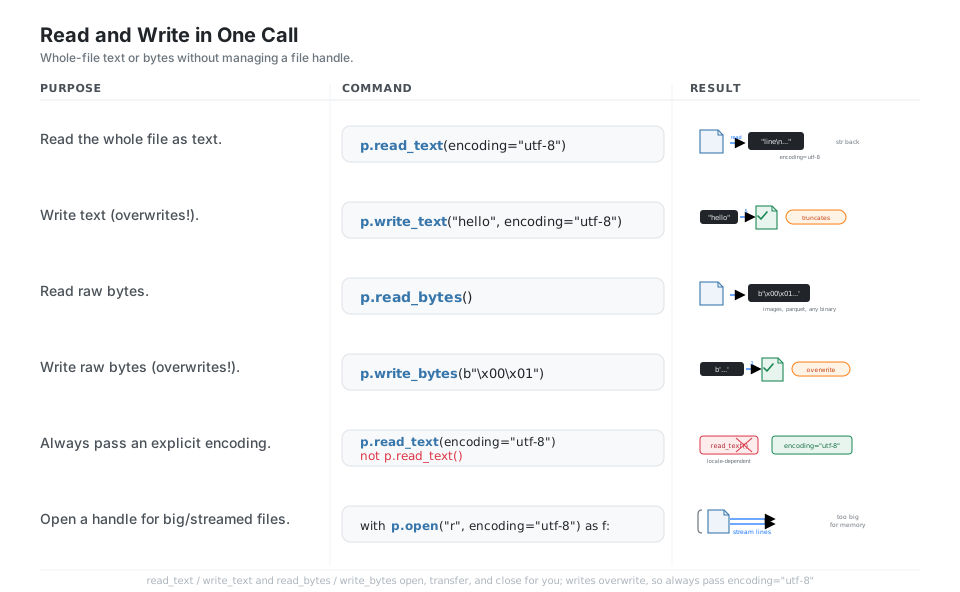
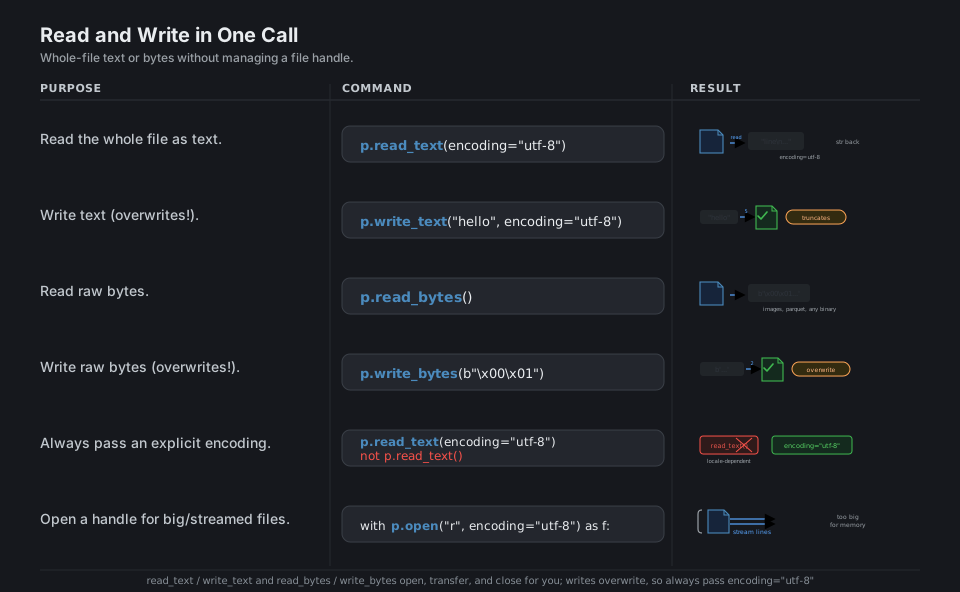
For whole-file work, pathlib gives you four convenience methods that open, transfer, and close the file for you: .read_text() / .write_text() for str and .read_bytes() / .write_bytes() for bytes. The two write methods overwrite the file (they truncate first), and the write methods return the number of characters or bytes written. Always pass encoding="utf-8" to the text methods so behavior does not depend on the machine’s locale, and drop down to p.open(...) inside a with block when a file is too big to slurp into memory at once.
p = Path("notes.md")

p.read_text(encoding="utf-8")    # whole file as str
p.write_text("hello", encoding="utf-8")   # overwrites! returns char count
p.read_bytes()                   # whole file as bytes: images, parquet, any binary
p.write_bytes(b"\x00\x01")       # overwrites! returns byte count

# Always pass an explicit encoding; the bare call is locale-dependent
p.read_text(encoding="utf-8")    # good       not  p.read_text()

with p.open("r", encoding="utf-8") as f:  # open a handle for big/streamed files
    for line in f:
        ...
See Path.read_text. The write methods truncate and replace; they do not append.
Create and remove
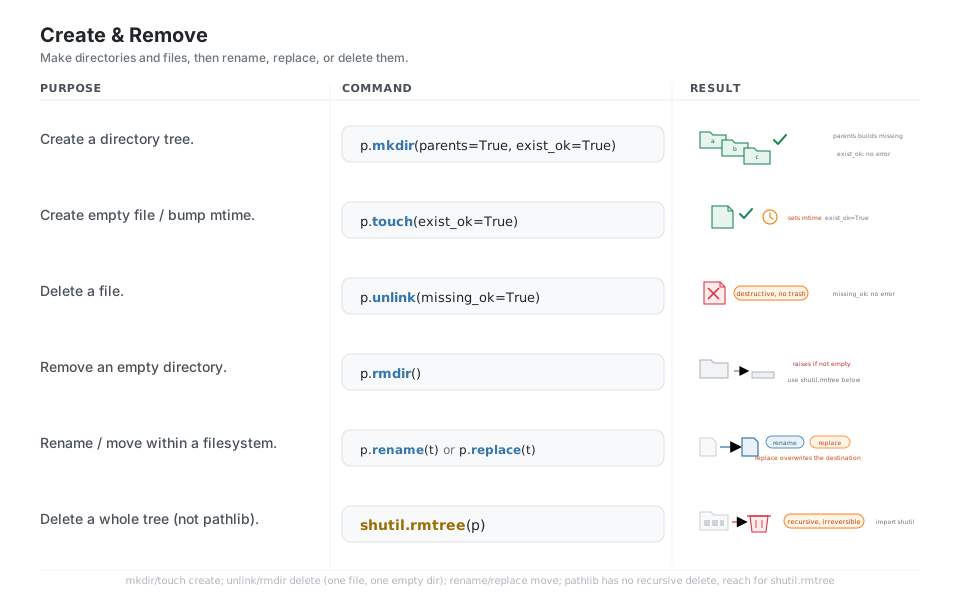
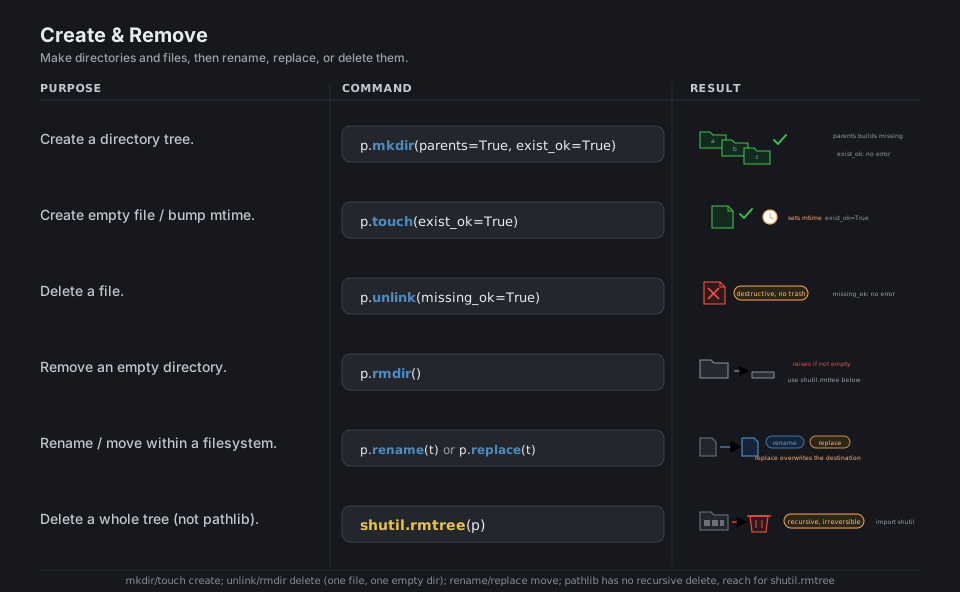
.mkdir(parents=True, exist_ok=True) builds a directory (and any missing parents) without complaining if it already exists, while .touch() creates an empty file or bumps an existing file’s modification time. Deletion is blunt and permanent: .unlink(missing_ok=True) removes a file, .rmdir() removes an empty directory, and to wipe a directory that still has contents you reach outside pathlib for shutil.rmtree. Move or rename within a filesystem with .rename(target) or .replace(target), where .replace silently overwrites an existing destination.
p = Path("a/b/c")

p.mkdir(parents=True, exist_ok=True)  # create a directory tree, no error if it exists
Path("a/b/file.txt").touch(exist_ok=True)  # create an empty file / bump mtime
Path("a/b/file.txt").unlink(missing_ok=True)  # delete a file (destructive, no trash)
p.rmdir()                             # remove an EMPTY directory (raises if not empty)
Path("old.txt").rename("new.txt")     # rename / move within a filesystem
Path("old.txt").replace("new.txt")    # like rename, but overwrites the destination

import shutil
shutil.rmtree("scratch")              # delete a whole tree (recursive, irreversible)
See Path.mkdir. pathlib has no recursive delete; use shutil.rmtree for a full tree.
Resolve and relate
.resolve() returns an absolute, normalized path with .. collapsed and symlinks followed (it touches the disk), whereas .absolute() just prepends the current directory without normalizing. To express one path against another, target.relative_to(base) strips a shared prefix and target.is_relative_to(base) is the safe boolean pre-check that tells you whether relative_to will succeed; pass walk_up=True (3.12+) to allow .. segments when the target sits outside the base. Path.cwd() and Path.home() give you the two anchor directories as Path objects to build from.
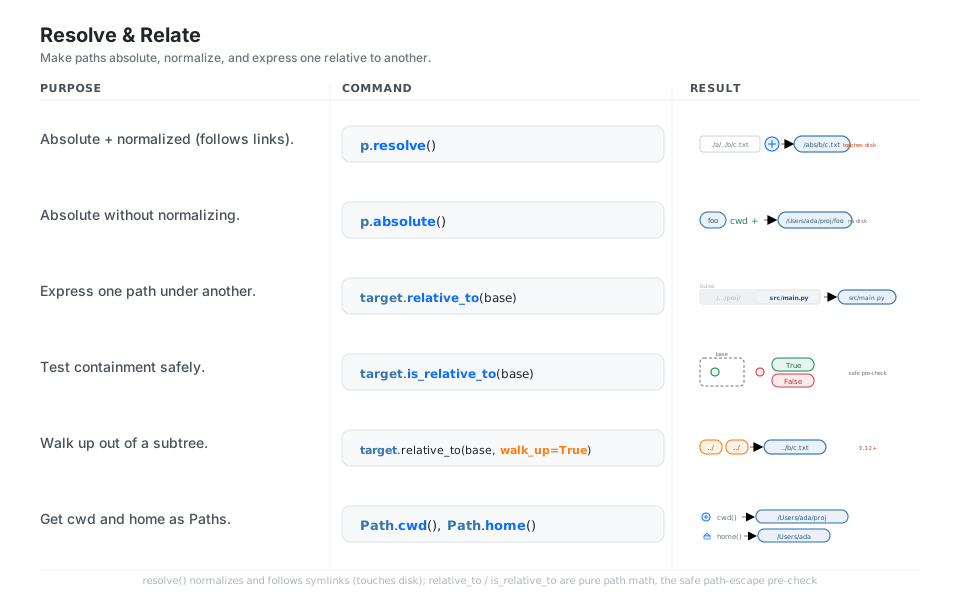
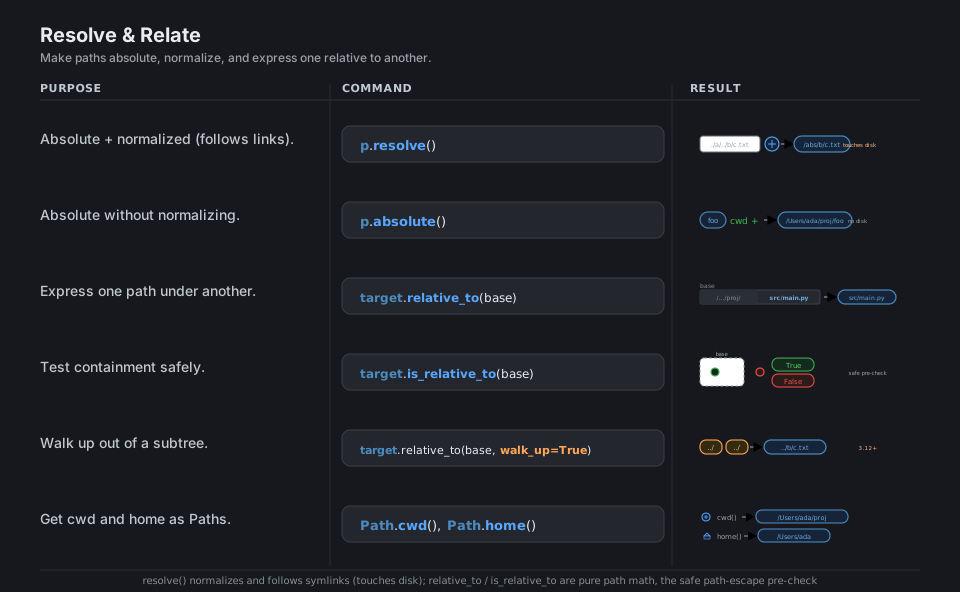
Path("./a/../b/c.txt").resolve()     # absolute + normalized, follows links (touches disk)
Path("foo").absolute()               # absolute, prepends cwd, no .. collapse, no disk

base = Path("/home/ada/proj")
target = Path("/home/ada/proj/src/main.py")
target.relative_to(base)             # PosixPath('src/main.py')   under base
target.is_relative_to(base)          # True   safe pre-check for relative_to
target.relative_to(Path("/home/ada/x"), walk_up=True)  # '../proj/src/main.py' (3.12+)

Path.cwd()                           # current directory as a Path
Path.home()                          # home directory as a Path
See Path.resolve. resolve touches the disk; absolute does not collapse ...
Quick Reference
| Command | What it does | Touches disk? | Area |
|---|---|---|---|
Path("a") / "b" / "c.txt" |
Join parts into a Path |
No | Build |
Path.cwd() / Path.home() |
Current / home directory | Reads cwd/env | Build |
p.expanduser() |
Expand a leading ~ |
No | Build |
p.parent / p.parents[1] |
Containing dir / ancestor | No | Anatomy |
p.name / p.stem / p.suffix |
Filename / minus suffix / extension | No | Anatomy |
p.parts / p.suffixes |
Component tuple / all extensions | No | Anatomy |
p.with_suffix(".parquet") |
Swap the extension | No | Rewrite |
p.with_name(...) / p.with_stem(...) |
Replace filename / stem | No | Rewrite |
p.exists() / p.is_file() / p.is_dir() |
Yes/no filesystem checks | Yes | Inspect |
p.stat().st_size |
Size, mtime, mode | Yes | Inspect |
p.iterdir() |
List one directory level | Yes | Glob |
p.glob("*.py") / p.rglob("*.py") |
Match one level / whole tree | Yes | Glob |
p.full_match("**/*.py") |
Test a path against a pattern | No | Glob |
p.read_text(encoding="utf-8") |
Whole file as str |
Yes | Read/write |
p.write_text(s, encoding="utf-8") |
Overwrite file with str |
Yes | Read/write |
p.read_bytes() / p.write_bytes(b) |
Whole file as bytes |
Yes | Read/write |
p.mkdir(parents=True, exist_ok=True) |
Create directory tree | Yes | Create/remove |
p.touch(exist_ok=True) |
Create empty file / bump mtime | Yes | Create/remove |
p.unlink(missing_ok=True) |
Delete a file | Yes | Create/remove |
p.rmdir() |
Remove an empty directory | Yes | Create/remove |
p.rename(t) / p.replace(t) |
Move / overwrite-move | Yes | Create/remove |
p.resolve() |
Absolute, normalized, links followed | Yes | Resolve |
p.absolute() |
Absolute, not normalized | No | Resolve |
t.relative_to(b) / t.is_relative_to(b) |
Path under base / safe check | No | Resolve |
| Attribute | Value | Meaning |
|---|---|---|
p.parts |
('/', 'home', 'ada', 'data', 'report.tar.gz') |
Every component |
p.anchor |
/ |
Root (drive + root) |
p.parent |
/home/ada/data |
Containing directory |
p.parents[1] |
/home/ada |
Grandparent (indexable) |
p.name |
report.tar.gz |
Final component |
p.stem |
report.tar |
Name without last suffix |
p.suffix |
.gz |
Last extension |
p.suffixes |
['.tar', '.gz'] |
All extensions |
| Pure (no disk) | Disk-touching |
|---|---|
/, joinpath |
exists, is_file, is_dir, stat |
parent, name, stem, suffix, parts |
iterdir, glob, rglob, walk |
with_suffix, with_name, with_stem |
read_text, write_text, read_bytes, write_bytes, open |
relative_to, is_relative_to, match, full_match |
mkdir, touch, unlink, rmdir, rename, replace |
absolute, expanduser, as_posix, as_uri |
resolve, samefile, cwd, home |
| Avoid | Use instead | Why |
|---|---|---|
os.path.join(a, b, c) |
Path(a) / b / c |
The / operator is the pathlib idiom |
os.path.dirname / basename / splitext |
p.parent / p.name / (p.stem, p.suffix) |
Object attributes, no string parsing |
p.link_to(target) |
target.hardlink_to(p) |
link_to was removed; hardlink_to is the current API (3.10+) |
p.match("**/*.py") for whole paths |
p.full_match("**/*.py") |
match is suffix-only; full_match (3.13+) matches the whole path including ** |
open(p) then manual .read() / .close() |
p.read_text(encoding="utf-8") |
One call opens, reads, and closes |
p.read_text() with no encoding |
p.read_text(encoding="utf-8") |
Bare call is locale-dependent and not portable |
Appendix: Sample Code
The Path mental model: pure math vs the disk
from pathlib import Path

# Pure path math (never touches the filesystem)
p = Path("data") / "raw" / "report.tar.gz"
p.name        # 'report.tar.gz'
p.stem        # 'report.tar'
p.suffix      # '.gz'
p.suffixes    # ['.tar', '.gz']
p.parent      # PosixPath('data/raw')
p.with_suffix(".parquet")   # PosixPath('data/raw/report.parquet')

# Disk-touching: only these actually hit the filesystem
p.exists()    # False  (we never created it)
Path.cwd()    # PosixPath('/Users/ada/proj')
Build, write, read, and clean up a file
from pathlib import Path
import tempfile

base = Path(tempfile.mkdtemp())          # a fresh sandbox directory

out = base / "notes" / "today.md"        # build the path with /
out.parent.mkdir(parents=True, exist_ok=True)   # make 'notes/' if needed

out.write_text("# Today\n- ship the cheatsheet\n", encoding="utf-8")
print(out.read_text(encoding="utf-8"))   # round-trips the text back

out.unlink(missing_ok=True)              # delete the file
out.parent.rmdir()                       # remove the now-empty directory
Walk a project and act on matches
from pathlib import Path

root = Path("src")

# Every Python file, at any depth, streamed (no giant list)
for f in root.rglob("*.py"):
    text = f.read_text(encoding="utf-8")
    if "TODO" in text:
        print(f, "has a TODO")

# Total size of all CSVs under the tree
total = sum(f.stat().st_size for f in root.rglob("*.csv"))
print(f"{total} bytes of CSV")

# One directory level only, sorted, directories first
for child in sorted(root.iterdir(), key=lambda p: (p.is_file(), p.name)):
    kind = "dir " if child.is_dir() else "file"
    print(kind, child.name)
Output paths that mirror an input tree
from pathlib import Path

src_root = Path("raw_data")
dst_root = Path("processed")

for src in src_root.rglob("*.csv"):
    rel = src.relative_to(src_root)          # e.g. 2026/jan/a.csv
    dst = (dst_root / rel).with_suffix(".parquet")
    dst.parent.mkdir(parents=True, exist_ok=True)
    # ... convert src -> dst here ...
    print(src, "->", dst)
# raw_data/2026/jan/a.csv -> processed/2026/jan/a.parquet
Resolve, relate, and guard against path escapes
from pathlib import Path

base = Path("/srv/uploads").resolve()
candidate = (base / user_supplied_name).resolve()   # collapse any ../

# Reject anything that escaped the upload directory
if not candidate.is_relative_to(base):
    raise ValueError("path traversal blocked")

print(candidate.relative_to(base))   # safe, base-relative path
Recursively remove a whole tree (reaches outside pathlib)
from pathlib import Path
import shutil

scratch = Path("scratch")
if scratch.exists():
    shutil.rmtree(scratch)   # pathlib has no recursive delete; use shutil
Behavior notes
- Pure path math never touches the disk.
/,.parent,.name,.stem,.suffix,.with_suffix, and.relative_toall read the path string only; they are fast, safe, and side-effect-free. with_suffixreplaces, it does not append.Path("data.tar").with_suffix(".tar.gz")is wrong; build a second extension yourself withp.parent / (p.name + ".gz").- The write methods overwrite.
write_textandwrite_bytestruncate the file first, so they replace existing contents rather than appending to them. - Always pass
encoding="utf-8"to text methods. The bareread_text()/write_text()calls depend on the machine’s locale and are not portable. - Deletion is permanent.
unlinkandshutil.rmtreedo not move to a trash;rmdirraises on a non-empty directory, so reach forshutil.rmtreeto wipe a full tree. - Version-gated helpers.
full_matchandfrom_urirequire Python 3.13+, whilewalk,walk_up=True, andcase_sensitive=require 3.12+.
References
pathlib documentation (CPython 3.14)
- Module home, Basic use / quick tour
- Pure paths (path-math classes that never touch the disk) and Concrete paths (the disk-touching
Path) - Correspondence to tools in
os/os.path
Per-section documentation
- Operators, Methods and properties, with_suffix
- Path.stat, Path.glob, Path.read_text
- Path.mkdir, Path.resolve, Path.walk
Related / underlying standard library
os.PathLike(why aPathworks anywhere a string path is expected) andos.fspathos.stat_result(what.stat()returns) andshutil.rmtree- glob pattern language (the
*,?,**wildcards pathlib uses) and PEP 428 (the original pathlib design rationale)