PyArrow is the Python binding for Apache Arrow, and it is the columnar memory format that sits underneath modern dataframes. Where the pandas and Polars sheets are about operating on a table, this sheet is about the layout the table is made of: each column is a contiguous, single-type buffer plus a null bitmap, a Table is named columns (each a ChunkedArray) described by a Schema, and on disk those same columns become Parquet (compressed, splittable) or Arrow IPC / Feather (the in-memory layout written straight to a file). The recurring picture in this sheet is one idea: stacked column buffers (the Arrow-blue accent) with a gray null bitmap strip beside each, flowing along arrows between memory and disk, and handed zero-copy to pandas, Polars, and numpy because every consumer agrees on the exact byte layout. The conventional imports are import pyarrow as pa for the core (arrays, Table, Schema, types) plus the submodules, which are not auto-loaded: import pyarrow.parquet as pq, import pyarrow.dataset as ds, import pyarrow.compute as pc, and import pyarrow.feather as feather. Everything here is verified against pyarrow 24.0.0.


Arrays and ChunkedArray
The atom of Arrow is a column: a contiguous, single-type buffer plus a null bitmap that records which slots are valid, built with pa.array(...) and optionally pinned to an exact type. A ChunkedArray is that same column split across several buffers so it can grow without re-allocating, and slicing returns a zero-copy view over the existing buffer rather than a fresh copy.
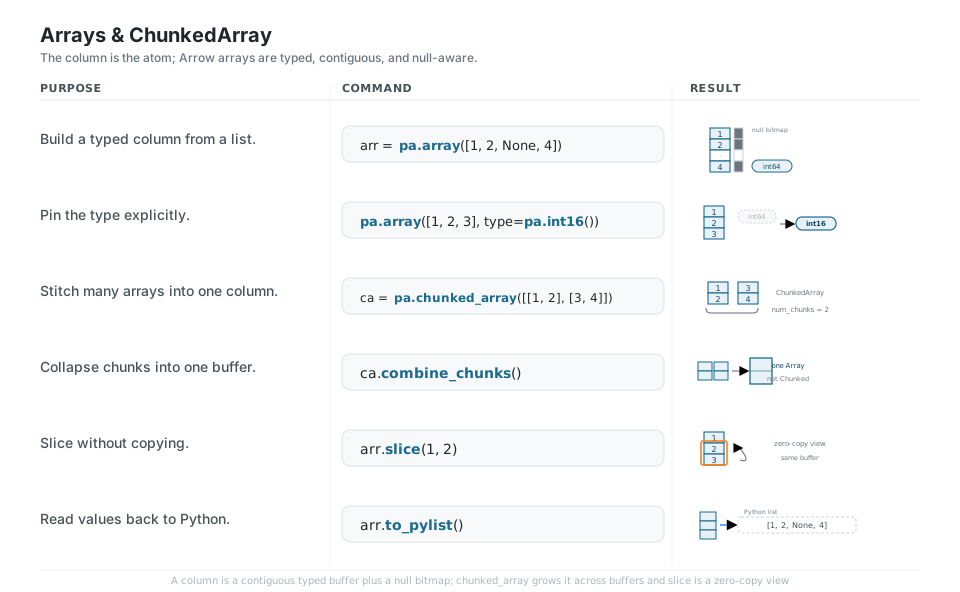
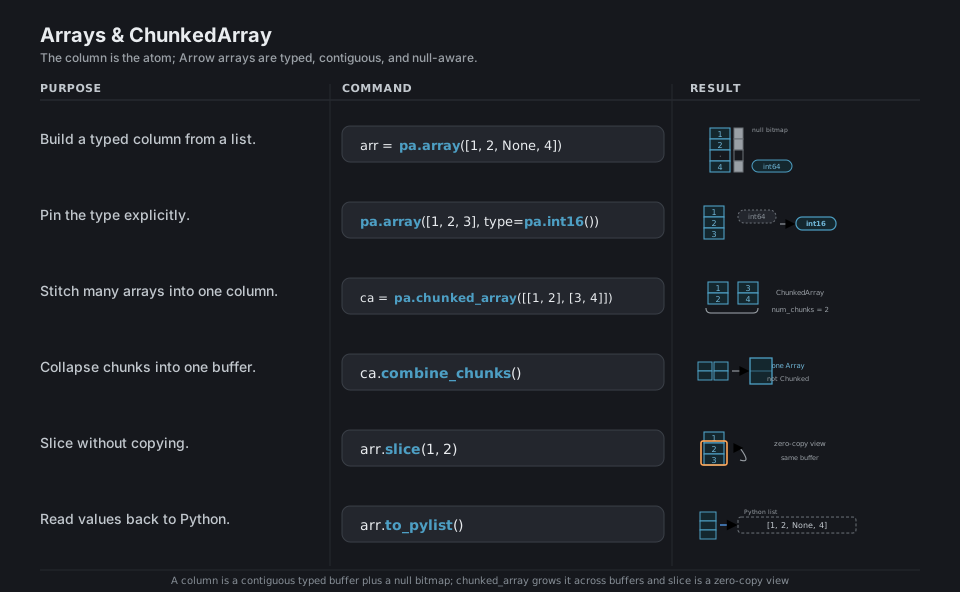
arr = pa.array([1, 2, None, 4])           # typed column + null bitmap (int64)
pa.array([1, 2, 3], type=pa.int16())      # pin the type explicitly
ca = pa.chunked_array([[1, 2], [3, 4]])   # one column across 2 buffers
ca.combine_chunks()                       # collapse to one Array (not a ChunkedArray)
arr.slice(1, 2)                           # zero-copy view, no buffer copy
arr.to_pylist()                           # -> [1, 2, None, 4]  (back to Python)
See Arrays and in-memory data. combine_chunks() returns a plain Array, so do not chain .num_chunks on it.
Table and Schema
A pa.Table is a set of named columns (each a ChunkedArray) described by a Schema that pairs every column name with its Arrow type. Because columns are stored separately, projecting with select, adding one with append_column, or reading the schema are cheap, and you can drop back to plain Python with to_pydict or to RecordBatch slices with to_batches.
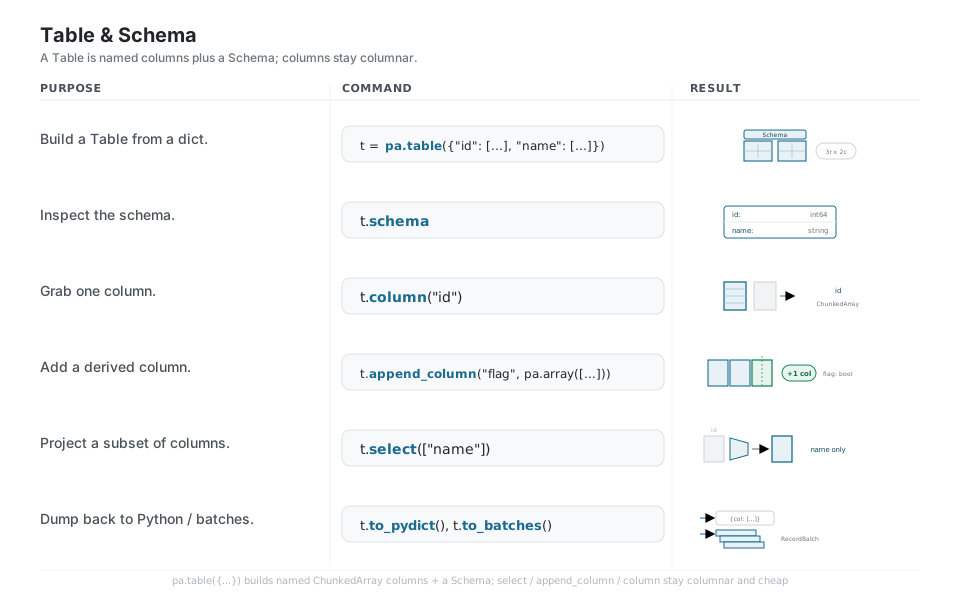
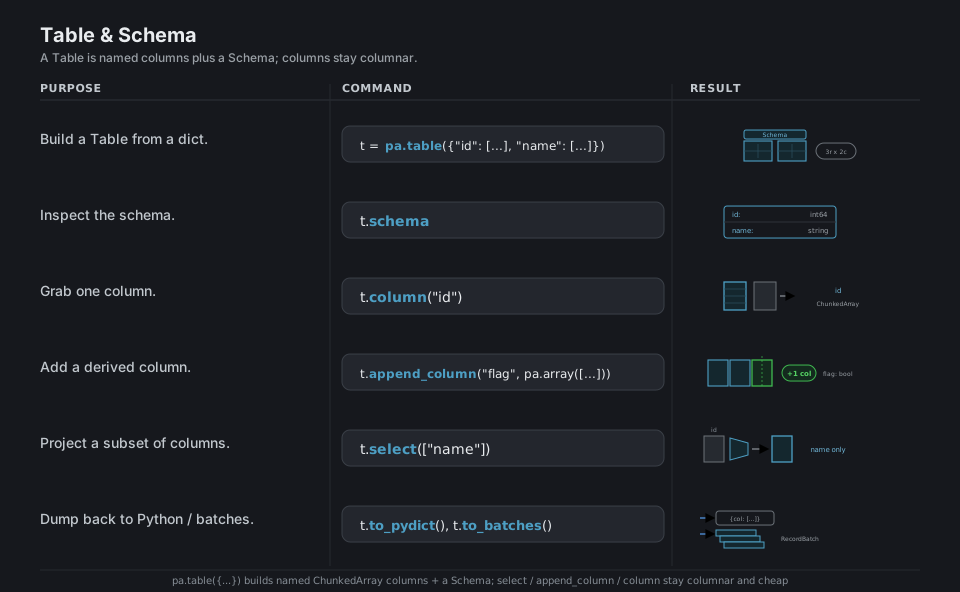
t = pa.table({"id": [1, 2, 3], "name": ["a", "b", "c"]})   # named columns + Schema
t.schema                                                   # id: int64 / name: string
t.column("id")                                             # lift one column (ChunkedArray)
t.append_column("flag", pa.array([True, False, True]))     # add a derived column
t.select(["name"])                                         # project a subset of columns
t.to_pydict(); t.to_batches()                              # -> dict; -> RecordBatch slices
See Tables and tabular data. Use the lowercase pa.table({...}) factory; there is no bare pa.Table({...}) call.
Types and nullability
Every Arrow column carries an explicit type (pa.int64(), pa.string(), pa.timestamp("us"), and nested pa.list_ or struct) and a per-value null bit, and you declare both in a Schema of pa.field(name, type, nullable=...). cast changes a column’s type, dictionary_encode compresses repeated strings into integer codes plus a lookup table (Arrow’s categorical), and marking a field nullable=False is a contract that the column holds no nulls.
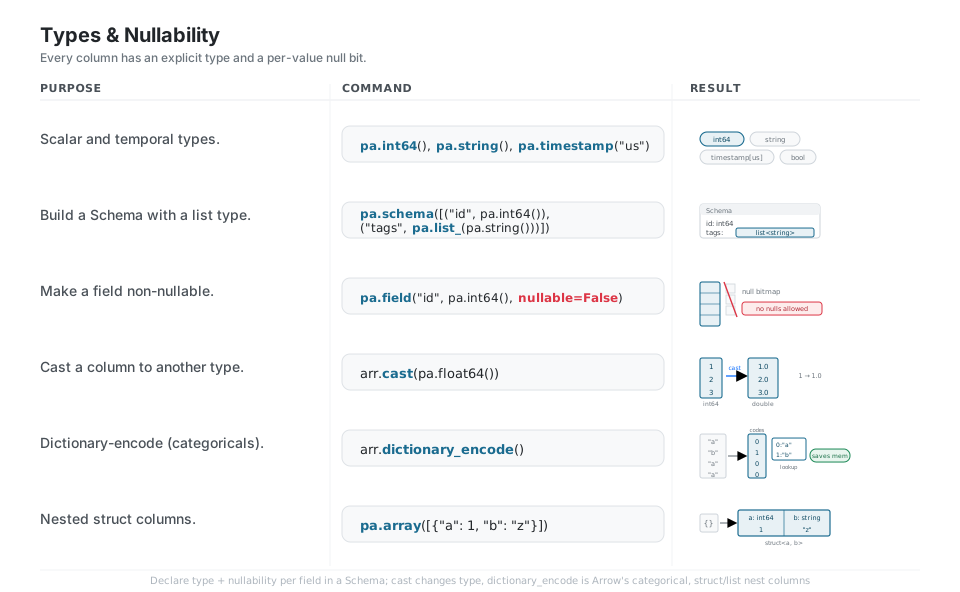
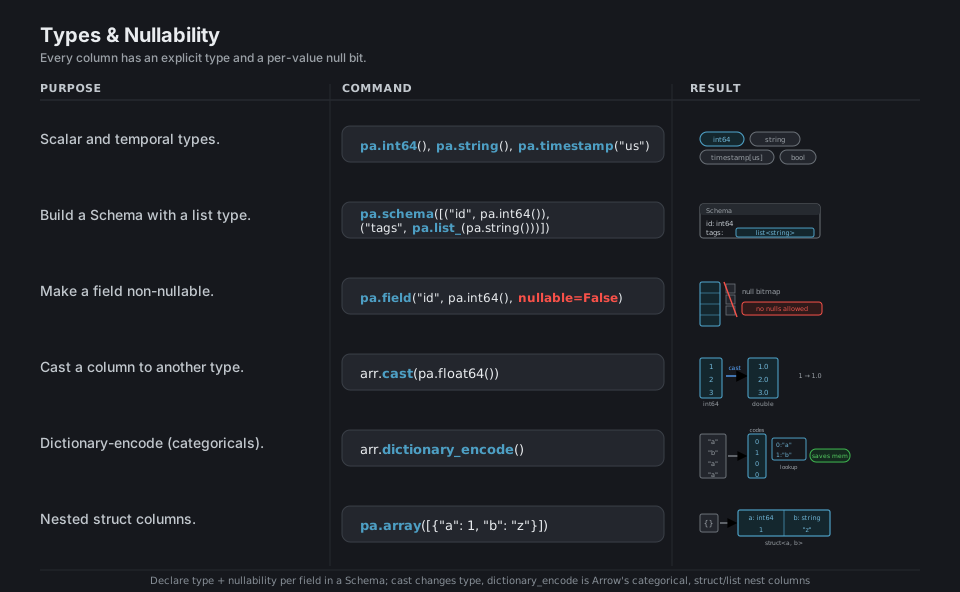
pa.int64(); pa.string(); pa.timestamp("us")                # scalar + temporal types
pa.schema([("id", pa.int64()), ("tags", pa.list_(pa.string()))])  # nested list type
pa.field("id", pa.int64(), nullable=False)                 # contract: no nulls
arr.cast(pa.float64())                                      # int64 -> double
arr.dictionary_encode()                                    # repeated strings -> codes + lookup
pa.array([{"a": 1, "b": "z"}])                             # struct<a: int64, b: string>
See Data types. dictionary_encode() is Arrow’s categorical; there is no sparse flag like scikit-learn’s encoders.
Parquet read and write
Parquet is the standard columnar file format: pq.write_table writes a Table (compressed, per compression=) and pq.read_table reads it back, but the real win is reading only the columns= you need. Use pq.read_metadata to inspect row counts and row groups without loading data, and pq.write_to_dataset(..., partition_cols=...) to fan rows into a folder tree of part files.
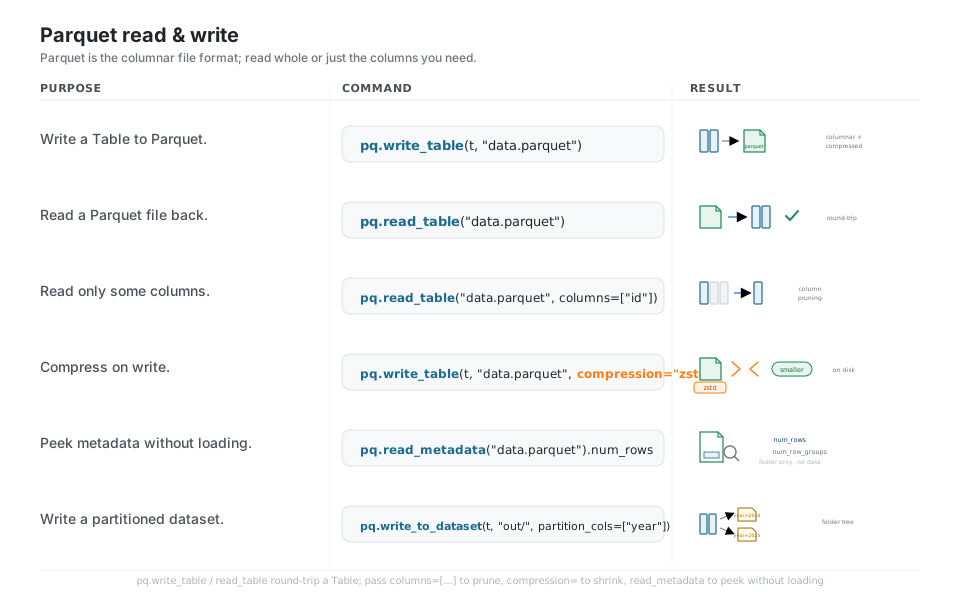
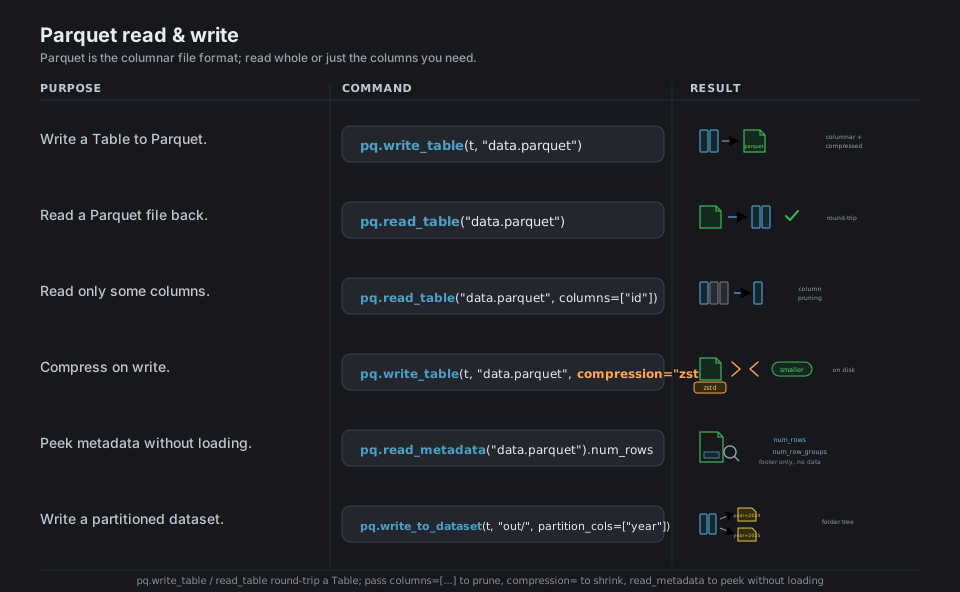
pq.write_table(t, "data.parquet")                          # Table -> columnar file
pq.read_table("data.parquet")                              # file -> Table (round-trip)
pq.read_table("data.parquet", columns=["id"])              # column pruning
pq.write_table(t, "data.parquet", compression="zstd")      # smaller file on write
pq.read_metadata("data.parquet").num_rows                  # peek footer, no data load
pq.write_to_dataset(t, "out/", partition_cols=["year"])    # fan into out/year=.../
See Reading and writing Parquet. For new multi-file work prefer the dataset API over write_to_dataset.
Dataset over many files
pyarrow.dataset treats a whole folder of Parquet (or other) files as one logical table that is lazy: nothing loads until you call to_table() or scan it. The big payoff is predicate and column pushdown, so filter=ds.field("year") == 2024 skips entire partitions and columns=[...] reads only the bytes you ask for, which is how you query data far larger than memory.
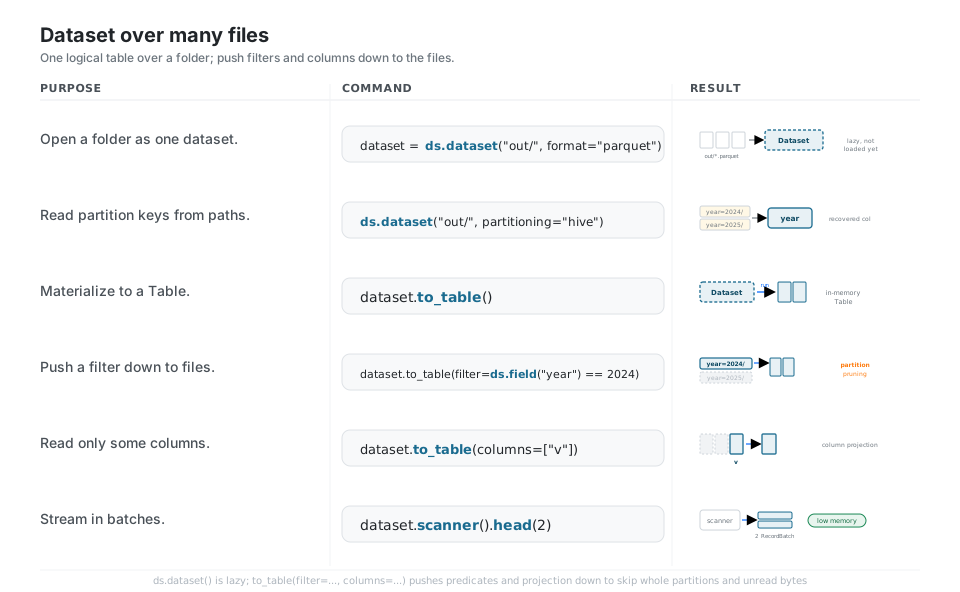
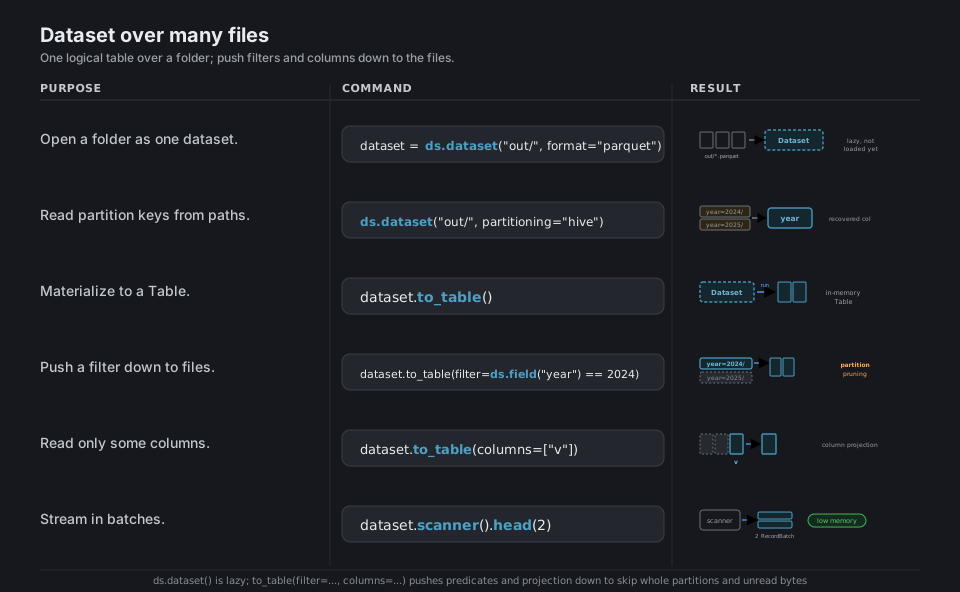
dataset = ds.dataset("out/", format="parquet")             # lazy, not loaded yet
ds.dataset("out/", partitioning="hive")                    # recover year= from paths
dataset.to_table()                                         # materialize to a Table
dataset.to_table(filter=ds.field("year") == 2024)          # partition pruning
dataset.to_table(columns=["v"])                            # column projection
dataset.scanner().head(2)                                  # stream first batches (low memory)
See Tabular Datasets. Predicate and column pushdown skip the bytes you do not ask for.
Compute kernels
pyarrow.compute (pc) is a library of vectorized C++ kernels that operate directly on columns: reductions like pc.sum, element-wise ops like pc.multiply, and comparisons like pc.greater that build boolean masks. A Table exposes the high-level verbs you reach for daily, filter, group_by(...).aggregate(...), and sort_by, all running on those same kernels without leaving Arrow.
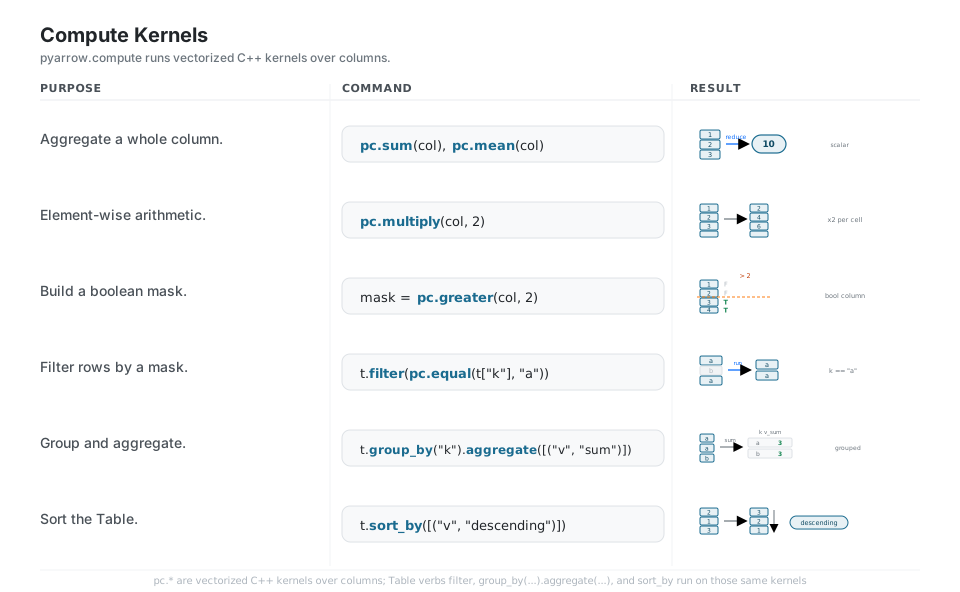
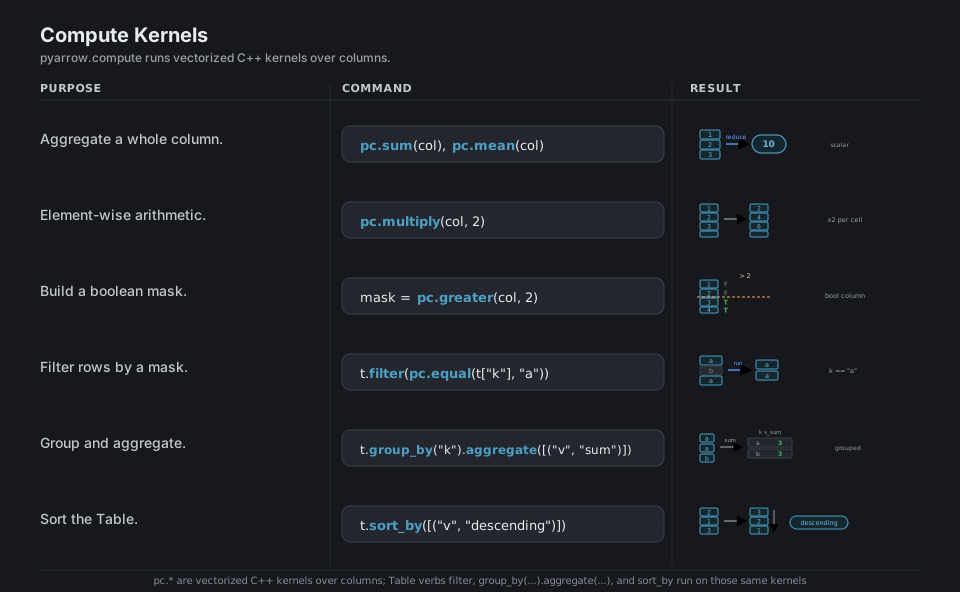
pc.sum(col); pc.mean(col)                                  # reduce a column to a scalar
pc.multiply(col, 2)                                        # element-wise: [1,2,3,4] -> [2,4,6,8]
mask = pc.greater(col, 2)                                  # boolean mask [F, F, T, T]
t.filter(pc.equal(t["k"], "a"))                            # keep matching rows
t.group_by("k").aggregate([("v", "sum")])                  # grouped aggregate -> k, v_sum
t.sort_by([("v", "descending")])                           # reorder high-to-low
See Compute functions. The full kernel list lives in the compute API reference.
Bridge to pandas, Polars, numpy
Arrow is the shared layout under modern dataframes, so t.to_pandas(), pl.from_arrow(t), and pl_df.to_arrow() move data between libraries by handing over the same buffers, often with zero copy. Pass types_mapper=pd.ArrowDtype to keep pandas columns on Arrow buffers, and remember that converting an Arrow array with nulls to numpy forces a copy, so to_numpy(zero_copy_only=False) is required.
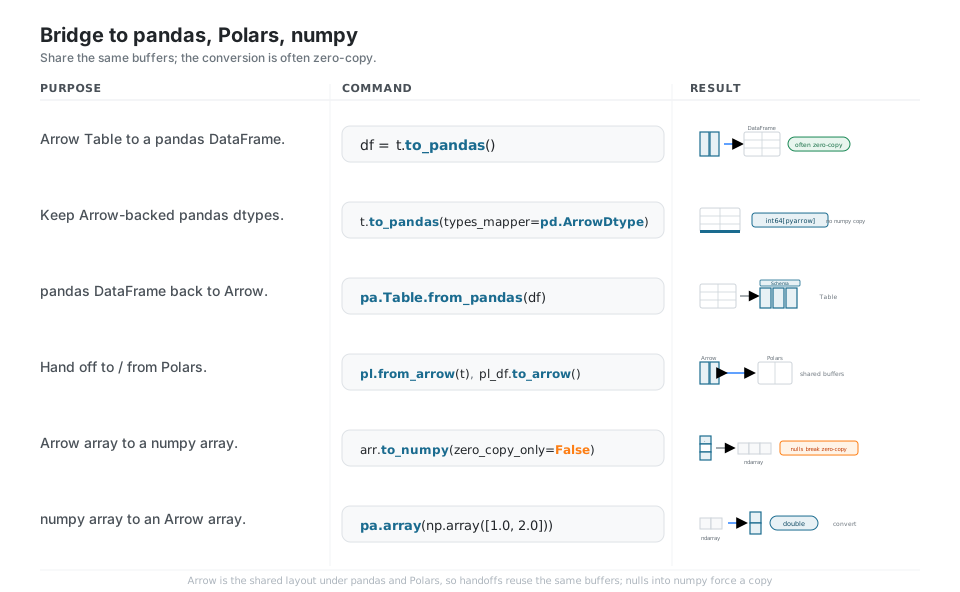
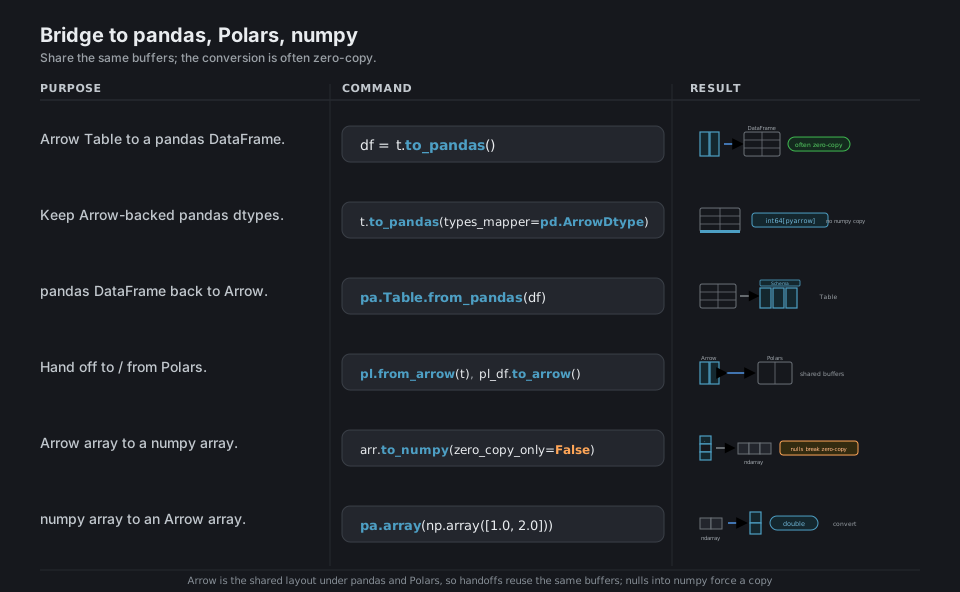
df = t.to_pandas()                                         # Arrow -> pandas (often zero-copy)
t.to_pandas(types_mapper=pd.ArrowDtype)                    # keep int64[pyarrow] dtypes
pa.Table.from_pandas(df)                                   # pandas -> Arrow
pl.from_arrow(t); pl_df.to_arrow()                         # Polars handoff (shared buffers)
arr.to_numpy(zero_copy_only=False)                         # nulls force a copy
pa.array(np.array([1.0, 2.0]))                             # numpy ndarray -> Arrow (double)
See Pandas integration. An Arrow array with nulls raises ArrowInvalid for numpy unless you pass zero_copy_only=False.
IPC and Feather
Arrow IPC (and its file convenience layer, Feather v2) writes the exact in-memory columnar layout straight to a buffer or file, so there is almost no encode or parse step, which makes it the fastest way to persist or move a Table between processes. Use feather.write_feather / read_table for a single file, pa.ipc.new_stream for a length-prefixed stream, and pa.ipc.new_file when you need random access to record batches; reach for Parquet when you want small, portable, compressed files.
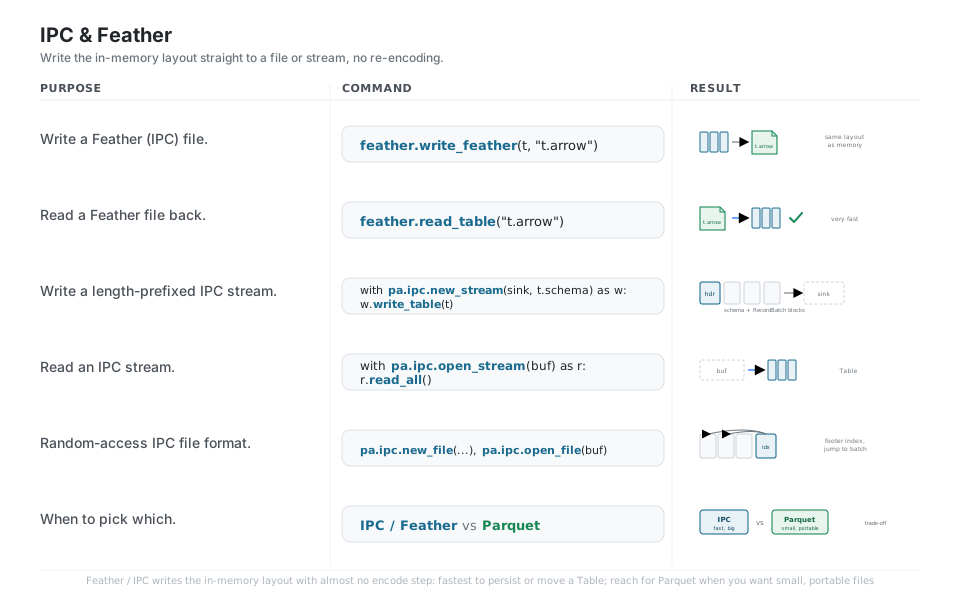
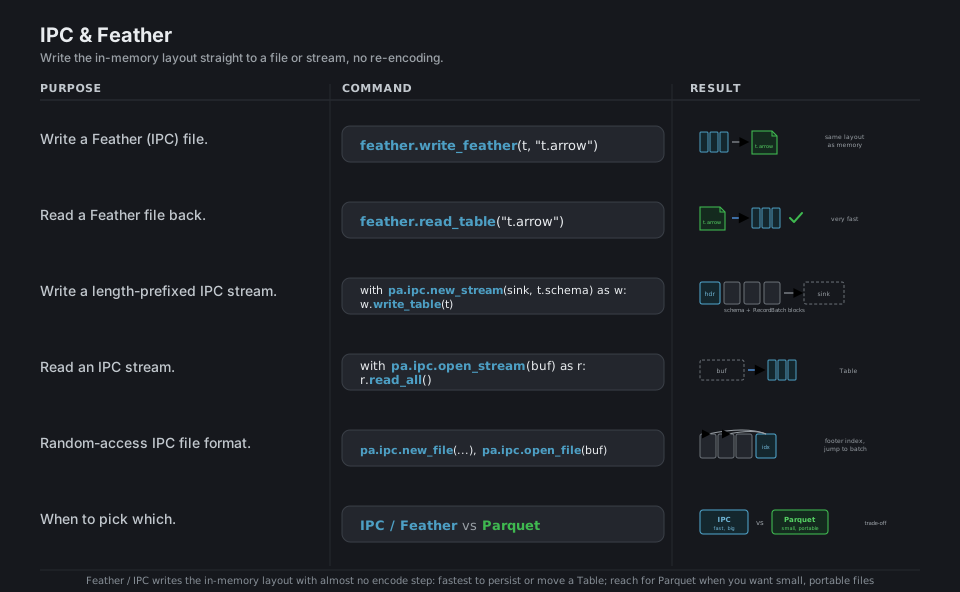
feather.write_feather(t, "t.arrow")                        # in-memory layout -> file
feather.read_table("t.arrow")                              # file -> Table (very fast)
with pa.ipc.new_stream(sink, t.schema) as w:               # length-prefixed IPC stream
    w.write_table(t)
with pa.ipc.open_stream(buf) as r:                         # read the stream back
    r.read_all()
pa.ipc.new_file(...); pa.ipc.open_file(buf)                # random access to record batches
See IPC, Feather, and streaming. Pick IPC/Feather for the fastest write/read, Parquet for small, portable files.
Quick Reference
| Command | What it does | Area |
|---|---|---|
pa.array([...]) |
Build a typed, null-aware column | Arrays |
pa.chunked_array([...]) |
One column across several buffers | Arrays |
pa.table({...}) |
Named columns + a Schema | Table |
t.select([...]) / t.append_column(...) |
Project / add columns | Table |
pq.write_table(t, path) |
Write a Table to Parquet | Parquet |
pq.read_table(path, columns=[...]) |
Read Parquet (column pruning) | Parquet |
pq.write_to_dataset(t, root, partition_cols=[...]) |
Partitioned write to a folder | Parquet |
t.to_pandas() / pa.Table.from_pandas(df) |
pandas bridge | Bridge |
pl.from_arrow(t) / pl_df.to_arrow() |
Polars bridge | Bridge |
arr.to_numpy(zero_copy_only=False) |
numpy bridge | Bridge |
pc.sum(col) / pc.multiply(col, 2) |
Vectorized kernels | Compute |
t.group_by("k").aggregate([("v", "sum")]) |
Grouped aggregate | Compute |
ds.dataset(root, format="parquet") |
One logical table over many files | Dataset |
dataset.to_table(filter=ds.field("y") == 1) |
Predicate pushdown | Dataset |
feather.write_feather(t, path) |
Write IPC/Feather file | IPC |
arr.cast(pa.float64()) |
Change a column’s type | Types |
arr.dictionary_encode() |
Categorical (codes + lookup) | Types |
| Object | What it is | Build with |
|---|---|---|
Array |
One contiguous, single-type column | pa.array([...]) |
ChunkedArray |
A column split across buffers | pa.chunked_array([...]) |
RecordBatch |
A slice of rows across all columns | pa.RecordBatch.from_arrays(...) |
Table |
Named ChunkedArray columns + Schema |
pa.table({...}) |
Schema |
Ordered (name, type, nullable) fields |
pa.schema([...]) |
Field |
One column’s name, type, nullability | pa.field(name, type) |
Dataset |
Lazy table over a folder of files | ds.dataset(root) |
| Type | Constructor | Notes |
|---|---|---|
| 64-bit integer | pa.int64() |
Default integer inference |
| Double | pa.float64() |
Default float inference |
| String (UTF-8) | pa.string() |
Large variant: pa.large_string() |
| Boolean | pa.bool_() |
One bit per value |
| Timestamp | pa.timestamp("us") |
Unit: s, ms, us, ns |
| Decimal | pa.decimal128(10, 2) |
Fixed precision and scale |
| List | pa.list_(pa.string()) |
Variable-length nested column |
| Struct | pa.struct([("a", pa.int64())]) |
Named nested fields |
| Dictionary | pa.dictionary(pa.int32(), pa.string()) |
Categorical (codes + values) |
| Format | Strength | Reach for it when |
|---|---|---|
| Parquet | Small, compressed, splittable, portable | Long-term storage, sharing, big tables queried by column |
| IPC / Feather | Fastest write/read (no re-encode), big | Caching between steps, fast handoff between processes |
Appendix: Sample Code
All commands and outputs below were verified live in a fresh venv on pyarrow 24.0.0.
Build a Table and round-trip through Parquet
import pyarrow as pa
import pyarrow.parquet as pq

t = pa.table({"id": [1, 2, 3], "name": ["a", "b", "c"]})
t.num_rows                 # 3
t.column_names             # ['id', 'name']
t.schema                   # id: int64 / name: string

pq.write_table(t, "data.parquet", compression="zstd")
back = pq.read_table("data.parquet", columns=["id"])
back.column_names          # ['id']  (only the column we asked for)

pq.read_metadata("data.parquet").num_rows   # 3, without loading the columns
The zero-copy bridge to pandas, Polars, and numpy
import pyarrow as pa
import pandas as pd
import polars as pl

t = pa.table({"id": [1, 2, 3], "name": ["a", "b", "c"]})

# Arrow -> pandas, keeping Arrow-backed dtypes (no numpy copy)
df = t.to_pandas(types_mapper=pd.ArrowDtype)
df.dtypes.iloc[0]          # int64[pyarrow]

# pandas -> Arrow, and the Polars round trip
t2 = pa.Table.from_pandas(df)
pl_df = pl.from_arrow(t)   # Arrow -> Polars (shared buffers)
t3 = pl_df.to_arrow()      # Polars -> Arrow

# Arrow array -> numpy; nulls force a copy, so pass the flag
pa.array([1, None, 3]).to_numpy(zero_copy_only=False)   # array([ 1., nan,  3.])
Compute kernels and grouped aggregation
import pyarrow as pa
import pyarrow.compute as pc

t = pa.table({"k": ["a", "a", "b"], "v": [1, 2, 3]})

pc.sum(t["v"]).as_py()                     # 6
pc.multiply(t["v"], 2).to_pylist()         # [2, 4, 6]

# filter rows, then group and aggregate
t.filter(pc.equal(t["k"], "a")).num_rows   # 2
t.group_by("k").aggregate([("v", "sum")]).to_pydict()
# {'k': ['a', 'b'], 'v_sum': [3, 3]}

t.sort_by([("v", "descending")]).column("v").to_pylist()   # [3, 2, 1]
A partitioned Dataset with predicate pushdown
import pyarrow as pa
import pyarrow.dataset as ds

t = pa.table({"year": [2024, 2024, 2025], "v": [1, 2, 3]})

# Write a hive-partitioned folder: out/year=2024/..., out/year=2025/...
ds.write_dataset(t, "out", format="parquet",
                 partitioning=["year"], partitioning_flavor="hive")

# Open the whole folder as one lazy table
dataset = ds.dataset("out", format="parquet", partitioning="hive")
dataset.schema.names               # ['v', 'year']  (year recovered from paths)
dataset.count_rows()               # 3

# Push the filter down so only the 2024 partition is read
dataset.to_table(filter=ds.field("year") == 2024).num_rows   # 2
dataset.to_table(columns=["v"]).column_names                 # ['v']
IPC / Feather for fast caching between steps
import pyarrow as pa
import pyarrow.feather as feather

t = pa.table({"id": [1, 2, 3], "name": ["a", "b", "c"]})

# Single Feather (IPC) file: written in the in-memory layout, very fast
feather.write_feather(t, "t.arrow")
feather.read_table("t.arrow").equals(t)      # True

# A length-prefixed IPC stream into an in-memory buffer
sink = pa.BufferOutputStream()
with pa.ipc.new_stream(sink, t.schema) as w:
    w.write_table(t)
buf = sink.getvalue()

with pa.ipc.open_stream(buf) as r:
    r.read_all().equals(t)                   # True
Declaring types and nullability
import pyarrow as pa

schema = pa.schema([
    pa.field("id", pa.int64(), nullable=False),     # contract: no nulls
    pa.field("ts", pa.timestamp("us")),
    pa.field("tags", pa.list_(pa.string())),        # nested list column
])

pa.array([1, 2, 3]).cast(pa.float64()).type         # double
pa.array(["x", "y", "x"]).dictionary_encode().type
# dictionary<values=string, indices=int32, ordered=0>
Behavior notes
combine_chunks()returns a plainArray.ChunkedArray.combine_chunks()collapses the chunks into a single contiguousArray, not aChunkedArray, so do not chain.num_chunkson the result.- Nulls break zero-copy to numpy. Converting an Arrow array that contains nulls to numpy raises
ArrowInvalidunless you passto_numpy(zero_copy_only=False); the nulls force a copy. - Prefer the dataset API for new multi-file work.
ds.write_dataset(...)/ds.dataset(...)is the general engine (filters, projection, multiple formats).pq.write_to_datasetstill works and is fine for a quick partitioned Parquet write. dictionary_encode()is Arrow’s categorical. There is no sparse flag like scikit-learn’s encoders; repeated values compress into integer codes plus a values lookup table, or you declare thepa.dictionary(...)type up front.- Build a Table with the lowercase factory. Use
pa.table({...})(orpa.Table.from_pydict/from_pandas/from_arrays); there is no barepa.Table({...})constructor call.
References
Apache Arrow / pyarrow documentation (stable)
- Documentation home and the Python API reference
- Arrays and in-memory data, Tables and tabular data, Data types
- Reading and writing Parquet, Tabular Datasets, IPC, Feather, and streaming
- Compute functions, Pandas integration, the Arrow columnar format spec
Project and related