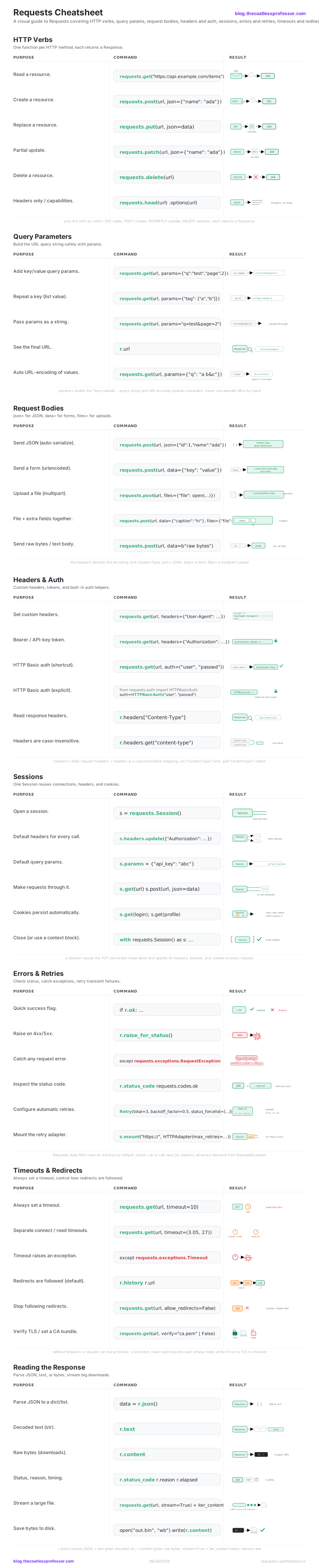
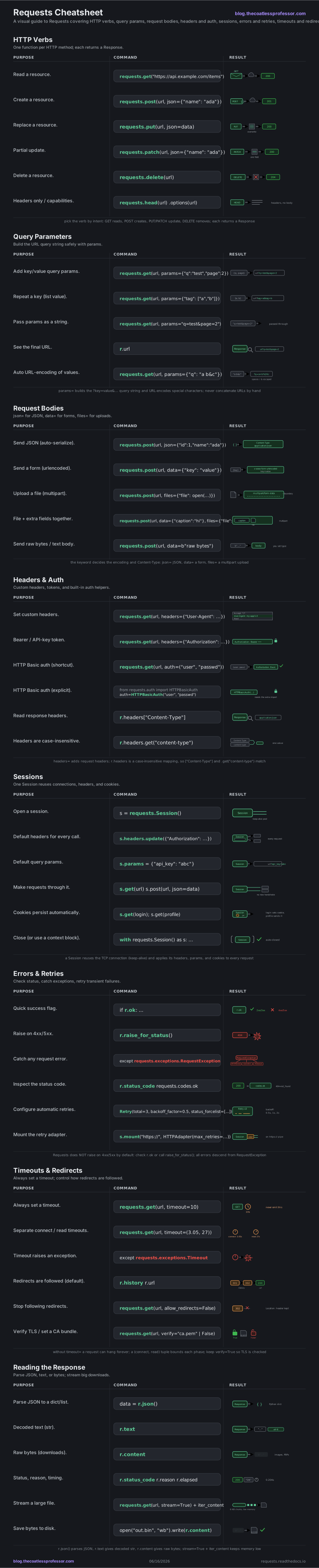
Requests is the de-facto standard library for human-friendly HTTP in Python. The mental model is a single round trip: you build a request (a verb plus a URL, with optional params, body, headers, and auth), send it along a gray arrow to a server, and get back a Response object you inspect. Every top-level call (requests.get, requests.post, and friends) returns that same Response, and its status code tells you the class of the result: green for 2xx success, amber for 3xx redirects, red for 4xx/5xx errors. This cheatsheet walks the eight stops of the daily workflow in the order you meet them: fire a verb, attach query params, send a body, set headers and auth, reuse a Session, handle errors and retries, control timeouts and redirects, then read the Response. Throughout, assume import requests; a few rows add their own import, shown inline.
HTTP Verbs
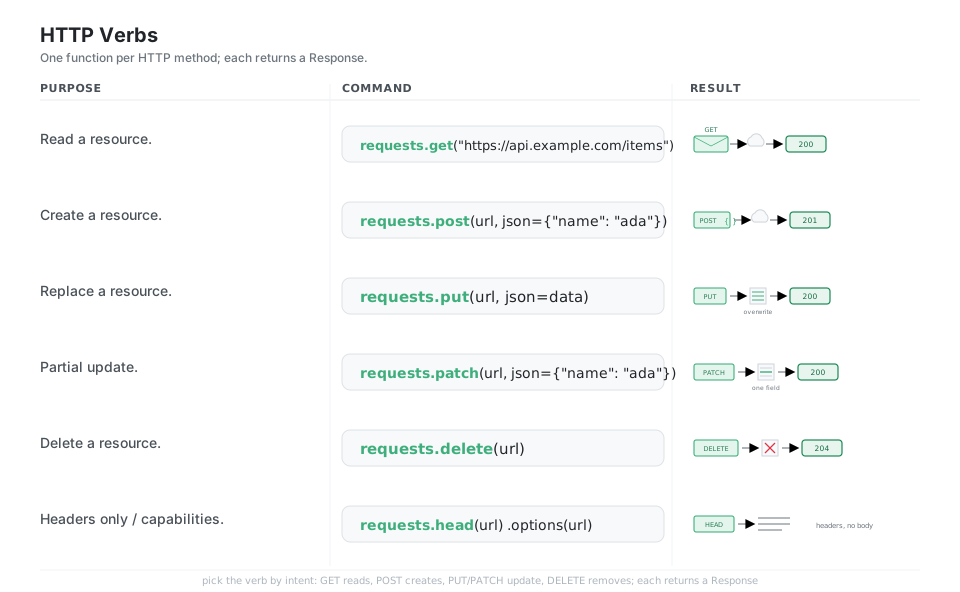
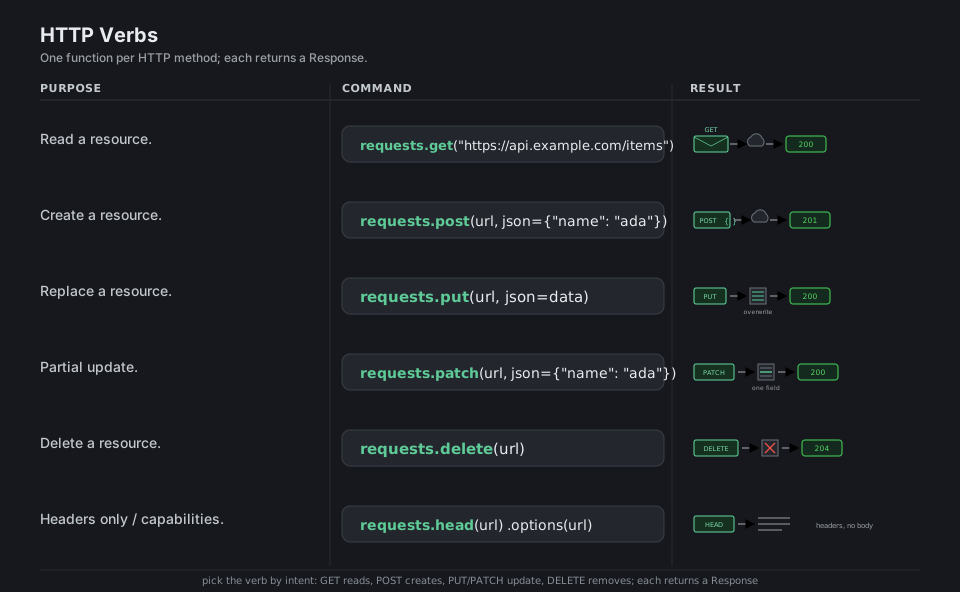
Every HTTP exchange is a method (GET, POST, PUT, PATCH, DELETE) sent to a URL, and Requests gives you one top-level function per method that returns a Response object you can inspect. Pick the verb by intent: GET reads, POST creates, PUT/PATCH update, and DELETE removes; HEAD and OPTIONS ask only about headers and capabilities.
import requests

requests.get("https://api.example.com/items")        # read a resource -> Response 200
requests.post(url, json={"name": "ada"})             # create a resource -> 201
requests.put(url, json=data)                         # replace a resource -> 200
requests.patch(url, json={"name": "ada"})            # partial update -> 200
requests.delete(url)                                 # delete a resource -> 204
requests.head(url)   requests.options(url)           # headers only / capabilities
See docs.
Query Parameters
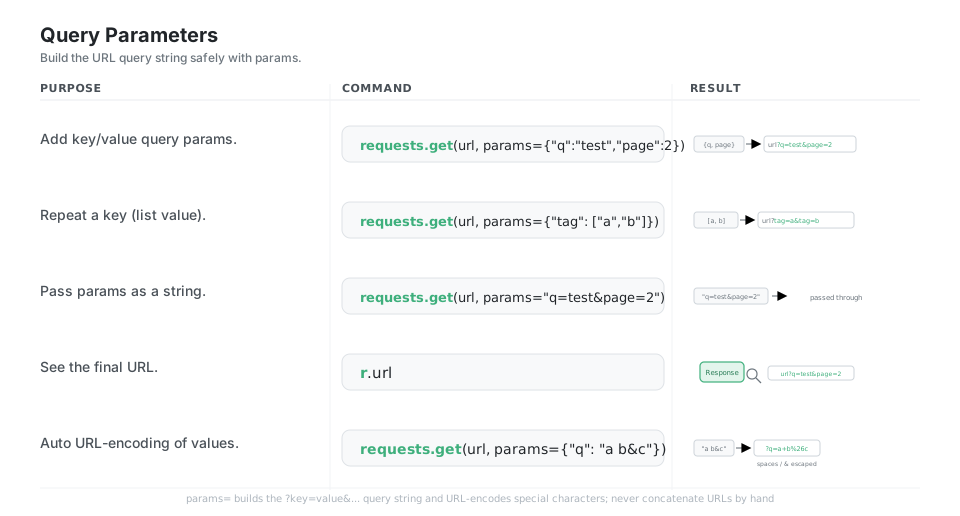
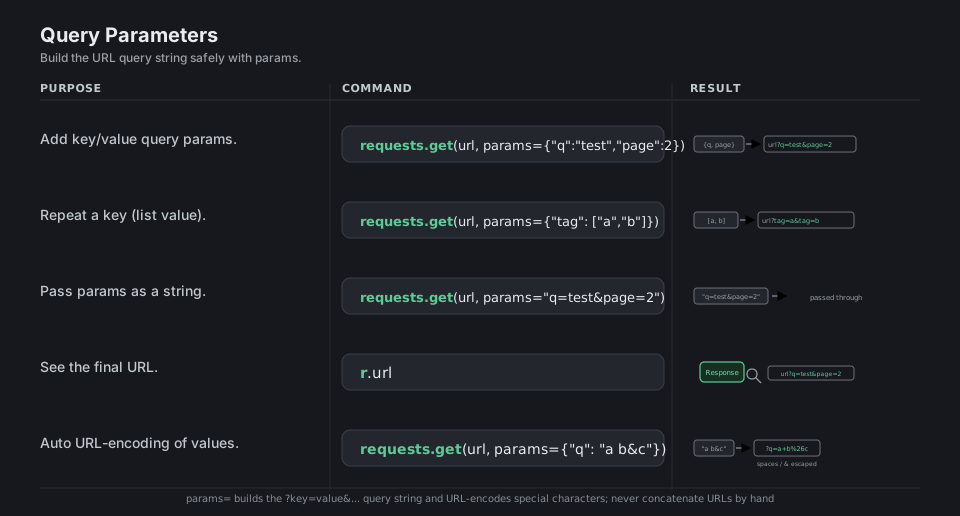
Pass params= a dict (or list of pairs) and Requests builds the ?key=value&... query string for you, URL-encoding spaces, &, and other special characters so you never concatenate URLs by hand. A list value repeats the key (tag=a&tag=b), and r.url shows you the exact URL that was sent.
import requests

requests.get(url, params={"q": "test", "page": 2})   # -> ...?q=test&page=2
requests.get(url, params={"tag": ["a", "b"]})        # list repeats key -> ...?tag=a&tag=b
requests.get(url, params="q=test&page=2")            # pass a raw string through
r.url                                                # the final, fully encoded URL
requests.get(url, params={"q": "a b&c"})             # auto-encode -> ...?q=a+b%26c
See docs.
Request Bodies
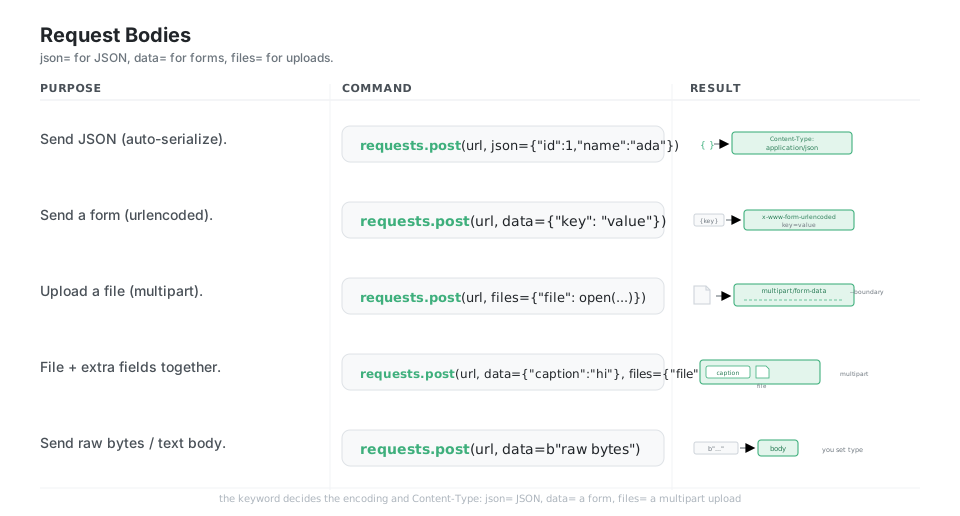
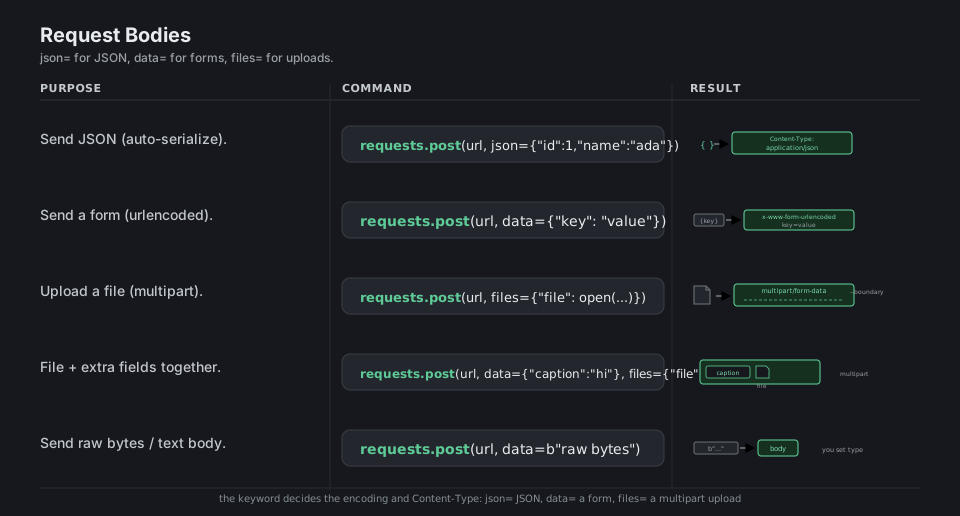
The keyword you choose decides how the body is encoded and which Content-Type is set: json= serializes a dict to JSON, data= sends an HTML-style URL-encoded form, and files= sends a multipart/form-data upload. You can combine data= and files= in one multipart request, or pass raw bytes/str to data= when you want to set the Content-Type yourself.
import requests

requests.post(url, json={"id": 1, "name": "ada"})    # JSON -> Content-Type: application/json
requests.post(url, data={"key": "value"})            # form -> application/x-www-form-urlencoded
requests.post(url, files={"file": open("a.png", "rb")})  # upload -> multipart/form-data
requests.post(url, data={"caption": "hi"}, files={"file": f})  # file + extra fields together
requests.post(url, data=b"raw bytes")                # raw body; you set Content-Type
See docs.
Headers & Auth
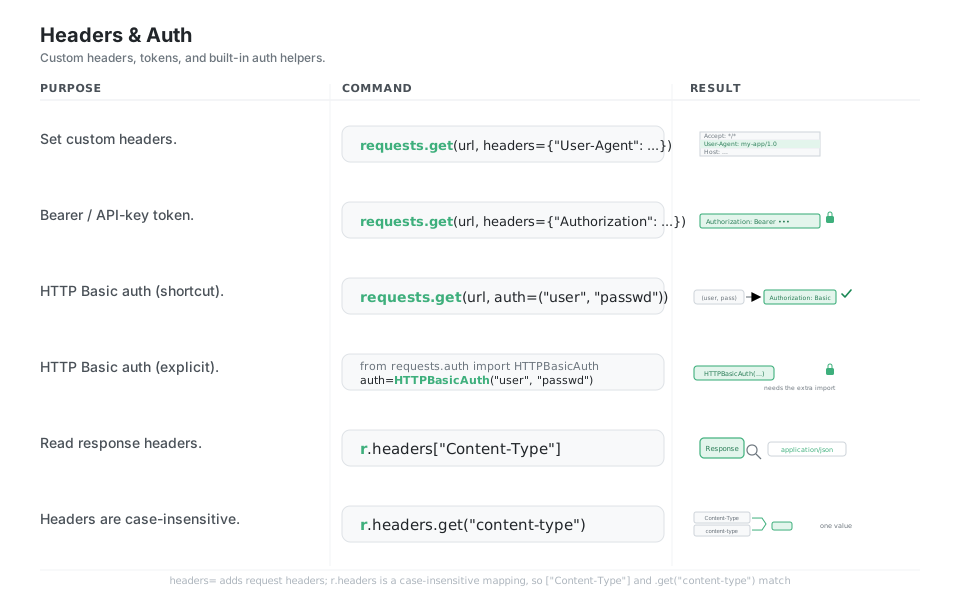
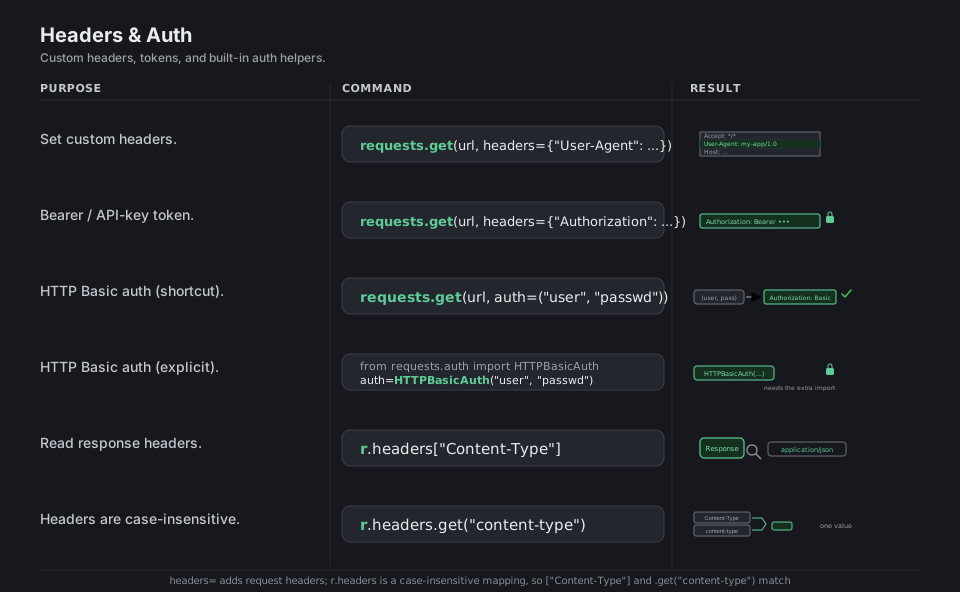
Add or override request headers with a headers= dict; the most common one is Authorization, either a Bearer token you set by hand or HTTP Basic credentials passed as a simple auth=("user", "pass") tuple. Response headers come back in r.headers, a case-insensitive mapping, so r.headers["Content-Type"] and r.headers.get("content-type") are the same lookup.
import requests
from requests.auth import HTTPBasicAuth

requests.get(url, headers={"User-Agent": "my-app/1.0"})         # set custom headers
requests.get(url, headers={"Authorization": "Bearer TOKEN"})    # bearer / API-key token
requests.get(url, auth=("user", "passwd"))                      # HTTP Basic auth (shortcut)
requests.get(url, auth=HTTPBasicAuth("user", "passwd"))         # HTTP Basic auth (explicit)
r.headers["Content-Type"]                                       # read a response header
r.headers.get("content-type")                                   # case-insensitive lookup
See docs.
Sessions
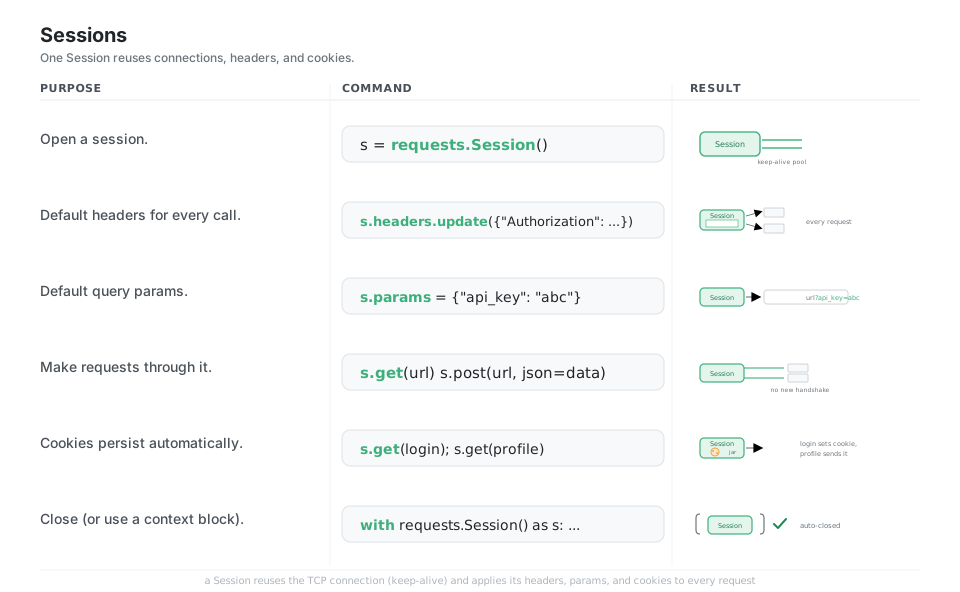
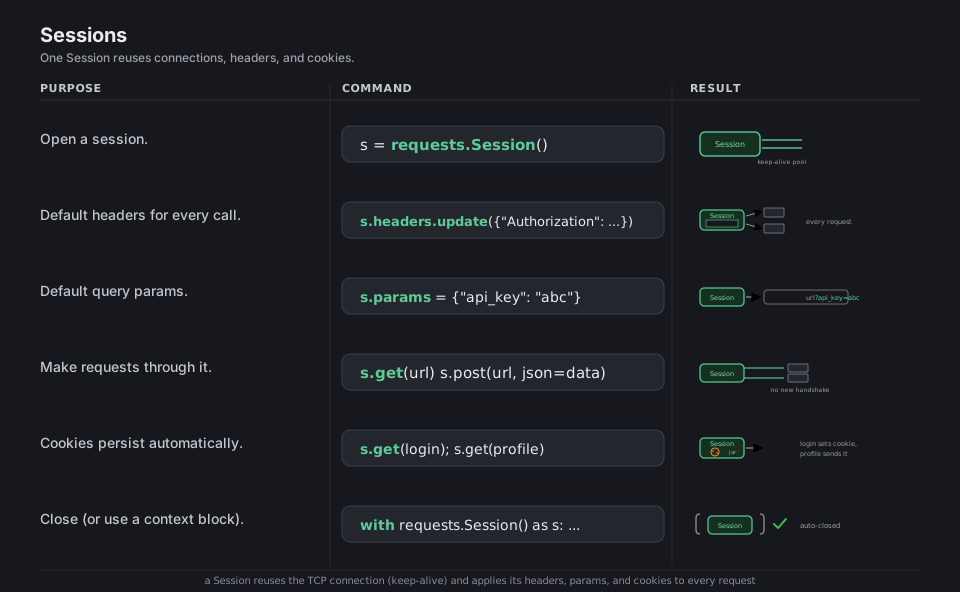
A requests.Session() persists settings across calls and, crucially, reuses the underlying TCP connection (keep-alive) so repeated requests to the same host are much faster. Headers set on s.headers, params on s.params, and any cookies the server sets are automatically applied to every subsequent request, which is why a Session is the right tool for talking to one API repeatedly.
import requests

s = requests.Session()                              # keep-alive connection pool
s.headers.update({"Authorization": "Bearer TOKEN"}) # default headers for every call
s.params = {"api_key": "abc"}                       # default query params
s.get(url)   s.post(url, json=data)                 # requests through it (no new handshake)
s.get(login_url); s.get(profile_url)                # cookies persist automatically
with requests.Session() as s:                       # close via a context block
    ...
See docs.
Errors & Retries
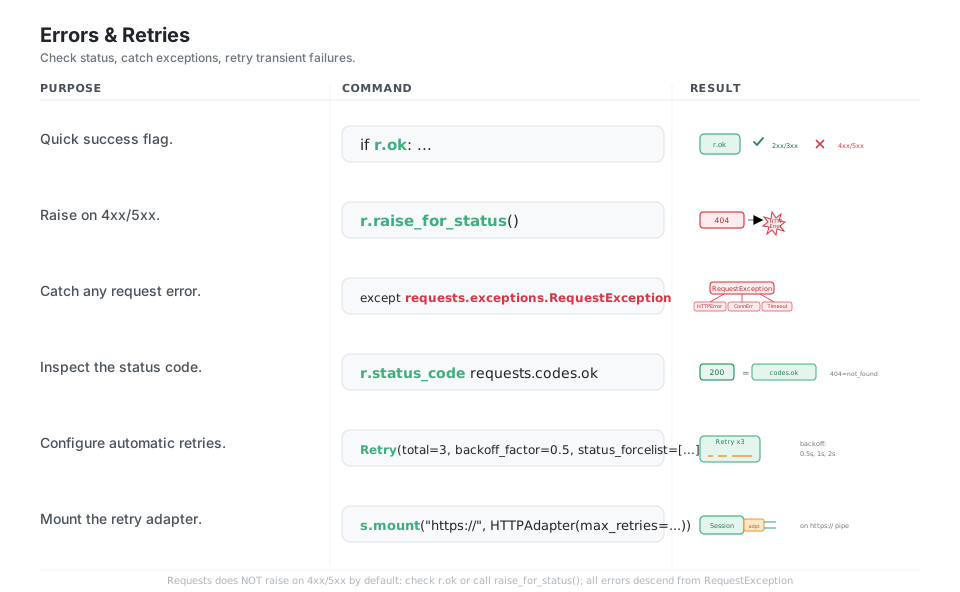
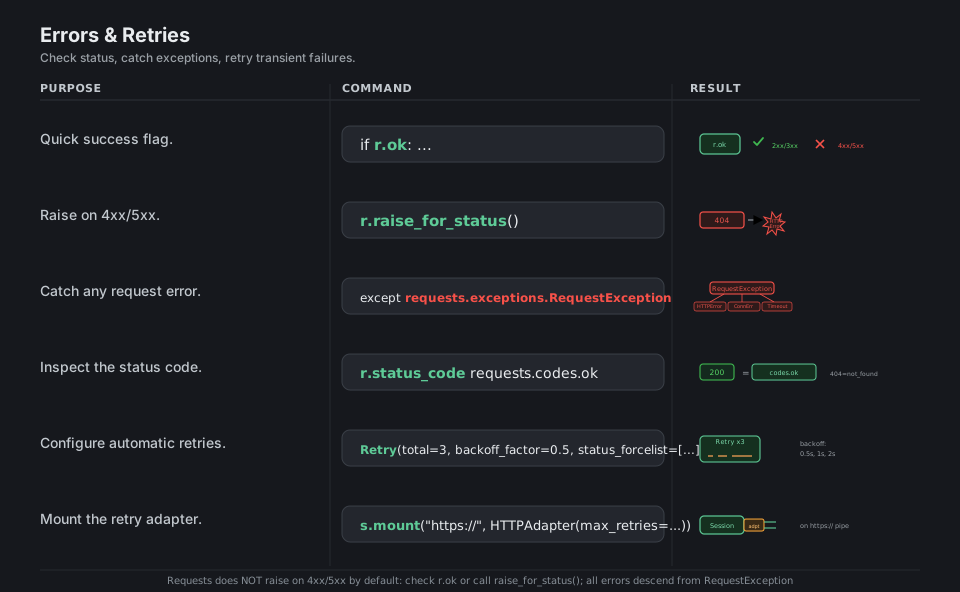
Requests does not raise on a 404 or 500 by default, so you either check r.ok/r.status_code yourself or call r.raise_for_status() to turn a bad status into an HTTPError. All Requests exceptions descend from requests.exceptions.RequestException, and transient failures (connection resets, 429, 5xx) are best handled by mounting an HTTPAdapter with a urllib3 Retry policy that backs off between attempts.
import requests
from requests.adapters import HTTPAdapter
from urllib3.util.retry import Retry

if r.ok: ...                                          # quick success flag (True for < 400)
r.raise_for_status()                                 # raise HTTPError on 4xx/5xx
except requests.exceptions.RequestException:         # catch any request error
    ...
r.status_code   requests.codes.ok                    # 200; codes.ok == 200, not_found == 404
retry = Retry(total=3, backoff_factor=0.5, status_forcelist=[429, 500, 502, 503, 504])
s.mount("https://", HTTPAdapter(max_retries=retry))  # mount the retry adapter
See docs.
Timeouts & Redirects
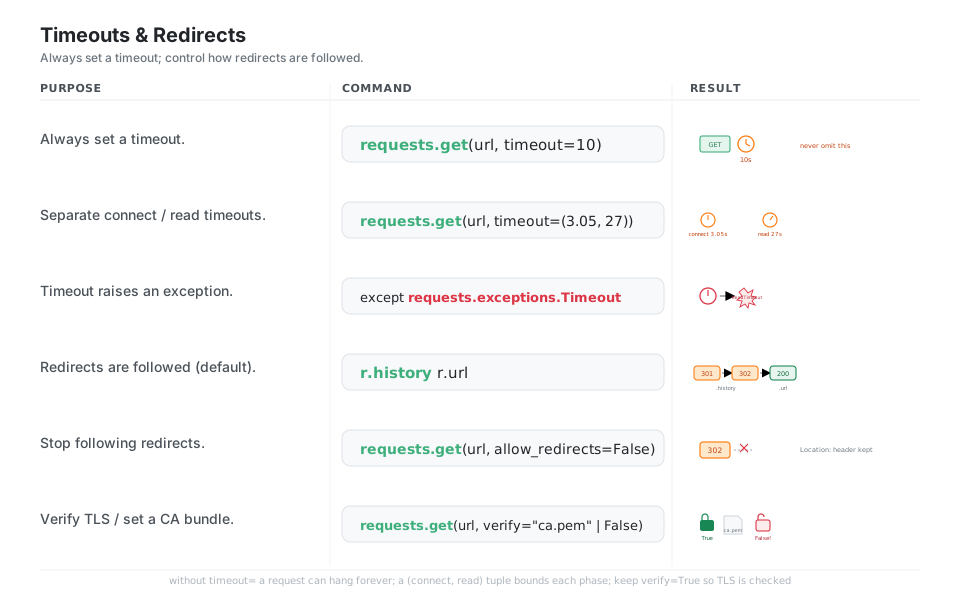
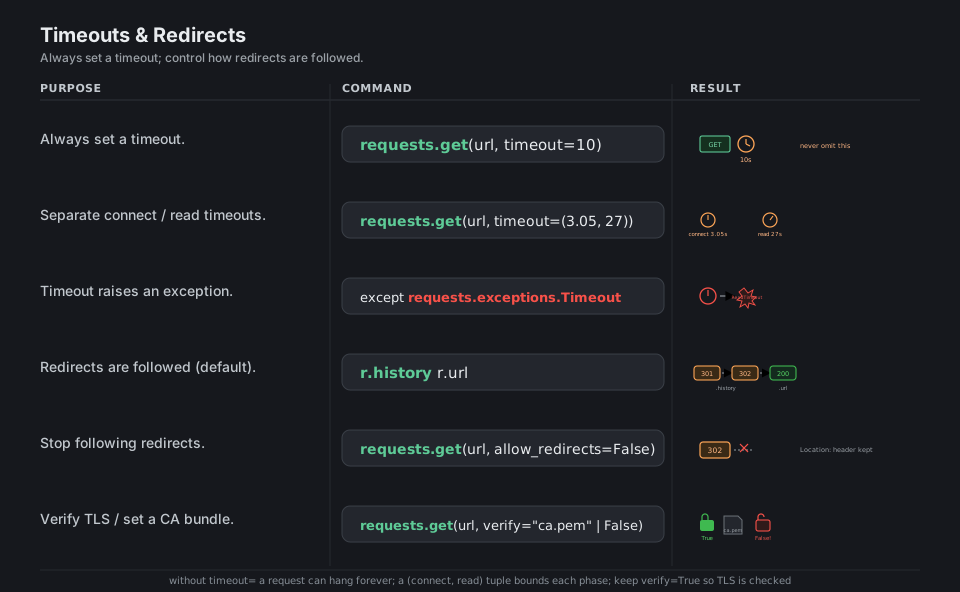
Without timeout=, a request can hang forever, so always set one; a single number bounds the whole wait, while a (connect, read) tuple bounds the handshake and the response-read separately, and a breach raises ConnectTimeout or ReadTimeout. Requests follows 3xx redirects automatically (the hops land in r.history and the final address in r.url); set allow_redirects=False to stop, and keep verify=True so TLS certificates are checked.
import requests

requests.get(url, timeout=10)                        # always set a timeout (whole wait)
requests.get(url, timeout=(3.05, 27))                # separate connect / read timeouts
except requests.exceptions.Timeout:                  # ConnectTimeout / ReadTimeout
    ...
r.history   r.url                                     # redirect chain 301 -> 302 -> 200
requests.get(url, allow_redirects=False)             # stop following 3xx
requests.get(url, verify="/path/ca.pem")             # set a CA bundle; verify=False disables TLS
See docs.
Reading the Response
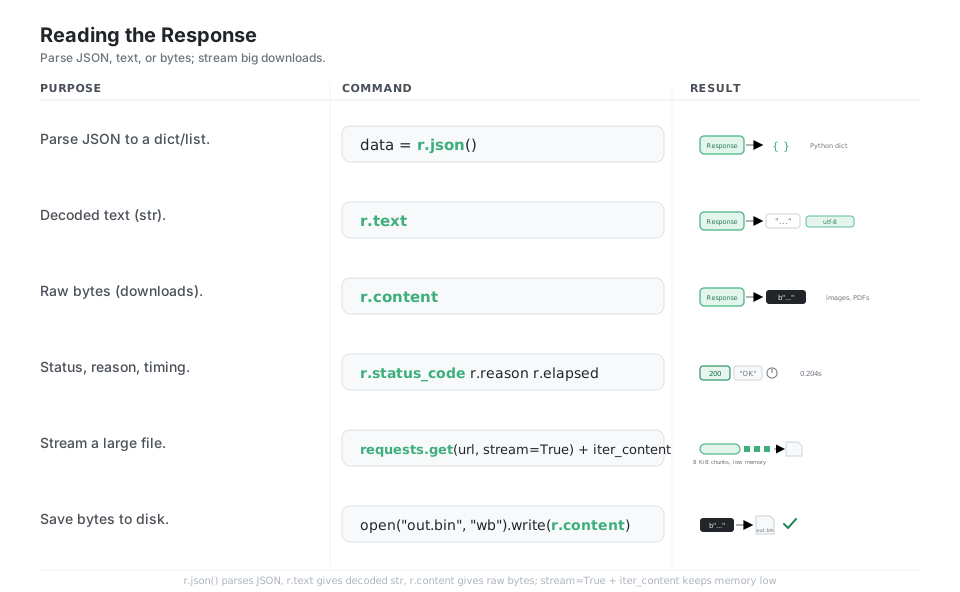
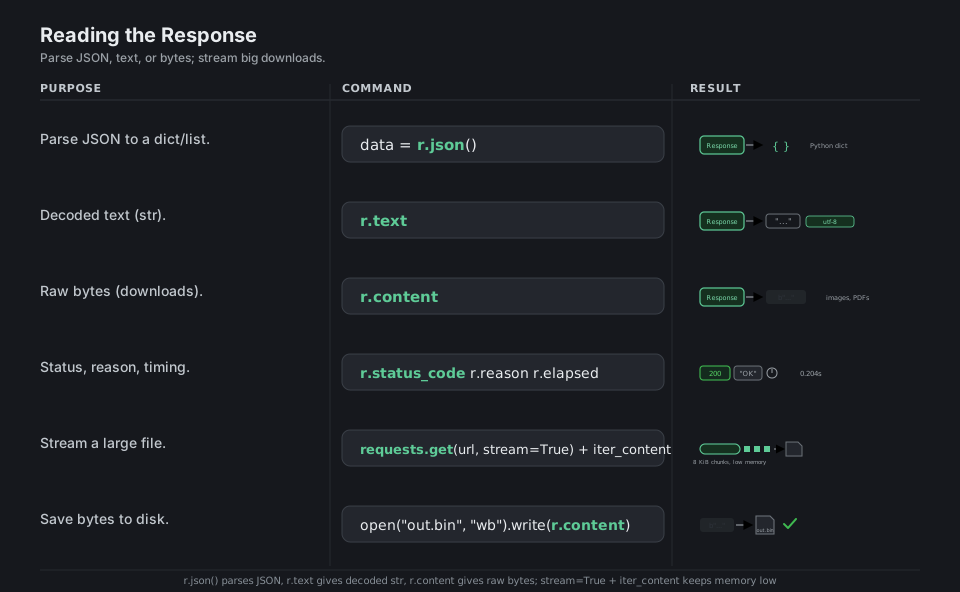
A Response exposes the body three ways: r.json() parses JSON into Python objects, r.text gives decoded str using the detected encoding, and r.content gives the raw bytes you need for images or other binaries. For large downloads, pass stream=True and consume r.iter_content(chunk_size=...) so the file never has to fit in memory at once.
import requests

data = r.json()                                      # parse JSON to a dict/list
r.text                                               # decoded text (str), encoding utf-8
r.content                                            # raw bytes (images, PDFs, binaries)
r.status_code   r.reason   r.elapsed                 # 200, "OK", 0.204s
requests.get(url, stream=True)                       # stream a large file
r.iter_content(8192)                                 # consume 8 KiB chunks, low memory
open("out.bin", "wb").write(r.content)               # save bytes to disk
See docs.
Quick Reference
| Command | What it does | Area |
|---|---|---|
requests.get(url) |
Read a resource (GET) | Verbs |
requests.post(url, json=...) |
Create with a JSON body | Verbs |
requests.put / patch / delete |
Update / partial-update / remove | Verbs |
params={"q": "x"} |
Build the ?... query string |
Params |
json={...} |
JSON body + application/json |
Body |
data={...} |
URL-encoded form body | Body |
files={"file": f} |
Multipart file upload | Body |
headers={...} |
Custom request headers | Headers |
auth=("user", "pass") |
HTTP Basic auth | Auth |
requests.Session() |
Reuse conn, headers, cookies | Session |
r.raise_for_status() |
Raise on 4xx/5xx | Errors |
timeout=10 / (3.05, 27) |
Bound the wait (always set it) | Timeout |
allow_redirects=False |
Stop following 3xx | Redirects |
r.json() / r.text / r.content |
Parsed / text / raw body | Response |
stream=True + iter_content |
Chunked large download | Response |
| Attribute | Type | Meaning |
|---|---|---|
r.status_code |
int |
Numeric status, e.g. 200 |
r.ok |
bool |
True for < 400 |
r.reason |
str |
Textual status, e.g. "OK" |
r.json() |
dict/list |
Body parsed as JSON |
r.text |
str |
Body decoded with r.encoding |
r.content |
bytes |
Raw body bytes |
r.headers |
mapping | Case-insensitive response headers |
r.url |
str |
Final URL (after redirects) |
r.history |
list |
Redirect chain (each a Response) |
r.elapsed |
timedelta |
Round-trip time |
r.cookies |
jar | Cookies set by the server |
| Class | Range | Meaning | Color cue |
|---|---|---|---|
| 2xx | 200 to 299 | Success | green |
| 3xx | 300 to 399 | Redirect | amber |
| 4xx | 400 to 499 | Client error (your request) | red |
| 5xx | 500 to 599 | Server error (their side) | red |
| Exception | Raised when |
|---|---|
RequestException |
Base class, catch this to catch everything |
ConnectionError |
DNS failure, refused connection, network down |
Timeout (ConnectTimeout, ReadTimeout) |
timeout= exceeded |
HTTPError |
raise_for_status() on a 4xx/5xx |
TooManyRedirects |
Redirect loop exceeded the limit |
JSONDecodeError |
r.json() on a non-JSON body |
Appendix: Sample Code
The request to Response mental model
import requests

r = requests.get("https://httpbin.org/get", params={"q": "test"}, timeout=10)

r.status_code        # 200
r.ok                 # True
r.url                # 'https://httpbin.org/get?q=test'
r.headers["Content-Type"]   # 'application/json'
r.json()["args"]     # {'q': 'test'}  -> server echoed our query param
Sending the three body kinds
import requests

url = "https://httpbin.org/post"

# JSON body  -> Content-Type: application/json
requests.post(url, json={"id": 1, "name": "ada"}, timeout=10)

# Form body  -> Content-Type: application/x-www-form-urlencoded
requests.post(url, data={"key": "value"}, timeout=10)

# File upload -> Content-Type: multipart/form-data
with open("photo.png", "rb") as f:
    requests.post(url, files={"file": f}, timeout=10)
A reusable Session with a retry policy
This is the pattern to copy for any real API client: one Session, default headers, and automatic backoff on transient failures.
import requests
from requests.adapters import HTTPAdapter
from urllib3.util.retry import Retry

def make_session(token: str) -> requests.Session:
    s = requests.Session()
    s.headers.update({
        "Authorization": f"Bearer {token}",
        "User-Agent": "my-app/1.0",
    })
    retry = Retry(
        total=3,                 # up to 3 retries
        backoff_factor=0.5,      # waits 0.5s, 1s, 2s between tries
        status_forcelist=[429, 500, 502, 503, 504],
        allowed_methods={"GET", "POST", "PUT", "PATCH", "DELETE"},
    )
    adapter = HTTPAdapter(max_retries=retry)
    s.mount("https://", adapter)
    s.mount("http://", adapter)
    return s

with make_session("TOKEN") as s:
    r = s.get("https://httpbin.org/get", timeout=10)
    r.raise_for_status()
    print(r.json()["headers"]["User-Agent"])   # 'my-app/1.0'
Robust error handling
import requests

try:
    r = requests.get("https://httpbin.org/status/503", timeout=(3.05, 10))
    r.raise_for_status()                 # turns 4xx/5xx into HTTPError
    data = r.json()
except requests.exceptions.Timeout:
    print("timed out, server too slow")
except requests.exceptions.ConnectionError:
    print("could not reach the server")
except requests.exceptions.HTTPError as e:
    print(f"bad status: {e.response.status_code}")
except requests.exceptions.JSONDecodeError:
    print("response was not JSON")
Streaming a large download to disk
import requests

url = "https://httpbin.org/bytes/100000"   # ~100 KiB of random bytes

with requests.get(url, stream=True, timeout=30) as r:
    r.raise_for_status()
    with open("download.bin", "wb") as f:
        for chunk in r.iter_content(chunk_size=8192):   # 8 KiB at a time
            f.write(chunk)
# The full body never has to fit in memory at once.
References
Requests documentation
- Requests documentation home, the quickstart, and advanced usage
- Authentication and the developer interface (
Response,Session, exceptions) - Per-section guides: HTTP verbs, query parameters, request bodies, sessions, errors and exceptions, timeouts, and response content
- Installation
Project and standards
- Requests on PyPI and Requests on GitHub
- urllib3
Retry(the retry policy used in Errors & Retries) - httpbin (the echo service used to verify every command)
- MDN references: HTTP methods and HTTP response status codes