Rich is the library for beautiful, expressive output in the terminal. Instead of fighting raw ANSI escape codes, you describe what you want with a BBCode-style markup ("[bold red]error[/]") and hand structured objects (a Table, a Tree, a Panel, a Progress bar) to a single sink that measures, colors, and draws them as crisp boxed frames. The recurring mental model in this sheet is one picture: a Console object on the left is the single output sink, and every renderable (a markup string, a grid, a tree, a box, a bar, highlighted code, a live view) flows along a gray arrow into that console and lands as a rounded terminal frame on the right. Where this looks like a plotting or app-building tool, the contrast is the point: Rich is not a plotting library (it draws bar-like progress and tables in text, not figures), it is not a full TUI framework (that is Textual, Rich’s sibling, for interactive apps), and it is not a logging framework (it is a handler you plug into the stdlib logging module). The conventional imports are from rich import print for a markup-aware drop-in and from rich.console import Console; console = Console() for everything else, and everything here is Rich v15.


Print, Markup and Styles
Import Rich’s print and it becomes a drop-in replacement for the builtin that pretty-prints containers and understands a BBCode-style markup, so "[bold red]error[/]" renders the word error bold and red without any escape codes by hand. Reach for a Console().print(..., style=...) or build a Text object with .stylize(...) when you want a style applied programmatically, and use rich.markup.escape when a string might contain literal square brackets.
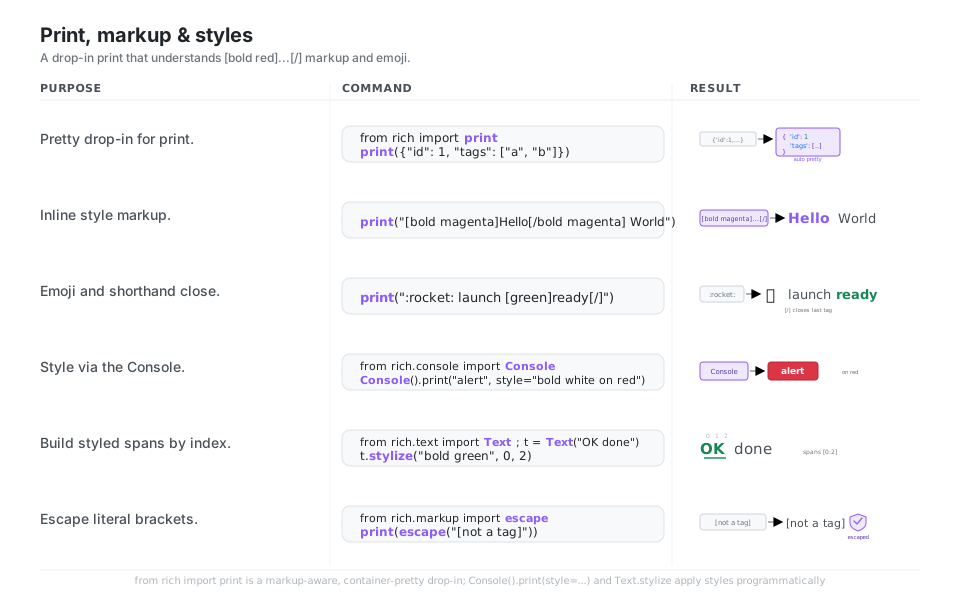
[bold red]...[/] and emoji.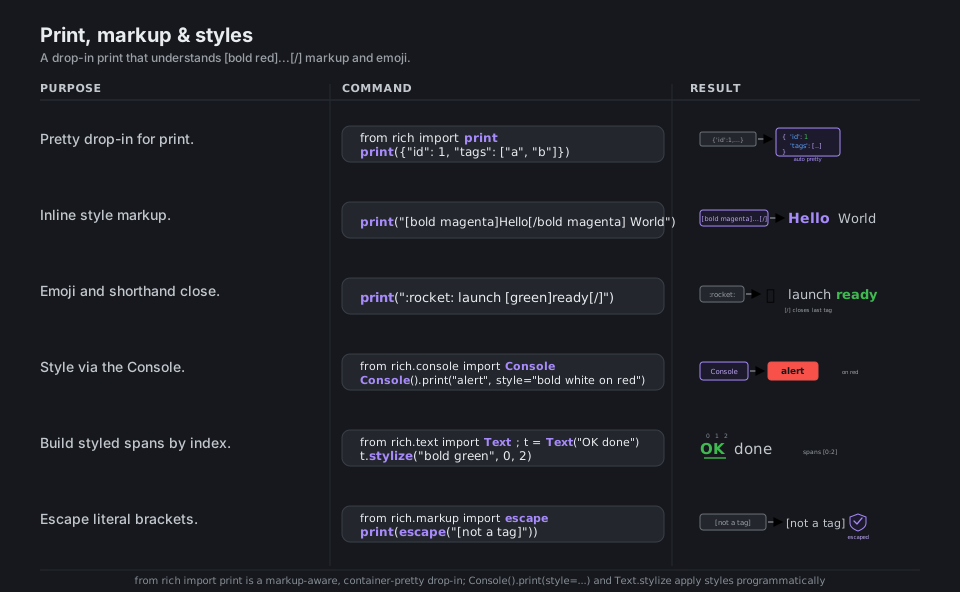
[bold red]...[/] and emoji.from rich import print
print({"id": 1, "tags": ["a", "b"]}) # auto pretty-prints containers
print("[bold magenta]Hello[/bold magenta] World") # inline style markup
print(":rocket: launch [green]ready[/]") # emoji + [/] closes last tag
from rich.console import Console
Console().print("alert", style="bold white on red") # style the whole output
from rich.text import Text
t = Text("OK done"); t.stylize("bold green", 0, 2) # style spans by index
from rich.markup import escape
print(escape("[not a tag]")) # print literal bracketsSee Console markup and Styles. Close the most recent tag with the shorthand [/].
Tables
A Table is the workhorse: construct it, declare columns with add_column (each can set justification, color, and wrapping), feed rows with add_row, then hand the whole object to console.print, which measures the content and draws an aligned, bordered grid for you. Table.grid() is the same engine with the borders off, which makes it the simplest way to lay out aligned label and value pairs or compose other renderables.
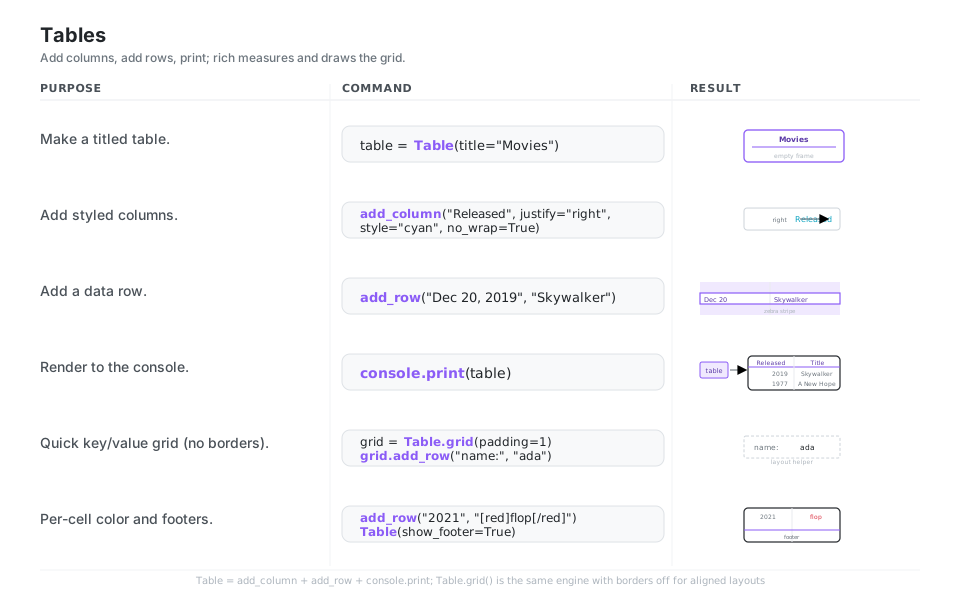
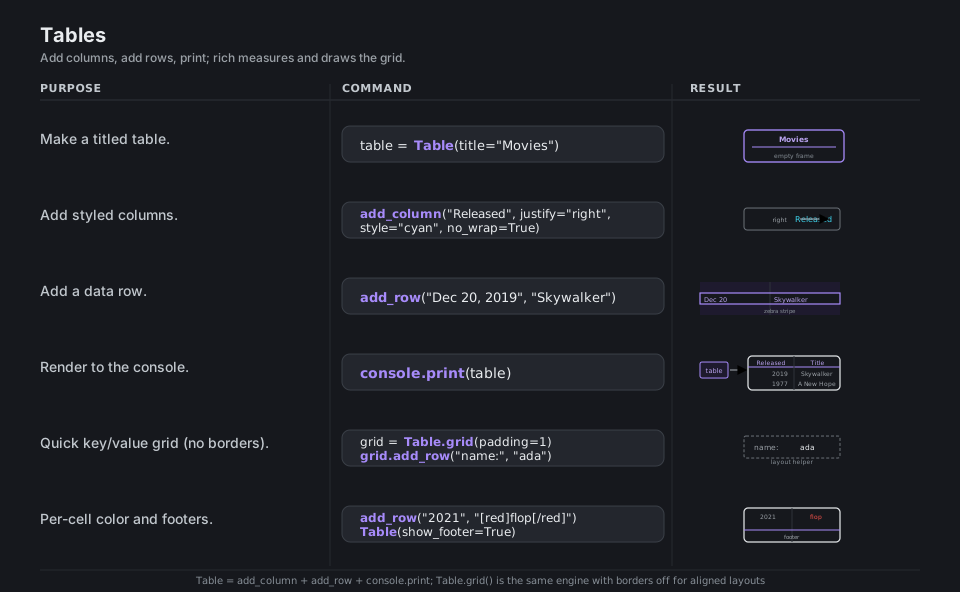
from rich.table import Table
table = Table(title="Movies")                       # a titled grid

table.add_column("Released", justify="right", style="cyan", no_wrap=True)
table.add_column("Title", style="magenta")          # styled columns
table.add_row("Dec 20, 2019", "The Rise of Skywalker")  # a data row
console.print(table)                                # measure + draw the grid

grid = Table.grid(padding=1); grid.add_row("name:", "ada")  # borderless layout
table.add_row("2021", "[red]flop[/red]")            # per-cell color
See Tables. Table.grid() is the same engine with the borders turned off.
Trees and Columns
A Tree models any hierarchy: start from a root label, and every .add(...) returns the new node so you can nest deeper by adding onto the returned branch, which is ideal for file listings, dependency graphs, or nested config. To place several renderables next to each other instead of stacked, wrap them in Columns, which flows them into balanced newspaper-style columns sized to the terminal width.
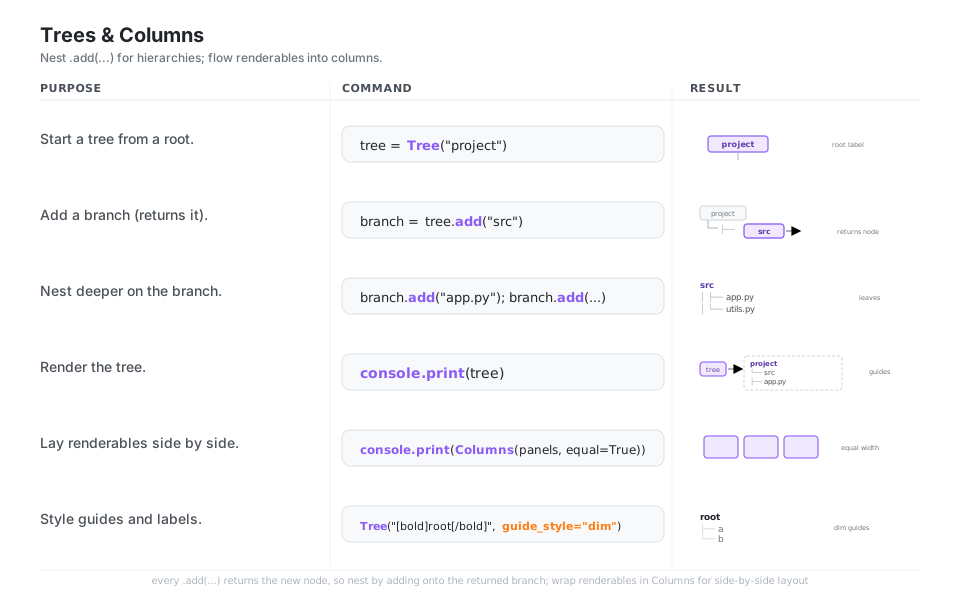
.add(...) for hierarchies; flow renderables into columns.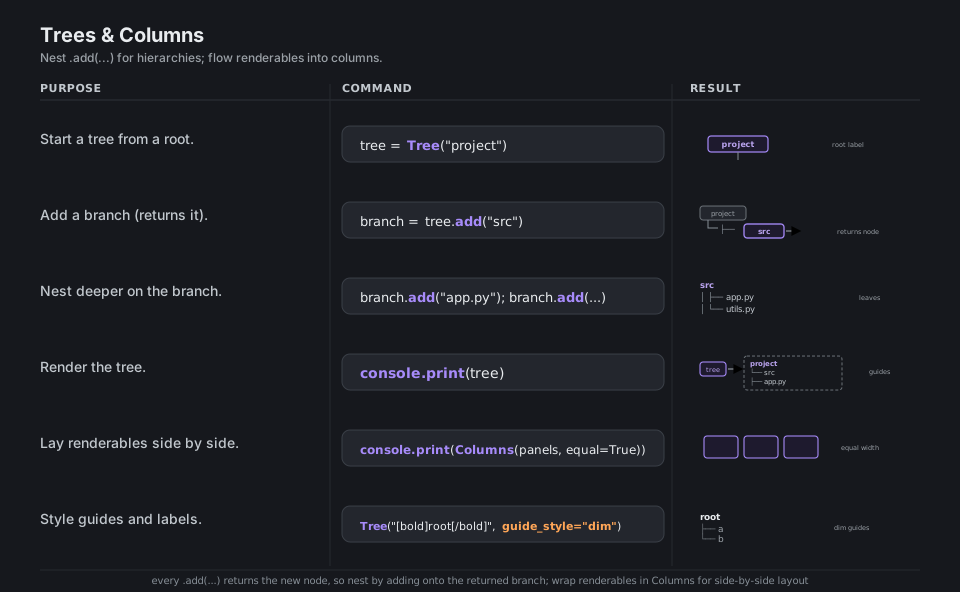
.add(...) for hierarchies; flow renderables into columns.from rich.tree import Tree
tree = Tree("project") # a root label
branch = tree.add("src") # add() returns the new branch
branch.add("app.py") # nest deeper on the returned node
branch.add("utils.py")
console.print(tree) # draw the indented guide lines
from rich.columns import Columns
console.print(Columns(panels, equal=True)) # side-by-side renderables
Tree("[bold]root[/bold]", guide_style="dim") # style the guide linesSee Tree and Columns. Each .add(...) returns the node so you can keep nesting.
Panels and Layout
A Panel draws a titled, rounded box around any renderable (text, a table, a tree), and Panel.fit shrinks the box to the content instead of the full width; console.rule(...) draws a labeled horizontal divider. For a split screen, a Layout carves the terminal into named regions you grow with split_column and split_row and then address by name (layout["body"]), which is the skeleton for a Live dashboard.
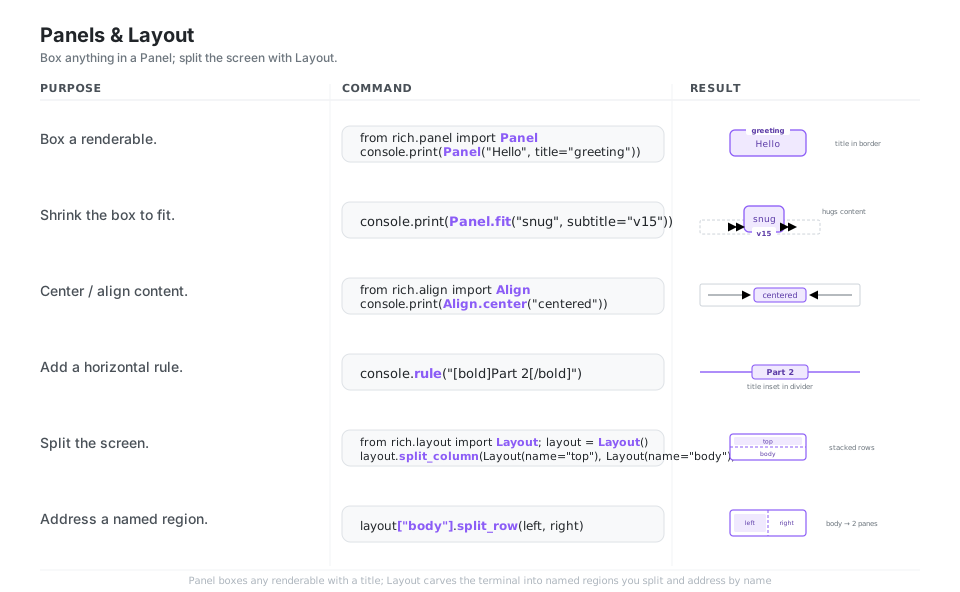
Panel; split the screen with Layout.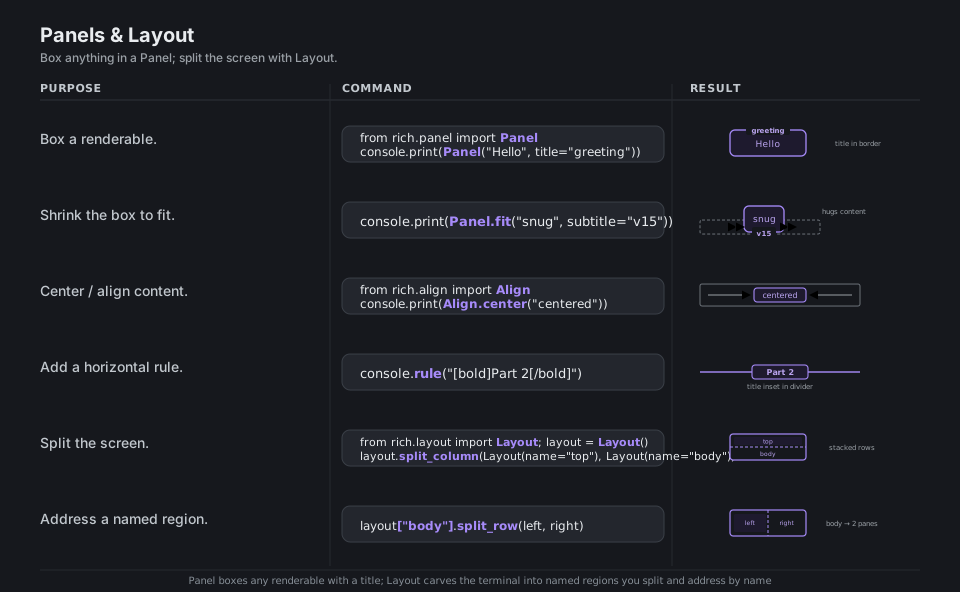
Panel; split the screen with Layout.from rich.panel import Panel
console.print(Panel("Hello", title="greeting")) # box a renderable
console.print(Panel.fit("snug", subtitle="v15")) # shrink the box to fit
from rich.align import Align
console.print(Align.center("centered")) # center content
console.rule("[bold]Part 2[/bold]") # a titled divider
from rich.layout import Layout
layout = Layout()
layout.split_column(Layout(name="top"), Layout(name="body")) # split the screen
layout["body"].split_row(Layout(name="left"), Layout(name="right")) # by nameSee Panel and Layout. Address a named region with layout["body"].
Progress Bars and Spinners
The fastest win is track(iterable, description=...), which wraps any loop in a live progress bar; for more control, a Progress object lets you compose columns (spinner, bar, counts, time remaining) and drive one or more tasks by hand with add_task and update(..., advance=...). When the work has no measurable total, console.status(...) shows a transient spinner that disappears when the block exits.
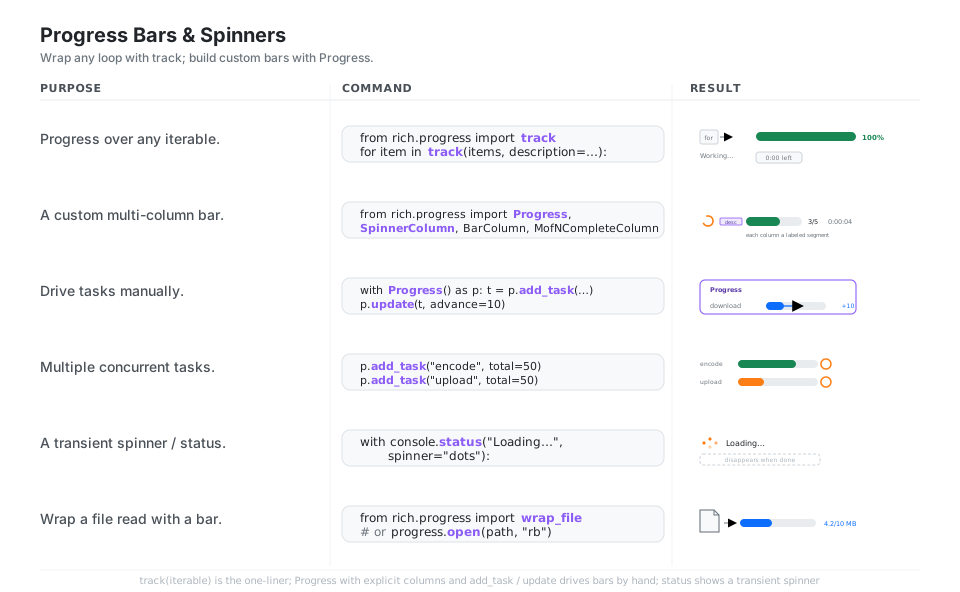
track; build custom bars with Progress.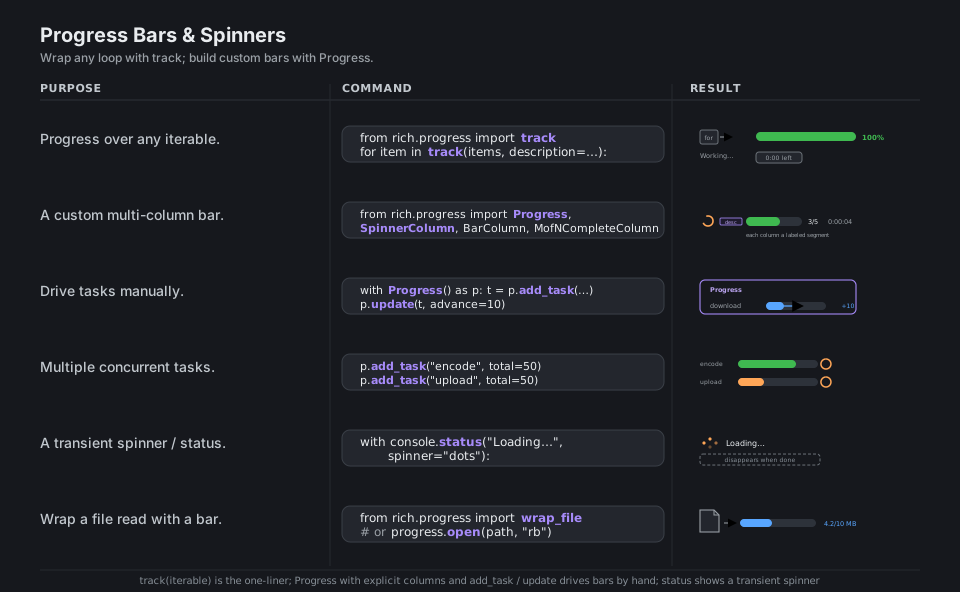
track; build custom bars with Progress.from rich.progress import track
for item in track(items, description="Working..."): # one-line loop bar
...
from rich.progress import Progress, SpinnerColumn, BarColumn, MofNCompleteColumn
with Progress() as p: # custom multi-column bar
t = p.add_task("download", total=100) # drive a task by hand
p.update(t, advance=10) # nudge the fill forward
p.add_task("encode", total=50) # multiple concurrent tasks
with console.status("Loading...", spinner="dots"): # transient spinner
...
from rich.progress import wrap_file # stream a file readSee Progress display. track is the one-liner; Progress gives you full column control.
Syntax and Pretty Tracebacks
Syntax runs your code through Pygments and renders it with a theme, line numbers, and highlighting, either from a string or with Syntax.from_path(...) straight from a file, and pretty.pprint and print_json give the same treatment to Python objects and JSON. The headline feature is traceback.install(), which replaces Python’s plain tracebacks with syntax-highlighted frames that can show local variables, making errors far easier to read.
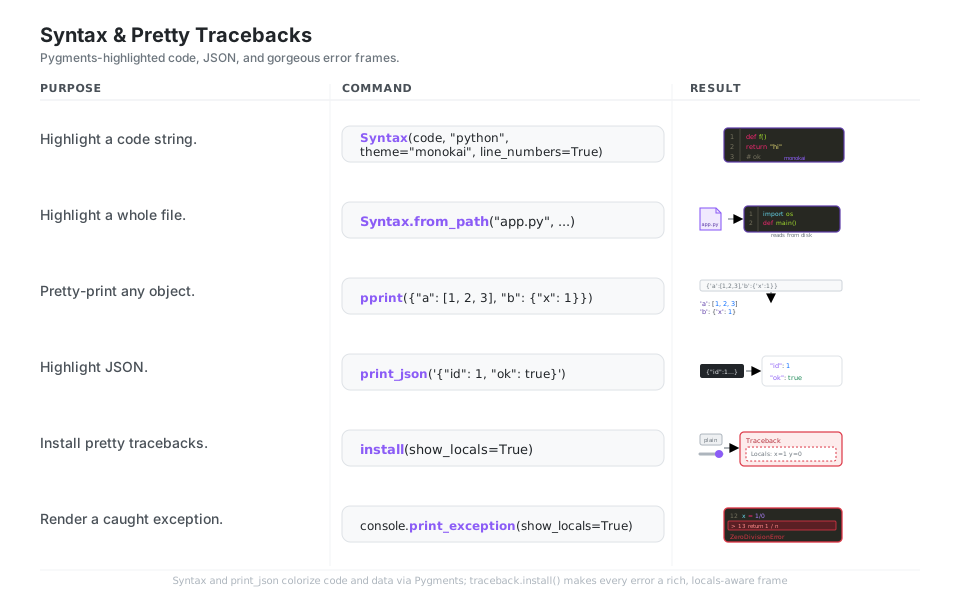
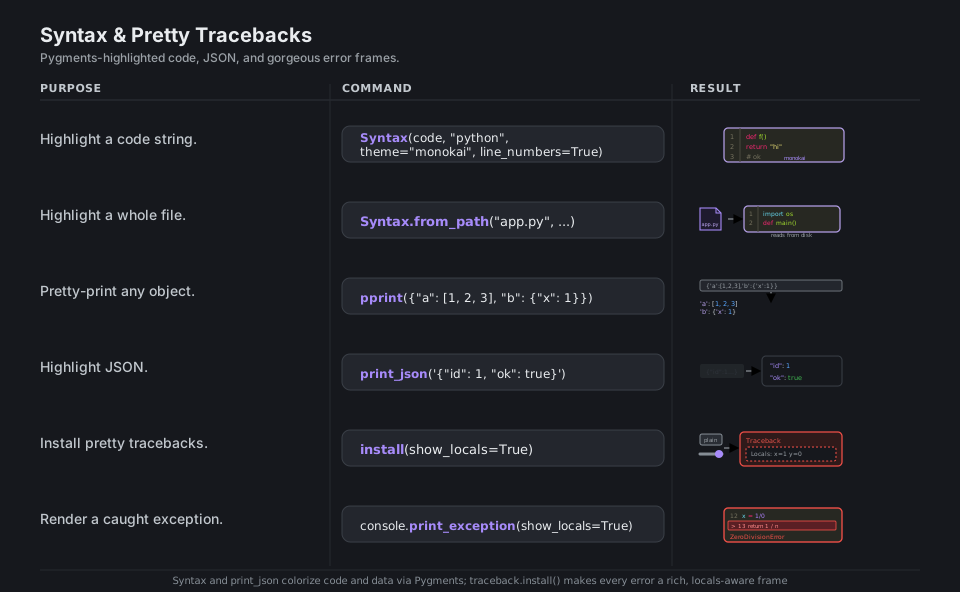
from rich.syntax import Syntax
console.print(Syntax(code, "python", theme="monokai", line_numbers=True))  # highlight
console.print(Syntax.from_path("app.py", line_numbers=True))   # read from disk

from rich.pretty import pprint
pprint({"a": [1, 2, 3], "b": {"x": 1}})            # color-coded object tree

from rich import print_json
print_json('{"id": 1, "ok": true}')               # highlighted JSON

from rich.traceback import install
install(show_locals=True)                          # pretty tracebacks everywhere
console.print_exception(show_locals=True)          # render the caught exception
See Syntax and Tracebacks. install(show_locals=True) shows locals on every error.
Live Updating Displays
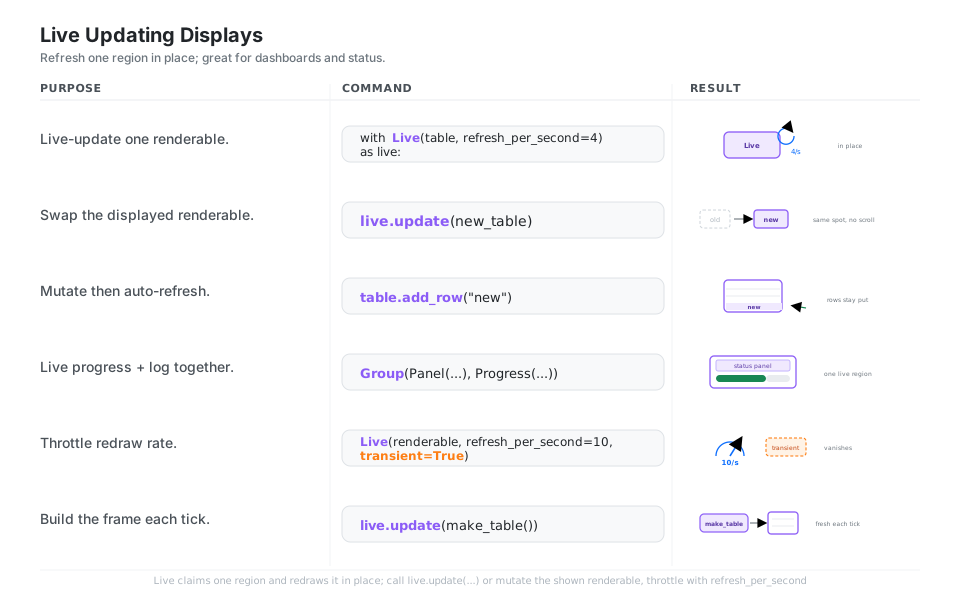
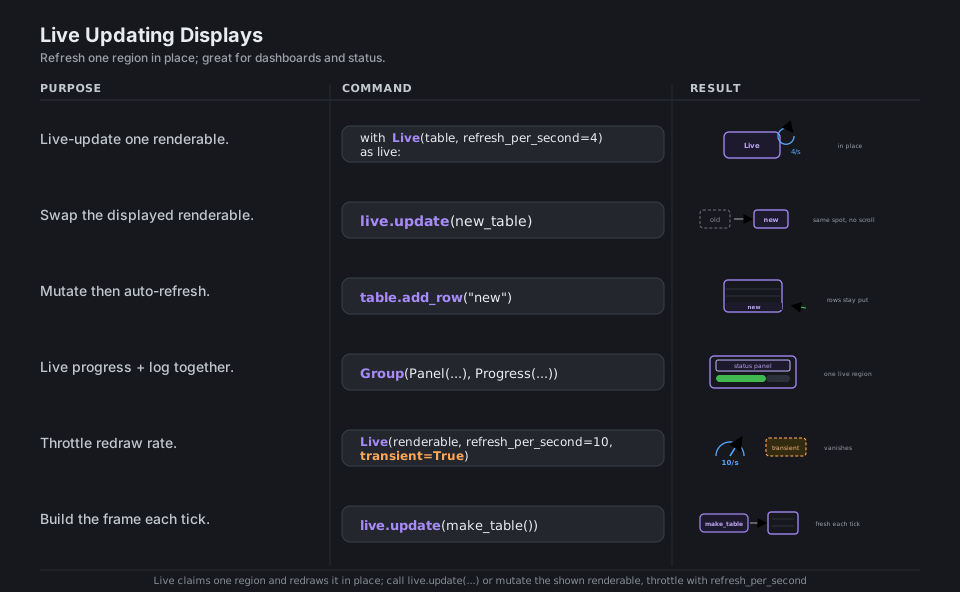
Live claims a region of the terminal and refreshes one renderable in place rather than scrolling, so you call live.update(new_renderable) (or mutate a table the Live is already showing) to redraw a dashboard, a growing table, or a status panel without spamming the screen. Tune refresh_per_second to throttle redraws and set transient=True when you want the region to vanish once the block ends.
from rich.live import Live
with Live(table, refresh_per_second=4) as live:    # update one region in place
    live.update(new_table)                         # swap the displayed renderable
    table.add_row("new")                           # or mutate; it auto-refreshes

from rich.console import Group
Live(Group(panel, progress))                       # a panel over a progress bar

Live(renderable, refresh_per_second=10, transient=True)  # throttle + vanish on exit
live.update(make_table())                          # build a fresh frame each tick
See Live display. transient=True makes the region vanish once the block ends.
Console and Logging Handler
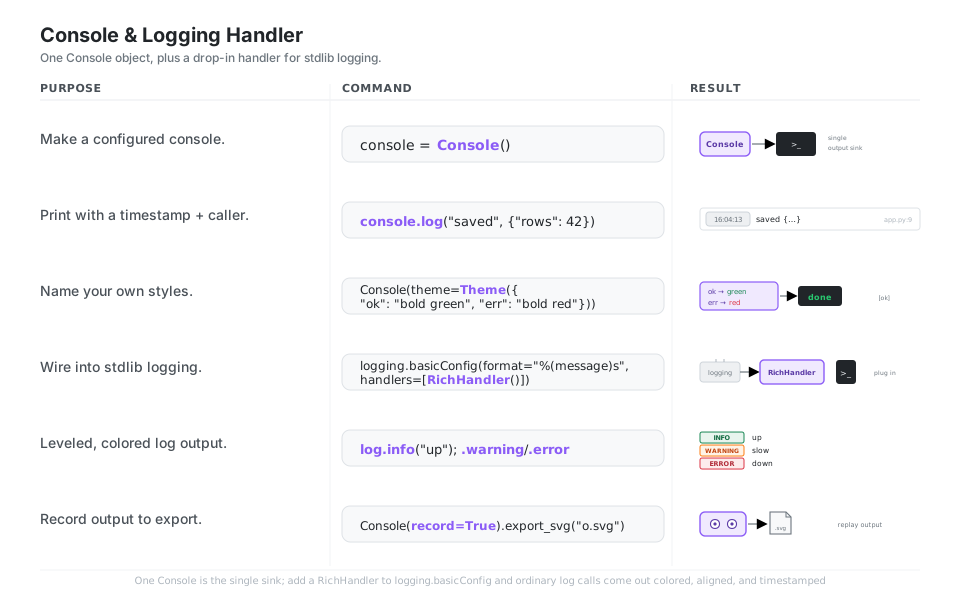
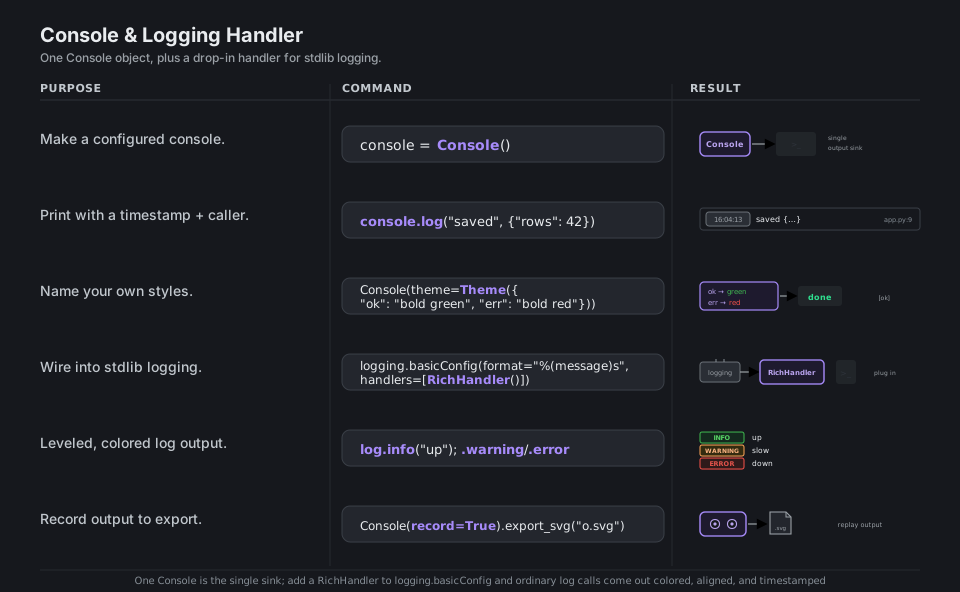
The Console object is the single output sink behind everything: it handles width detection, themes (name your own styles with Theme), console.log(...) with timestamps and caller info, and record=True so you can later export_text or export_svg. To bring Rich into an existing program, add a RichHandler to the standard library’s logging config and your ordinary log.info, log.warning, and log.error calls come out colored, aligned, and (optionally) with rich tracebacks.
from rich.console import Console
console = Console()                                # the single output sink

console.log("saved", {"rows": 42})                 # timestamp + caller file:line

from rich.theme import Theme
Console(theme=Theme({"ok": "bold green", "err": "bold red"}))  # named styles

import logging
from rich.logging import RichHandler
logging.basicConfig(level="INFO", format="%(message)s", handlers=[RichHandler()])
log = logging.getLogger("app")
log.info("up"); log.warning("slow"); log.error("down")  # leveled colored output

Console(record=True).export_svg("out.svg")         # capture and replay output
See Console API and Logging handler. Add a RichHandler to color stdlib logging.
Quick Reference
| Command | What it does | Area |
|---|---|---|
from rich import print |
Pretty, markup-aware drop-in print | |
print("[bold red]hi[/]") |
Inline style markup | |
Console().print(x, style=...) |
Print a renderable with a style | |
Table(); add_column; add_row |
Build and draw an aligned grid | Tables |
Table.grid() |
Borderless layout grid | Tables |
Tree("root"); branch = t.add(...) |
Nested hierarchy, branch returned | Trees |
Columns(items) |
Side-by-side renderables | Trees |
Panel("x", title=...) |
Box a renderable with a title | Panels |
Layout().split_column(...) |
Carve the screen into regions | Layout |
track(iterable, description=...) |
One-line loop progress bar | Progress |
with Progress() as p: p.add_task(...) |
Custom multi-task bars | Progress |
console.status("...", spinner=...) |
Transient spinner | Progress |
Syntax(code, "python", ...) |
Highlight code | Syntax |
traceback.install(show_locals=True) |
Pretty exceptions everywhere | Tracebacks |
with Live(renderable) as live: ... |
Refresh a region in place | Live |
Console() / console.log(...) |
The output sink + timestamped log | Console |
RichHandler() in logging.basicConfig |
Colored stdlib logging | Logging |
| Member | Does |
|---|---|
console.print(*renderables, style=...) |
Render anything to the terminal |
console.log(*objects) |
Print with timestamp and caller file:line |
console.rule(title) |
Draw a labeled horizontal divider |
console.status(msg, spinner=...) |
Context-managed transient spinner |
console.print_exception(show_locals=...) |
Render the current exception, rich style |
console.print_json(json_str) |
Pretty, highlighted JSON |
Console(record=True) + export_text() / export_svg() |
Capture and replay output |
Console(theme=Theme({...})) |
Register named styles |
console.width, console.size |
Detected terminal dimensions |
| Import | Renderable | Use for |
|---|---|---|
from rich.table import Table |
Table |
Tabular data, aligned grids |
from rich.tree import Tree |
Tree |
Hierarchies, file trees |
from rich.panel import Panel |
Panel |
Boxed, titled content |
from rich.columns import Columns |
Columns |
Side-by-side layout |
from rich.layout import Layout |
Layout |
Split-screen regions |
from rich.progress import Progress |
Progress |
Progress bars and tasks |
from rich.syntax import Syntax |
Syntax |
Highlighted source code |
from rich.markdown import Markdown |
Markdown |
Rendered Markdown |
from rich.text import Text |
Text |
Programmatic styled spans |
from rich.live import Live |
Live |
In-place updating displays |
| Markup | Effect |
|---|---|
[bold]...[/bold] or [b]...[/b] |
Bold |
[italic]...[/italic] or [i]...[/i] |
Italic |
[underline]...[/underline] |
Underline |
[red], [green], [#8b5cf6] |
Foreground color (name or hex) |
[on yellow] |
Background color |
[bold red on white] |
Combine in one tag |
[link=https://...]text[/link] |
Clickable hyperlink |
[/] |
Close the most recent tag |
:rocket: :warning: |
Emoji shortcodes |
\[literal] or escape("[x]") |
Print literal brackets |
Appendix: Sample Code
The Console mental model
from rich.console import Console

console = Console()

console.print("[bold magenta]Hello[/] :wave:")        # markup + emoji
console.print("alert", style="bold white on red")     # a style override
console.rule("[bold]Section[/bold]")                  # a titled divider
console.log("processed", {"rows": 42})                # timestamp + caller file:line
A table, a tree, and a panel
from rich.console import Console
from rich.table import Table
from rich.tree import Tree
from rich.panel import Panel

console = Console()

table = Table(title="Movies")
table.add_column("Released", justify="right", style="cyan", no_wrap=True)
table.add_column("Title", style="magenta")
table.add_row("Dec 20, 2019", "Star Wars: The Rise of Skywalker")
console.print(table)

tree = Tree("project")
src = tree.add("src")
src.add("app.py")
src.add("utils.py")
console.print(tree)

console.print(Panel.fit("All systems go", title="status", subtitle="v15"))
Progress over a loop, and a custom multi-column bar
import time
from rich.progress import (
    track, Progress, SpinnerColumn, BarColumn,
    TextColumn, MofNCompleteColumn, TimeRemainingColumn,
)

# The one-liner: wrap any iterable.
for _ in track(range(20), description="Working..."):
    time.sleep(0.05)

# A custom bar with explicit columns and a manual task.
with Progress(
    SpinnerColumn(),
    TextColumn("[progress.description]{task.description}"),
    BarColumn(),
    MofNCompleteColumn(),
    TimeRemainingColumn(),
) as progress:
    task = progress.add_task("download", total=100)
    while not progress.finished:
        progress.update(task, advance=5)
        time.sleep(0.02)
Syntax highlighting and pretty tracebacks
from rich.console import Console
from rich.syntax import Syntax
from rich.traceback import install

console = Console()

code = '''def greet(name: str) -> None:
    print(f"hi {name}")
'''
console.print(Syntax(code, "python", theme="monokai", line_numbers=True))

# Replace every uncaught traceback with a rich, locals-aware one.
install(show_locals=True)

try:
    1 / 0
except ZeroDivisionError:
    console.print_exception(show_locals=True)
A live dashboard that refreshes in place
import time
from rich.live import Live
from rich.table import Table

def make_table(tick: int) -> Table:
    t = Table(title=f"tick {tick}")
    t.add_column("metric")
    t.add_column("value", justify="right")
    t.add_row("requests", str(tick * 7))
    t.add_row("errors", "[red]0[/red]")
    return t

with Live(make_table(0), refresh_per_second=4) as live:
    for tick in range(1, 11):
        time.sleep(0.25)
        live.update(make_table(tick))   # redraws the same region, no scroll
Rich as your stdlib logging handler
import logging
from rich.logging import RichHandler

logging.basicConfig(
    level="INFO",
    format="%(message)s",
    datefmt="[%X]",
    handlers=[RichHandler(rich_tracebacks=True)],
)

log = logging.getLogger("app")
log.info("started")              # green INFO row, timestamp, caller
log.warning("disk almost full")  # amber WARNING row
log.error("upload failed")       # red ERROR row
Behavior notes
- There is no
rich.__version__. Rich does not expose the attribute; get the version withimportlib.metadata.version("rich")orpip show rich. This trips people up. - The pretty drop-in shadows the builtin only where you import it.
from rich import printis intentional; usefrom rich import print as rprintif you want both in the same module. - Close tags with the shorthand
[/]. It closes the most recent style, so you rarely need to spell out[/bold magenta]. Both are valid on Rich 15. Console.printcontrols markup and highlight. Passmarkup=Falseto print a string literally andhighlight=Falseto turn off automatic number and URL highlighting.- Prefer the column-list
Progressconstructor. The legacyauto_refreshkeyword still works, but composing explicit columns (SpinnerColumn(),BarColumn(), …) is the current idiom.
References
Rich documentation (stable)
- Documentation home and the Introduction
- Console markup, Styles, Tables
- Tree, Columns, Panel, Layout
- Progress display, Syntax, Tracebacks
- Live display, Console API, Logging handler
- Pretty printing and Prompts, the API reference
Project and related
- rich on PyPI and on GitHub
- Pygments themes (used by
Syntax), Textual (Rich’s sibling for full TUI apps)