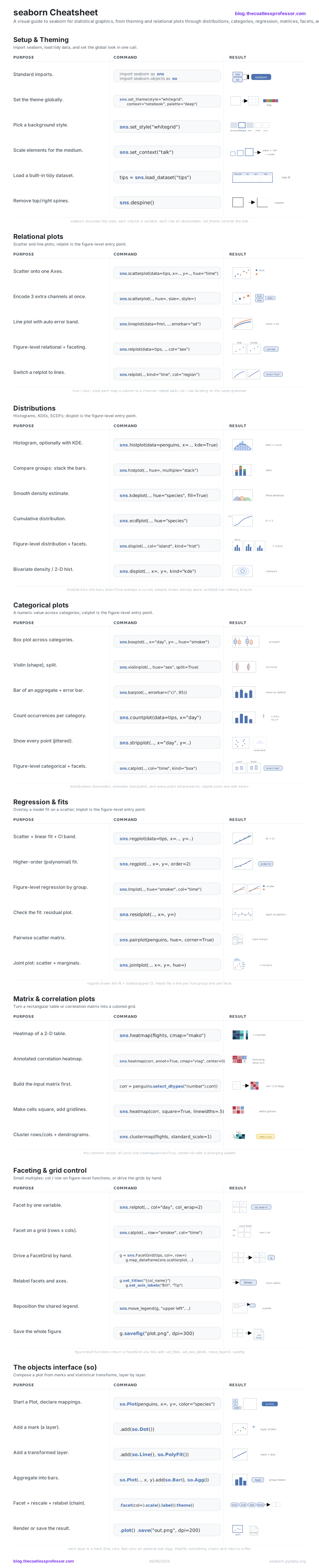
seaborn is the statistical data-visualization library built on matplotlib and tightly integrated with pandas DataFrames. It assumes tidy data: a frame where each column is a variable and each row is an observation, which is why nearly every call is data=df plus column-name mappings (x=, y=, hue=, size=, style=) that let seaborn do the statistics, grouping, and legend for you. There are three layers a daily user moves between: the classic API, which splits into axes-level functions (scatterplot, boxplot) that draw onto a single matplotlib Axes and figure-level functions (relplot, displot, catplot, lmplot) that own the whole figure and add faceting for free; the grid objects (FacetGrid, PairGrid, JointGrid) those figure-level functions are built on, for manual control; and the newer, composable objects interface (seaborn.objects, imported as so). Pair this sheet with the NumPy and pandas sheets for the data that feeds it.
Setup & Theming
seaborn assumes tidy data: a pandas DataFrame where each column is a variable and each row is an observation, which is why almost every call is data=df plus column-name mappings. set_theme() is the one call that controls the whole look at once, bundling a style (the background and grid), a context (how large elements scale for paper vs. a talk), and a palette (the default colors). Set it once at the top of a notebook and every later plot inherits it.
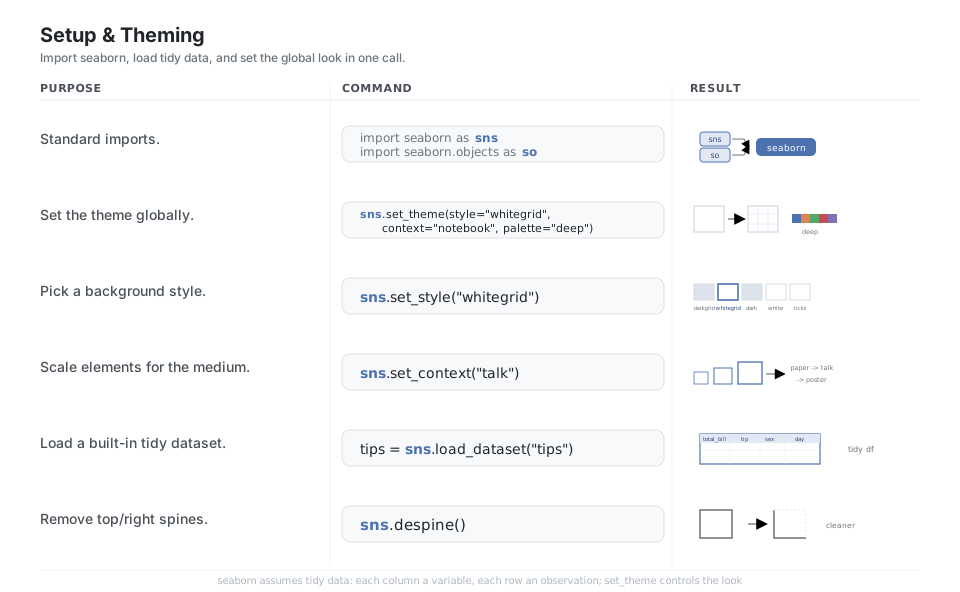
import seaborn as sns
import seaborn.objects as so

sns.set_theme(style="whitegrid", context="notebook", palette="deep")  # global look
sns.set_style("whitegrid")              # background: darkgrid/whitegrid/dark/white/ticks
sns.set_context("talk")                 # scale: paper/notebook/talk/poster
tips = sns.load_dataset("tips")         # a built-in tidy DataFrame
sns.despine()                           # remove the top and right spines
See set_theme and aesthetics.
Relational plots
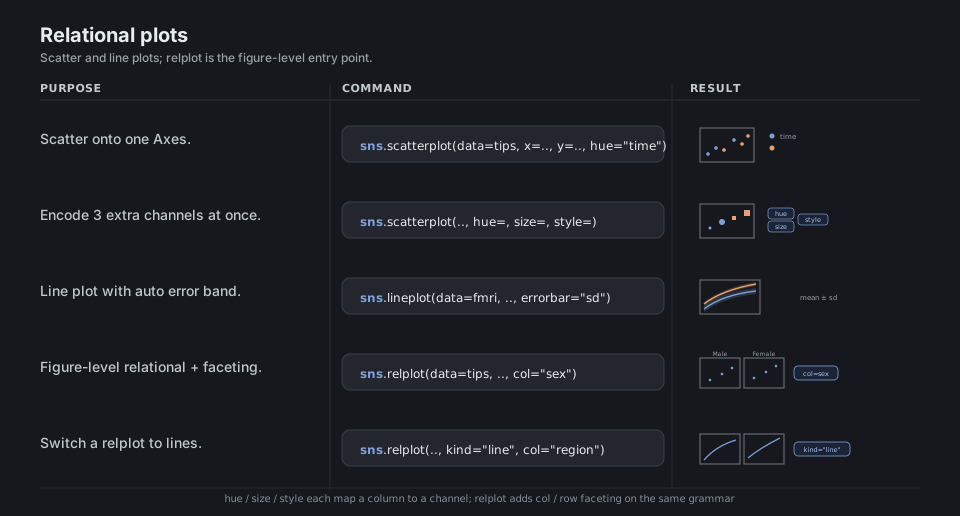
Relational plots answer “how do two numeric variables relate?” Reach for scatterplot to show individual observations and lineplot when x is ordered (like time), where seaborn automatically aggregates repeated y values to a mean and draws an error band. The same call grows by adding semantic channels: hue (color), size, and style each map a column to a visual property, and the figure-level relplot adds col/row faceting on top of the identical grammar.
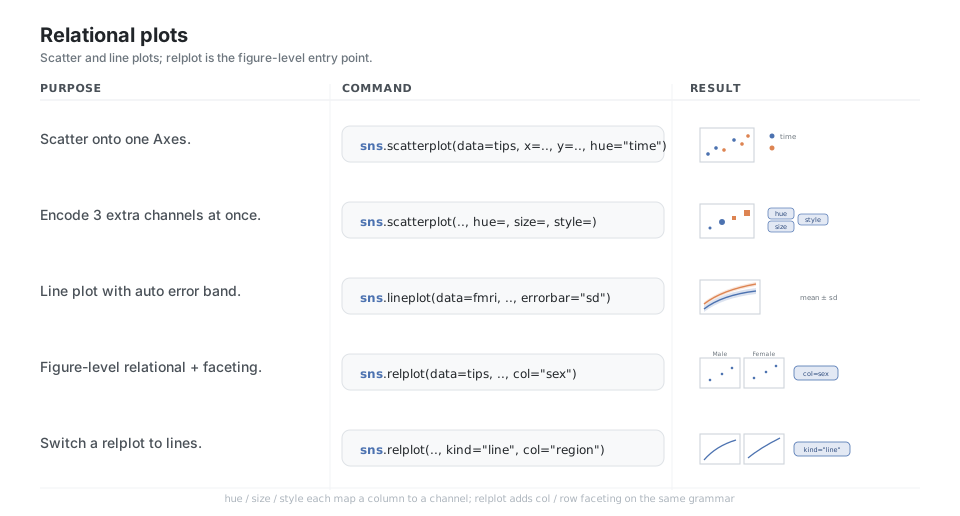
sns.scatterplot(data=tips, x="total_bill", y="tip", hue="time")   # points on one Axes
sns.scatterplot(data=tips, x="total_bill", y="tip",
                hue="time", size="size", style="sex")             # 3 extra channels at once
sns.lineplot(data=fmri, x="timepoint", y="signal",
             hue="region", errorbar="sd")                         # line + mean +/- sd band
sns.relplot(data=tips, x="total_bill", y="tip",
            col="sex", kind="scatter")                            # figure-level + faceting
sns.relplot(data=fmri, x="timepoint", y="signal",
            kind="line", col="region")                            # switch a relplot to lines
See relplot and relational tutorial.
Distributions
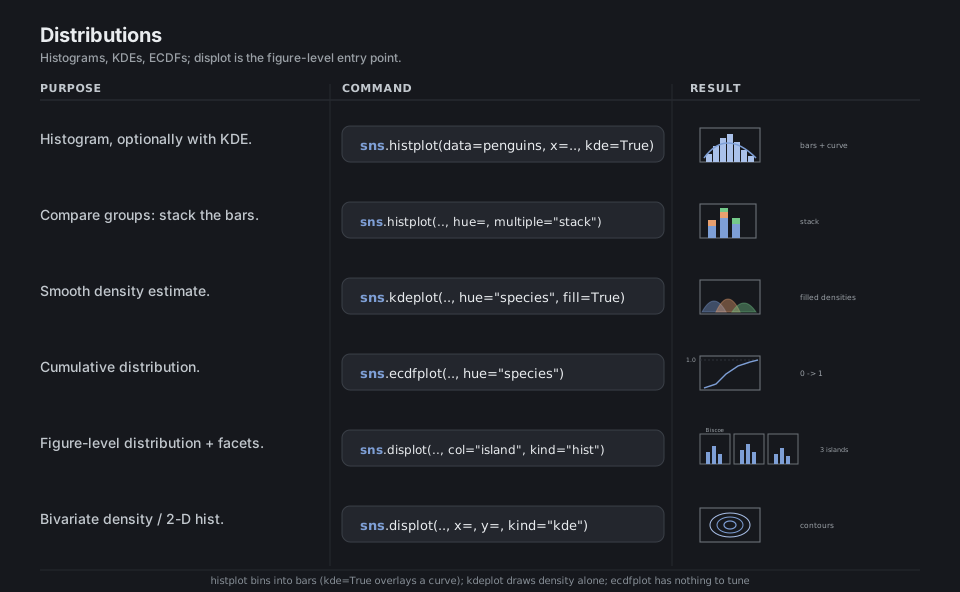
Distribution plots answer “what is the shape of this variable?” histplot bins observations into bars (add kde=True for a smooth overlay), kdeplot draws the smooth density alone, and ecdfplot shows the cumulative proportion with no binning choices to tune. Add a hue to compare groups and choose how overlapping groups stack with multiple=; displot is the figure-level version that adds faceting.
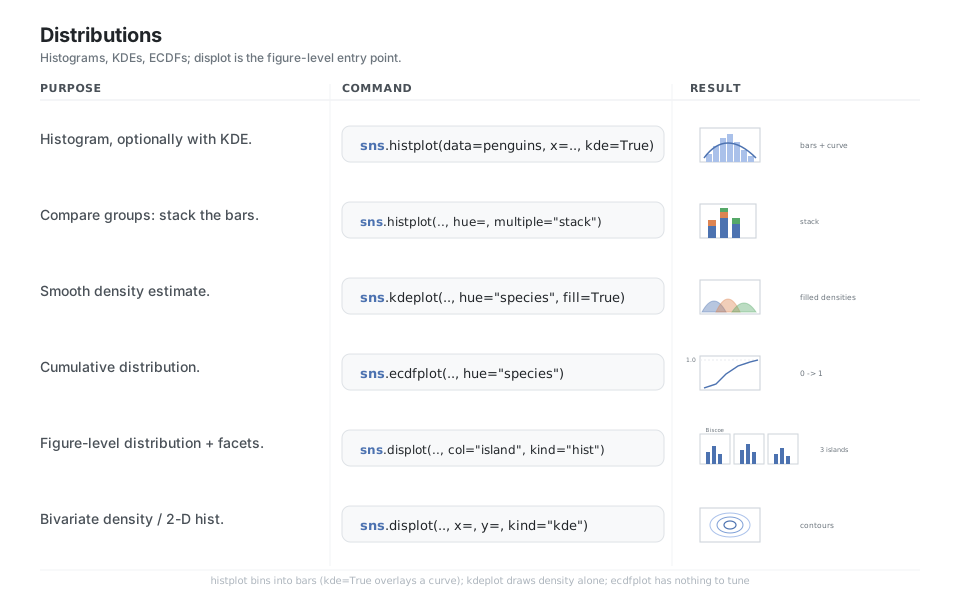
sns.histplot(data=penguins, x="flipper_length_mm", kde=True)      # bars + smooth overlay
sns.histplot(data=penguins, x="flipper_length_mm",
             hue="species", multiple="stack")                     # stack groups per bin
sns.kdeplot(data=penguins, x="flipper_length_mm",
            hue="species", fill=True)                             # smooth density alone
sns.ecdfplot(data=penguins, x="flipper_length_mm", hue="species") # cumulative proportion
sns.displot(data=penguins, x="flipper_length_mm",
            hue="species", col="island", kind="hist")             # figure-level + facets
sns.displot(data=penguins, x="bill_length_mm",
            y="bill_depth_mm", kind="kde")                        # bivariate density
See displot and distributions tutorial.
Categorical plots
Categorical plots put a categorical variable on one axis and a numeric value on the other, and they split into three families: distributions (boxplot, violinplot, boxenplot), estimates with error bars (barplot, pointplot), and every-point scatters (stripplot, swarmplot). countplot is the special case that just tallies rows per category; catplot is the figure-level wrapper, where you pick the family with kind= and get faceting for free.
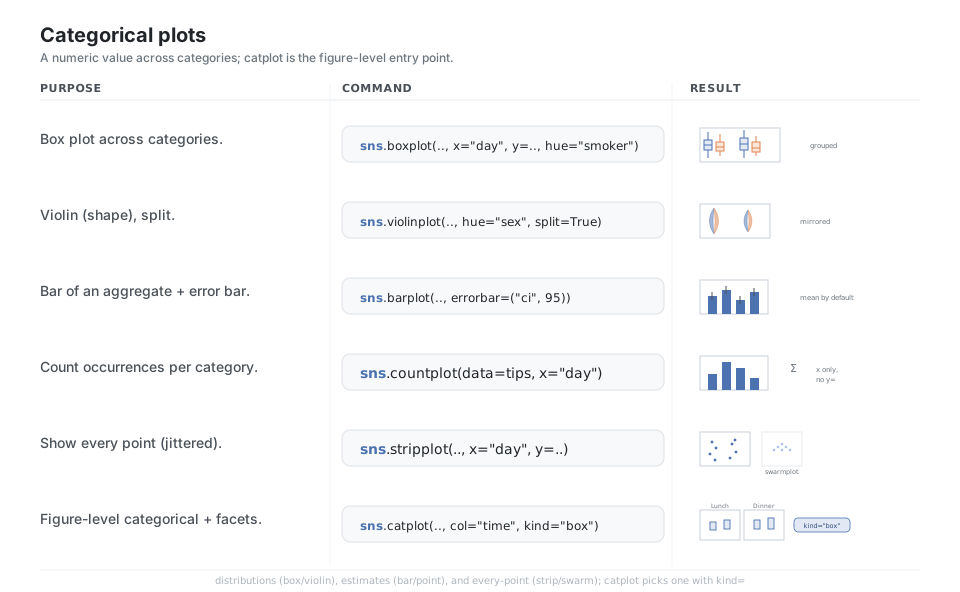
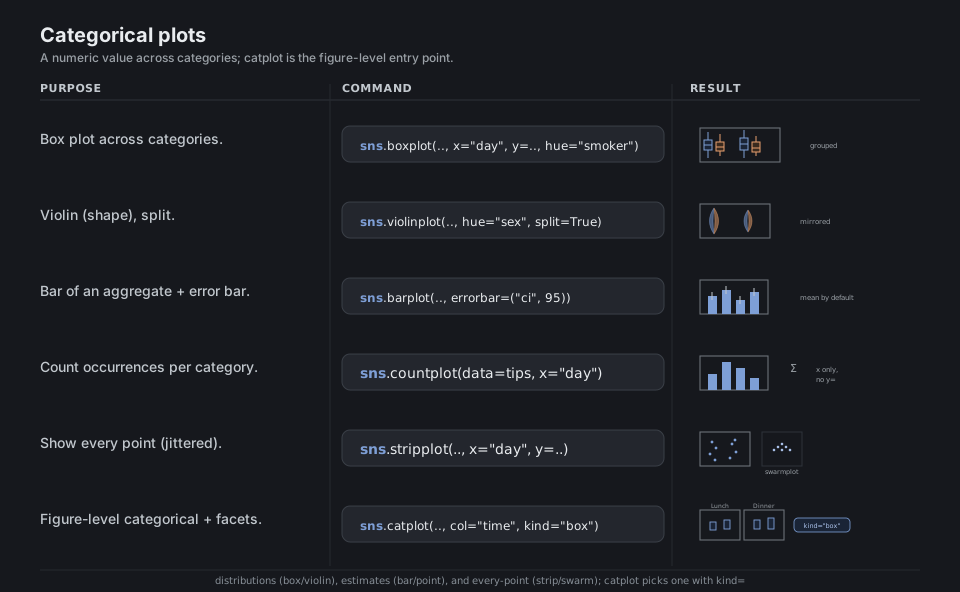
sns.boxplot(data=tips, x="day", y="total_bill", hue="smoker")     # grouped boxes per day
sns.violinplot(data=tips, x="day", y="total_bill",
               hue="sex", split=True)                             # split violin per category
sns.barplot(data=tips, x="day", y="total_bill",
            errorbar=("ci", 95))                                  # mean by default + 95% CI
sns.countplot(data=tips, x="day")                                 # tally rows per category
sns.stripplot(data=tips, x="day", y="total_bill")                 # every point, jittered
sns.catplot(data=tips, x="day", y="total_bill",
            hue="sex", col="time", kind="box")                    # figure-level + facets
See catplot and categorical tutorial.
Regression & relationships with a fit
These overlay a model on a relationship so you can see the trend, not just the cloud: regplot draws a scatter plus a fitted line and a bootstrapped confidence band, and lmplot is its figure-level form that fits a separate line per hue group and per facet. pairplot and jointplot zoom out to many variables at once, pairing scatters with marginal distributions so you scan relationships and shapes together.
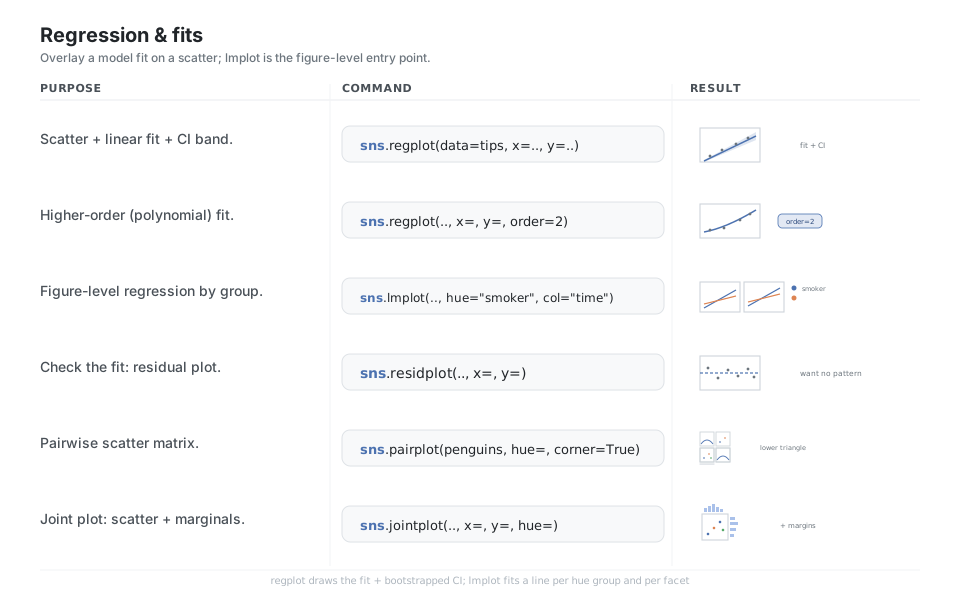
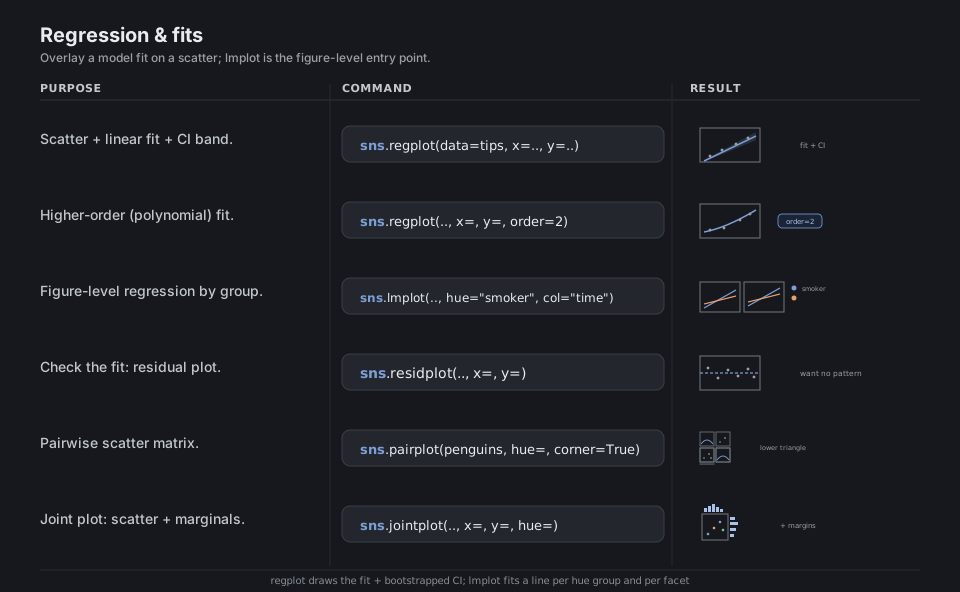
sns.regplot(data=tips, x="total_bill", y="tip")                   # scatter + linear fit + CI
sns.regplot(data=tips, x="total_bill", y="tip", order=2)          # higher-order (poly) fit
sns.lmplot(data=tips, x="total_bill", y="tip",
           hue="smoker", col="time")                              # figure-level + facets
sns.residplot(data=tips, x="total_bill", y="tip")                 # residuals around zero-line
sns.pairplot(penguins, hue="species", corner=True)               # pairwise scatter matrix
sns.jointplot(data=penguins, x="bill_length_mm",
              y="bill_depth_mm", hue="species", kind="scatter")   # scatter + marginals
See lmplot and regression tutorial.
Matrix & correlation plots
When your data is already a rectangular table of numbers, a heatmap maps each cell’s value to a color so patterns pop out at a glance; the most common recipe is df.corr() into a heatmap(..., annot=True, center=0) with a diverging palette so positive and negative correlations read as opposite colors. clustermap goes further by reordering rows and columns via hierarchical clustering and drawing dendrograms, which requires the optional scipy dependency.
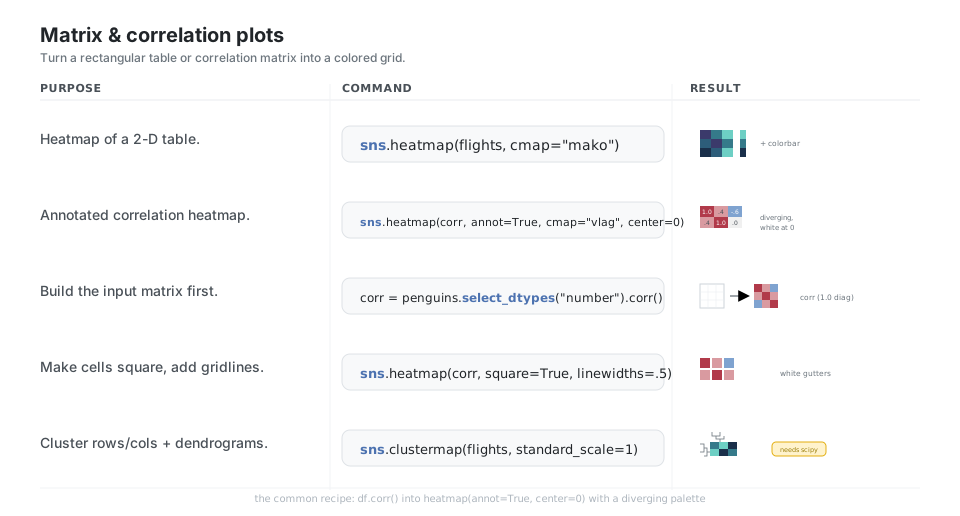
sns.heatmap(flights, cmap="mako")                                 # 2-D table -> colored grid
sns.heatmap(corr, annot=True, fmt=".2f",
            cmap="vlag", center=0)                                # annotated, diverging
corr = penguins.select_dtypes("number").corr()                    # build the input matrix
sns.heatmap(corr, square=True, linewidths=.5, cbar=True)          # square cells + gridlines
sns.clustermap(flights, standard_scale=1, cmap="mako")            # cluster + dendrograms (scipy)
See heatmap and clustermap.
Faceting & grid control
Faceting splits one plot into a grid of “small multiples”, one panel per subset of the data, so you compare groups without overplotting; on any figure-level function it is as simple as adding col= and/or row= (with col_wrap to fold a long row). Under the hood these return a FacetGrid (or PairGrid/JointGrid) object, which you can also build directly and paint with .map_dataframe(...), then tidy up with set_titles, set_axis_labels, move_legend, and savefig.
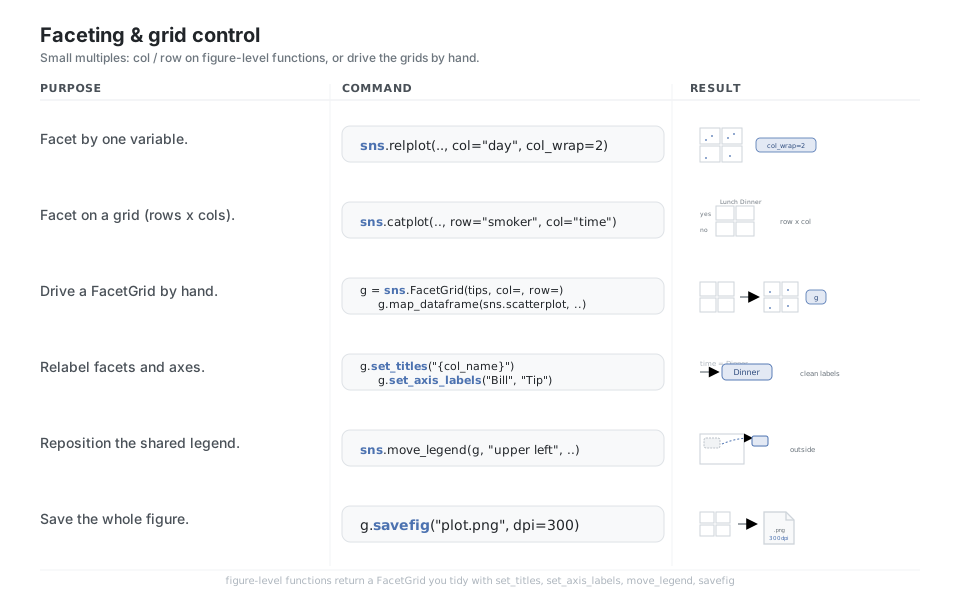
sns.relplot(data=tips, x="total_bill", y="tip",
            col="day", col_wrap=2)                                # facet by one variable, wrapped
sns.catplot(data=tips, x="sex", y="tip",
            row="smoker", col="time", kind="box")                # facet on a row x col grid
g = sns.FacetGrid(tips, col="time", row="sex")                    # drive a FacetGrid by hand
g.map_dataframe(sns.scatterplot, x="total_bill", y="tip")        # paint each cell
g.set_titles("{col_name}")                                        # relabel facets
g.set_axis_labels("Bill", "Tip")                                  # relabel axes
sns.move_legend(g, "upper left", bbox_to_anchor=(1, 1))           # reposition shared legend
g.savefig("plot.png", dpi=300)                                    # save the whole figure
See FacetGrid and axis grids tutorial.
The objects interface
seaborn.objects (imported as so) is the newer, composable API inspired by the Grammar of Graphics: you start with a Plot that declares the data and mappings, then .add() one or more layers, each combining a mark (Dot, Line, Bar, Area) with an optional stat transform (Agg, Hist, PolyFit, Est) and move (Dodge, Jitter, Stack). Everything is chainable and returns a new Plot, so .facet(), .scale(), .label(), .limit(), and .theme() read top to bottom, and .plot() or .save() renders the result.
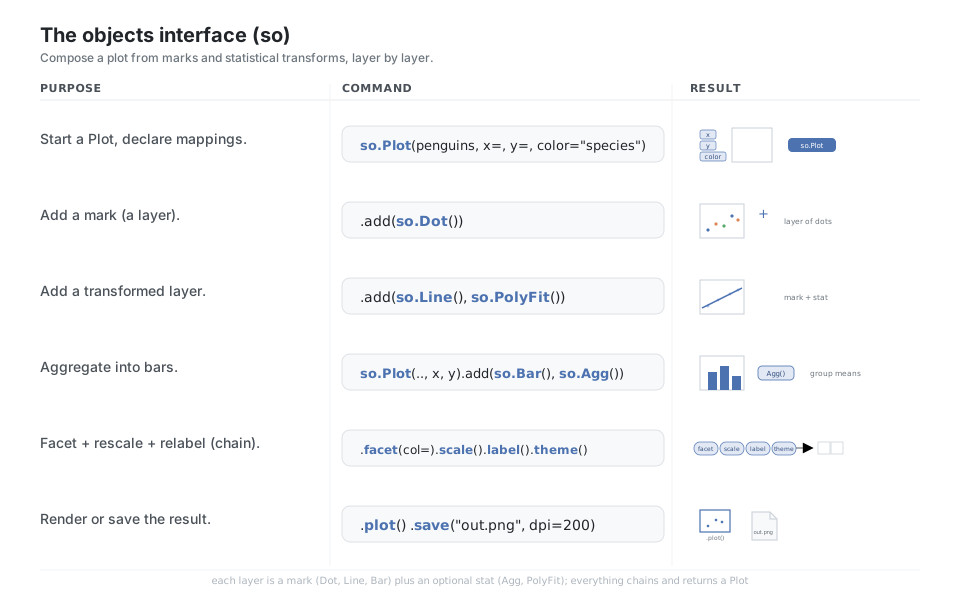
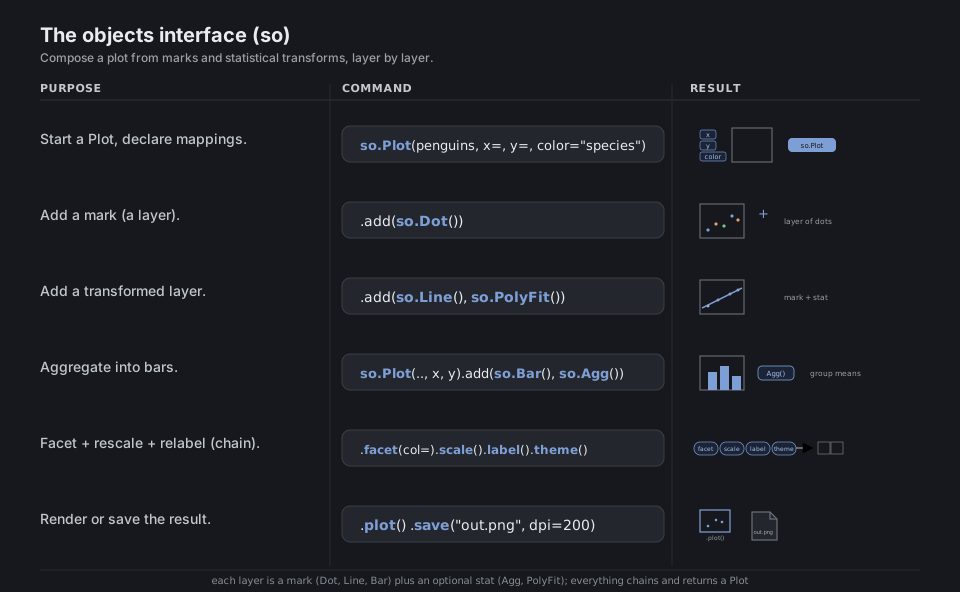
so.Plot(penguins, x="bill_length_mm", y="bill_depth_mm", color="species")  # declare mappings
.add(so.Dot())                                          # add a mark (a layer)
.add(so.Line(), so.PolyFit())                           # add a transformed layer (mark + stat)
(so.Plot(penguins, x="species", y="body_mass_g").add(so.Bar(), so.Agg()))  # aggregate into bars
.facet(col="island").scale(color="deep").label(x="Bill").theme({"axes.grid": True})  # chain
.plot()  ; .save("out.png", dpi=200)                    # render or save the result
See objects.Plot and objects tutorial.
Quick Reference
| Layer | What it is | Daily-use entry points |
|---|---|---|
| Setup & theming | global look + tidy data | set_theme, set_style, set_context, load_dataset, despine |
| Relational | numeric vs. numeric | scatterplot, lineplot, relplot |
| Distribution | shape of a variable | histplot, kdeplot, ecdfplot, displot |
| Categorical | numeric across categories | boxplot, violinplot, barplot, countplot, stripplot, catplot |
| Regression | a fit over a relationship | regplot, lmplot, residplot, pairplot, jointplot |
| Matrix | table or correlation grid | heatmap, clustermap |
| Faceting | small multiples | FacetGrid, relplot/catplot/displot with col/row |
| Objects | composable grammar | so.Plot, .add, .facet, .scale, .plot, .save |
| Function level | What it owns | Returns | Faceting |
|---|---|---|---|
Axes-level (scatterplot, boxplot, heatmap) |
one matplotlib Axes |
the Axes |
no (compose by hand) |
Figure-level (relplot, displot, catplot, lmplot) |
the whole figure | a FacetGrid |
yes, via col / row |
Joint / pair (jointplot, pairplot) |
a multi-Axes figure | JointGrid / PairGrid |
built in |
Objects (so.Plot) |
a composable plot spec | a new Plot |
yes, via .facet() |
Appendix: Sample Code
Minimal end-to-end (axes-level)
The canonical four steps: theme, data, plot, render.
import seaborn as sns
import matplotlib.pyplot as plt

sns.set_theme(style="whitegrid")        # one call sets the global look
tips = sns.load_dataset("tips")         # a tidy DataFrame

sns.scatterplot(data=tips, x="total_bill", y="tip", hue="time")
plt.show()
Figure-level + faceting in one call
relplot owns the whole figure, so col= adds small multiples without any matplotlib boilerplate. It returns a FacetGrid you can keep tidying.
import seaborn as sns

tips = sns.load_dataset("tips")

g = sns.relplot(
    data=tips, x="total_bill", y="tip",
    hue="smoker", col="time", kind="scatter",
)
g.set_axis_labels("Total bill ($)", "Tip ($)")
g.set_titles("{col_name}")
g.savefig("tips_by_time.png", dpi=300)
The objects interface, layered
Compose a plot from a data + mappings Plot, then stack a raw-data layer and a fitted-line layer.
import seaborn.objects as so
import seaborn as sns

penguins = sns.load_dataset("penguins")

(
    so.Plot(penguins, x="bill_length_mm", y="bill_depth_mm", color="species")
    .add(so.Dot())                       # mark: raw points
    .add(so.Line(), so.PolyFit())        # mark + stat: a fitted trend per group
    .facet(col="island")                 # small multiples
    .scale(color="deep")                 # palette
    .label(x="Bill length (mm)", y="Bill depth (mm)")
    .save("penguins_objects.png", dpi=200)
)
Correlation heatmap recipe
The most-reached-for matrix plot: numeric columns, correlation, annotated diverging heatmap.
import seaborn as sns

penguins = sns.load_dataset("penguins")
corr = penguins.select_dtypes("number").corr()

sns.heatmap(corr, annot=True, fmt=".2f", cmap="vlag", center=0, square=True)
Built-in datasets used in this sheet
All loadable via sns.load_dataset(name). Tidy, small, and well known:
tips       -> total_bill, tip, sex, smoker, day, time, size   (restaurant bills)
penguins   -> species, island, bill_*, flipper_length_mm, body_mass_g, sex
fmri       -> subject, timepoint, event, region, signal       (time series, for lineplot)
flights    -> year, month, passengers (pivot to a matrix for heatmap)
References
seaborn documentation
- seaborn overview, installing, and the introduction tutorial
- Function overview (figure-level vs. axes-level) and tidy data structures
- Figure aesthetics and color palettes
- Relational, distributions, categorical, and regression tutorials
- Multi-plot grids, the objects interface, properties, and the API reference
Per-function API pages
set_theme,load_dataset,relplot,scatterplot,lineplotdisplot,histplot,kdeplot,ecdfplotcatplot,boxplot,violinplot,barplot,countplot,stripplot,swarmplotlmplot,regplot,residplot,pairplot,jointplotheatmap,clustermap,FacetGrid,move_legend,objects.Plot
Ecosystem
- matplotlib and pandas (the libraries seaborn builds on)
- The seaborn paper (Waskom 2021, JOSS) and seaborn on GitHub