Transformers is the model-definition framework that sits in front of over a million pretrained checkpoints on the Hugging Face Hub, and the whole point is that you pull any of them by name and use it in a few lines. You name a task and pipeline() hands you a ready-to-run model; you load an AutoModel and its matching AutoTokenizer from the same checkpoint; you generate text with model.generate() or read raw logits from a forward pass; and you fine-tune with Trainer and share the result with push_to_hub(). The recurring mental model in this sheet is one picture: text flows along a gray arrow into a tokenizer that emits input_ids plus an attention_mask, those flow into a model box loaded from the Hub, and the model emits either logits and hidden states (forward) or new token ids (generate) that a tokenizer decodes back to text. Where the PyTorch sheet is about tensors, autograd, and the training loops you write yourself, this sheet is one level up: the high-level Pipeline and Trainer abstractions write those loops for you. The conventional import is from transformers import pipeline, AutoTokenizer, AutoModelForCausalLM, and everything here is transformers v5 (PyTorch-only; deprecated v4 spellings are flagged per section).


Install & load from the Hub
Transformers is the model-definition framework that sits in front of over a million pretrained checkpoints on the Hugging Face Hub, and you pull any of them by name with a from_pretrained("org/model") call that downloads and caches the weights once. As of v5 the backend is PyTorch only (the TensorFlow and Flax backends were sunset), so install transformers[torch], pass dtype="auto" to load weights in their stored precision instead of doubling memory in float32, and add device_map="auto" to spread a large model across your GPUs and CPU.
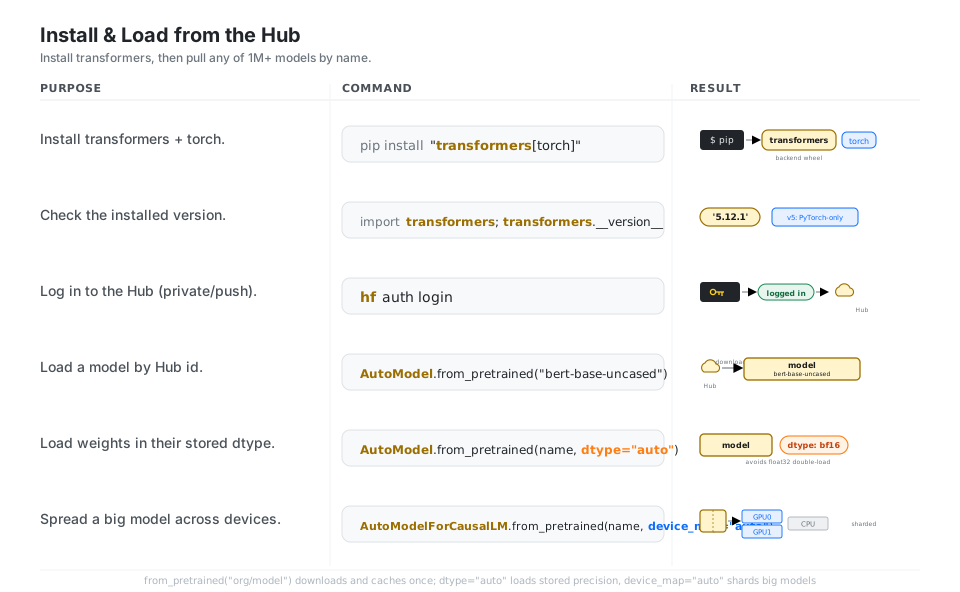
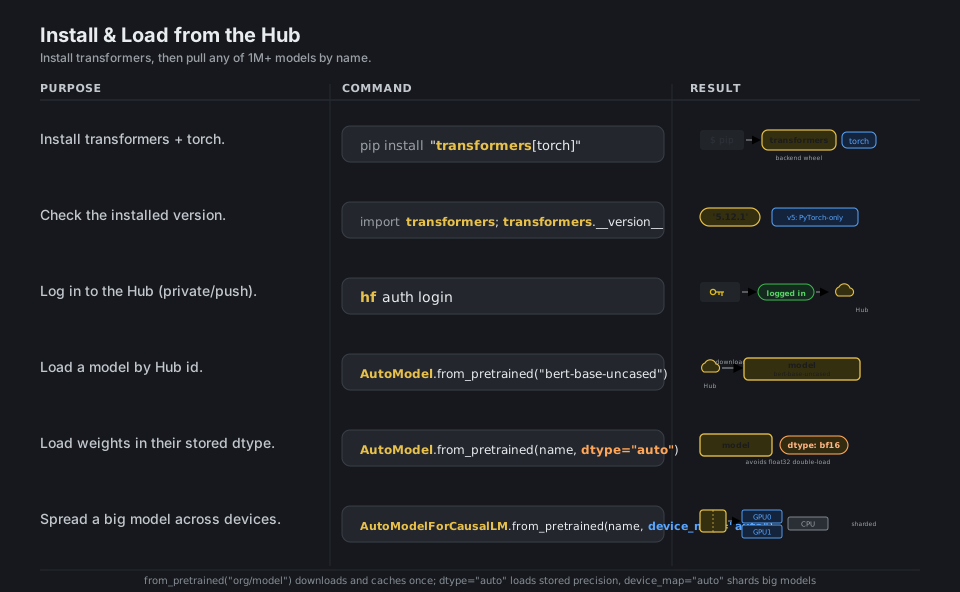
pip install "transformers[torch]"     # PyTorch backend (v5 is PyTorch-only)
hf auth login                         # log in for private models / push
import transformers
transformers.__version__ # '5.12.1'
from transformers import AutoModel, AutoModelForCausalLM
AutoModel.from_pretrained("bert-base-uncased") # download from the Hub
AutoModel.from_pretrained("bert-base-uncased", dtype="auto") # stored precision
AutoModelForCausalLM.from_pretrained(name, device_map="auto") # shard across devicesSee Installation. Use dtype="auto", not the deprecated torch_dtype=.
pipeline(): a task in 3 lines
pipeline() is the fastest path to a working model: name a task such as "sentiment-analysis", "text-generation", or "automatic-speech-recognition", and it loads a sensible default model plus its preprocessor and returns a callable you invoke on raw text, images, or audio. Override the model= argument to choose a specific checkpoint, set device= to pick hardware, pass a list with batch_size= for throughput, and any extra keyword arguments (like max_new_tokens) flow straight through to the underlying model.
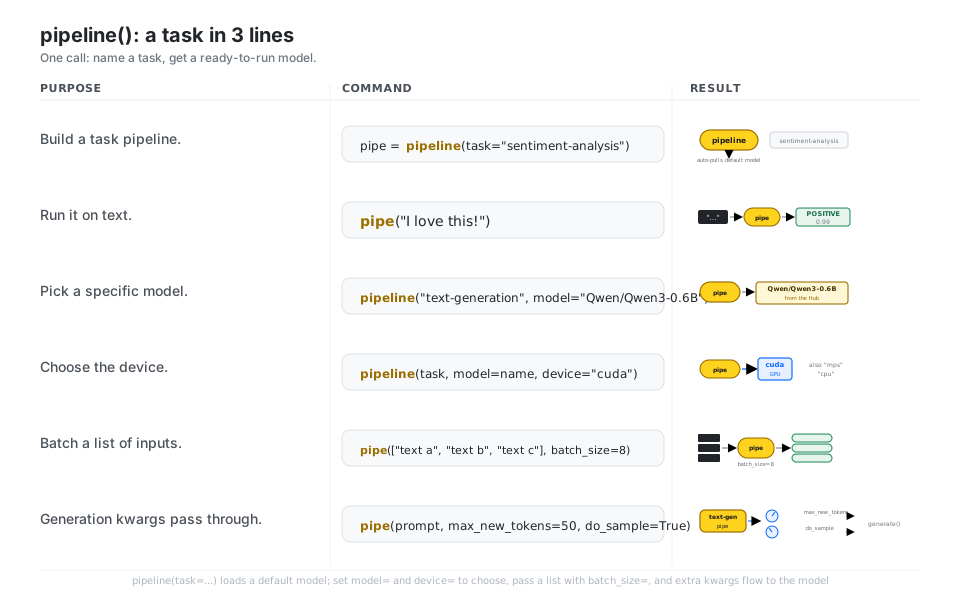
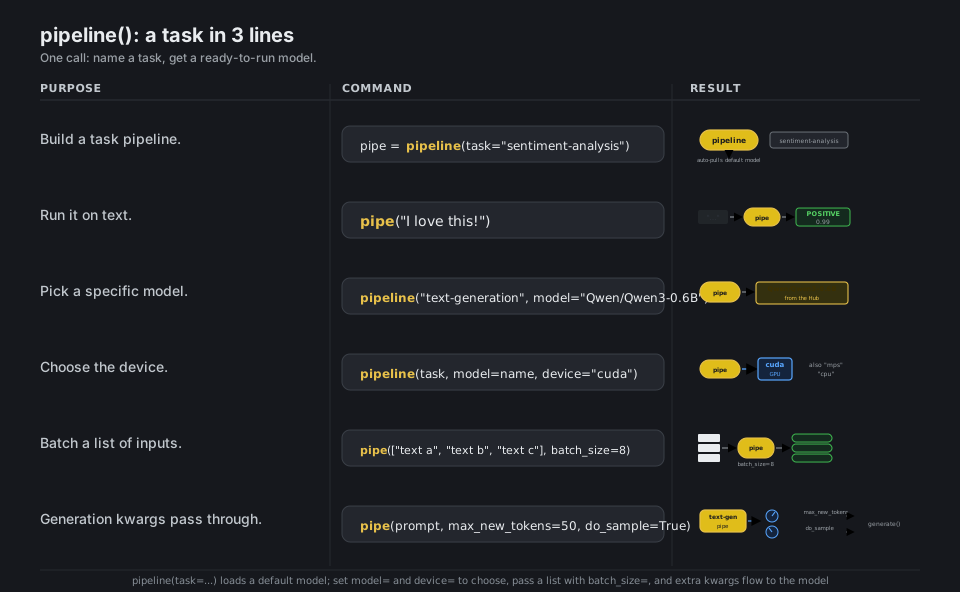
from transformers import pipeline

pipe = pipeline(task="sentiment-analysis")     # loads a default model from the Hub
pipe("I love this!")                           # [{'label': 'POSITIVE', 'score': 0.99}]

pipeline("text-generation", model="Qwen/Qwen3-0.6B")        # pick a specific model
pipeline(task, model=name, device="cuda")                   # also "mps", "cpu"
pipe(["text a", "text b", "text c"], batch_size=8)          # batch a list of inputs
pipe(prompt, max_new_tokens=50, do_sample=True)             # kwargs pass through
See Pipelines. Extra keyword arguments flow straight to the underlying model.
Tokenize: text to input_ids + mask
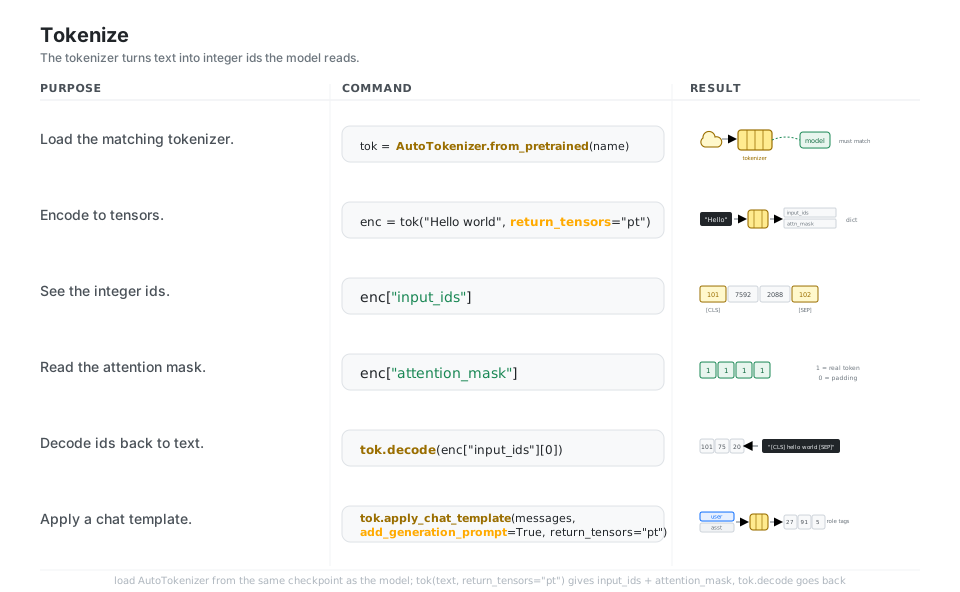
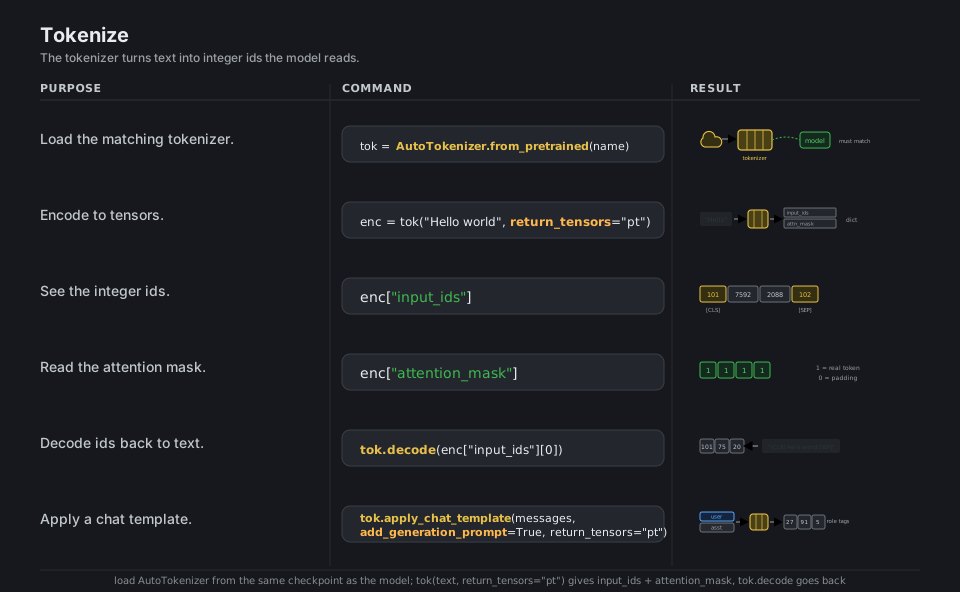
Models do not read text, they read integers, so an AutoTokenizer (always loaded from the same checkpoint as the model) splits text into subword tokens and maps each to an integer input_ids tensor, alongside an attention_mask that marks which positions are real (1) versus padding (0). Call it with return_tensors="pt" to get PyTorch tensors, use tok.decode(...) to go back to text, and use tok.apply_chat_template(...) to format a list of role and content messages the way a chat model expects.
from transformers import AutoTokenizer

tok = AutoTokenizer.from_pretrained("bert-base-uncased")   # must match the model
enc = tok("Hello world", return_tensors="pt")              # {input_ids, attention_mask}
enc["input_ids"]            # tensor([[ 101, 7592, 2088,  102]])  with [CLS]/[SEP]
enc["attention_mask"]       # tensor([[1, 1, 1, 1]])  1 = real token, 0 = padding
tok.decode(enc["input_ids"][0])                            # "[CLS] hello world [SEP]"

tok.apply_chat_template(messages, add_generation_prompt=True, return_tensors="pt")
See Tokenizer. v5 uses one fast tokenizers backend, so use_fast= is obsolete.
AutoModel & AutoTokenizer
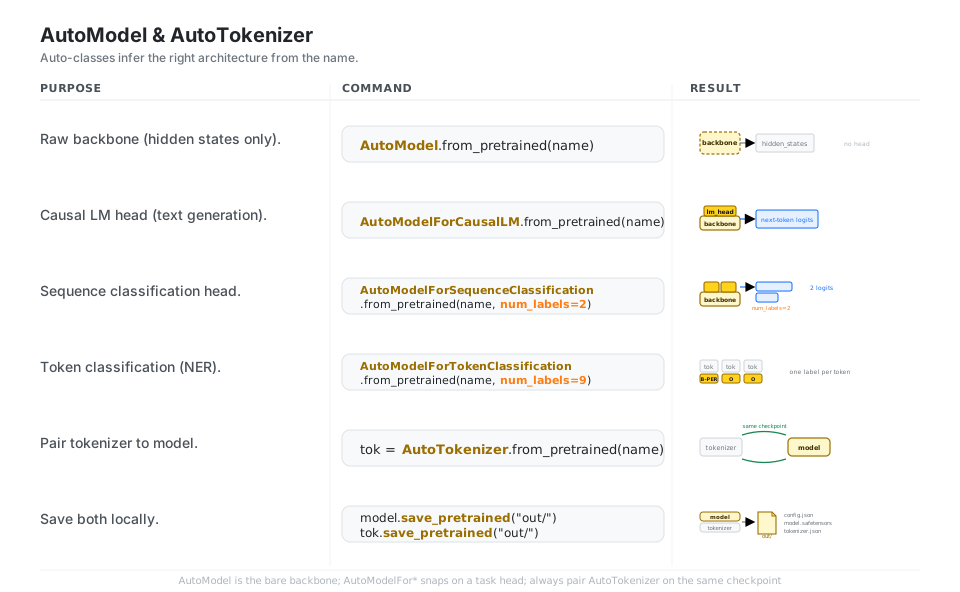
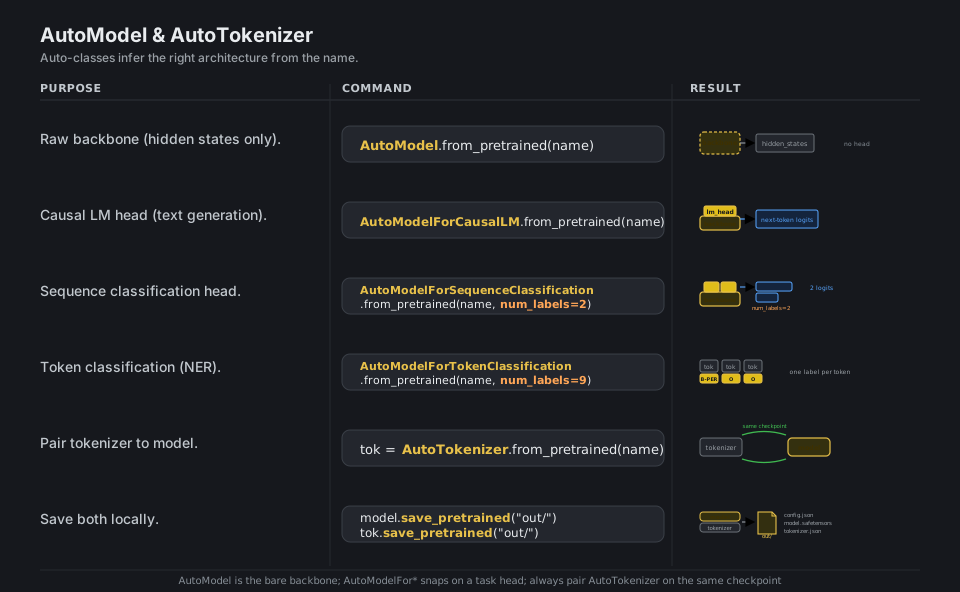
The Auto* classes read a checkpoint’s config and instantiate the correct architecture for you, so the only thing that changes between tasks is which head you ask for: AutoModel gives the bare backbone (hidden states only), while AutoModelForCausalLM, AutoModelForSequenceClassification, and AutoModelForTokenClassification add the matching task head (pass num_labels= for the classification heads). Always pair the model with AutoTokenizer.from_pretrained on the same name, and save_pretrained("dir/") writes the config, safetensors weights, and tokenizer files together.
from transformers import (
    AutoModel, AutoModelForCausalLM,
    AutoModelForSequenceClassification, AutoModelForTokenClassification,
    AutoTokenizer,
)

AutoModel.from_pretrained(name)                                 # bare backbone, hidden states
AutoModelForCausalLM.from_pretrained(name)                      # + lm_head (next-token logits)
AutoModelForSequenceClassification.from_pretrained(name, num_labels=2)   # + classifier head
AutoModelForTokenClassification.from_pretrained(name, num_labels=9)      # + per-token head (NER)

tok = AutoTokenizer.from_pretrained(name)                       # same checkpoint as the model
model.save_pretrained("out/"); tok.save_pretrained("out/")      # config + safetensors + tokenizer
See Auto classes. The Auto* classes pick the architecture from the checkpoint config.
Batch, pad & truncate
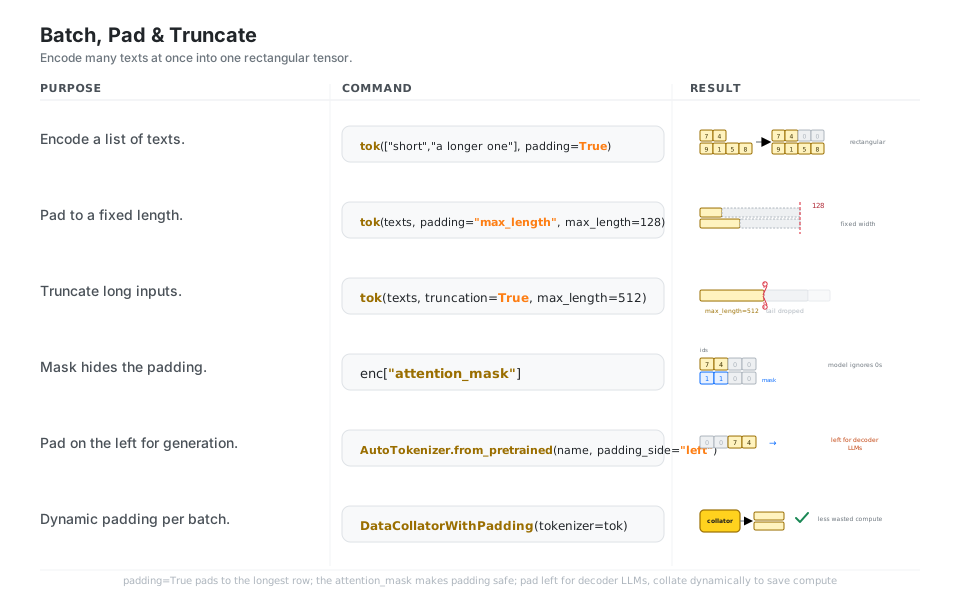
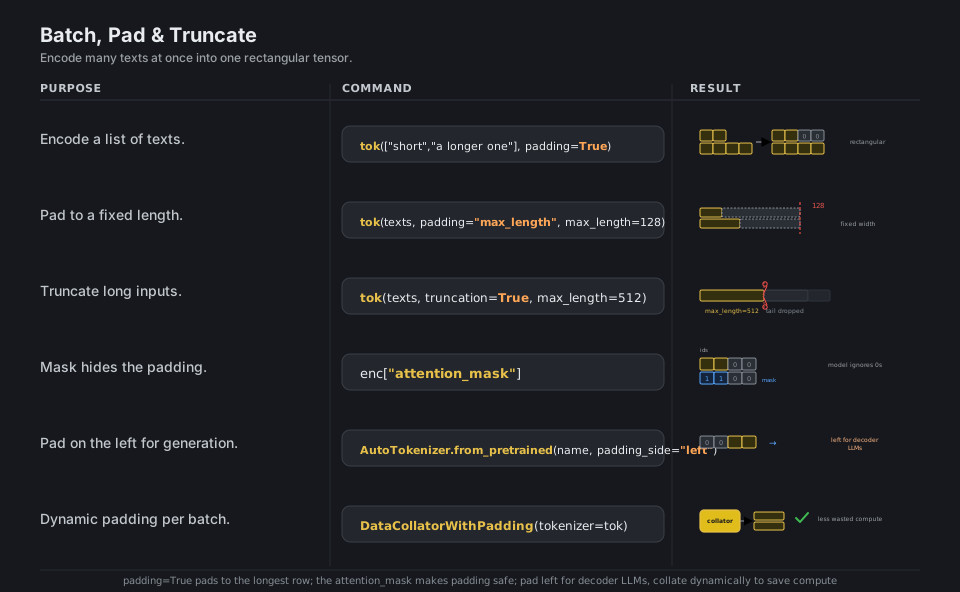
A model wants one rectangular tensor, but real texts have different lengths, so pass a list with padding=True to pad every sequence up to the longest one in the batch (or padding="max_length" with max_length= for a fixed width) and truncation=True to clip sequences that are too long. The attention_mask is what makes padding safe, the model ignores the 0 positions; for decoder-only LLMs set padding_side="left" so generation continues from real tokens, and prefer a DataCollatorWithPadding to pad each batch dynamically and waste less compute.
from transformers import AutoTokenizer, DataCollatorWithPadding

tok(["short", "a longer one"], return_tensors="pt", padding=True)   # pad to the longest row
tok(texts, padding="max_length", max_length=128)                    # pad to a fixed width
tok(texts, truncation=True, max_length=512)                         # clip long sequences
enc["attention_mask"]                                               # 1 = real, 0 = padding

AutoTokenizer.from_pretrained(name, padding_side="left")            # left pad for decoder LLMs
DataCollatorWithPadding(tokenizer=tok)                              # pad each batch dynamically
See Padding and truncation. Decoder-only LLMs need padding_side="left" for generation.
Generate text (sampling knobs)
model.generate(**inputs, ...) autoregressively appends new tokens, and the single most important argument is max_new_tokens because the default output is only about twenty tokens. By default decoding is greedy (always the top token); set do_sample=True to sample, then shape the distribution with temperature (higher is more random), top_k and top_p to trim the candidate pool, and repetition_penalty to discourage loops, and finally tok.batch_decode(out, skip_special_tokens=True) turns the generated ids back into clean text.
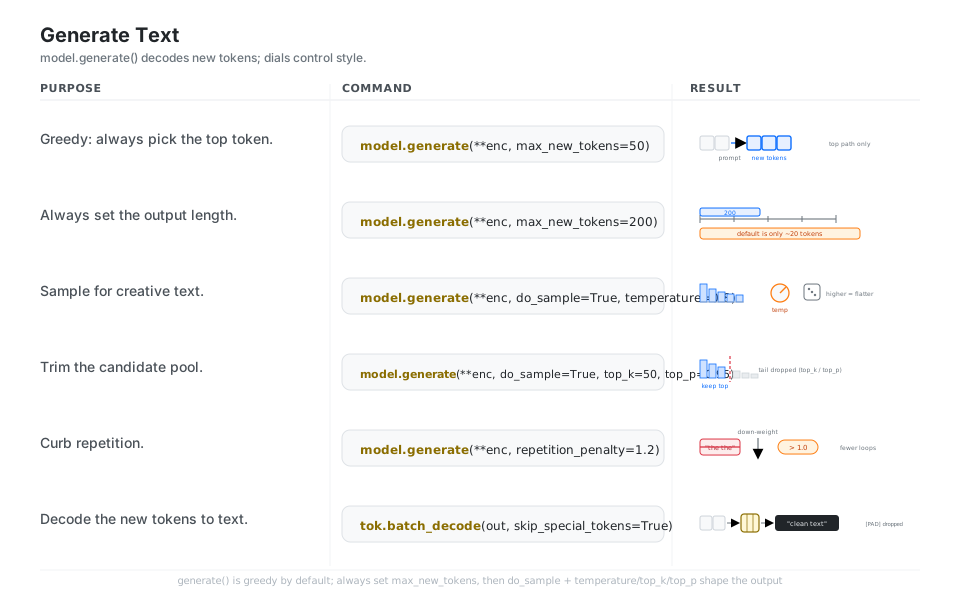
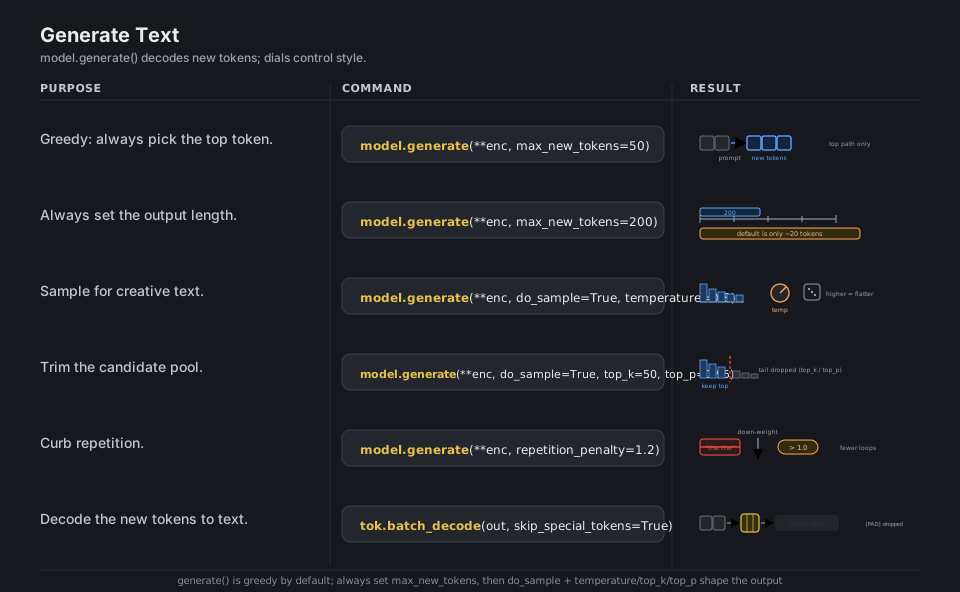
model.generate(**enc, max_new_tokens=50)                       # greedy: top token each step
model.generate(**enc, max_new_tokens=200)                      # always set the length
model.generate(**enc, do_sample=True, temperature=0.8)         # sample; higher = more random
model.generate(**enc, do_sample=True, top_k=50, top_p=0.95)    # trim the candidate pool
model.generate(**enc, repetition_penalty=1.2)                  # >1.0 discourages repeats

tok.batch_decode(out, skip_special_tokens=True)                # ids back to clean text
See Generation. Always set max_new_tokens; the default output is only about 20 tokens.
Forward pass & logits
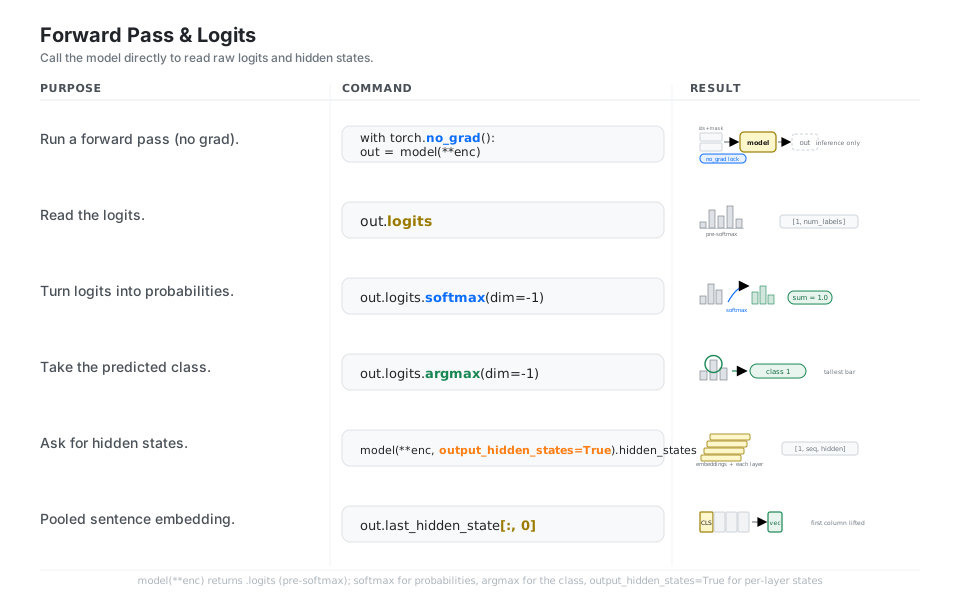
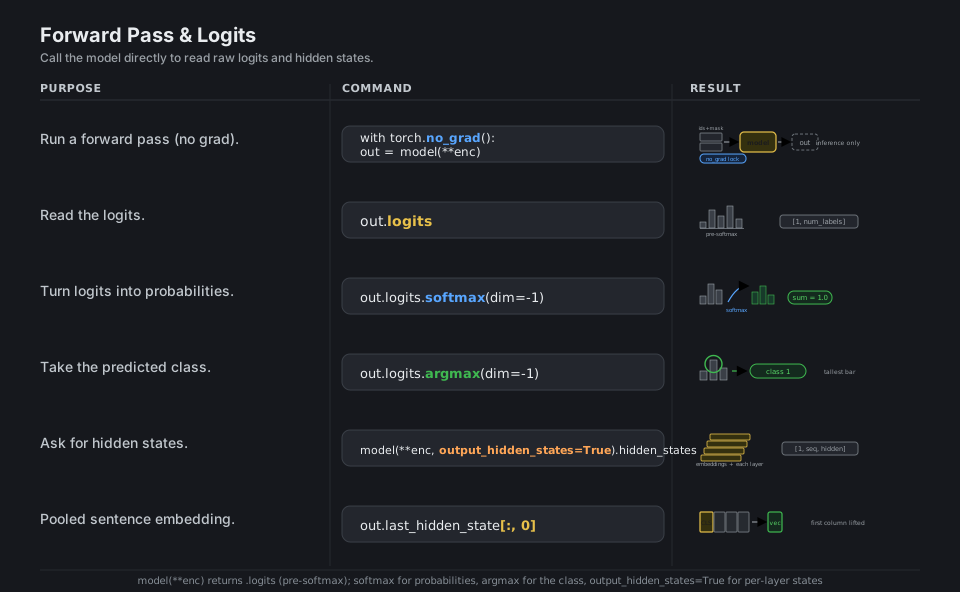
When you want the raw outputs instead of generated text, call the model directly as model(**inputs) inside torch.no_grad(), which returns an output object whose .logits are the pre-softmax scores (shape [batch, num_labels] for a classifier, [batch, seq, vocab] for an LM). Apply .softmax(dim=-1) for probabilities and .argmax(dim=-1) for the predicted class; pass output_hidden_states=True to also get every layer’s hidden_states, and slice last_hidden_state[:, 0] for a [CLS] pooled sentence embedding.
import torch

with torch.no_grad():            # inference only, no gradient bookkeeping
    out = model(**enc)

out.logits                       # raw pre-softmax scores, e.g. [1, num_labels]
out.logits.softmax(dim=-1)       # logits -> probabilities (sum to 1.0)
out.logits.argmax(dim=-1)        # predicted class id

model(**enc, output_hidden_states=True).hidden_states   # per-layer hidden states
out.last_hidden_state[:, 0]                             # [CLS] pooled embedding
See Model outputs. Wrap inference in torch.no_grad() to skip gradient bookkeeping.
Fine-tune with Trainer & push
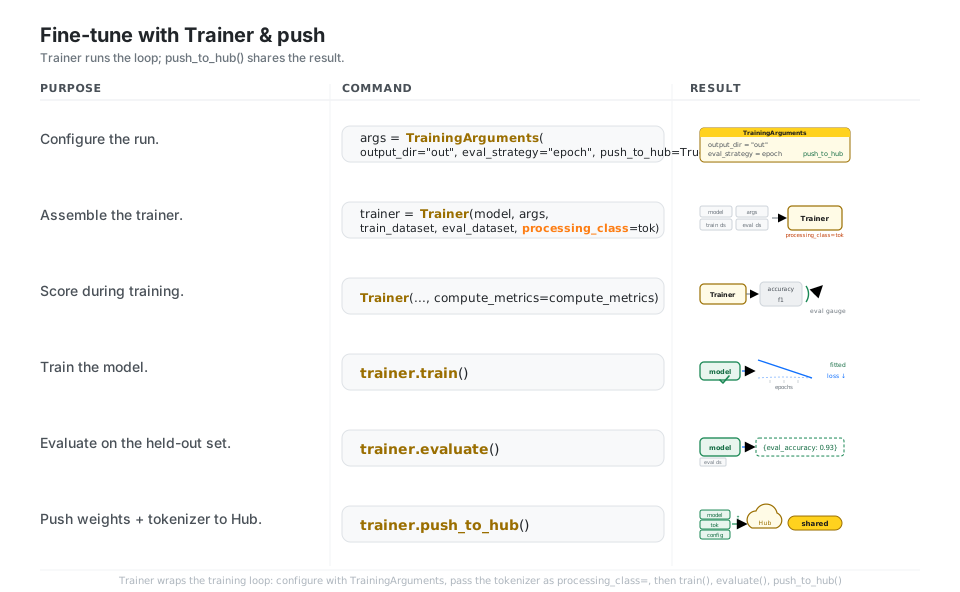
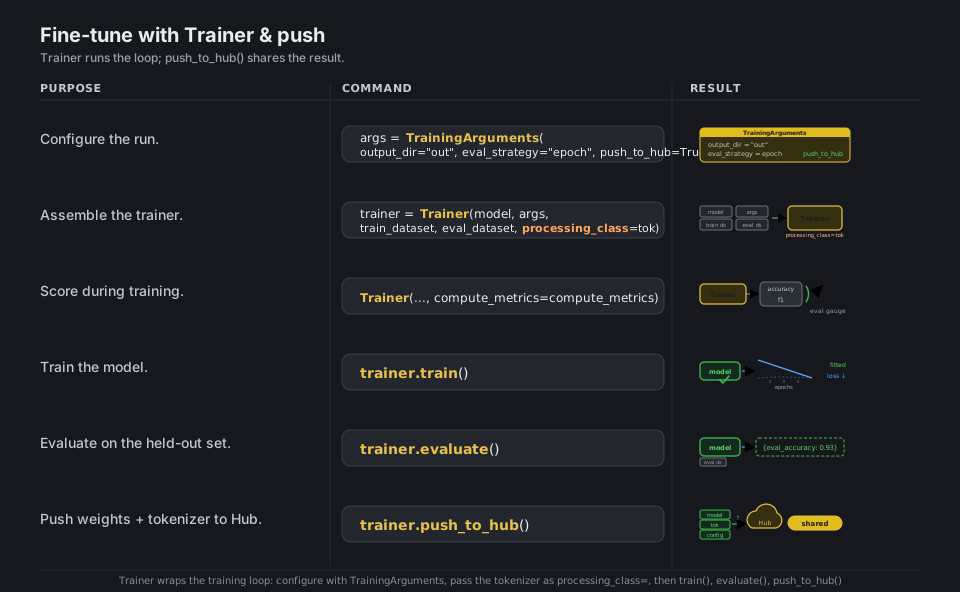
Trainer is the high-level training and evaluation loop: you describe the run with TrainingArguments (output_dir, eval_strategy="epoch", learning_rate, num_train_epochs, push_to_hub=True), then hand Trainer your model, those args, a train and eval dataset, and the tokenizer as processing_class= (the v5 name, the old tokenizer= argument is deprecated). Call trainer.train() to run the loop, trainer.evaluate() to score on the held-out set, and trainer.push_to_hub() to upload the fine-tuned weights, tokenizer, and a model card to the Hub.
from transformers import TrainingArguments, Trainer

args = TrainingArguments(output_dir="out", eval_strategy="epoch", push_to_hub=True)

trainer = Trainer(
    model=model, args=args,
    train_dataset=ds["train"], eval_dataset=ds["test"],
    processing_class=tok,            # v5 name (was tokenizer=)
    compute_metrics=compute_metrics, # score with accuracy, f1, etc.
)

trainer.train()             # model turns "fitted", loss descends
trainer.evaluate()          # {'eval_accuracy': 0.93}
trainer.push_to_hub()       # weights + tokenizer + model card -> the Hub
See Fine-tuning. Pass processing_class=tok, not the deprecated tokenizer=tok.
Quick Reference
| Command | What it does | Area |
|---|---|---|
pip install "transformers[torch]" |
Install with the PyTorch backend | Install |
AutoModel.from_pretrained(name) |
Download a checkpoint from the Hub | Load |
from_pretrained(name, dtype="auto") |
Load weights in their stored precision | Load |
pipeline(task="...") |
One-call inference, default model | Pipeline |
pipeline(task, model=name, device=...) |
Pick the model and hardware | Pipeline |
AutoTokenizer.from_pretrained(name) |
Load the matching tokenizer | Tokenize |
tok(text, return_tensors="pt") |
Encode to input_ids + attention_mask |
Tokenize |
tok(texts, padding=True, truncation=True) |
Batch into one rectangular tensor | Batch |
AutoModelForCausalLM.from_pretrained(name) |
Backbone + LM head for generation | Model |
AutoModelForSequenceClassification(..., num_labels=k) |
Backbone + classifier head | Model |
model.generate(**enc, max_new_tokens=...) |
Decode new tokens | Generate |
tok.batch_decode(out, skip_special_tokens=True) |
Ids back to clean text | Generate |
model(**enc).logits |
Forward pass, raw scores | Forward |
Trainer(model, args, ..., processing_class=tok) |
High-level training loop | Fine-tune |
trainer.train() / trainer.push_to_hub() |
Fit, then share on the Hub | Fine-tune |
| Auto-class | Adds | Use for |
|---|---|---|
AutoModel |
nothing (bare backbone) | Embeddings, hidden states |
AutoModelForCausalLM |
LM head | Text generation (GPT, Llama, Qwen) |
AutoModelForSeq2SeqLM |
encoder-decoder LM head | Translation, summarization (T5) |
AutoModelForSequenceClassification |
classifier head | Sentiment, topic, NLI |
AutoModelForTokenClassification |
per-token head | NER, POS tagging |
AutoModelForQuestionAnswering |
span head | Extractive QA |
AutoModelForMaskedLM |
masked LM head | Fill-mask (BERT) |
AutoTokenizer |
(preprocessor) | Always pair with the model |
| Argument | Type | Effect |
|---|---|---|
max_new_tokens |
int |
Output length (always set this) |
do_sample |
bool |
True to sample, False is greedy |
temperature |
float |
Higher is more random (needs do_sample) |
top_k |
int |
Keep only the top-k tokens |
top_p |
float |
Keep the top-p probability mass |
repetition_penalty |
float |
>1.0 discourages repeats |
num_beams |
int |
>1 enables beam search |
eos_token_id |
int/list |
Token(s) that stop generation |
| Argument | Meaning |
|---|---|
return_tensors="pt" |
Return PyTorch tensors |
padding=True |
Pad to the longest in the batch |
padding="max_length" |
Pad to a fixed max_length |
truncation=True |
Clip sequences over max_length |
max_length=512 |
The length cap for pad/truncate |
padding_side="left" |
Pad on the left (decoder LLMs) |
add_special_tokens=True |
Add [CLS]/[SEP] etc. |
| v4 (deprecated) | v5 (current) |
|---|---|
from_pretrained(name, torch_dtype=...) |
from_pretrained(name, dtype="auto") |
Trainer(..., tokenizer=tok) |
Trainer(..., processing_class=tok) |
TrainingArguments(evaluation_strategy=...) |
TrainingArguments(eval_strategy=...) |
from_pretrained(name, use_fast=...) |
(obsolete; single fast tokenizers backend) |
TFAutoModel / FlaxAutoModel |
AutoModel (PyTorch only) |
Appendix: Sample Code
The fastest possible inference (pipeline)
from transformers import pipeline

# Names a task; loads a default model + preprocessor from the Hub.
clf = pipeline(task="sentiment-analysis")
clf("I love this!")
# [{'label': 'POSITIVE', 'score': 0.9998}]

# Pick a specific model and run text generation.
gen = pipeline("text-generation", model="Qwen/Qwen3-0.6B")
gen("The secret to a good cheatsheet is", max_new_tokens=40, do_sample=True)
The text to ids to model to output mental model
import torch
from transformers import AutoTokenizer, AutoModelForSequenceClassification

name = "distilbert/distilbert-base-uncased-finetuned-sst-2-english"
tok = AutoTokenizer.from_pretrained(name)
model = AutoModelForSequenceClassification.from_pretrained(name, dtype="auto")

enc = tok("Transformers makes this easy.", return_tensors="pt")
enc["input_ids"]        # tensor([[ 101, 19081,  ... ,  102]])
enc["attention_mask"]   # tensor([[1, 1, ... , 1]])

with torch.no_grad():
    out = model(**enc)

probs = out.logits.softmax(dim=-1)   # pre-softmax logits -> probabilities
pred = out.logits.argmax(dim=-1)     # predicted class id
model.config.id2label[pred.item()]   # 'POSITIVE'
Generating text with sampling knobs
import torch
from transformers import AutoTokenizer, AutoModelForCausalLM

name = "Qwen/Qwen3-0.6B"
tok = AutoTokenizer.from_pretrained(name)
model = AutoModelForCausalLM.from_pretrained(name, dtype="auto", device_map="auto")

messages = [{"role": "user", "content": "Give me three tips for clear writing."}]
enc = tok.apply_chat_template(
    messages, add_generation_prompt=True, return_tensors="pt"
).to(model.device)

out = model.generate(
    enc,
    max_new_tokens=200,      # always set this; default is tiny
    do_sample=True,
    temperature=0.8,
    top_p=0.95,
    repetition_penalty=1.1,
)
# Decode only the newly generated tokens, dropping the prompt.
print(tok.batch_decode(out[:, enc.shape[1]:], skip_special_tokens=True)[0])
Batching a list of texts safely
from transformers import AutoTokenizer

tok = AutoTokenizer.from_pretrained("bert-base-uncased")

batch = tok(
    ["short text", "a noticeably longer piece of text here"],
    return_tensors="pt",
    padding=True,        # pad up to the longest row in this batch
    truncation=True,     # clip anything past max_length
    max_length=512,
)
batch["input_ids"].shape        # torch.Size([2, 9]) -> one rectangular tensor
batch["attention_mask"][0]      # 1s for real tokens, 0s for padding
Fine-tuning and pushing to the Hub
This is the canonical pattern: tokenize a dataset, configure TrainingArguments, hand everything to Trainer, train, then push.
import numpy as np
import evaluate
from datasets import load_dataset
from transformers import (
    AutoTokenizer,
    AutoModelForSequenceClassification,
    DataCollatorWithPadding,
    TrainingArguments,
    Trainer,
)

name = "distilbert/distilbert-base-uncased"
tok = AutoTokenizer.from_pretrained(name)
model = AutoModelForSequenceClassification.from_pretrained(name, num_labels=2)

ds = load_dataset("rotten_tomatoes")
ds = ds.map(lambda b: tok(b["text"], truncation=True), batched=True)
collator = DataCollatorWithPadding(tokenizer=tok)

metric = evaluate.load("accuracy")
def compute_metrics(eval_pred):
    logits, labels = eval_pred
    preds = np.argmax(logits, axis=-1)
    return metric.compute(predictions=preds, references=labels)

args = TrainingArguments(
    output_dir="distilbert-rotten-tomatoes",
    learning_rate=2e-5,
    per_device_train_batch_size=8,
    num_train_epochs=2,
    eval_strategy="epoch",     # v5 name (was evaluation_strategy)
    push_to_hub=True,
)

trainer = Trainer(
    model=model,
    args=args,
    train_dataset=ds["train"],
    eval_dataset=ds["test"],
    processing_class=tok,      # v5 name (was tokenizer=)
    data_collator=collator,
    compute_metrics=compute_metrics,
)

trainer.train()
trainer.evaluate()
trainer.push_to_hub()
Behavior notes
- v5 is PyTorch-only. The TensorFlow and Flax backends were sunset; reach for the PyTorch
Auto*classes, notTFAutoModelorFlaxAutoModel. Installtransformers[torch]. - Load in the stored precision with
dtype="auto". This avoids loading weights into float32 and doubling memory; the oldtorch_dtype=argument is deprecated. - Always pair a tokenizer with its model. Load
AutoTokenizer.from_pretrained(name)on the same checkpoint as the model, or the integer ids will not line up with what the model was trained on. - Always set
max_new_tokensongenerate(). The default output length is small (about 20 tokens), and sampling knobs (temperature,top_k,top_p) only apply whendo_sample=True. - Pad left for decoder LLMs. Set
padding_side="left"so generation continues from real tokens, and prefer aDataCollatorWithPaddingto pad each batch dynamically instead of to a fixed width. Traineruses v5 spellings. Passprocessing_class=tok(nottokenizer=tok) andeval_strategy=(notevaluation_strategy=); the v4 names still work but warn.
References
Transformers documentation (v5)
- Documentation home and the Quickstart
- Installation, Pipelines, Tokenizer
- Auto classes, Padding and truncation, Generation
- Model outputs, Fine-tuning, the v5 announcement
Generation and training APIs
Project and related
- transformers on PyPI and on GitHub
- Hugging Face Hub (find a model), huggingface_hub (login, push)
- the LLM course for background