Typer builds command-line interfaces straight from typed Python functions: the function signature is the interface. You create a typer.Typer() app, decorate a function with @app.command(), and Typer reads each parameter to decide its role, parse the string from the shell, validate it, and generate a Rich-formatted --help for free. The recurring mental model in this sheet is one picture: a typed def function on the left flows along a teal @app.command() arrow and emerges on the right as a command in a terminal, with its parsed --options and auto-generated help. A parameter with no default becomes a positional ARGUMENT, a parameter with a default becomes a --OPTION, and the type hint decides parsing. Where this looks like the pydantic sheet, the contrast is the point: pydantic validates data into objects, while Typer turns a function into terminal UI. The conventional imports are import typer and from typing import Annotated, and everything here uses the modern Annotated form (the older typer.Option(...)-as-default spelling is flagged per section).


A Command from a Function
Typer turns an ordinary typed Python function into a command-line command: you create a typer.Typer() app, decorate the function with @app.command(), and call app() at the bottom of the file. There is no argument-parsing boilerplate to write, the function signature is the interface, and typer.echo(...) prints output the same way print would. With exactly one command the name disappears and app.py Ada runs it directly; a second command makes the names required.
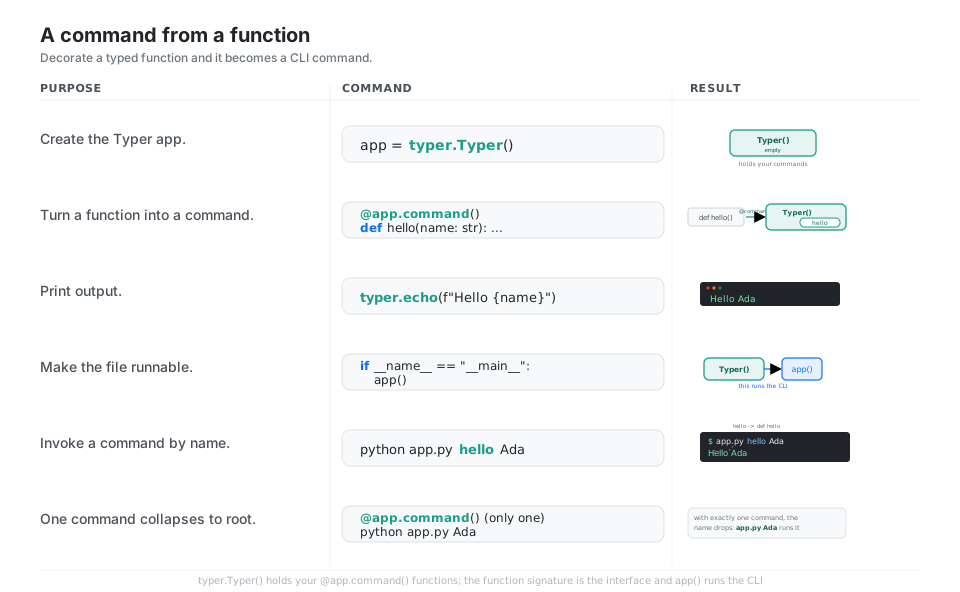
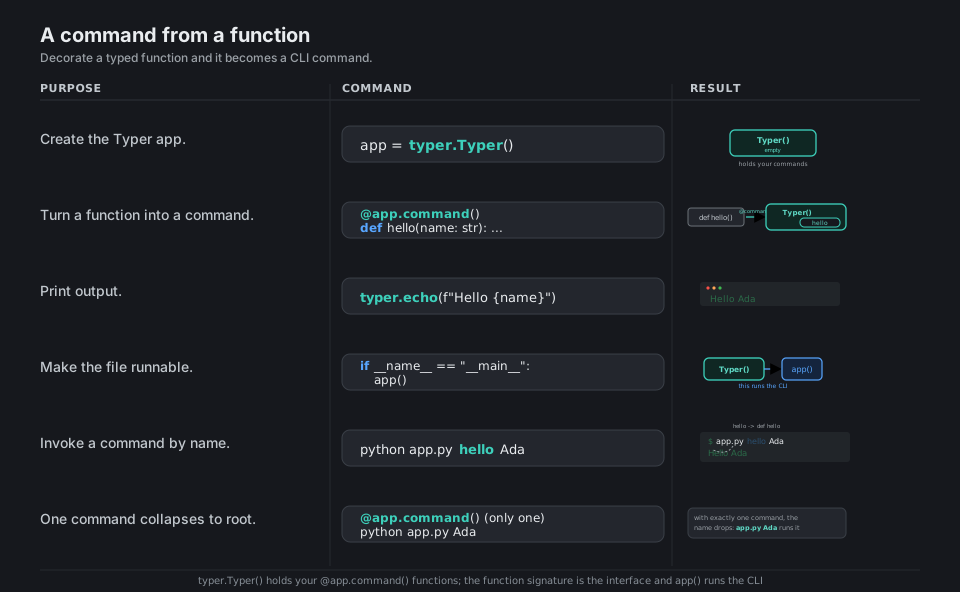
import typer

app = typer.Typer()                       # the CLI app container

@app.command()                            # turn a function into a command
def hello(name: str):
    typer.echo(f"Hello {name}")           # prints like print(), to stdout

if __name__ == "__main__":
    app()                                 # this runs the CLI
# python app.py hello Ada   -> Hello Ada
# one command only? python app.py Ada runs it directly (no command name)
See Commands. The function signature is the interface; no argparse boilerplate.
Arguments vs Options
Typer reads each parameter to decide its role: no default makes a required positional ARGUMENT, a default makes an optional --OPTION, and the type hint (str, int, bool, Path, an Enum) decides how the shell string is parsed and validated. The modern style wraps the Typer metadata in Annotated[type, typer.Argument(...)] or Annotated[type, typer.Option(...)] and leaves the Python default on the right; the old “Option as the default value” form still works but Annotated is preferred.
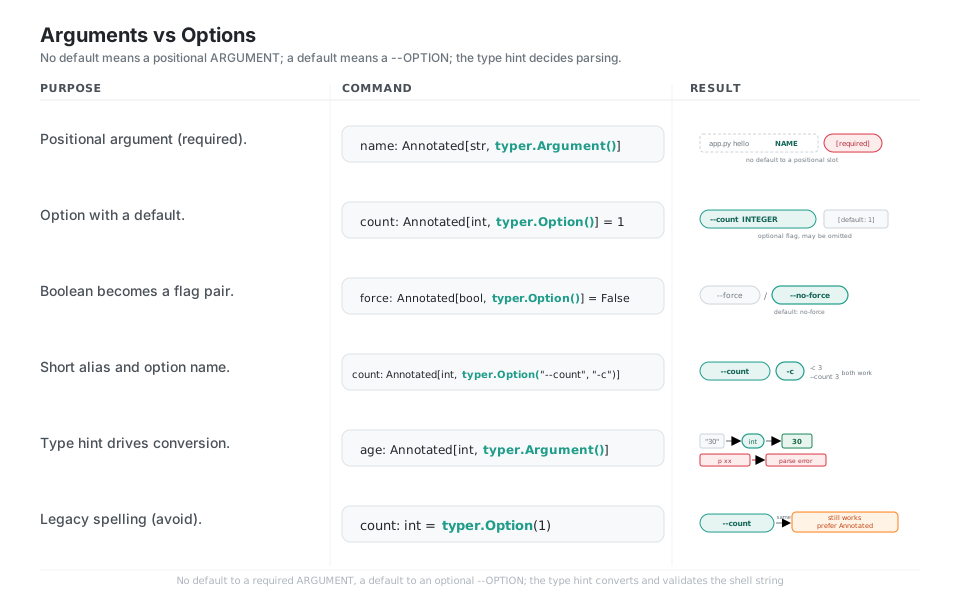
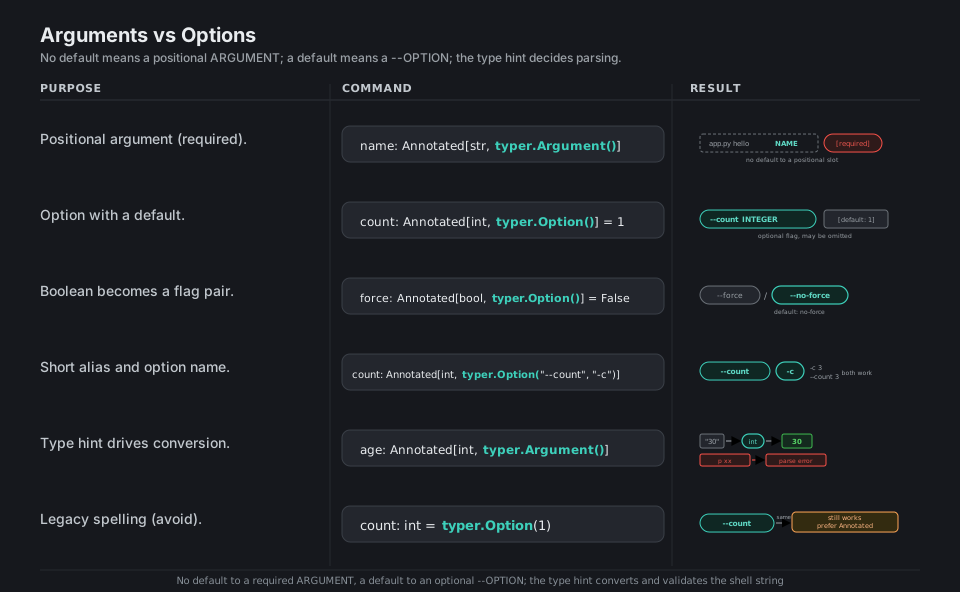
from typing import Annotated

name: Annotated[str, typer.Argument()]                  # required positional NAME
count: Annotated[int, typer.Option()] = 1               # optional --count [default: 1]
force: Annotated[bool, typer.Option()] = False          # --force / --no-force flag pair
count: Annotated[int, typer.Option("--count", "-c")]    # long flag plus -c short alias
age: Annotated[int, typer.Argument()]                   # "30" -> 30; "xx" -> parse error
count: int = typer.Option(1)                            # legacy form: works, prefer Annotated
See Arguments and Options. The type hint drives parsing and conversion.
The Auto-generated –help
Because Typer knows every parameter’s name, type, default, and help string, it builds a complete, Rich-formatted --help screen for free at both the app and per-command level. Your function docstring becomes the command description, each help= string annotates its parameter, the app-level help= describes the root, and --help always exits cleanly with status 0.
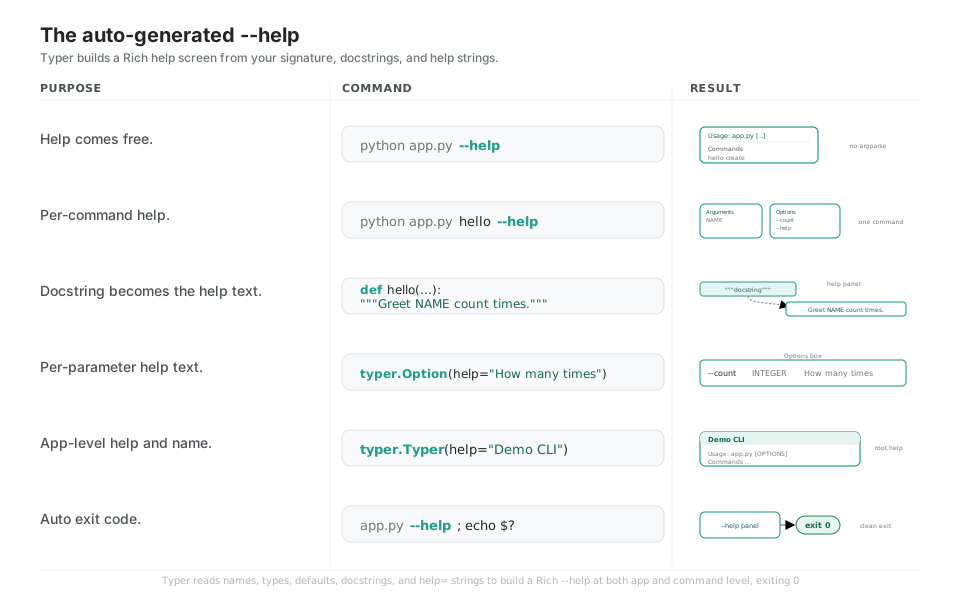
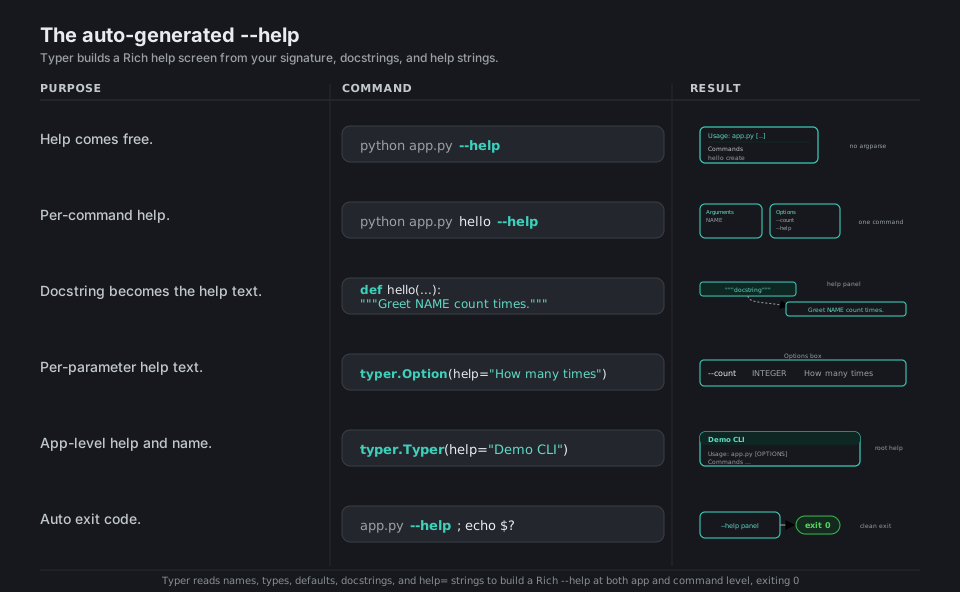
python app.py --help            # Rich panel: Usage line + Commands box (no boilerplate)
python app.py hello --help      # per-command: Arguments box + Options box
# """Greet NAME count times."""  -> the command's description line
# typer.Option(help="How many times")  -> description beside --count
# typer.Typer(help="Demo CLI")          -> top description of the root --help
python app.py --help; echo $?   # 0   (help is a clean exit)
See Commands help. Docstrings and help= strings populate the panel; --help exits 0.
Multiple Commands and Subcommands
Adding more @app.command() functions gives you a command set (app.py create, app.py delete), and you can rename a command independently of its function with @app.command("rm"). To build nested groups like git remote add, make a second typer.Typer() and mount it with app.add_typer(child, name="items"), which gives the group its own help and a usage breadcrumb.
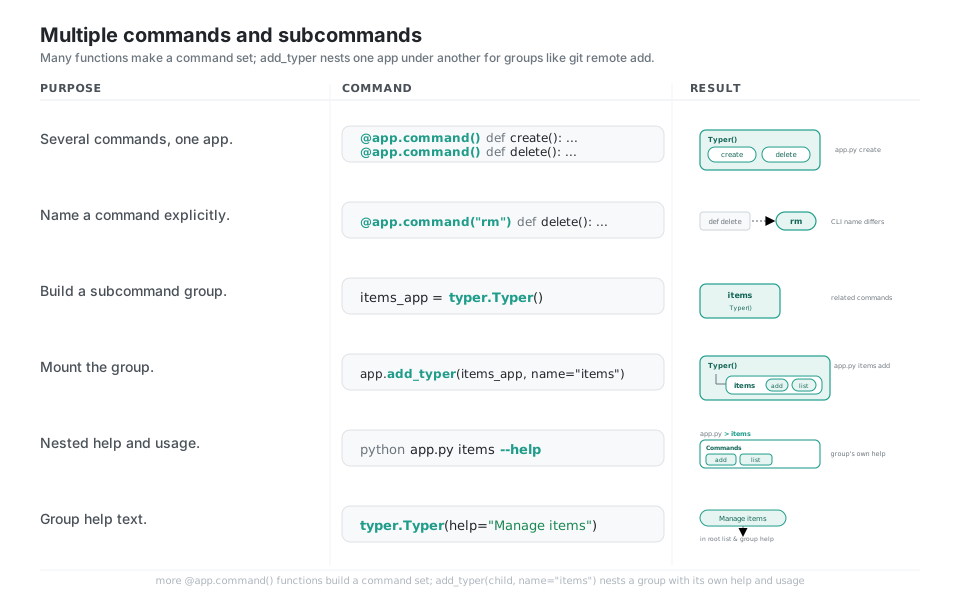
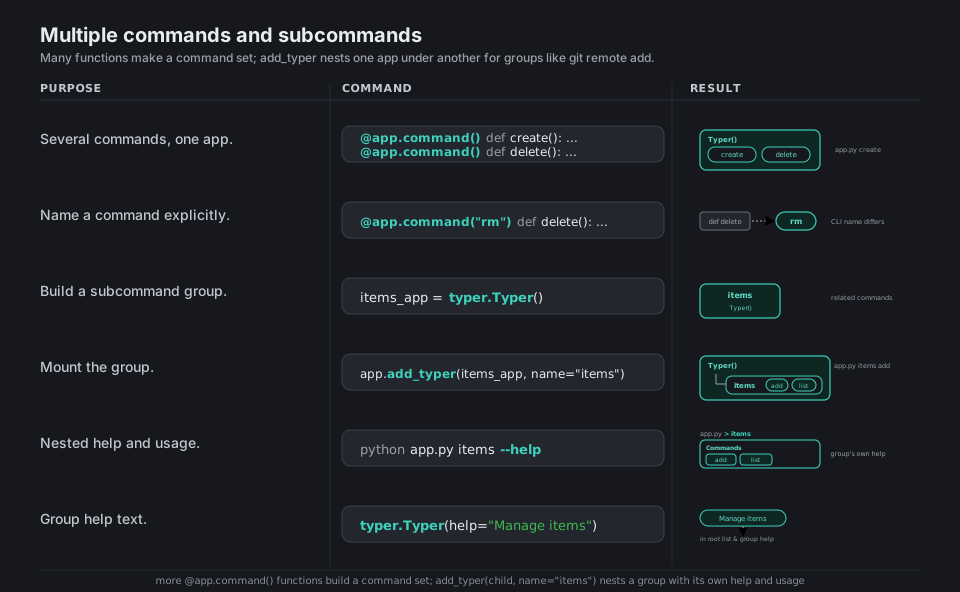
app = typer.Typer()

@app.command()                              # app.py create
def create(): ...

@app.command("rm")                          # CLI name differs from function name
def delete(): ...                           # -> app.py rm

items = typer.Typer(help="Manage items")    # a group of related commands
app.add_typer(items, name="items")          # mount it -> app.py items add
# python app.py items --help               -> lists the group's own subcommands
See Subcommands. add_typer nests one app under another for command groups.
Prompts and Confirms
When you want to ask the user instead of failing, mark an option prompt=True so Typer prompts for it when omitted, add confirmation_prompt=True and hide_input=True for passwords, or call typer.prompt(...) inline for an ad-hoc question. Gate destructive actions with typer.confirm(...), and stop a run with typer.Abort() (or the abort=True shortcut), which prints Aborted. and exits nonzero.
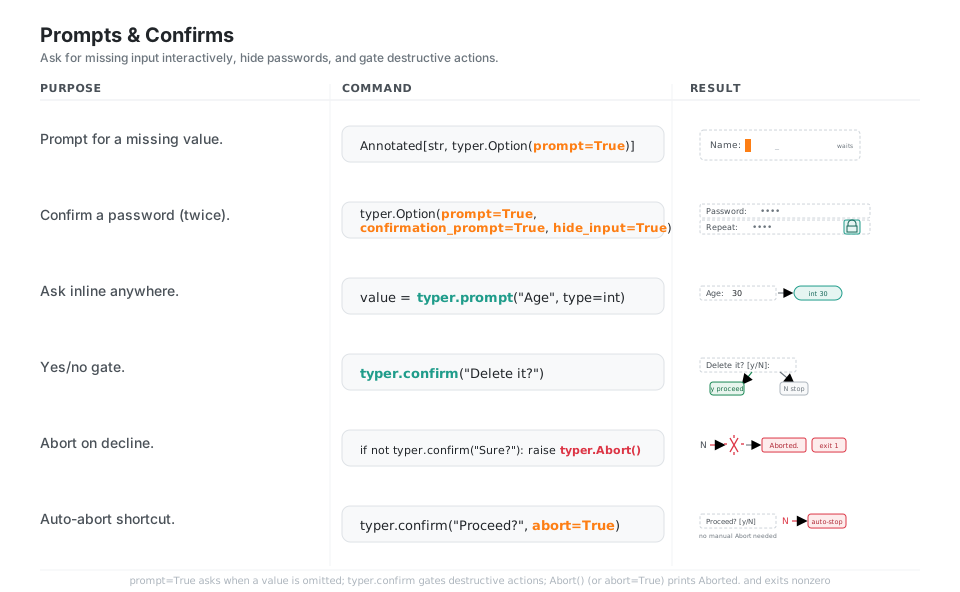
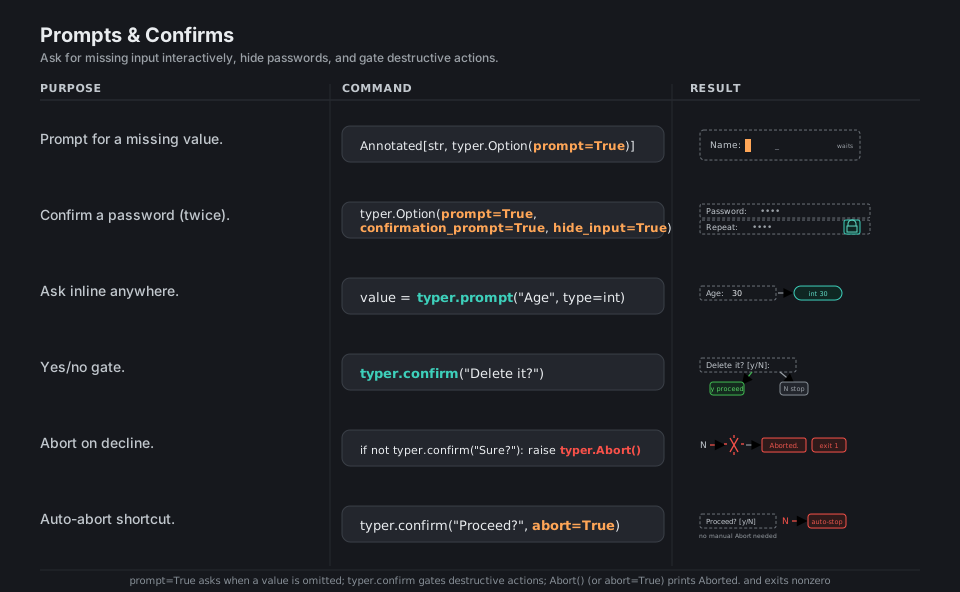
name: Annotated[str, typer.Option(prompt=True)]                     # omitted? prompts "Name:"
pw: Annotated[str, typer.Option(prompt=True,
              confirmation_prompt=True, hide_input=True)]           # asks twice, masked

age = typer.prompt("Age", type=int)                                # inline, returns typed int
typer.confirm("Delete it?")                                        # "Delete it? [y/N]:"
if not typer.confirm("Sure?"):
    raise typer.Abort()                                            # prints "Aborted.", exit 1
typer.confirm("Proceed?", abort=True)                              # abort shortcut, no manual raise
See Prompt. prompt=True asks when omitted; Abort prints Aborted. and exits nonzero.
Rich Output and Colors
Print plainly with typer.echo, add color and weight in one call with typer.secho(..., fg=typer.colors.GREEN, bold=True), or pre-style text with typer.style(...); pass err=True to send a line to stderr. Typer ships Rich as a dependency, so you can also build a rich.table.Table, print it through a Rich Console, and enable inline markup in help text with rich_markup_mode="rich".
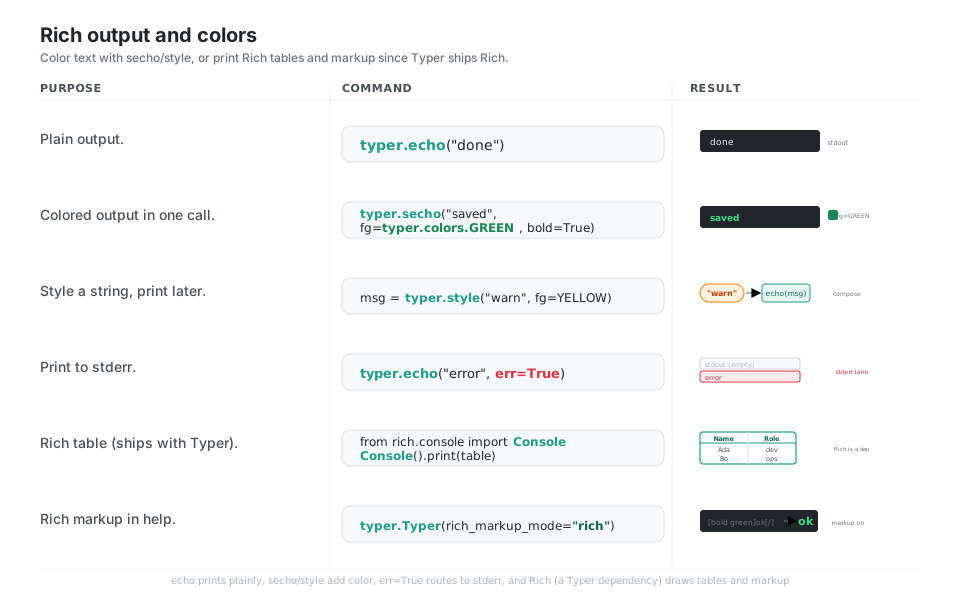
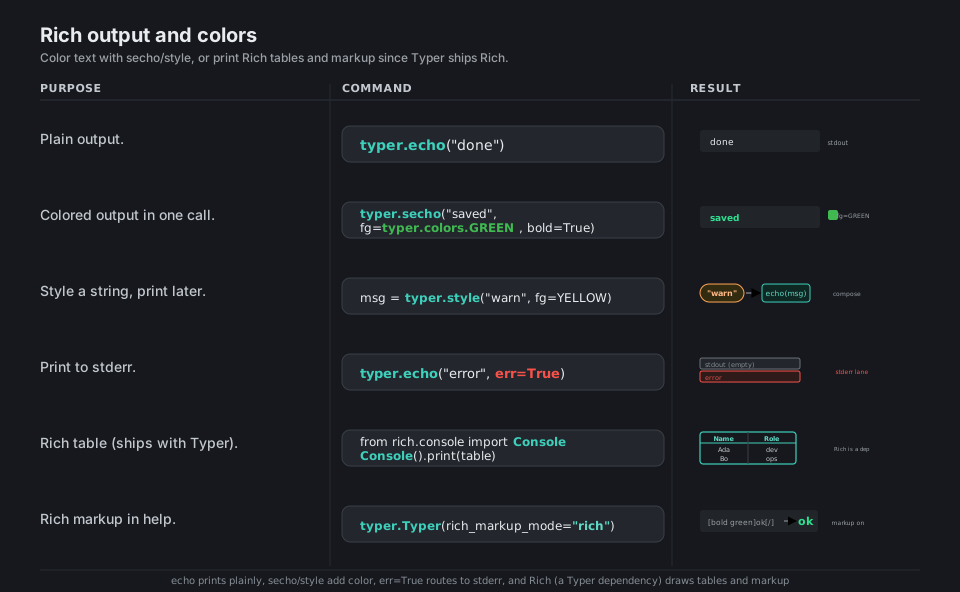
typer.echo("done")                                          # plain, to stdout
typer.secho("saved", fg=typer.colors.GREEN, bold=True)      # color + weight in one call
msg = typer.style("warn", fg=typer.colors.YELLOW)           # compose, then echo later
typer.echo("error", err=True)                               # route to stderr

from rich.console import Console                             # Rich ships with Typer
Console().print(table)                                      # print a rich.table.Table
typer.Typer(rich_markup_mode="rich")                        # [bold green]ok[/] renders in help
See Printing and colors. Rich is a Typer dependency, so tables and markup come built in.
Validation and Defaults
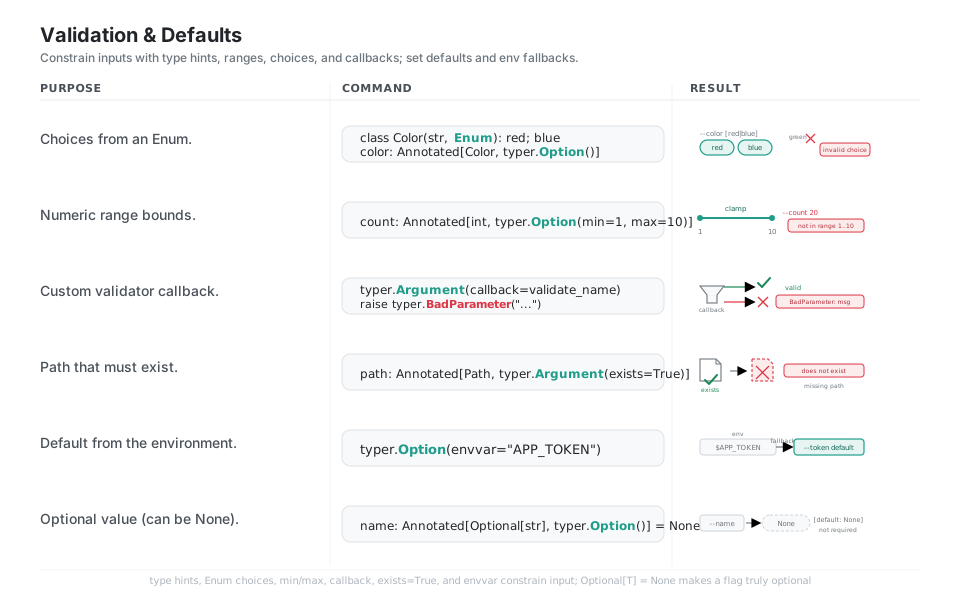
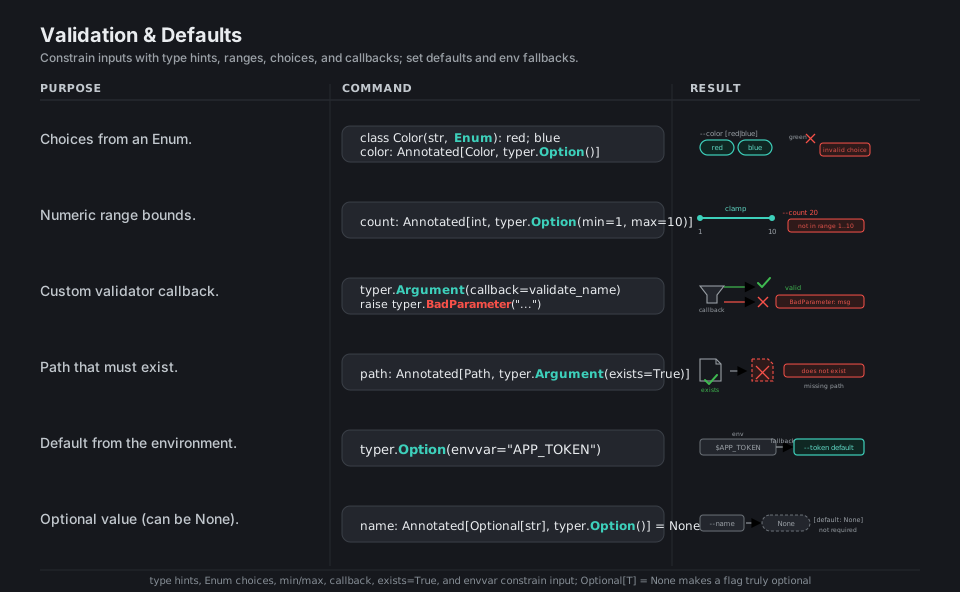
Constrain inputs declaratively: an Enum type produces a fixed choice list, min=/max= bound numbers, exists=True requires a real Path, and a callback= function can raise typer.BadParameter with a custom message. Defaults come from the right-hand side of the parameter, fall back to an environment variable via envvar=, and become genuinely optional when the type is Optional[...] with a None default.
from enum import Enum
from pathlib import Path
from typing import Optional

class Color(str, Enum):
    red = "red"; blue = "blue"

color: Annotated[Color, typer.Option()]                     # --color [red|blue], else error
count: Annotated[int, typer.Option(min=1, max=10)]          # --count 20 -> not in range
name: Annotated[str, typer.Argument(callback=validate)]     # callback raises BadParameter
path: Annotated[Path, typer.Argument(exists=True)]          # missing path -> error
token: Annotated[str, typer.Option(envvar="APP_TOKEN")]     # falls back to the env var
name: Annotated[Optional[str], typer.Option()] = None       # truly optional [default: None]
See Parameter types. Enums, min/max, exists, and callbacks validate input.
Run the App
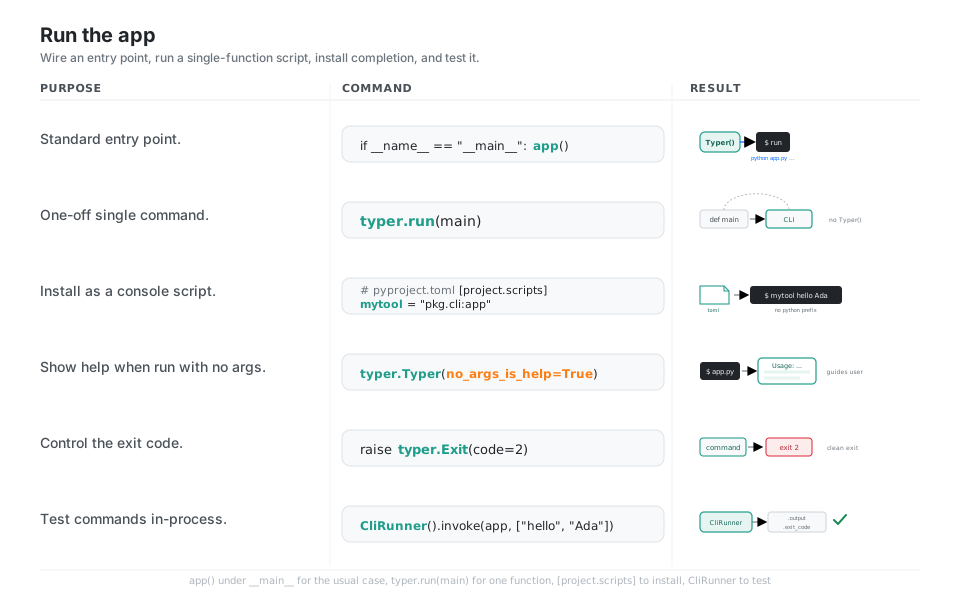
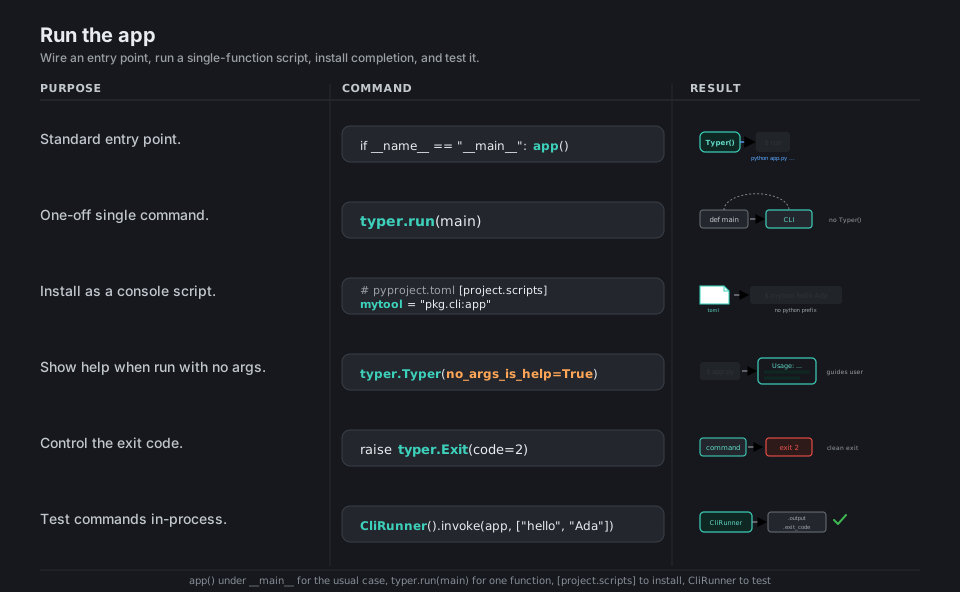
Wire app() under an if __name__ == "__main__": guard for the usual case, or skip the app entirely with typer.run(main) for a single-function script. Register a console-script entry point in pyproject.toml so the tool runs as a bare command, set no_args_is_help=True to greet users who run it with no arguments, control the process exit with raise typer.Exit(code=...), and test commands in-process with typer.testing.CliRunner.
if __name__ == "__main__":
    app()                                          # python app.py ...

typer.run(main)                                    # single function, no Typer() needed
# pyproject.toml -> [project.scripts] mytool = "pkg.cli:app"  -> mytool hello Ada
typer.Typer(no_args_is_help=True)                  # no command? show the help panel
raise typer.Exit(code=2)                           # clean programmatic exit (exit 2)

from typer.testing import CliRunner
CliRunner().invoke(app, ["hello", "Ada"])          # capture .output and .exit_code
See Building a package and Testing. typer.run is the quickest CLI of all.
Quick Reference
| Command | What it does | Area |
|---|---|---|
app = typer.Typer() |
Create the CLI app container | App |
@app.command() |
Turn a function into a command | Command |
typer.run(main) |
Run a single function as a CLI | Command |
name: Annotated[str, typer.Argument()] |
Required positional argument | Args |
count: Annotated[int, typer.Option()] = 1 |
Optional --count with a default |
Options |
app.add_typer(child, name="items") |
Mount a subcommand group | Subcommands |
typer.Option(prompt=True) |
Ask for the value if omitted | Prompts |
typer.confirm("Sure?") |
Yes/no gate | Prompts |
typer.echo(...) / typer.secho(..., fg=...) |
Print / print in color | Output |
typer.Option(min=1, max=10) |
Bound a numeric input | Validation |
typer.Argument(callback=fn) |
Custom validation, raise BadParameter |
Validation |
raise typer.Exit(code=2) |
Exit with a status code | Run |
typer.Typer(no_args_is_help=True) |
Show help when run with no args | Run |
CliRunner().invoke(app, [...]) |
Test a command in-process | Run |
| Parameter | Role | Example usage |
|---|---|---|
| No default | Required positional ARGUMENT | app.py hello Ada |
| Has a default | Optional --OPTION |
app.py hello --count 3 |
bool with default |
--flag / --no-flag pair |
app.py run --force |
Optional[T] = None |
Truly optional, may be None |
app.py hello (no value) |
Enum type |
Fixed choice list | app.py paint --color red |
| Setting | Meaning |
|---|---|
help="..." |
Help text shown in --help |
"--name", "-n" |
Long flag plus short alias |
prompt=True |
Prompt for the value when omitted |
confirmation_prompt=True |
Ask twice (passwords) |
hide_input=True |
Mask typed input |
min=, max= |
Numeric bounds |
exists=True |
Path must exist on disk |
envvar="APP_TOKEN" |
Fall back to an environment variable |
callback=fn |
Run custom validation |
| Call | Effect |
|---|---|
typer.echo(msg) |
Print to stdout |
typer.echo(msg, err=True) |
Print to stderr |
typer.secho(msg, fg=typer.colors.RED) |
Print in color |
raise typer.Exit() |
Clean exit (code 0) |
raise typer.Exit(code=1) |
Exit with a status code |
raise typer.Abort() |
Print Aborted., exit nonzero |
raise typer.BadParameter("msg") |
Report an invalid parameter value |
Appendix: Sample Code
The minimal Typer app (the canonical shape)
import typer
from typing import Annotated

app = typer.Typer(help="A tiny greeter CLI.")


@app.command()
def hello(
    name: Annotated[str, typer.Argument(help="Who to greet")],
    count: Annotated[int, typer.Option("--count", "-c", help="How many times")] = 1,
    formal: Annotated[bool, typer.Option(help="Use a formal greeting")] = False,
):
    """Greet NAME, COUNT times."""
    greeting = "Good day" if formal else "Hi"
    for _ in range(count):
        typer.secho(f"{greeting}, {name}!", fg=typer.colors.GREEN, bold=True)


if __name__ == "__main__":
    app()
$ python app.py hello Ada -c 2 --formal
Good day, Ada!
Good day, Ada!
$ python app.py hello --help
Usage: app.py hello [OPTIONS] NAME
Greet NAME, COUNT times.
Arguments: * name TEXT Who to greet [required]
Options: --count -c INTEGER How many times [default: 1]
--formal / --no-formal Use a formal greeting [default: no-formal]Multiple commands and a subcommand group
import typer

app = typer.Typer()
items = typer.Typer(help="Manage items")
app.add_typer(items, name="items")


@app.command()
def version():
    typer.echo("mytool 1.0.0")


@items.command("add")
def items_add(name: str):
    typer.secho(f"added {name}", fg=typer.colors.GREEN)


@items.command("rm")
def items_rm(name: str):
    typer.secho(f"removed {name}", fg=typer.colors.RED)


if __name__ == "__main__":
    app()
# python app.py version        -> mytool 1.0.0
# python app.py items add foo  -> added foo
# python app.py items --help   -> lists `add` and `rm`
Prompts, confirmation, and validation
import typer
from typing import Annotated
from enum import Enum

app = typer.Typer()


class Env(str, Enum):
    dev = "dev"
    prod = "prod"


def check_name(value: str) -> str:
    if not value.isalpha():
        raise typer.BadParameter("name must be letters only")
    return value


@app.command()
def deploy(
    name: Annotated[str, typer.Argument(callback=check_name)],
    env: Annotated[Env, typer.Option()] = Env.dev,
    token: Annotated[str, typer.Option(prompt=True, hide_input=True, envvar="APP_TOKEN")] = "",
    workers: Annotated[int, typer.Option(min=1, max=16)] = 4,
):
    if env is Env.prod:
        typer.confirm("Deploy to PROD?", abort=True)   # 'n' -> Aborted., exit 1
    typer.secho(f"deploying {name} to {env.value} with {workers} workers", fg=typer.colors.BLUE)


if __name__ == "__main__":
    app()
The quickest possible CLI (single function)
import typer


def main(name: str, count: int = 1):
    """Say hello COUNT times."""
    for _ in range(count):
        typer.echo(f"Hello {name}")


if __name__ == "__main__":
    typer.run(main)        # no typer.Typer() needed for one command
# python app.py World --count 2  -> Hello World (twice)
Install as a real command, and test it
# pyproject.toml
[project.scripts]
mytool = "mypkg.cli:app"
# tests/test_cli.py
from typer.testing import CliRunner
from mypkg.cli import app
runner = CliRunner()
def test_hello():
result = runner.invoke(app, ["hello", "Ada", "-c", "2"])
assert result.exit_code == 0
assert result.output.count("Ada") == 2After pip install -e ., the command runs without a python prefix:
$ mytool hello Ada -c 2
Hi, Ada!
Hi, Ada!
Behavior notes
- No default means ARGUMENT, a default means OPTION. A parameter with no default is a required positional argument; once it has a default it becomes an optional
--flag, and the type hint decides how the shell string is parsed. - Prefer the
Annotatedform. Attach Typer metadata viatyping.Annotated, for examplename: Annotated[str, typer.Option()] = "x". The oldername: str = typer.Option("x")(Option as the default value) still works in 0.26 but is the legacy spelling. - A single command collapses to root. An app with exactly one
@app.command()runs that command directly (app.py ARG), with no command name; a second command makes both names required. --helpis a clean exit. Typer builds the Rich help screen from your signature and docstrings and exits with status 0, so help never looks like an error.- Rich ships with Typer. Colored output, tables, and
rich_markup_mode="rich"work out of the box becauserichis one of Typer’s hard dependencies. boolbecomes a flag pair. Aboolparameter with a default renders as--force / --no-force, not as a value you pass.
References
Typer documentation (current)
- Documentation home and the Tutorial index
- First steps, the Typer app object, and the API reference
- Commands, Arguments, Options, Commands help
- Subcommands, Prompt, Printing and colors
- Parameter types, Building a package, Testing
Project and related