Why a Makefile?
R package development involves a surprising number of commands. Need a CRAN check? Was it devtools::check(args = "--as-cran") or rcmdcheck::rcmdcheck()? Precompile vignettes? Render the README? Spell-check the docs? The exact invocations are just awkward enough that you can never quite recall them from muscle memory.
On top of that, every package is a little different. One has a precompile.R script for vignettes. Another uses pkgdown. A third has a README.Rmd that needs rendering. Without a shared convention, each package ends up with its own ad hoc shell scripts, .Rprofile hacks, or hastily written contributor notes.
A Makefile solves both problems. It gives every package the same short, memorable commands:
make test              # run the test suite
make check-cran        # full CRAN check
make vignettes         # precompile or build, depending on what's there
make help              # show everything available
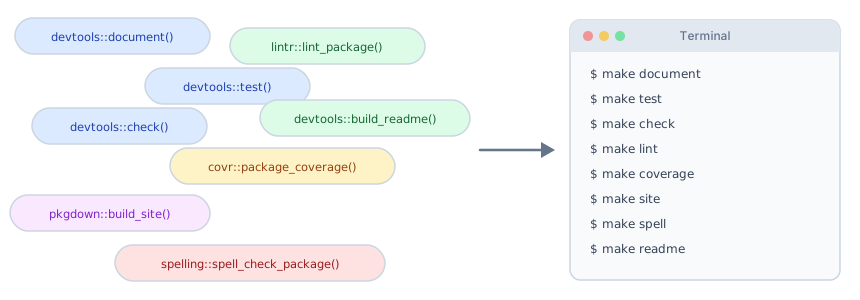
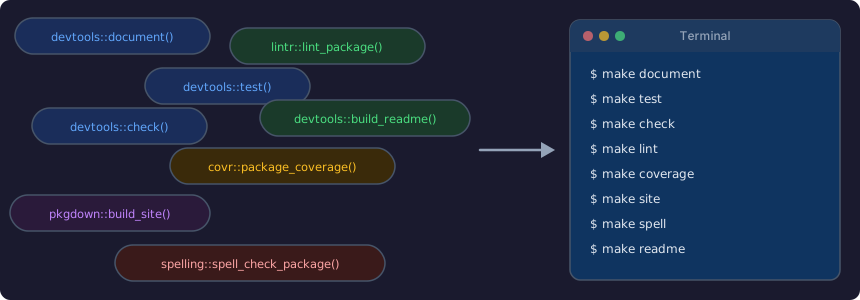
New contributors clone the repo, type make help, and immediately see what is available. No Slack messages, no guesswork. Figure 1 shows the shift from a scattered collection of R commands to a unified make interface.
Make in 60 Seconds
If you have never used Make before, here is the survival guide. GNU Make reads a file called Makefile in your project root. That file contains targets, which are named recipes that run shell commands. You invoke them with make <target>.
A target looks like this:
document:
    @Rscript -e 'devtools::document()'
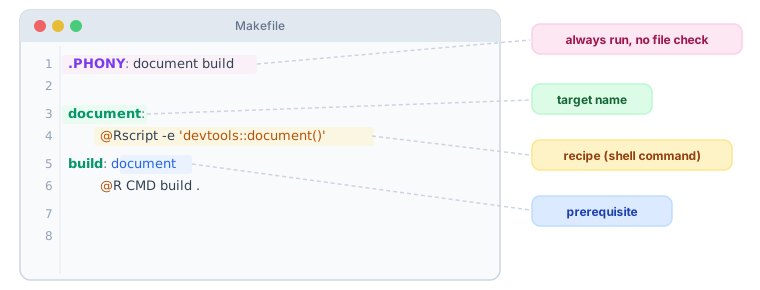
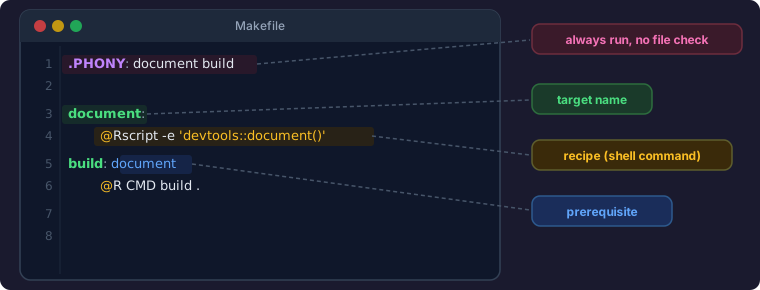
The name before the colon is the target. The indented line below it is the recipe, the shell command that runs when you type make document. That indentation must be a literal tab character, not spaces. This is Make’s most infamous quirk, and yes, it has tripped up every developer at least once.
Targets can have prerequisites, other targets that must run first:
build: document
    @R CMD build .
Here, make build will automatically run document before building the tarball. Make figures out the ordering for you.
A few more things worth knowing:
.PHONYtells Make that a target name does not correspond to an actual file. Without it, if you happened to have a file calledbuildin your directory, Make would say “nothing to do” and skip the recipe..PHONYprevents that.:=is a simple variable assignment.PKG_NAME := mypackagesets a variable you can reference later as$(PKG_NAME).@at the start of a recipe line suppresses the echo of the command itself, so you only see the output.
That is genuinely all you need to follow along. Figure 3 summarizes these four concepts visually.
On macOS, Make ships with the Xcode Command Line Tools. If you have ever run xcode-select --install or installed Xcode, you already have it. Check with make --version.
On Linux, Make is available through your package manager (sudo apt install make on Debian/Ubuntu, sudo dnf install make on Fedora).
On Windows, the easiest path is to install Rtools, which bundles make alongside the compilers R packages need. Once Rtools is on your PATH, make works from any terminal. Alternatively, Chocolatey (choco install make) or WSL both provide Make.
Configuration
The top of the Makefile sets up variables that the rest of the targets use. Rather than hard-coding the package name and version, we pull them directly from DESCRIPTION:
PKG_NAME    := $(shell sed -n 's/^Package: *//p' DESCRIPTION)
PKG_VERSION := $(shell sed -n 's/^Version: *//p' DESCRIPTION)
PKG_TARBALL := $(PKG_NAME)_$(PKG_VERSION).tar.gz
$(shell ...) runs a shell command at parse time. The sed one-liner finds the line starting with Package: (or Version:) and extracts everything after the colon. This means you never have to edit the Makefile when you bump your version number because it picks up the change from DESCRIPTION.
Next, feature detection:
HAS_PRECOMPILE := $(wildcard vignettes/precompile.R)
HAS_PKGDOWN    := $(wildcard _pkgdown.yml)
HAS_README_RMD := $(wildcard README.Rmd)
HAS_README_QMD := $(wildcard README.qmd)
$(wildcard ...) expands to the filename if it exists, or an empty string if it does not. We use these later for conditional logic so that the same Makefile adapts to packages with or without pkgdown, precompiled vignettes, or a README.Rmd/README.qmd.
There is also a FILTER variable for targeted test runs:
FILTER ?=The ?= syntax means “set this only if it is not already defined.” This lets you pass a filter from the command line (make test FILTER=simulate) without modifying the Makefile.
Finally, ANSI color codes make the output easier to scan:
GREEN  := \033[0;32m
YELLOW := \033[0;33m
RED    := \033[0;31m
CYAN   := \033[0;36m
NC     := \033[0m
Yellow for “working on it,” green for “done.” Small touch, but it makes a difference when you are staring at a terminal full of output.
Core Workflow
The heart of the Makefile is five targets that cover the daily development loop:
document:
    @echo "$(YELLOW)Generating documentation...$(NC)"
    @Rscript -e 'devtools::document()'
    @echo "$(GREEN)Documentation complete$(NC)"

build: document
    @echo "$(YELLOW)Building $(PKG_NAME) $(PKG_VERSION)...$(NC)"
    @R CMD build .
    @echo "$(GREEN)Build complete: $(PKG_TARBALL)$(NC)"

install:
    @echo "$(YELLOW)Installing $(PKG_NAME)...$(NC)"
    @R CMD INSTALL --no-multiarch --with-keep.source .
    @echo "$(GREEN)Install complete$(NC)"

load:
    @echo "$(YELLOW)Loading $(PKG_NAME) via load_all()...$(NC)"
    @Rscript -e 'devtools::load_all()'
    @echo "$(GREEN)Package loaded$(NC)"

deps:
    @echo "$(YELLOW)Installing dependencies...$(NC)"
    @Rscript -e 'devtools::install_deps(dependencies = TRUE)'
    @echo "$(GREEN)Dependencies installed$(NC)"
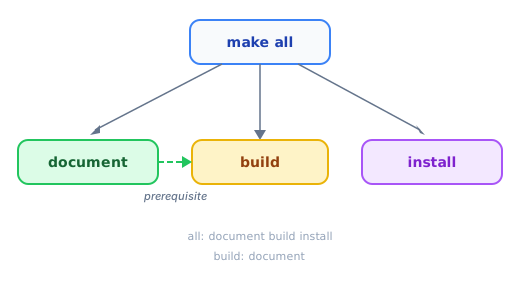
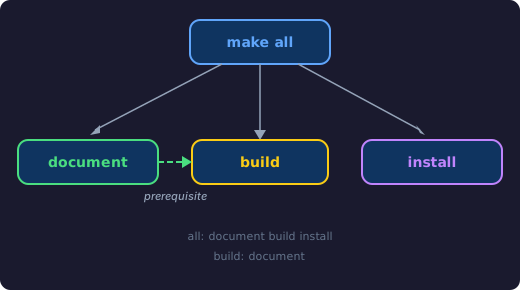
Notice the dependency chain: build: document means Make will automatically run document before build. You never forget to regenerate your roxygen2 documentation before building a tarball.
The all target ties the full pipeline together:
all: document build installSince all is the first real target in the Makefile (after .PHONY), running bare make with no arguments triggers it. That gives you a one-command “regenerate docs, build, and install” workflow. Figure 5 shows how make all orchestrates these targets.
load and deps stand alone. load is for the quick devtools::load_all() cycle during active development, and deps handles dependency installation, which is especially useful when setting up a fresh clone.
Testing
Testing gets its own section of the Makefile because there are several different levels of checking you might want to run:
test:
ifdef FILTER
    @echo "$(YELLOW)Running tests matching '$(FILTER)'...$(NC)"
    @Rscript -e 'devtools::test(filter = "$(FILTER)")'
else
    @echo "$(YELLOW)Running all tests...$(NC)"
    @Rscript -e 'devtools::test()'
endif

check:
    @echo "$(YELLOW)Running R CMD check...$(NC)"
    @Rscript -e 'devtools::check()'

check-cran:
    @echo "$(YELLOW)Running R CMD check (CRAN mode)...$(NC)"
    @Rscript -e 'devtools::check(args = "--as-cran")'

coverage:
    @echo "$(YELLOW)Computing test coverage...$(NC)"
    @Rscript -e 'covr::report(covr::package_coverage())'

revdep:
    @echo "$(YELLOW)Running reverse dependency checks...$(NC)"
    @Rscript -e 'revdepcheck::revdep_check(num_workers = 4)'
The FILTER conditional is the one I reach for most often. When I am working on a specific feature and only want to run the tests that exercise it:
make test FILTER=simulateThis passes filter = "simulate" to devtools::test(), which runs only test files whose names match the pattern. Much faster than running the entire suite every time you tweak a line.
check and check-cran wrap the two flavors of R CMD check that you will use regularly. The CRAN variant adds --as-cran, which enables the stricter checks that CRAN’s incoming submission system applies. I tend to run check during development and check-cran before submitting.
coverage opens an interactive coverage report via {covr}, and revdep kicks off a reverse dependency check with {revdepcheck}. This is something you will want before any major release if other packages depend on yours.
Code Quality
These four targets are thin wrappers, but their real value is discoverability. I do not need to remember which package provides the spell checker or whether the lintr function is lint_package() or lint_dir(). I just type make lint.
lint:
    @echo "$(YELLOW)Linting package...$(NC)"
    @Rscript -e 'lintr::lint_package()'

format:
    @echo "$(YELLOW)Formatting R code with air...$(NC)"
    @air format .
    @echo "$(GREEN)Formatting complete$(NC)"

spell:
    @echo "$(YELLOW)Spell checking documentation...$(NC)"
    @Rscript -e 'spelling::spell_check_package()'

urlcheck:
    @echo "$(YELLOW)Checking URLs...$(NC)"
    @Rscript -e 'urlchecker::url_check()'
The format target calls air directly as a command-line tool rather than through R. Air is Posit’s Rust-based R formatter that is fast, opinionated, and increasingly the standard choice for automated R formatting.
spell and urlcheck are the kind of targets you run right before a CRAN submission. Broken URLs and typos in documentation are easy to miss during development but will reliably earn you a NOTE from CRAN’s checks.
Adaptive Targets
Not every R package has vignettes. Not every package uses pkgdown. Not every package has a README.Rmd. The Makefile handles all of these cases with conditional logic:
vignettes:
ifneq ($(HAS_PRECOMPILE),)
    @echo "$(YELLOW)Precompiling vignettes...$(NC)"
    @Rscript -e 'source("vignettes/precompile.R")'
    @echo "$(GREEN)Vignettes precompiled$(NC)"
else
    @echo "$(YELLOW)Building vignettes...$(NC)"
    @Rscript -e 'devtools::build_vignettes()'
    @echo "$(GREEN)Vignettes built$(NC)"
endif
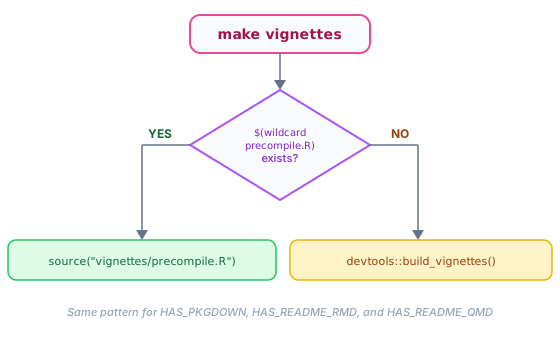
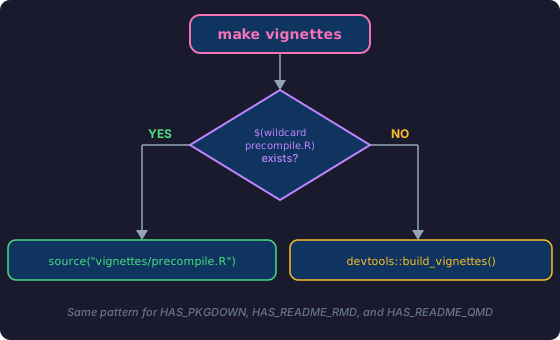
Remember those HAS_PRECOMPILE, HAS_PKGDOWN, HAS_README_RMD, and HAS_README_QMD variables from the configuration section? Here is where they pay off. ifneq checks whether the variable is non-empty, which it will be if $(wildcard ...) found the file.
The same pattern applies to readme and site:
readme:
ifneq ($(HAS_README_RMD),)
    @echo "$(YELLOW)Rendering README.Rmd...$(NC)"
    @Rscript -e 'devtools::build_readme()'
    @echo "$(GREEN)README rendered$(NC)"
else ifneq ($(HAS_README_QMD),)
    @echo "$(YELLOW)Rendering README.qmd...$(NC)"
    @quarto render README.qmd
    @echo "$(GREEN)README rendered$(NC)"
else
    @echo "$(YELLOW)No README.Rmd or README.qmd found, skipping.$(NC)"
endif

site:
ifneq ($(HAS_PKGDOWN),)
    @echo "$(YELLOW)Building pkgdown site...$(NC)"
    @Rscript -e 'pkgdown::build_site()'
    @echo "$(GREEN)Site built$(NC)"
else
    @echo "$(YELLOW)No _pkgdown.yml found, skipping.$(NC)"
endif
This means you can drop the same Makefile into any R package and it will do the right thing. A package with vignettes/precompile.R gets precompilation; one without gets devtools::build_vignettes(). A package with _pkgdown.yml gets make site; one without gets a polite skip message. No editing required.
Precompiled vignettes deserve their own discussion. When and why you would reach for a precompile.R script (API calls, long-running models, CRAN time limits) will be the subject of a future post.
Figure 7 illustrates the decision logic for the vignettes target.
Self-Documenting Help
A Makefile is only useful if people know what targets are available. There are two good approaches to a help target, and which one you pick depends on how many targets you have.
The Hand-Crafted Approach
The full Makefile uses a manually written help target with grouped sections:
help:
    @echo "$(GREEN)$(PKG_NAME) $(PKG_VERSION) Makefile$(NC)"
    @echo ""
    @echo "$(YELLOW)Core:$(NC)"
    @echo "  $(CYAN)all$(NC)              Document, build, and install (default)"
    @echo "  $(CYAN)document$(NC)         Generate roxygen2 documentation"
    # ... and so on for each section
This is more work to maintain, but it produces nicely organized output with logical groupings (Core, Testing, Code Quality, etc.). For a Makefile with 20+ targets, the structure is worth the effort.
The krisnova One-Liner
For simpler Makefiles, there is an elegant trick attributed to krisnova’s Makefile template: annotate each target with a ## comment, then use a single help target to extract and display them:
document:  ## Generate roxygen2 documentation
    @Rscript -e 'devtools::document()'

build: document  ## Build package tarball
    @R CMD build .

.PHONY: help
help:  ## Show help messages for make targets
    @grep -E '^[a-zA-Z_-]+:.*?## .*$$' $(firstword $(MAKEFILE_LIST)) | sort | \
      awk 'BEGIN {FS = ":.*?## "}; {printf "\033[32m%-30s\033[0m %s\n", $$1, $$2}'
The grep finds lines matching target: ... ## description, and awk formats them into a clean two-column table. It is self-maintaining: add a ## comment to any target and it automatically appears in make help.
I first encountered this pattern in a countdown PR discussion and have been using variations of it ever since. My general guidance: use the ## trick for Makefiles with a handful of targets; switch to hand-crafted help when you have many targets that benefit from logical grouping.
The Full Makefile
Here is everything assembled into a single file. Drop it into the root of any R package, run make help, and customize from there.
# Makefile for R package development. Run `make help` for all targets.

# ==============================================================================
# Configuration
# ==============================================================================

PKG_NAME    := $(shell sed -n 's/^Package: *//p' DESCRIPTION)
PKG_VERSION := $(shell sed -n 's/^Version: *//p' DESCRIPTION)
PKG_TARBALL := $(PKG_NAME)_$(PKG_VERSION).tar.gz

# Optional feature detection
HAS_PRECOMPILE := $(wildcard vignettes/precompile.R)
HAS_PKGDOWN    := $(wildcard _pkgdown.yml)
HAS_README_RMD := $(wildcard README.Rmd)
HAS_README_QMD := $(wildcard README.qmd)

# Test filter (e.g., make test FILTER=simulate)
FILTER ?=

# Colors
GREEN  := \033[0;32m
YELLOW := \033[0;33m
RED    := \033[0;31m
CYAN   := \033[0;36m
NC     := \033[0m

# ==============================================================================
# Phony Targets
# ==============================================================================

.PHONY: all help document build install load deps \
        test check check-cran coverage revdep \
        lint format spell urlcheck \
        vignettes readme \
        site preview-site preview-vignette \
        update clean

all: document build install

# ==============================================================================
# Core Workflow
# ==============================================================================

document:
    @echo "$(YELLOW)Generating documentation...$(NC)"
    @Rscript -e 'devtools::document()'
    @echo "$(GREEN)Documentation complete$(NC)"

build: document
    @echo "$(YELLOW)Building $(PKG_NAME) $(PKG_VERSION)...$(NC)"
    @R CMD build .
    @echo "$(GREEN)Build complete: $(PKG_TARBALL)$(NC)"

install:
    @echo "$(YELLOW)Installing $(PKG_NAME)...$(NC)"
    @R CMD INSTALL --no-multiarch --with-keep.source .
    @echo "$(GREEN)Install complete$(NC)"

load:
    @echo "$(YELLOW)Loading $(PKG_NAME) via load_all()...$(NC)"
    @Rscript -e 'devtools::load_all()'
    @echo "$(GREEN)Package loaded$(NC)"

deps:
    @echo "$(YELLOW)Installing dependencies...$(NC)"
    @Rscript -e 'devtools::install_deps(dependencies = TRUE)'
    @echo "$(GREEN)Dependencies installed$(NC)"

# ==============================================================================
# Testing
# ==============================================================================

test:
ifdef FILTER
    @echo "$(YELLOW)Running tests matching '$(FILTER)'...$(NC)"
    @Rscript -e 'devtools::test(filter = "$(FILTER)")'
else
    @echo "$(YELLOW)Running all tests...$(NC)"
    @Rscript -e 'devtools::test()'
endif

check:
    @echo "$(YELLOW)Running R CMD check...$(NC)"
    @Rscript -e 'devtools::check()'

check-cran:
    @echo "$(YELLOW)Running R CMD check (CRAN mode)...$(NC)"
    @Rscript -e 'devtools::check(args = "--as-cran")'

coverage:
    @echo "$(YELLOW)Computing test coverage...$(NC)"
    @Rscript -e 'covr::report(covr::package_coverage())'

revdep:
    @echo "$(YELLOW)Running reverse dependency checks...$(NC)"
    @Rscript -e 'revdepcheck::revdep_check(num_workers = 4)'

# ==============================================================================
# Code Quality
# ==============================================================================

lint:
    @echo "$(YELLOW)Linting package...$(NC)"
    @Rscript -e 'lintr::lint_package()'

format:
    @echo "$(YELLOW)Formatting R code with air...$(NC)"
    @air format .
    @echo "$(GREEN)Formatting complete$(NC)"

spell:
    @echo "$(YELLOW)Spell checking documentation...$(NC)"
    @Rscript -e 'spelling::spell_check_package()'

urlcheck:
    @echo "$(YELLOW)Checking URLs...$(NC)"
    @Rscript -e 'urlchecker::url_check()'

# ==============================================================================
# Vignettes & README
# ==============================================================================

vignettes:
ifneq ($(HAS_PRECOMPILE),)
    @echo "$(YELLOW)Precompiling vignettes...$(NC)"
    @Rscript -e 'source("vignettes/precompile.R")'
    @echo "$(GREEN)Vignettes precompiled$(NC)"
else
    @echo "$(YELLOW)Building vignettes...$(NC)"
    @Rscript -e 'devtools::build_vignettes()'
    @echo "$(GREEN)Vignettes built$(NC)"
endif

readme:
ifneq ($(HAS_README_RMD),)
    @echo "$(YELLOW)Rendering README.Rmd...$(NC)"
    @Rscript -e 'devtools::build_readme()'
    @echo "$(GREEN)README rendered$(NC)"
else ifneq ($(HAS_README_QMD),)
    @echo "$(YELLOW)Rendering README.qmd...$(NC)"
    @quarto render README.qmd
    @echo "$(GREEN)README rendered$(NC)"
else
    @echo "$(YELLOW)No README.Rmd or README.qmd found, skipping.$(NC)"
endif

# ==============================================================================
# pkgdown Site
# ==============================================================================

site:
ifneq ($(HAS_PKGDOWN),)
    @echo "$(YELLOW)Building pkgdown site...$(NC)"
    @Rscript -e 'pkgdown::build_site()'
    @echo "$(GREEN)Site built$(NC)"
else
    @echo "$(YELLOW)No _pkgdown.yml found, skipping.$(NC)"
endif

preview-site:
ifneq ($(HAS_PKGDOWN),)
    @echo "$(YELLOW)Building and previewing pkgdown site...$(NC)"
    @Rscript -e 'pkgdown::build_site(preview = TRUE)'
else
    @echo "$(YELLOW)No _pkgdown.yml found, skipping.$(NC)"
endif

preview-vignette:
ifdef V
    @open vignettes/$(V).html 2>/dev/null || \
        xdg-open vignettes/$(V).html 2>/dev/null || \
        echo "$(RED)Cannot open vignettes/$(V).html$(NC)"
else
    @echo "$(YELLOW)Opening vignette index...$(NC)"
    @Rscript -e 'browseVignettes("$(PKG_NAME)")'
endif

# ==============================================================================
# Update from GitHub
# ==============================================================================

update:
    @echo "$(YELLOW)Pulling latest from origin/main...$(NC)"
    @git pull origin main
    @echo "$(GREEN)Updated to latest main$(NC)"

# ==============================================================================
# Cleanup
# ==============================================================================

clean:
    @echo "$(YELLOW)Cleaning build artifacts...$(NC)"
    @rm -rf $(PKG_NAME).Rcheck
    @rm -f $(PKG_TARBALL)
    @rm -rf doc Meta
    @rm -f man/*.Rd.bak
    @rm -f Rplots.pdf
    @echo "$(GREEN)Clean complete$(NC)"

# ==============================================================================
# Help
# ==============================================================================

help:
    @echo "$(GREEN)$(PKG_NAME) $(PKG_VERSION) Makefile$(NC)"
    @echo ""
    @echo "$(YELLOW)Core:$(NC)"
    @echo "  $(CYAN)all$(NC)              Document, build, and install (default)"
    @echo "  $(CYAN)document$(NC)         Generate roxygen2 documentation"
    @echo "  $(CYAN)build$(NC)            Build package tarball"
    @echo "  $(CYAN)install$(NC)          Install the package"
    @echo "  $(CYAN)load$(NC)             Load package via devtools::load_all()"
    @echo "  $(CYAN)deps$(NC)             Install all dependencies"
    @echo ""
    @echo "$(YELLOW)Testing:$(NC)"
    @echo "  $(CYAN)test$(NC)             Run all tests"
    @echo "  $(CYAN)test FILTER=pat$(NC)  Run tests matching pattern"
    @echo "  $(CYAN)check$(NC)            Run R CMD check"
    @echo "  $(CYAN)check-cran$(NC)       Run R CMD check (CRAN mode)"
    @echo "  $(CYAN)coverage$(NC)         Compute test coverage report"
    @echo "  $(CYAN)revdep$(NC)           Run reverse dependency checks"
    @echo ""
    @echo "$(YELLOW)Code Quality:$(NC)"
    @echo "  $(CYAN)lint$(NC)             Lint package with lintr"
    @echo "  $(CYAN)format$(NC)           Format R code with air"
    @echo "  $(CYAN)spell$(NC)            Spell check documentation"
    @echo "  $(CYAN)urlcheck$(NC)         Check URLs in documentation"
    @echo ""
    @echo "$(YELLOW)Vignettes:$(NC)"
    @echo "  $(CYAN)vignettes$(NC)        Precompile or build vignettes"
    @echo "  $(CYAN)readme$(NC)           Render README to README.md"
    @echo "  $(CYAN)preview-vignette$(NC) Preview vignettes (V=name for specific)"
    @echo ""
    @echo "$(YELLOW)Site:$(NC)"
    @echo "  $(CYAN)site$(NC)             Build pkgdown site"
    @echo "  $(CYAN)preview-site$(NC)     Build and preview pkgdown site"
    @echo ""
    @echo "$(YELLOW)Other:$(NC)"
    @echo "  $(CYAN)update$(NC)           Pull latest from origin/main"
    @echo "  $(CYAN)clean$(NC)            Remove build artifacts"
    @echo "  $(CYAN)help$(NC)             Show this help message"
Closing Thoughts
A Makefile is a living document. The version above covers the targets I reach for most often, but yours will evolve. Maybe you add a make bump-patch target that increments the version in DESCRIPTION. Maybe you wire up make release to handle the full CRAN submission dance. The point is that the Makefile grows with your workflow instead of replacing it.
To get started, drop the Makefile into the root of your R package and run make help to see what is available. Then make deps to install dependencies and make check to give it a spin. From there, add or remove targets as your package needs them. make clean sweeps away build artifacts when things get messy, and make update pulls the latest changes from your main branch.
I use similar Makefiles for Shiny apps and Quarto projects, each with targets tailored to that workflow. I also plan to write about precompiling vignettes with precompile.R, which this Makefile supports but we only touched on briefly. More on all of those in future posts.
The real payoff is consistency. The next time someone clones your package and asks “how do I run the tests?”, the answer is always the same: make test.
References
- GNU Make Manual
- Phony Targets (GNU Make)
- The DESCRIPTION File (Writing R Extensions)
- Checking Packages (Writing R Extensions)
- CRAN Submission Checklist
- devtools: Tools to Make Developing R Packages Easier
- roxygen2: In-Line Documentation for R
- covr: Test Coverage for Packages
- revdepcheck: Reverse Dependency Checking
- lintr: A Linter for R Code
- spelling: Tools for Spell Checking in R
- urlchecker: Run CRAN URL Checks
- pkgdown: Make Static HTML Documentation for a Package
- air: An R Formatter
- krisnova’s Self-Documenting Makefile