

The first time you watch a Shinylive app boot, it looks like any other Shiny app: a slider moves, a plot redraws, everything is interactive. Then you open your browser’s developer tools, glance at the network tab, and notice something that quietly rearranges your mental model. There is no round trip to a server. The browser downloaded a file called app.json, unpacked it, and started running R (or Python) locally. Nothing you click is talking to a backend, because there is no backend.
Sit with that for a second, because it has a consequence that is easy to miss: there are no secrets. To run a Shiny app on the client, the whole thing, source code and all, has to be delivered to the client. That is not a leak. It is the entire point. And once you accept that the app is the bundle, a small package like peeky (now on CRAN) stops looking like a hacking tool and starts looking like what it is: a mirror.
Two ways to run a Shiny app
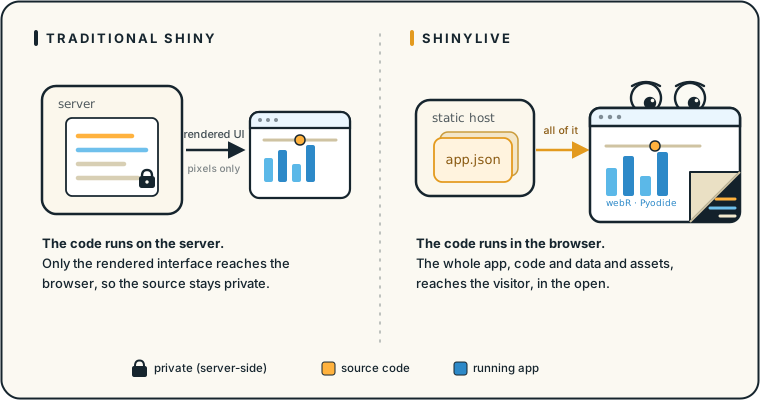
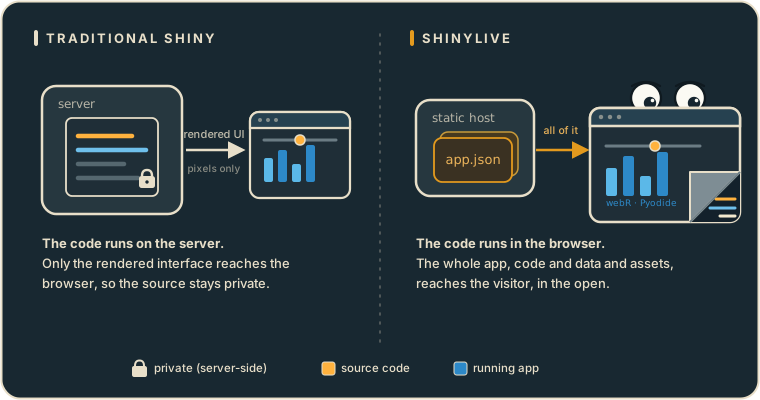
In the traditional model, a Shiny app runs on a computational server. Your R or Python process lives on a machine you control, the user’s browser sends it events, and the server sends back rendered output. The source code never leaves the server. If you have an API key, a database password, or a proprietary algorithm buried in server(), the user never sees it. Privacy is a side effect of where the code runs.
# The classic arrangement: this code executes on the server, not the client
library(shiny)

ui <- fluidPage(
  # UI elements
)

server <- function(input, output, session) {
  # Business logic, secrets, and all, stay here on the server
}

shinyApp(ui, server)
Shinylive changes where the code runs. It leans on WebAssembly builds of R (webR) and Python (Pyodide), so the interpreter itself runs inside the browser tab and your app runs on top of it. There is no computational server left to keep anything private, because there is no computational server at all. You can host the result on GitHub Pages, Netlify, or an S3 bucket, the same way you would host a static site.
That is a wonderful property for teaching, demos, reproducibility, and reach. It is also a property you have to design around, because the privacy that used to come for free is gone.
The conversion bundles everything
You produce a Shinylive app by running a converter over an existing Shiny app. In R that is shinylive::export():
# install.packages("shinylive")
shinylive::export(
  appdir = "myapp",   # your existing Shiny app
  destdir = "_site"   # a static site you can deploy anywhere
)
Under the hood, the converter does something delightfully literal. It walks your app directory, collects every file it needs (R or Python source, datasets, CSS, images, configuration), and serializes all of it into a single manifest named app.json. Each entry records a file’s name, its contents, and whether it is text or binary:
[
  { "name": "app.R",              "content": "library(shiny)\nui <- fluidPage(...)", "type": "text" },
  { "name": "data/dataset.csv",   "content": "date,value\n2024-01-01,42",           "type": "text" },
  { "name": "www/logo.png",       "content": "iVBORw0KGgoAAAANSUhEUgAA...",          "type": "binary" }
]
The browser fetches this manifest, writes each file into webR’s or Pyodide’s in-memory filesystem, and launches the app against them. Which means the manifest is not an internal build artifact you can wave away. It is a public URL, sitting next to your index.html, containing a faithful copy of your project. The app is the bundle, and the bundle is right there.
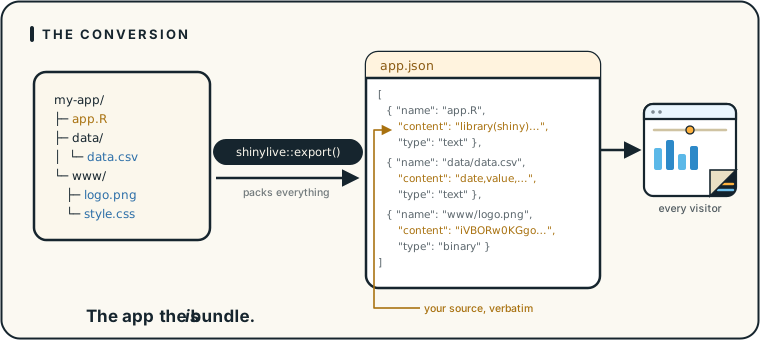
shinylive::export() serializes every file, code and data and assets, into a single app.json manifest that is served to every visitor. The app is the bundle.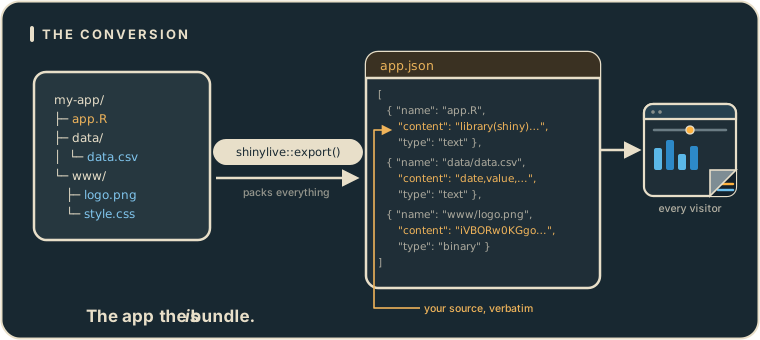
shinylive::export() serializes every file, code and data and assets, into a single app.json manifest that is served to every visitor. The app is the bundle.Quarto documents that embed apps through the quarto-shinylive extension work a little differently. Instead of an external app.json, each app is inlined into the rendered HTML as a <pre class="shinylive-r"> (or shinylive-python) block, with a data-engine attribute and the familiar #| options and ## file: markers describing the files. Same idea, different envelope: the source is still sitting in the page you served.
peeky runs the pipeline backward
If the conversion is “gather every file and publish it,” then reversing it is mechanical. That is all peeky does. The headline function, peek_shinylive_app(), takes a URL, figures out what kind of Shinylive deployment it is, and reconstructs the project on disk:
- Fetch the URL. A plain
httr::GET()on whatever you point it at. - Standalone or Quarto? If the response is HTML and the page carries the tell-tale
main.content#quarto-document-contentelement,peekytreats it as a Quarto document. Otherwise it goes looking for anapp.json. - For Quarto documents, it parses the HTML with
rvest, pulls out everypre.shinylive-randpre.shinylive-pythonblock, reads thedata-engineattribute to tell R from Python, and decodes the#|options and## file:markers back into individual files. - For standalone apps, it locates the manifest by trying the URL as given, then
url/app.json, then the parent directory’sapp.json, validates that the JSON really is a Shinylive manifest, and parses it withjsonlite. - Reconstruct and report. Either way, the files are written back into a directory tree that mirrors the original project, and
peekyprints the exact commands to launch each app.
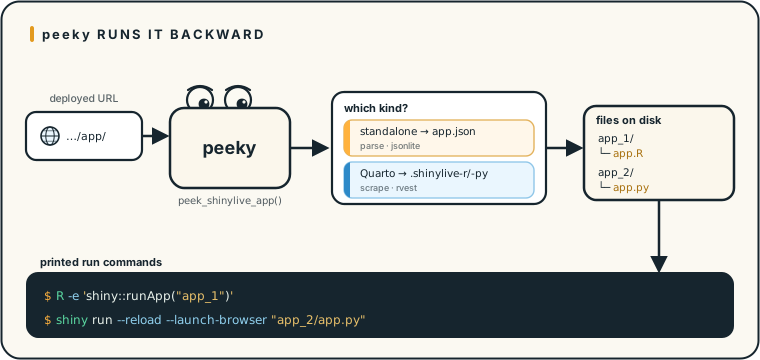
peek_shinylive_app() runs the conversion backward: fetch the URL, detect a standalone app.json or a Quarto document, reconstruct the files, and print the commands to run each app.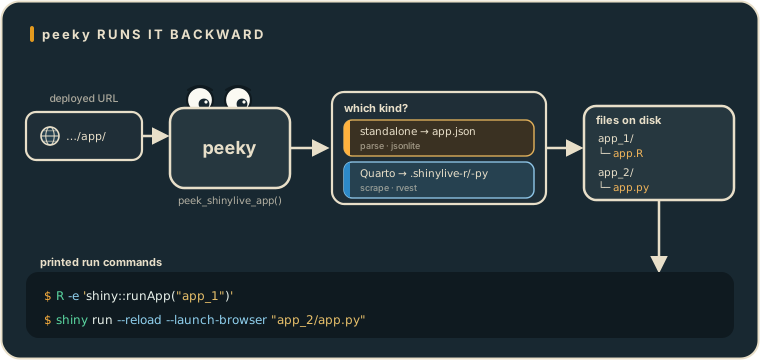
peek_shinylive_app() runs the conversion backward: fetch the URL, detect a standalone app.json or a Quarto document, reconstruct the files, and print the commands to run each app.If you already know what you are looking at, two focused functions skip the detection step: peek_standalone_shinylive_app() for an app.json bundle, and peek_quarto_shinylive_app() for an embedded document, the latter able to emit either separate app directories or a single rebuilt .qmd.
Taking a peek
In practice it is a one-liner. Point peeky at the Shinylive extension’s own demo site and tell it where to write:
library(peeky)

# You always say where the files go; there is no default write location
peek_shinylive_app(
  "https://quarto-ext.github.io/shinylive/",
  output_dir = "shinylive-apps"
)
#>
#> ── Shinylive Applications ──────────────────────────────────────────
#>
#> ── Shiny for Python Applications ──
#>
#> Run in Terminal:
#> shiny run --reload --launch-browser "/…/shinylive-apps/app_1/app.py"
#> shiny run --reload --launch-browser "/…/shinylive-apps/app_2/app.py"
#> ...
Each app lands in its own app_1, app_2, … directory, ready to run. A relative output_dir like "shinylive-apps" is resolved against your working directory, which is why the printed commands carry the fully-qualified path. Nothing was cracked open; peeky just downloaded the files the site already handed to every visitor and arranged them the way they started. Because the output path is a required argument, peeky never drops files somewhere you did not ask for.
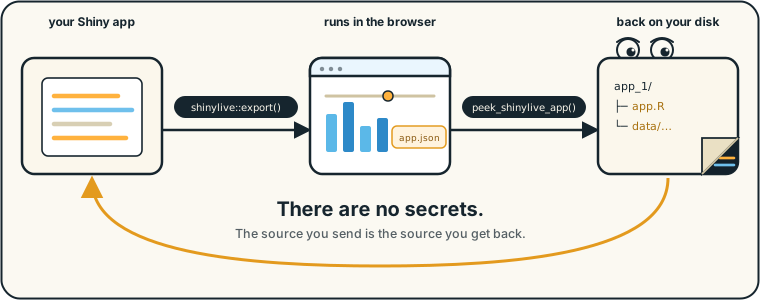
shinylive::export() sends out, peek_shinylive_app() brings back. The source you send is the source you get back.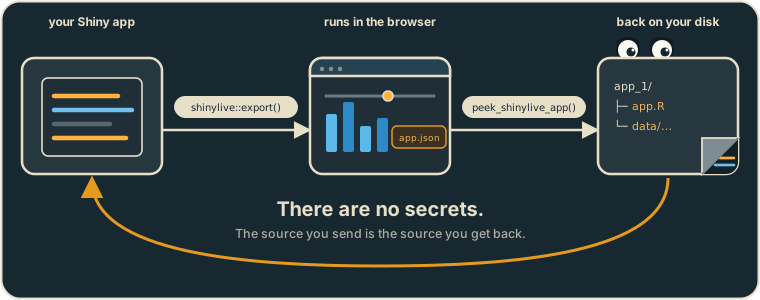
shinylive::export() sends out, peek_shinylive_app() brings back. The source you send is the source you get back.What this means if you build with Shinylive
I built peeky as a teaching tool. It grew out of conversations about Shiny security, transparency, and where computation ought to live during STATS 290 at Stanford University in Fall 2024. It is one thing to tell students that a browser-based app hands over its source; it is another to give them a one-liner that downloads that source and prints the commands to run it.
So take the demonstration as an invitation to design accordingly:
- Treat everything client-side as public. API keys, database credentials, and auth tokens embedded in a Shinylive app are effectively published. Keep them behind a real server-side endpoint.
- Mind your data. Any dataset bundled into the app is downloadable in full. That is fine for a teaching example and a problem for PII, PHI, or a proprietary table.
- Consider a hybrid. Run the non-sensitive, compute-heavy pieces in the browser, and keep protected logic and data behind an authenticated API.
None of this is an argument against Shinylive. It is one of the most exciting things to happen to Shiny, and I reach for it constantly. It is an argument for building with an accurate picture of what your users receive. peeky just makes that picture impossible to ignore: design with the understanding that your users can read everything you send them.
Where to go next
peeky is on CRAN:
install.packages("peeky")For the release notes, see the announcement post. For a longer, step-by-step tour of the full round trip, from a server-side Shiny app to a Shinylive bundle and back again, read From Server-side to Browser-based Shiny Apps and Back Again in the package documentation. And if you find a Shinylive app in the wild that peeky cannot take apart, that is a bug report I would love to see.
Acknowledgements
Thanks to the Shinylive, webR, and Pyodide teams for making browser-based data science possible, and for stating the “there are no secrets” truth plainly enough that a package could be built to prove it.