

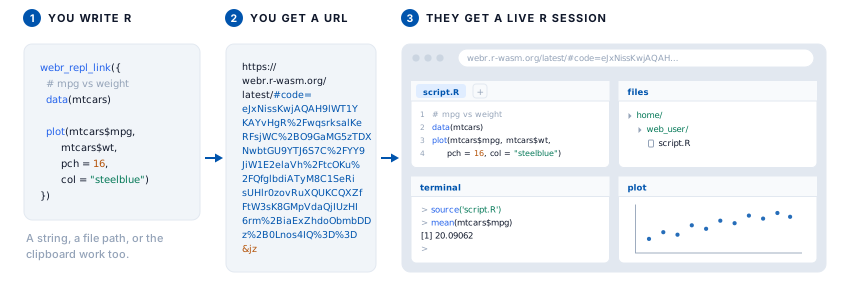
The livelink package (GitHub, documentation) turns a piece of R code into a URL that runs it in the browser. There is no server, no account, and nothing to upload. You hand someone a link, they click it, and they are looking at a live R session with your code already in the editor. Two destinations are supported: webR, a full R REPL compiled to WebAssembly, and Shinylive, which runs R and Python Shiny applications entirely client-side.
Sharing R usually starts with a tax. First install R, then an IDE, then the one package that will not compile on somebody’s laptop. That tax is why a reproducible example turns into a support thread, why a workshop loses its first twenty minutes to setup, and why a “just try this” is rarely just anything. livelink removes the install step from the sharing part. The link is the runnable code.
The trick is that there is no trick. Everything after the # in a URL is a fragment, and browsers never send a fragment to any server. livelink compresses your code, base64-encodes it, and writes it into that fragment. The link is the whole payload. There is nothing on the other end to spin up, pay for, or take down when you forget it exists.
Regular readers may recognize the idea from the other direction. My peeky package makes the point that a Shinylive app keeps no secrets: to run in the browser, the app hands its entire source to the visitor, because the app is the bundle. livelink is that same property turned into a feature on purpose. Instead of pulling code out of someone else’s link, you deliberately pack your own code into one and pass it along.
Your first link
Pass code to webr_repl_link(). You can hand it a braced expression, so there are no quotes to balance and no newlines to escape, and your editor keeps highlighting the code:
library(livelink)

link <- webr_repl_link({
  data(mtcars)
  plot(mtcars$mpg, mtcars$wt)
})
The returned object prints a readable summary, and the URL is the thing you share:
── webR Link ──

<https://webr.r-wasm.org/latest/#code=eJyLrlbKS8xNVbJSKk4uyiwo0QtS0lEqSCzJAIroZ%2BTnpuqXpybFlxanFukjKShJrSgBKkhJLEnUyC1JTiwq1ozJK8jJL4HyVHIL0nUUoOzyEk2l2lgAXmokRA%3D%3D&jz>

File: 'script.R' → '/home/web_user/script.R'
Version: "latest"
Autorun: FALSE
Strings, file paths, and the clipboard work too, when the code already lives somewhere else:
webr_repl_link("plot(1:10)")     # a string
webr_repl_link("analysis.R")     # a file on disk
webr_repl_link()                 # whatever is on your clipboard
panels trims webR down to just the parts you want (an editor and a plot pane, say, and no terminal to wander off into), and autorun = TRUE runs the code the moment the page opens, which is right for a demo and wrong for an exercise.
A Shiny app, in R or Python
shinylive_r_link() and shinylive_py_link() do the same for a Shiny application, in either language:
app <- "
library(shiny)
ui <- fluidPage(sliderInput('n', 'Bins', 1, 50, 30), plotOutput('hist'))
server <- function(input, output) {
  output$hist <- renderPlot(hist(faithful$waiting, breaks = input$n))
}
shinyApp(ui, server)
"

shinylive_r_link(app, mode = "app")
mode = "app" sends the reader straight to the running application; mode = "editor" puts the code beside it, which is what you want when the point is to teach. The engine is written into the URL itself, shinylive.io/r/ versus shinylive.io/py/, so a link carries its own language with it.
More than one file, and whole directories
Real work is rarely a single script. webr_repl_project() packs several files into one link, and each file can be written as R in braces rather than as a string full of escaped newlines:
webr_repl_project(list(
  "main.R"    = { source("utils.R"); summarise(mtcars) },
  "utils.R"   = { summarise <- function(d) summary(d) },
  "README.md" = "# Analysis"
))
The braced blocks are captured, never run, so an assignment inside one leaves nothing behind in your session. For teaching, webr_repl_exercise() returns a paired scaffold and worked solution, and webr_repl_directory() turns a folder of scripts into one link per file, or into a single bundled link with single_link = TRUE.
Reading a link back
Because the files live inside the URL, any link turns back into files with no network access and no cooperation from a server. preview_webr_link() decodes a link in memory and tells you what is inside without writing anything, which is the honest way to open a link a stranger sent you:
preview_webr_link(url)decode_webr_link() extracts the files once you have decided you trust them, and decode_shinylive_link() and preview_shinylive_link() do the same for Shiny apps. Encoding and decoding are exact inverses: the files you put into a link are the files you get back, byte for byte, including multi-file projects and non-ASCII text. For a closer look at how a piece of R code becomes a URL and back, and why nothing is lost in that round trip, see the companion post Data Science as a Reproducible Link.
Links inside a document
If you write in Quarto or R Markdown, you should not have to build a link in one chunk and paste the URL into another. livelink plugs into knitr two ways. A livelink: true option on an ordinary r chunk runs the chunk as usual, its output and plots and all appearing in the page, and adds a link underneath:
```{r}
#| livelink: true
#| autorun: true
data(mtcars)
plot(mtcars$mpg, mtcars$wt)   # a comment that survives
```
A ```{livelink} chunk instead shows the code and produces a link without running anything, for a Shiny app or code the session should not execute. Both hand the chunk’s verbatim source to the link, which matters more than it sounds: knitr evaluates chunks through evaluate::evaluate(), which discards source references, so comments inside a braced { } expression are silently lost when a document renders. The chunk source keeps them, so your annotations reach the reader.
Installation
livelink is on GitHub now, with a CRAN submission in review. Install the current version with pak:
# install.packages("pak")
pak::pak("coatless-rpkg/livelink")
Once it clears CRAN, install.packages("livelink") will work as well.
For a guided tour, the package ships vignettes on getting started, multi-file projects and Shiny apps, decoding and previewing links, links inside documents, and teaching with livelink.
Acknowledgements
Thanks to George Stagg for webR and its browser REPL, and to Winston Chang for the Shinylive share-URL feature. livelink writes to the share formats they built and opens in the runtimes they maintain, so it is mostly a friendly wrapper around a good idea they had. Pyodide is its own remarkable project, and it is what runs the Python side of Shinylive. Thanks, too, to peeky for stating the other half of this idea plainly enough that the feature became obvious. And for turning a braced R expression into clean, verbatim source, livelink borrows reprex’s stringify_expression(), which is MIT licensed. livelink is one step, and webrarian is the next, already taking shape.
For details, see the livelink news file entry below:
livelink news file entry for version 0.1.0
Features
- Added
webr_repl_link(),webr_repl_project(),webr_repl_exercise(), andwebr_repl_directory()to create shareable webR REPL links for single scripts, multi-file projects, exercise and solution pairs, and whole directories. - Added
shinylive_r_link(),shinylive_py_link(),shinylive_project(), andshinylive_directory()for R and Python Shiny apps on Shinylive. - Added
decode_*()andpreview_*()functions to extract the embedded files from any link or inspect them in memory, the exact inverse of link creation. - Code can be given as an R expression, a string, a file path, a named list of files, or clipboard content. Multi-file projects can be written as braced R rather than as escaped strings.
- Added a
livelinkchunk engine and a chunk hook for knitr and Quarto, so a code chunk in a document can carry its own runnable link, with comments intact. - Returned objects work with
repl_urls(),as.character(),format(),knit_print()(a clickable link in a rendered document), andas.data.frame().
References
Every external link used above, gathered in one place:
- livelink on GitHub
- livelink documentation
- Data Science as a Reproducible Link, how it works
- Getting Started with livelink
- Multi-file projects and Shiny apps
- Decoding and previewing links
- Links inside documents
- Teaching with livelink
- webR
- Shinylive
- George Stagg, webR and its REPL
- Winston Chang, the Shinylive share-URL feature
- Pyodide, the Python runtime behind Shinylive
- peeky, the same idea from the other direction
- reprex, whose stringify_expression livelink adapts
- webrarian, coming next
- webrarian preview