shinyelectron exports a Shiny app, in R or Python, as a standalone desktop application. On your own laptop that is one call to export() and a native installer for whatever machine you happened to run it on. The catch is baked into how desktop software works: a .dmg can only be built on macOS, an .exe on Windows, and an .AppImage on Linux. If you want to ship to all three, the honest answer has always been that you need all three, plus an Apple machine and a signing certificate if you want macOS users to open the thing without arguing with Gatekeeper.
Most of us do not keep three machines warm for a release. What we do keep is a GitHub repository, and GitHub already offers hosted runners for macOS, Windows, and Linux. So the natural home for a cross-platform build is a workflow file, not a shelf of hardware. That is what coatless-actions/shiny-to-electron@v1 is for.
Four steps on a fresh runner
shiny-to-electron is a composite GitHub Action, which is a fancy way of saying it is a thin wrapper around a sequence of steps you would otherwise write by hand. Point it at a Shiny app and, on whatever runner it lands on, it will:
- set up R and Node.js,
- install
shinyelectronfrom GitHub, - run
shinyelectron::export()for one platform and one architecture, - upload the resulting installer as a run artifact.
Each invocation builds exactly one installer. That is deliberate. You do not ask a single job to produce a macOS build and a Windows build, because no single runner can. You run the action once per target and let the matrix fan the copies out across runners in parallel.
The inputs read the way export() reads. appdir is the path to the app, app-name is the display name on the installer, and platform (mac, win, or linux) plus arch say which target this job is for. The rest are optional: app-type is autodetected as r-shiny or py-shiny but can be set explicitly, runtime-strategy picks among the five runtime strategies and follows shinyelectron’s own default of shinylive when unset, upload-artifact defaults to 'true', and shinyelectron-source defaults to github::coatless-rpkg/shinyelectron so you can pin an exact version when you need a reproducible build.
A real matrix workflow
Here is the shape I reach for. The include block lists one entry per target, each row naming the runner alongside the platform and arch the action should build. macos-latest gives us Apple silicon, macos-15-intel covers the older Intel Macs, windows-latest handles 64-bit Windows, and ubuntu-latest produces the Linux .AppImage.
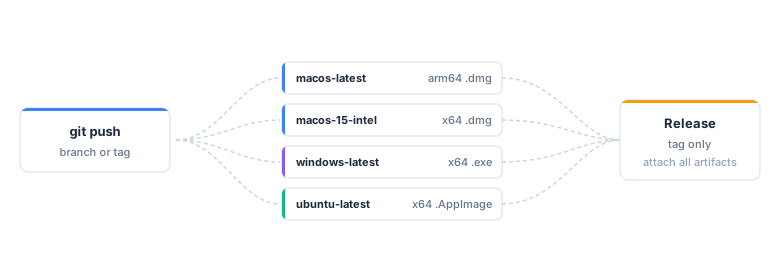
One push fans out across platform runners; a tag adds a release job that attaches every installer.
name: build-installers

on:
  push:
    tags: ["v*"]

jobs:
  build:
    strategy:
      fail-fast: false
      matrix:
        include:
          - os: macos-latest      # Apple silicon
            platform: mac
            arch: arm64
          - os: macos-15-intel    # Intel Macs
            platform: mac
            arch: x64
          - os: windows-latest
            platform: win
            arch: x64
          - os: ubuntu-latest
            platform: linux
            arch: x64
    runs-on: ${{ matrix.os }}
    steps:
      - uses: actions/checkout@v7
      - uses: coatless-actions/shiny-to-electron@v1
        with:
          appdir: app
          app-name: My Dashboard
          platform: ${{ matrix.platform }}
          arch: ${{ matrix.arch }}
Push a v* tag and four jobs start at once. A few minutes later you have four artifacts on the run: a signed-or-unsigned .dmg for each Mac architecture, an .exe, and an .AppImage. I set fail-fast: false on purpose so that a hiccup on one platform does not cancel the other three; I would rather see three installers and one red job than nothing at all.
A companion release job usually follows, downloading every artifact and attaching it to a GitHub Release keyed to the same tag. That turns “cut a release” into “push a tag,” which is about as low as the ceremony can go.
Signing, and where the secrets live
Building an installer is one thing; building one that opens without a scary warning is another. shinyelectron’s sign argument turns on macOS Developer ID signing and Apple notarization together with Windows Authenticode, and the action exposes it as the sign input. Flip it to 'true' and supply the credentials, and the macOS builds come out signed and notarized.
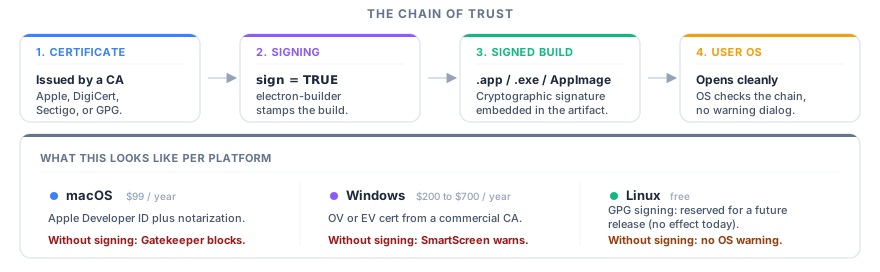
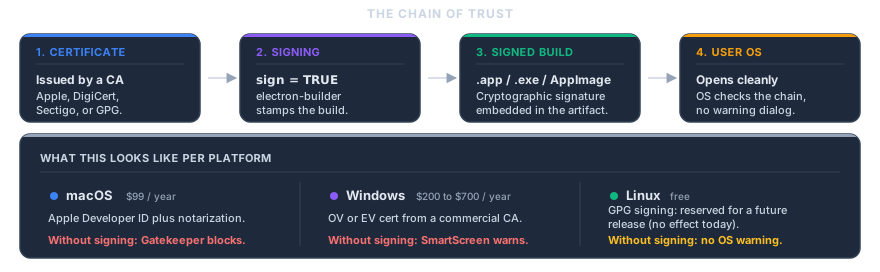
The chain of trust: sign during export, distribute, and the user’s OS verifies before launch.
There is one wrinkle worth stating plainly, because it is the thing that trips people up. A composite action reads its environment from the job, not from the step that calls it. So the CSC_* and APPLE_* variables belong under a job-level env: block, not tucked into the with: of the step. Put them on the step and the action simply will not see them.
jobs:
  build:
    runs-on: ${{ matrix.os }}
    env:
      CSC_LINK: ${{ secrets.CSC_LINK }}
      CSC_KEY_PASSWORD: ${{ secrets.CSC_KEY_PASSWORD }}
      APPLE_ID: ${{ secrets.APPLE_ID }}
      APPLE_APP_SPECIFIC_PASSWORD: ${{ secrets.APPLE_APP_SPECIFIC_PASSWORD }}
      APPLE_TEAM_ID: ${{ secrets.APPLE_TEAM_ID }}
    steps:
      - uses: actions/checkout@v7
      - uses: coatless-actions/shiny-to-electron@v1
        with:
          appdir: app
          app-name: My Dashboard
          platform: ${{ matrix.platform }}
          arch: ${{ matrix.arch }}
          sign: 'true'
Store the certificate and Apple credentials as repository secrets, hand them to the job’s env, and the same matrix that produced unsigned builds now produces signed and notarized ones. The Windows and Linux jobs read the block too and simply ignore the pieces they do not need, so one env stanza covers every runner. The certificate itself comes from an Apple Developer Program membership on macOS (a commercial certificate on Windows); the Code Signing article has the full walkthrough.
We build our own demos this way
This is not a workflow I sketched for the blog and never ran. shinyelectron publishes a prebuilt demo installer for every runtime strategy on every platform, and those installers are produced by this exact action on GitHub’s hosted runners. The signed, notarized macOS demos that open without a Gatekeeper prompt come off the same pipeline described above. If the action can build and sign the demos, it can build and sign yours. You can browse the finished installers in the Download Prebuilt Demos gallery.
For the full input reference, the release job that attaches installers to a GitHub Release, and troubleshooting notes, see the Building with GitHub Actions article in the shinyelectron documentation. If you are new to the package, the re-introduction is the place to start, and the v0.2.0 release notes cover everything the export() under this action can now do.
References
- Shiny for R, Posit’s Shiny web framework.
- R, the R language.
- Python, the Python language.
- shiny-to-electron action, the composite GitHub Action.
- Building with GitHub Actions, the CI build guide in the docs.
- Download Prebuilt Demos, the gallery of prebuilt demo installers.
- Code Signing, the signing and notarization guide.
- Apple Developer Program, Apple’s program for Developer ID signing and notarization.