The first time someone sends you a livelink URL and you click it, the browser does something that quietly rearranges your mental model. A tab opens, R or Python boots up inside it, your correspondent’s code is already sitting in the editor, and the plot is already drawn. You check the network tab out of habit, and there is nothing to check. No request went out to fetch the code, because there was no code to fetch. It arrived in the link, tucked into the fragment after the #, the one part of a URL a browser never sends to anyone.
Sit with that for a second, because what it means is easy to miss. No server ran the code. The whole analysis, source and data and all, rode in on the URL you clicked and computed in your own tab. None of that would be possible without WebAssembly, a portable compiled format that browsers now run at close to native speed. webR is the WebAssembly build of R that runs in a tab, Pyodide is the same for Python, and Shinylive stitches either one into a live Shiny app. webR and Shinylive stood those runtimes up at their own expense, and livelink only aims a link at them.
Once you accept it, the tidiest description of what that link does is almost a slogan. Data science is a reproducible link, not a link to a dashboard someone else keeps running for you, not a link to a repository you have to clone and install first, but the running analysis itself, handed over as a single string of text you can open and run.
I did not arrive at that idea gently. Its shorter, punchier form, “data science is a link,” first struck a nerve in a LinkedIn post in the summer of 2025, which drew 676 reactions and became the most popular thing I have ever written there. The size of the response told me the phrase was carrying more than a party trick, and livelink is my attempt to make it literally true, in both directions. It packs your work into a live link, which is where the name comes from, and it reads any link back into files. It is a shared experiment more than a product, and even the sharelink URLs it writes are ones webR already knew how to open.
livelink did not invent any of this. The webR REPL and the Shinylive editor each had a share link before livelink existed, and livelink only builds on both. It is not the only tool chasing the idea now, either. The notebook world has been converging on it quickly, with QuantStack’s notebook.link arriving for Jupyter in January 2026 and JupyterLite 0.8 adding notebook sharing in July 2026.
Regular readers have met the other half of this idea. My peeky package makes the point that a Shinylive app keeps no secrets, since to run in the browser it hands its entire source to every visitor. livelink is that same property pointed the other way and used on purpose. If a browser app is going to give away everything it needs to run, you may as well put everything it needs to run in the link and call it a feature. All of which changes the answer to a small, familiar question. “Can you share that R code?” used to mean twenty minutes of installation drama. Now it is just a link, and “it works on my machine” has become a harder excuse than it used to be.
Two ways to share R code
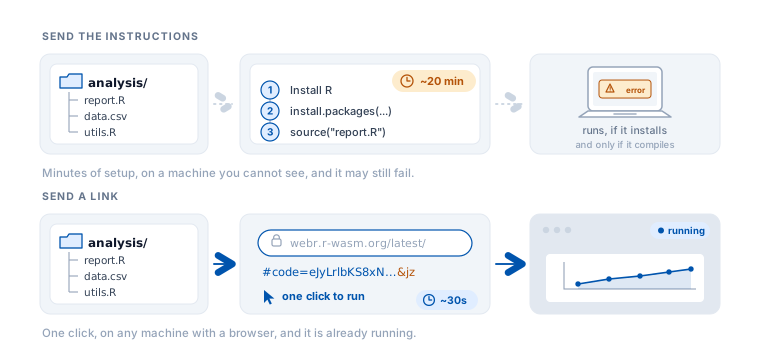
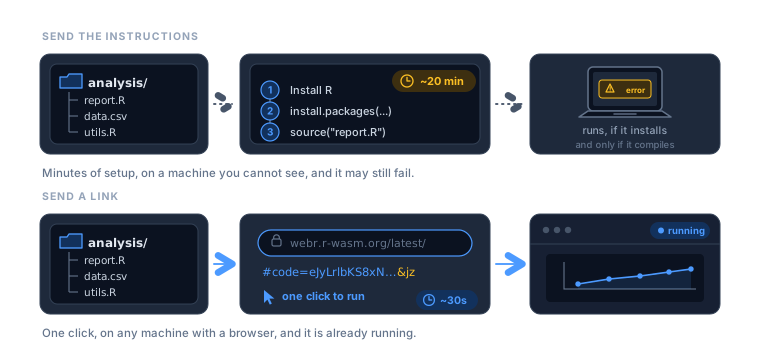
In the usual arrangement, sharing R means shipping instructions for reproducing your environment. Install R, then the packages, then run this. The code travels as text, but the ability to run it travels as a checklist you hope the other person completes. The runtime lives on their machine, and you have no idea whether it is there. This is why a reproducible example turns into a support thread and why a workshop opens with setup instead of the material.
The other way moves the runtime instead of the code. Those WebAssembly runtimes run the interpreter inside the recipient’s browser tab, downloaded on demand the way a page downloads a font, so nothing is installed because nothing needs to be. The R that runs your code arrives with the page, and the only thing you have to deliver is the code. Both tools already ship a share button that packs the current editor into a link, and that button is where I first met the idea, in Shinylive’s editor and soon after in webR’s.
Building on the share button
livelink takes that idea and turns it from a button into a toolkit. You know how you zip a folder to share it? This is that, except the archive is the URL itself, and clicking it does not just unpack the project, it runs it. An autorun setting controls how much runs when it opens, all the files, none of them, or just the ones you name. Where the built-in buttons pack whatever sits in one editor, livelink packs arbitrary R: a single script, a named set of files, a paired exercise and worked solution, or a whole directory of course scripts, each written as ordinary R in braces rather than a string of escaped newlines. It works in both directions, so it does not only write links, it reads any link back into files, including the msgpack links webR’s own button produces. And it runs where you already work, from the R console and inside a knitr or Quarto document, so a chunk can carry its own runnable link.
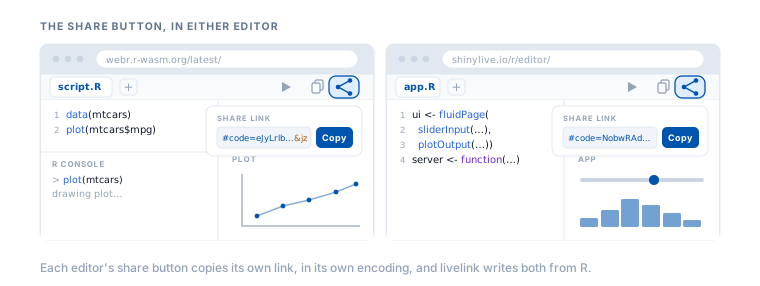
#code= link and a copy button. The two links differ, each in its own encoding, and livelink writes both from R.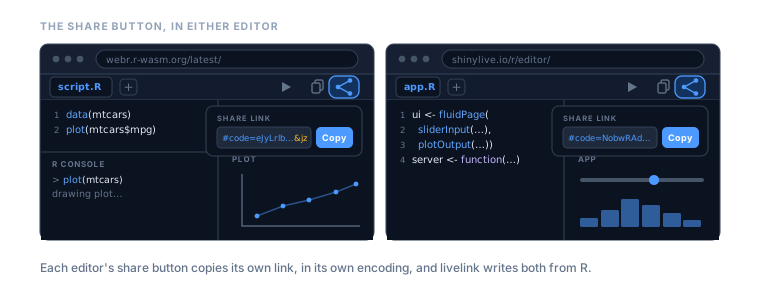
#code= link and a copy button. The two links differ, each in its own encoding, and livelink writes both from R.None of this stands on its own. By default every link points at an environment someone else keeps running, webr.r-wasm.org for R and shinylive.io for Shiny, and it is written in webR’s own sharelink format, so it opens there exactly like one from the share button. That default is not a lock-in, though. Point the base URL at a webR or Shinylive instance you deploy yourself, on your own domain or an internal network, and the same links open against your copy instead. livelink hosts nothing and runs nothing of its own. With the hard part already built, the only open question is how far “just send a link” can go.
Everything after the hash
The trick, such as it is, lives in one character. Take any URL apart and everything after the # is the fragment. It was meant to point at an anchor inside a page, and browsers treat it as strictly client-side, so the fragment is never included in the HTTP request to the server. Single-page apps lean on this for routing; livelink leans on it for storage. Whatever livelink writes after #code= stays on the visitor’s machine, and the R runtime in the tab reads it from there.
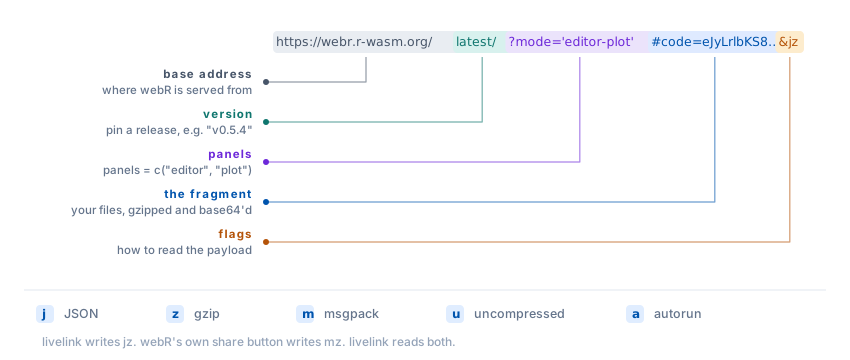
#code= fragment carrying your files, and the flags saying how the payload was encoded.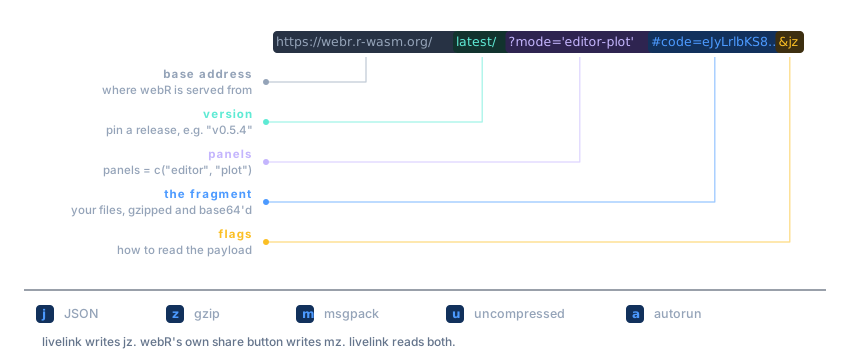
#code= fragment carrying your files, and the flags saying how the payload was encoded.That is why there is no backend to talk to, though it is worth being exact about what “no server” means. Something still serves the page, but only a static web host, the same kind behind any ordinary website. Here webr.r-wasm.org hands out the webR runtime, and a GitHub Pages or Netlify site would do just as well if you publish the files yourself. It gives every visitor the identical bytes and never sees your code, which lives in the fragment. What is gone is the compute server. No one has to keep R and its packages installed on a box, or stand up and pay for and patch a web IDE, because the runtime boots inside the reader’s own tab and the analysis rides in on the URL. A static file host is the whole operational footprint, which makes livelink an ephemeral IDE for data science: editor, runtime, and code assembled in the tab when the link opens, and gone when it closes.
A ?mode='editor-plot' query in front of the fragment tells webR which panels to show, so you can read a link and know the recipient will land on an editor and a plot pane and no terminal.
The pipeline that gets code into the fragment
Turning files into a fragment is a short, deterministic pipeline. livelink takes the files you hand it, a single script or a named list of them, and records each one as a small JSON object of its name, its path in the virtual filesystem, and its text:
[{ "name": "script.R", "path": "/home/web_user/script.R", "text": "plot(1:10)" }]It compresses that JSON with gzip (memCompress()), base64-encodes the result, and percent-escapes it so the + and / that base64 produces do not collide with URL syntax. The output goes after #code=, trailed by a couple of flags that tell the reader how to unpack it: j for JSON, z for gzip, a for autorun. A link livelink writes ends in &jz. webR’s own share button writes &mz, using msgpack instead of JSON, and livelink reads both, so a link made by either tool decodes the same way.
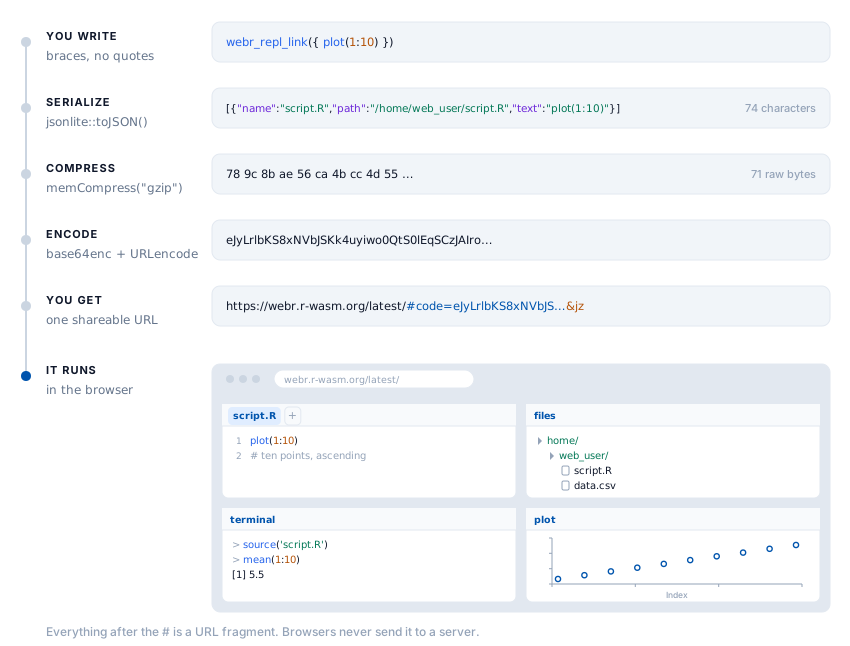
#. Opening the link runs it in the browser.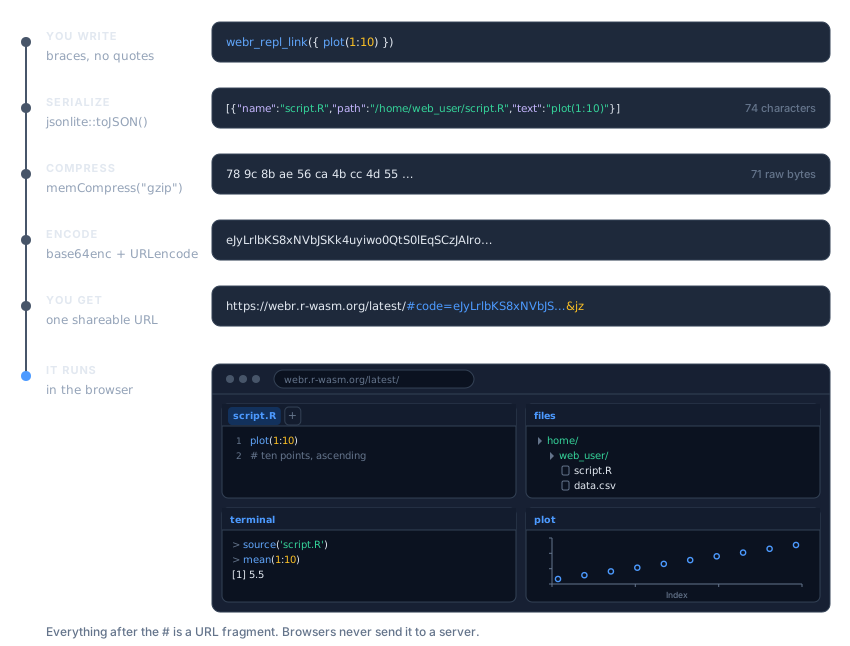
#. Opening the link runs it in the browser.Shinylive links use a different envelope for the same idea. In place of gzip and base64 they use LZ-string compression tuned for URLs, and the engine is written into the path, shinylive.io/r/ versus shinylive.io/py/, so a link carries its own language. The principle does not change. The whole app, serialized and compressed, sits in the part of the URL that never leaves the browser.
The round trip loses nothing
Because the payload is entirely self-contained, reading a link back is the pipeline in reverse, and it needs no network at all. decode_webr_link() percent-decodes, base64-decodes, gunzips, and parses the JSON back into files on your disk. preview_webr_link() does the same in memory and writes nothing, which is the honest way to open a link a stranger sent you. Look before you extract.
library(livelink)

url <- as.character(webr_repl_link({ data(mtcars); plot(mtcars$mpg, mtcars$wt) }))

# Inspect what is inside without writing a single file
preview_webr_link(url)
What you put in is what you get back, byte for byte, including multi-file projects and non-ASCII text.
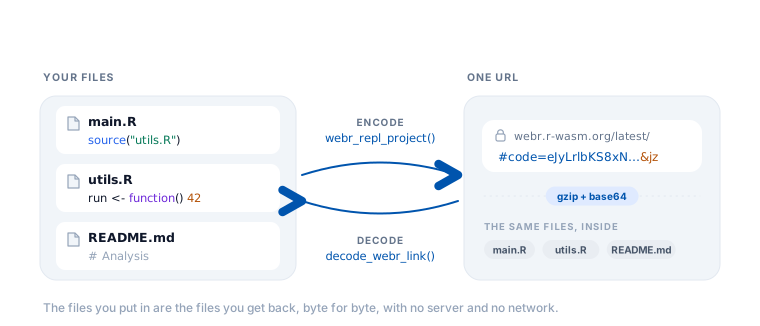
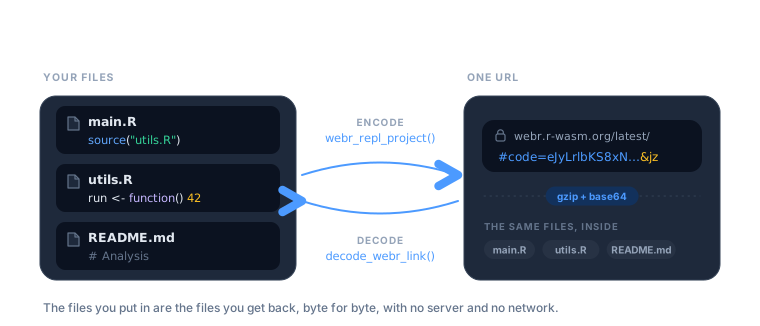
There is a pleasing detail here. Source code compresses well, so a link usually comes out smaller than the code it carries, since gzip more than pays for what base64 costs. The exception is binary data, which does not compress and which base64 inflates by a third, so a PNG does not belong in a link. Have the code fetch it, or point at it. And this decoding is the same “no secrets” property peeky trades on, except here it is a feature you were handed on purpose. Any livelink, and any link webR itself produced, opens back up into the exact files that made it.
How far “just send a link” goes
The moment a runnable session fits in a string, a handful of everyday frictions get smaller. Teaching is the clearest case. A class no longer opens with an install guide and a room of laptops that each fail differently. You send a link, and R is running in the browser on whatever the student brought, a Chromebook included. webr_repl_exercise() hands back a scaffold and a worked solution as two separate links, and webr_repl_directory() turns a folder of course scripts into one link apiece, so a whole lab becomes a list of URLs.
The same move rescues the reproducible example. A reprex that opens and runs in one click is a different object from a block of text and a hope that it reproduces, because the reader is no longer asked to rebuild your environment before they can even see the problem. Bug reports get the same upgrade, which is worth a great deal to anyone who has watched an issue stall on “cannot reproduce.”
Documents gain something quieter, and to me more satisfying. livelink plugs into knitr and Quarto so a chunk can carry its own link, and it matters for a subtle reason. Under the hood, knitr runs chunks through evaluate::evaluate(), which discards source references, so the comments inside a braced { } expression are silently lost by the time a document renders. A livelink chunk is handed the verbatim source instead, comments and all, so the annotations you wrote for the reader actually reach the reader.
A fair warning, in the same spirit. The runtime draws the boundary, not livelink. webR ships a large slice of CRAN but not all of it, so a link that reaches for a package with no WebAssembly build, or for a system library, or for a live network call, will simply not run. What does run is most of everyday analysis, the base-R-and-tidyverse core, and that set keeps widening as webR grows.
None of it leans on a database, a container, or a URL with an expiry date. The link is the whole artifact, and it keeps working for as long as browsers keep honoring the fragment, which is to say for as long as there are browsers.
Try it yourself
livelink is on GitHub now, with a CRAN submission in review, so install the current version with pak:
# install.packages("pak")
pak::pak("coatless-rpkg/livelink")
Once it clears CRAN, install.packages("livelink") will work as well.
For the release notes and the full function tour, see the announcement post. The package documentation carries vignettes on getting started, multi-file projects and Shiny apps, decoding and previewing links, links inside documents, and teaching with livelink. If you find a link livelink cannot make or cannot read, that is a bug report I would love to see.
Acknowledgements
Thanks to George Stagg for webR and its browser REPL, and to Winston Chang for the Shinylive share-URL feature. livelink writes to the share formats they built and opens in the runtimes they maintain, so it is mostly a friendly wrapper around a good idea they had. Pyodide is its own remarkable project, and it is what runs the Python side of Shinylive. Thanks, too, to peeky for stating the other half of this idea plainly enough that the feature became obvious. And for turning a braced R expression into clean, verbatim source, livelink borrows reprex’s stringify_expression(), which is MIT licensed. livelink is one step, and webrarian is the next, already taking shape.